
1. Introduction
This manual provides essential instructions for the safe and effective use of your BBRKIN Biometric Handgun Safe, Model PS15F. This safe offers multiple access methods including biometric fingerprint, digital keypad, and traditional key access, designed for quick and secure storage of firearms and valuables. Please read this manual thoroughly before operating the safe and retain it for future reference.
2. Safety Information
- Secure Storage: Always store firearms unloaded and separate from ammunition.
- Key Security: Keep the override keys in a secure location away from the safe and out of reach of children. Do not store keys inside the safe.
- Code Security: Do not share your PIN code or biometric data with unauthorized individuals. Memorize your code and avoid writing it down in an easily discoverable place.
- Child Safety: This safe is designed to prevent unauthorized access, especially by children. Ensure the safe is always locked when not in use.
- Mounting: For enhanced security, consider mounting the safe to a stationary object using the provided hardware or security cable.
3. Package Contents
Verify that all items are present in your package:
- BBRKIN Biometric Handgun Safe (Model PS15F)
- Override Keys (2)
- Security Cable
- Mounting Hardware
- Instruction Manual
4. Product Features
- 3-Way Quick Access: Biometric fingerprint, digital keypad, and manual key.
- Durable Construction: Made from alloy steel for enhanced security.
- Padded Interior: Soft foam lining protects contents from scratches and damage.
- Interior LED Light: Illuminates automatically upon opening for visibility in low light.
- Silent Mode: Option to mute keypad sounds for discreet operation.
- Anti-theft Alarm: Alerts to tampering or unauthorized entry attempts.
- Portable Design: Compact and lightweight for easy transport or discreet placement.
- Security Cable: Allows anchoring the safe to a stationary object.
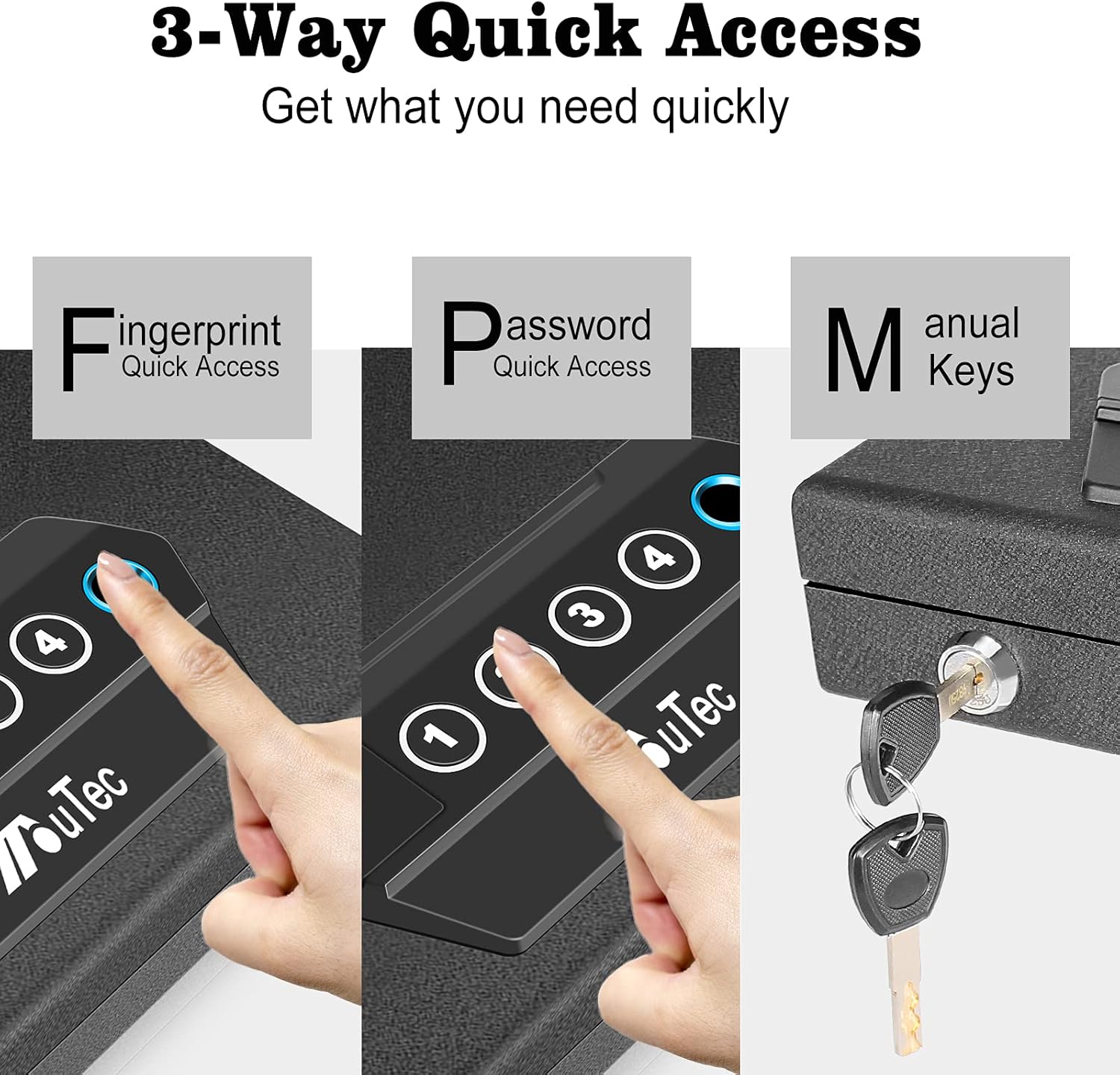
Figure 4.1: The safe offers three quick access methods: biometric fingerprint, digital keypad, and manual key access.

Figure 4.2: The interior of the safe is lined with protective padded foam.

Figure 4.3: An interior LED light provides visibility to the safe's contents.

Figure 4.4: The included security cable allows the safe to be anchored to a fixed object.

Figure 4.5: The safe features a smart anti-theft alarm system.
5. Setup
5.1 Battery Installation
The safe requires 4 AAA batteries to power the electronic locking mechanisms. Locate the battery compartment, typically on the underside or inside the lid. Insert the batteries, ensuring correct polarity (+/-).

Figure 5.1: The battery compartment requires 4 AAA batteries.
5.2 Setting Up Biometric Fingerprints
The safe can store up to 20 fingerprints. Follow these steps to register your fingerprints:
- With the safe open, use the provided screwdriver or a similar pointed object to press and hold the RESET button for three seconds.
- All keypad keys (1-4) will light up once, and you will hear one beep. The fingerprint scanner will then light up blue. Release the RESET button.
- Place your finger on the center of the fingerprint scanner for the first of three total scans. Ensure good surface contact.
- When your finger is on the scanner, the light will turn green. Lift your finger immediately.
- The scanner light will turn blue again. Without touching any other keys or the reset button, place the same finger back onto the scanner for the second scan. Lift it up again after the light turns green.
- Repeat step 5 for the third scan. After the third successful scan, you will hear double beeps, confirming successful registration.
- If you wait too long between scans, or if a scan is unsuccessful (e.g., 4 beeps), the process will time out. You will need to start over from step 1.
5.3 Setting Up PIN Code
To set or change your personal identification number (PIN) code:
- With the safe open, press the RESET button (located inside the safe). The keypad lights will illuminate.
- Enter your desired 4-8 digit PIN code.
- Press the fingerprint button (or 'E' if labeled) to confirm.
- Re-enter your PIN code and press the fingerprint button again to confirm.
- A successful confirmation will be indicated by a beep. Test your new code with the safe open before closing it.
5.4 Silent Mode Activation
To activate or deactivate silent mode (mutes keypad sounds), press and hold the '1' key on the keypad for approximately 3 seconds.
6. Operating Instructions
6.1 Opening with Fingerprint
To open the safe using a registered fingerprint:
- Place a registered finger firmly on the biometric scanner.
- If the fingerprint is recognized, the safe will automatically open.
6.2 Opening with PIN Code
To open the safe using your PIN code:
- Enter your 4-8 digit PIN code on the keypad.
- Press the fingerprint button (or 'E' if labeled) to confirm.
- If the code is correct, the safe will automatically open.
6.3 Opening with Key
In case of battery failure or forgotten codes, use the override key:
- Locate the keyhole, usually discreetly placed on the front of the safe.
- Insert the override key and turn it to unlock the safe.
7. Mounting the Safe
For added security, the safe can be mounted to a fixed surface or secured with the included cable.
7.1 Using the Security Cable
Loop the security cable around a stationary object (e.g., a car seat frame, bed frame) and then through the designated attachment point on the safe. Secure the cable using its locking mechanism.
7.2 Bolt-Down Installation
The safe features pre-drilled holes on the bottom for permanent installation. Use the provided mounting hardware to secure the safe to a solid surface such as a floor, shelf, or inside a cabinet.

Figure 7.1: The compact safe can be discreetly placed in various locations, such as a drawer.
8. Maintenance
- Battery Replacement: Replace batteries annually or when the low battery indicator appears. Always use new, high-quality AAA batteries.
- Cleaning: Clean the exterior of the safe with a soft, damp cloth. Avoid abrasive cleaners or solvents. Keep the fingerprint scanner clean and dry for optimal performance.
- Interior Care: The foam interior can be wiped clean with a damp cloth if necessary. Ensure it is completely dry before placing firearms back inside.
9. Troubleshooting
- Fingerprint Scanner Inconsistency: If the scanner frequently fails to recognize your fingerprint, try re-registering your finger multiple times from different angles. Ensure your finger is clean and dry. Rough or damaged fingerprints (e.g., from manual labor or climbing) may reduce recognition accuracy.
- Keypad Not Responding: Check battery levels. Replace all 4 AAA batteries if they are low or depleted.
- Safe Not Opening Electronically: If both fingerprint and keypad access fail, use the manual override key. This may indicate a battery issue or a need to reset the electronic system.
- Continuous Beeping/Flashing Lights: This often indicates an error during programming or an attempted unauthorized entry. Refer to the programming steps or use the override key to open and reset the system. Removing and reinserting batteries can also reset the system.
10. Specifications
| Brand | BBRKIN |
| Model Number | PS15F |
| Product Dimensions (D x W x H) | 7.5" x 2.9" x 13.75" |
| Item Weight | 7 Pounds |
| Material | Alloy Steel |
| Lock Type | Biometric, Electronic Combination Lock, Key |
| Power Source | 4 x AAA Batteries (not included) |
| Special Features | Biometric Fingerprint, Silent Mode, Anti-theft Alarm, Interior LED Light |
| Mounting Type | Right, Left, Top (via pre-drilled holes), Security Cable |
| Water Resistance Level | Not Water Resistant |
11. Warranty and Support
For warranty information, technical support, or any questions regarding your BBRKIN Biometric Handgun Safe, please contact BBRKIN customer service. Refer to the product packaging or the official BBRKIN website for contact details.
