1. Introduction
This manual provides essential information for the proper installation and handling of your GinTai LCD LVDS Screen Video Cable. This cable is designed as a replacement part for specific MSI GS65 Stealth laptop models. Please read this manual thoroughly before attempting any installation.
Product Overview
The GinTai LCD LVDS Screen Video Cable is a critical component responsible for transmitting video signals from the laptop's motherboard to the display panel. This specific cable is compatible with MSI GS65 Stealth models MS-16Q4 and K1N-3040130-H39, featuring a 40-pin connector.
Key Features
- High-quality replacement component.
- Tested for functionality before shipping.
- Designed for compatibility with MSI GS65 Stealth MS-16Q4 and K1N-3040130-H39.
2. Safety Information
Working with electronic components requires caution. Adhere to the following safety guidelines:
- Power Off: Always ensure the laptop is completely powered off and disconnected from its power source before beginning any installation or repair. Remove the battery if possible.
- Static Discharge: Use an anti-static wrist strap or frequently touch a grounded metal object to prevent electrostatic discharge (ESD), which can damage sensitive electronic components.
- Professional Installation: Special skills and techniques are required for proper installation. If you are not confident in your ability to perform the replacement, seek assistance from a qualified technician.
- Handle with Care: Electronic cables and connectors are delicate. Avoid excessive force when connecting or disconnecting.
3. Package Contents
Your package should contain the following item:
- 1 x GinTai LCD LVDS Screen Video Cable (Replacement)
4. Setup and Installation
Before You Begin
- Ensure you have the correct tools (e.g., small Phillips head screwdriver, plastic prying tools).
- Familiarize yourself with the laptop's internal layout by consulting a service manual or reputable online guides for your specific MSI GS65 Stealth model.
- Work in a clean, well-lit, and static-free environment.
Installation Steps
The following steps are general guidelines. Specific disassembly procedures may vary by laptop model. It is highly recommended to consult a detailed disassembly guide for your MSI GS65 Stealth laptop.
- Prepare the Laptop: Power off the laptop completely and disconnect the AC adapter. Remove the bottom cover of the laptop.
- Disconnect Battery: Locate and disconnect the laptop battery to prevent accidental power-on during the repair.
- Access the Display Assembly: Carefully follow your laptop's service manual to disassemble the display assembly and access the existing LVDS cable. This may involve removing the screen bezel and the display panel itself.
- Disconnect Old Cable: Gently disconnect the old LVDS cable from both the display panel connector and the motherboard connector. Note the orientation of the cable.
- Install New Cable: Connect the new GinTai LVDS cable. Ensure the connectors are properly aligned and seated firmly. Do not force the connectors.
- Route Cable: Route the new cable exactly as the original was routed to prevent pinching or damage during reassembly.
- Reassemble: Carefully reassemble the display assembly and the laptop, ensuring all screws and components are returned to their original positions.
- Reconnect Battery: Reconnect the laptop battery.
- Test: Power on the laptop and verify that the display functions correctly.
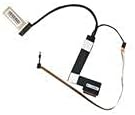
Image 1: The GinTai LCD LVDS Screen Video Cable, showing its overall form and connectors.
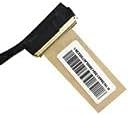
Image 2: A close-up view of one end of the LVDS cable, highlighting the connector and a product label.
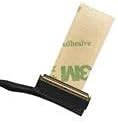
Image 3: A detailed view of another connector on the LVDS cable, showing the adhesive backing for secure placement.
5. Operating Instructions
Once the GinTai LCD LVDS Screen Video Cable is correctly installed, its operation is integrated with the laptop's display system. No specific user interaction is required for the cable itself. The laptop's display should function normally, showing the operating system and applications.
- After installation, power on your laptop.
- Verify that the display shows a clear image without flickering, lines, or color distortion.
- Adjust display settings through your operating system if necessary.
6. Maintenance
The GinTai LCD LVDS Screen Video Cable is a passive component and requires minimal maintenance once installed. However, general care for your laptop can help ensure its longevity:
- Avoid Physical Stress: Do not bend or twist the laptop screen excessively, as this can put stress on the internal display cable.
- Keep Clean: Ensure the laptop's interior remains free of dust and debris, which can affect electronic components over time.
- Professional Servicing: If further internal servicing is required, always seek professional assistance.
7. Troubleshooting
If you encounter issues after installing the GinTai LCD LVDS Screen Video Cable, consider the following troubleshooting steps:
- No Display/Black Screen:
- Ensure the cable is securely connected at both the motherboard and display panel ends.
- Verify that the laptop battery is properly connected and charged, and the AC adapter is functioning.
- Check if the display backlight is working (you might see a faint image if the backlight is off).
- Flickering or Distorted Image:
- Re-seat the cable connectors to ensure a firm connection.
- Inspect the cable for any visible damage or kinks.
- Ensure the cable is not pinched during reassembly.
- Incorrect Colors or Lines on Screen:
- This could indicate a loose connection or a damaged cable. Re-check connections.
- Verify that the display panel itself is not damaged.
If these steps do not resolve the issue, it is recommended to consult a professional laptop repair technician.
8. Specifications
| Feature | Specification |
|---|---|
| Brand | GinTai |
| Compatible Models | MSI GS65 Stealth MS-16Q4, K1N-3040130-H39 |
| Connector Type | 40-Pin LVDS |
| Color | Black |
| Unit Count | 1.0 Count |
9. Warranty and Support
This product is covered by the standard warranty provided by GinTai. For specific warranty terms and conditions, please refer to the product packaging or contact GinTai customer service directly.
If you have any questions, require technical assistance, or need to report an issue, please do not hesitate to contact GinTai customer service. Contact information can typically be found on the product packaging or the official GinTai website.


