
yuwell 7F-10
yuwell High Capacity Oxygen Concentrator Machine - Model 7F-10
User Instruction Manual
1. Introduction
This manual provides essential information for the safe and effective operation, maintenance, and troubleshooting of your yuwell High Capacity Oxygen Concentrator Machine, Model 7F-10. Please read this manual thoroughly before using the device to ensure proper function and to prevent injury or damage.
2. Product Features
- High Capacity: Delivers up to 10 Litres Per Minute (LPM) of oxygen.
- High Concentration: Achieves up to 95% oxygen concentration.
- Durable Construction: Made from high-quality plastic for longevity.
- Modern Design: Features a sleek, modern aesthetic.
- Portable: Equipped with wheels for easy mobility despite its 28.5 kg weight.
- Compact Dimensions: Measures 60 x 40 x 60 Centimeters.
3. Components and Parts
Familiarize yourself with the main components of your oxygen concentrator:

Figure 3.1: Overall Front View
This image shows the main unit from the front, highlighting the humidifier bottle connection, oxygen outlet, and control panel.

Figure 3.2: Control Panel Detail
A closer look at the front panel, including the power switch, flow rate knob, and digital display.
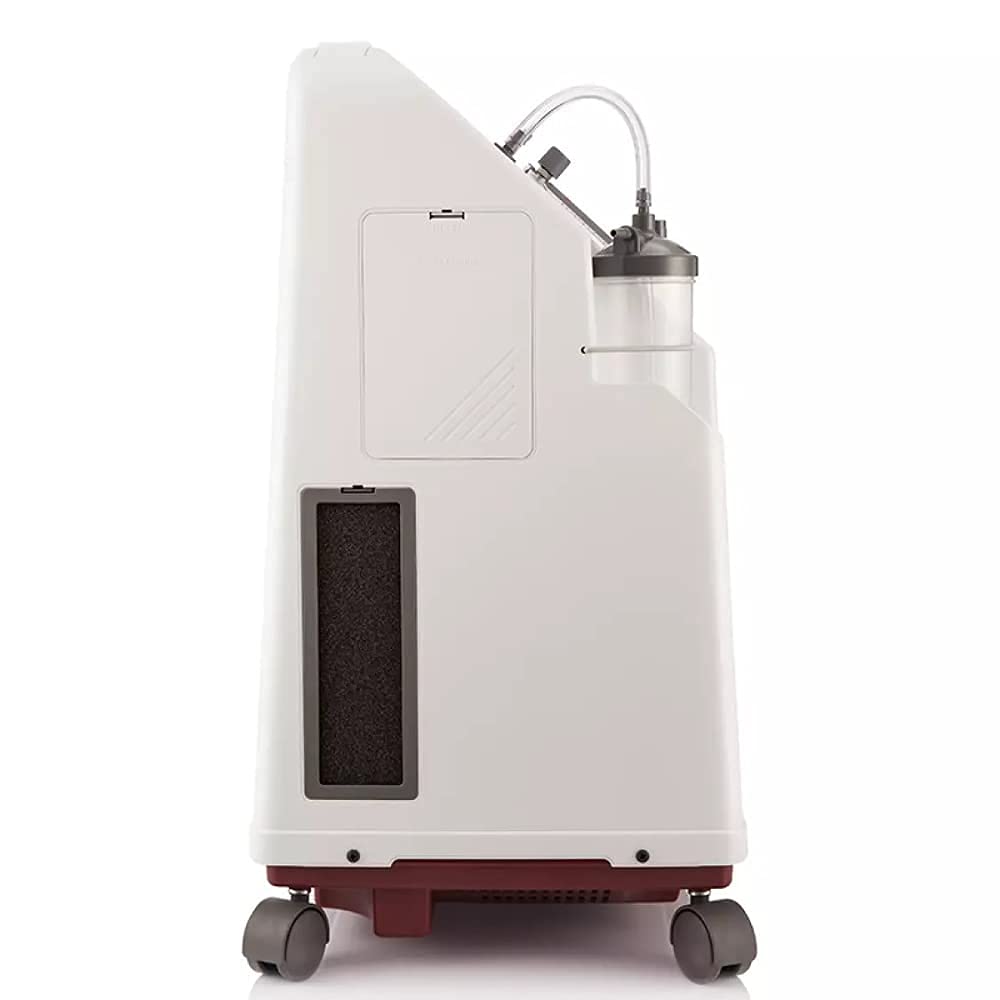
Figure 3.3: Side View with Filter Access
This view illustrates the side of the machine, where the air intake filter is located for easy maintenance.

Figure 3.4: Rear View
The back of the unit, showing the power cord connection and product identification label.
- Oxygen Outlet: Where purified oxygen exits the machine.
- Flow Meter: Indicates the oxygen flow rate in Litres Per Minute (LPM).
- Humidifier Bottle: Used to humidify the oxygen before delivery to the patient.
- Control Panel: Includes power switch, flow adjustment knob, and indicator lights.
- Air Intake Filter: Filters ambient air before it enters the concentrator.
- Power Cord: Connects the unit to an electrical outlet.
- Casters (Wheels): For easy movement of the unit.
4. Setup Instructions
- Unpacking: Carefully remove the oxygen concentrator from its packaging. Inspect for any visible damage. Retain packaging for future transport or storage.
- Placement: Place the unit on a flat, stable surface, ensuring at least 15 cm (6 inches) of clearance from walls, furniture, or curtains to allow for proper air circulation. Do not place it in an enclosed space.
- Humidifier Bottle Preparation:
- Unscrew the humidifier bottle from its holder.
- Fill the bottle with distilled or sterile water up to the maximum fill line. Do not overfill.
- Securely reattach the humidifier bottle to the oxygen outlet port on the concentrator.
- Connecting Nasal Cannula/Mask: Attach one end of the nasal cannula or oxygen mask tubing to the outlet port of the humidifier bottle.
- Power Connection: Plug the power cord into a grounded electrical outlet. Ensure the outlet provides stable voltage, as recommended for medical devices.
5. Operating Instructions
- Power On: Press the power switch to turn on the oxygen concentrator. The unit will typically perform a self-test, and indicator lights will illuminate.
- Warm-up Period: Allow the machine to run for approximately 5-10 minutes to reach optimal oxygen concentration.
- Adjust Flow Rate: Rotate the flow adjustment knob to set the desired oxygen flow rate, as prescribed by a healthcare professional. Observe the ball in the flow meter to ensure it aligns with the correct LPM setting.
- Oxygen Delivery: Place the nasal cannula or mask comfortably on the user.
- Monitoring: Periodically check the humidifier water level and ensure the flow meter indicates the correct setting.
- Power Off: When finished, turn off the unit by pressing the power switch.
6. Maintenance
Regular maintenance is crucial for the longevity and efficient operation of your oxygen concentrator.
6.1 Daily Maintenance
- Humidifier Bottle: Empty and rinse the humidifier bottle daily with warm water. Refill with fresh distilled or sterile water.
- Exterior Cleaning: Wipe the exterior of the unit with a damp cloth. Do not use abrasive cleaners or solvents.
6.2 Weekly Maintenance
- Air Intake Filter: Remove the air intake filter (located on the side of the unit). Wash it with warm, soapy water, rinse thoroughly, and allow it to air dry completely before reinserting. Do not operate the unit without the filter.
- Nasal Cannula/Mask: Clean or replace the nasal cannula/mask as per manufacturer's instructions or as advised by your healthcare provider.
6.3 Periodic Maintenance
- Internal Filter Replacement: Consult your healthcare provider or the manufacturer for recommended intervals for internal filter replacement. This typically requires professional service.
7. Troubleshooting
This section addresses common issues you might encounter. For problems not listed here, contact customer support.
| Problem | Possible Cause | Solution |
|---|---|---|
| Unit does not power on. | Power cord unplugged; power outage; faulty outlet. | Check power cord connection. Verify power supply to the outlet. Try a different outlet. |
| Low oxygen flow. | Flow rate set too low; kinked tubing; dirty air filter; humidifier bottle issues. | Adjust flow rate. Check and straighten tubing. Clean air filter. Ensure humidifier bottle is correctly filled and attached. |
| Unusual noise from unit. | Unit not on a flat surface; internal component issue; dirty filter. | Ensure unit is on a level surface. Clean air filter. If noise persists, contact customer support. |
| Humidifier bottle bubbling excessively or not at all. | Incorrect water level; loose connection. | Adjust water level to within min/max lines. Tighten humidifier bottle connection. |
8. Specifications
| Attribute | Detail |
|---|---|
| Model Number | 7F-10 |
| Oxygen Flow Rate | Up to 10 Litres Per Minute (LPM) |
| Oxygen Concentration | Up to 95% |
| Product Dimensions (LxWxH) | 60 x 40 x 60 Centimeters |
| Item Weight | 28.5 Kilograms |
| Material | Plastic |
| Manufacturer | Jiangsu Yuyue Medical Equipment and Supply Co. Ltd. |
| First Available Date | 21 April 2021 |
9. Warranty and Support
For information regarding warranty coverage, service, or technical support, please refer to the warranty card included with your product or contact the manufacturer directly. Keep your purchase receipt as proof of purchase.
Manufacturer: Jiangsu Yuyue Medical Equipment and Supply Co. Ltd.
For further assistance, you may also contact the seller through the platform where the product was purchased.
Ask a question about this manual
Ask about setup, troubleshooting, compatibility, parts, safety, or missing instructions. Manuals+ will review the question and use this page’s manual context to help answer it.