
1. Product Overview
The Joyroom JR-ZS199 is a versatile 2-in-1 device designed for in-car use, combining a wireless charger with a mobile phone holder. It features an infrared sensor for automatic clamping and supports Qi wireless charging protocols, delivering up to 15W of power. This device is engineered for convenient and secure smartphone mounting and charging while driving.

Image 1: Front view of the Joyroom JR-ZS199 Car Wireless Charger and Mobile Holder, showcasing its sleek design and automatic clamping arms.
2. Setup
2.1 Package Contents
Please verify that all items are present in the package:
- Joyroom JR-ZS199 Car Wireless Charger and Mobile Holder
- Air Vent Mount
- USB Charging Cable
- User Manual (this document)
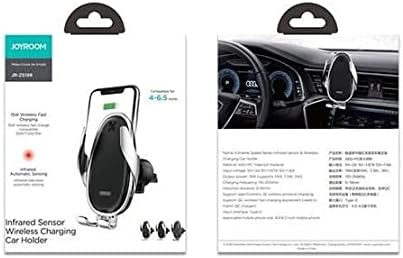
Image 2: Packaging of the Joyroom JR-ZS199, illustrating the product and its key features on the box.
2.2 Installation
- Attach the Air Vent Mount: Securely connect the air vent mount to the back of the Joyroom JR-ZS199 holder. Ensure it clicks into place firmly.
- Mount to Car Air Vent: Carefully insert the air vent clip into a suitable horizontal or vertical air vent slat in your vehicle. Adjust the angle for optimal viewing.

Image 3: The Joyroom JR-ZS199 holder mounted on a car's air vent, demonstrating its placement and integration into the vehicle interior.
2.3 Power Connection
Connect the provided USB charging cable to the charging port on the Joyroom JR-ZS199 holder. Plug the other end of the cable into a car charger (not included) or a USB port in your vehicle. The device requires a 5V/2A, 9V/1.67A, or 12V/1.6A input for optimal performance.
3. Operating Instructions
3.1 Placing a Smartphone
Once powered on, the holder's infrared sensor will detect the presence of a smartphone. Simply bring your Qi-compatible smartphone close to the holder, and the clamping arms will automatically open. Place your phone into the holder, and the arms will automatically close, securing your device and initiating wireless charging.
3.2 Removing a Smartphone
To remove your smartphone, locate the touch-sensitive release area (often on the side or top of the holder). A light touch will cause the clamping arms to open, allowing you to safely retrieve your device. The built-in capacitor ensures that the arms can open and close a few times even after the power supply is disconnected.
3.3 Wireless Charging
The Joyroom JR-ZS199 supports Qi wireless charging with output power options of 5W, 7.5W, 10W, and 15W. Ensure your smartphone is Qi-compatible for wireless charging functionality. Charging will begin automatically when the phone is securely placed in the holder and the device is powered.

Image 4: Visual representation of the Joyroom JR-ZS199's core features, including 15W wireless fast charging, infrared sensor, and one-handed operation.
4. Maintenance
4.1 Cleaning
To maintain the device's appearance and functionality, wipe the surface with a soft, dry cloth. Avoid using abrasive cleaners, solvents, or harsh chemicals, as these can damage the finish or internal components. Ensure the device is disconnected from power before cleaning.
4.2 Storage
When not in use for extended periods, store the Joyroom JR-ZS199 in a cool, dry place away from direct sunlight and extreme temperatures. Keep it free from dust and moisture.
5. Troubleshooting
- Device not powering on: Ensure the USB cable is securely connected to both the holder and a functioning car charger or USB port. Verify the car charger is receiving power.
- Wireless charging not working:
- Confirm your smartphone is Qi-compatible.
- Check if the phone is properly centered on the charging pad.
- Remove any thick phone cases that might interfere with wireless charging.
- Ensure the input power supply meets the required specifications (5V/2A, 9V/1.67A, or 12V/1.6A).
- Clamping arms not opening/closing automatically:
- Verify the device is powered on.
- Ensure the infrared sensor is not obstructed or dirty.
- If power was recently disconnected, the capacitor may have depleted its charge. Reconnect power.
- Device feels loose on air vent: Re-secure the air vent mount, ensuring it is tightly clipped to a stable vent slat.
6. Specifications
| Feature | Specification |
|---|---|
| Model | JR-ZS199 |
| Brand | Joyroom |
| Type | 2-in-1 Car Wireless Charger and Mobile Holder |
| Color | Silver |
| Input | 5V/2A, 9V/1.67A, 12V/1.6A |
| Output | 5W / 7.5W / 10W / 15W |
| Wireless Charging Protocol | Qi Standard |
| Mounting Type | Air Outlet |
| Compatible Devices | Smartphones (Qi-compatible) |
| Item Weight | 176 g |
| Package Dimensions | 13.8 x 11.8 x 6 cm |
7. Warranty and Support
For specific warranty information, please refer to the warranty card included with your purchase or visit the official Joyroom website. If you encounter any issues not covered in this manual or require further assistance, please contact Joyroom customer support through their official channels.