
1. Introduction
This manual provides essential instructions for setting up, operating, and maintaining your Zeblaze NEO Waterproof Sport Smart Watch. Please read this manual thoroughly before using the device to ensure proper function and longevity.
2. Package Contents
Verify that all items are present in your product package:
- Zeblaze NEO Smart Watch
- Leather Straps
- Charging Cable
- User Manual (this document)
3. Product Overview
The Zeblaze NEO features a 1.54-inch IPS color touch display and is designed for sport and daily use. It includes a heart-rate sensor, proximity sensor, and accelerometer sensor for comprehensive tracking.

Image 1: Front view of the Zeblaze NEO Smart Watch, showing the display with time and activity indicators.
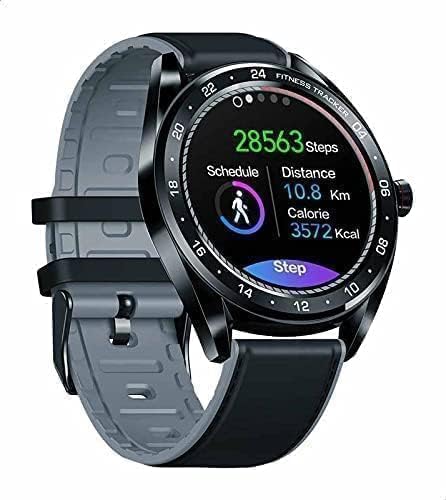
Image 2: Angled view of the Zeblaze NEO Smart Watch, highlighting the fitness tracking interface with steps, distance, and calories.
Key Components:
- Display: 1.54 inches IPS color touch display screen (240 x 240 pixels).
- Sensors: Heart-rate sensor, proximity sensor, accelerometer sensor.
- Strap: Leather straps, adjustable for wrist sizes 135 - 230 mm.
- Physical Button(s): (Typically a side button for power/menu, specific function may vary)
4. Setup
4.1 Charging the Device
- Connect the charging cable to the charging port on the back of the watch.
- Plug the other end of the charging cable into a USB power adapter (5V/1A recommended) or a computer's USB port.
- The watch display will indicate charging status. A full charge typically takes approximately 2 hours.
- The battery capacity is 180 mAh.
4.2 Installing the Companion Application
To unlock the full functionality of your Zeblaze NEO, you need to install the official companion application on your smartphone. Search for "Zeblaze Fit" or a similar official application in your device's app store.
- Compatible with Android 4.4 or iOS 8.0 and above.
4.3 Pairing with Your Smartphone
- Ensure your smartphone's Bluetooth is enabled.
- Open the Zeblaze companion application on your smartphone.
- Follow the in-app instructions to search for and connect to your Zeblaze NEO device. The watch uses Bluetooth version 4.0.
- Confirm the pairing request on both your watch and smartphone.
5. Operating Instructions
5.1 Basic Navigation
- Touch Screen: Swipe left/right, up/down to navigate through menus and features. Tap to select.
- Side Button: Press to wake the screen, return to the home screen, or access the main menu.
5.2 Heart Rate Monitoring
The Zeblaze NEO is equipped with a heart-rate sensor. To measure your heart rate:
- Ensure the watch is worn snugly on your wrist.
- Navigate to the heart rate monitoring interface on the watch.
- The watch will automatically begin measuring your heart rate.
- For continuous monitoring, enable the feature in the companion app settings.
5.3 Activity Tracking
Utilize the accelerometer sensor to track your daily steps, distance, and calories burned. Access these metrics directly on the watch or through the companion app for detailed historical data.
5.4 Notifications
Once paired with your smartphone, the watch can display notifications for calls, messages, and other applications. Configure notification settings within the companion application.
6. Maintenance
6.1 Cleaning and Care
- Wipe the watch screen and body with a soft, damp cloth.
- Avoid using harsh chemicals or abrasive materials.
- For leather straps, clean with a specialized leather cleaner and avoid prolonged exposure to water.
6.2 Water Resistance (IP67)
The Zeblaze NEO has an IP67 waterproof rating. This means it is protected from dust and can withstand immersion in water up to 1 meter for up to 30 minutes. It is suitable for daily use, such as hand washing or light rain.
Important: IP67 rating does not guarantee protection against hot water, steam, or prolonged immersion. Avoid wearing the watch while showering, swimming, or diving.
7. Troubleshooting
Common Issues and Solutions:
- Watch not turning on: Ensure the watch is fully charged. Connect it to the charger for at least 30 minutes.
- Cannot pair with smartphone:
- Ensure Bluetooth is enabled on your phone.
- Make sure the watch is within range of your phone.
- Restart both the watch and your phone.
- Try unpairing and re-pairing through the companion app.
- Inaccurate heart rate readings:
- Ensure the watch is worn snugly on your wrist, not too tight or too loose.
- Clean the sensor on the back of the watch.
- Avoid excessive movement during measurement.
- Notifications not appearing:
- Check notification permissions for the companion app on your phone.
- Ensure the watch is connected via Bluetooth.
- Verify notification settings within the companion app.
If problems persist, refer to the support section of the companion application or contact Zeblaze customer support.
8. Specifications
| Feature | Detail |
|---|---|
| Brand | Zeblaze |
| Model Number | NEO |
| Dimensions | 46.5 x 46.5 x 12 mm |
| Weight | 56 gm (watch only), 154 g (package) |
| Band Size | 135 - 230 mm |
| Band Material | Leather straps |
| Display | 1.54 inches IPS color touch display |
| Resolution | 240 x 240 pixels |
| Screen Size | 33 mm |
| Waterproof Rate | IP67 |
| Battery Capacity | 180 mAh |
| Sensors | Heart-rate sensor, proximity sensor, accelerometer sensor |
| Bluetooth Version | 4.0 |
| Compatibility | Android 4.4 or iOS 8.0 and above |
| Operating System | Android Wear |
| Memory Storage Capacity | 128 MB |
| Item Shape | Round |
9. Warranty and Support
For warranty information and customer support, please refer to the documentation provided with your purchase or visit the official Zeblaze website. Keep your proof of purchase for any warranty claims.
If you encounter issues not covered in this manual, please contact Zeblaze customer service for assistance.


