
1. Product Overview
This manual provides essential information for the safe and efficient operation of your Samsung 1.5 Ton 4 Star Inverter Split AC, model AR18AY4ACWK. Please read it thoroughly before using the appliance.
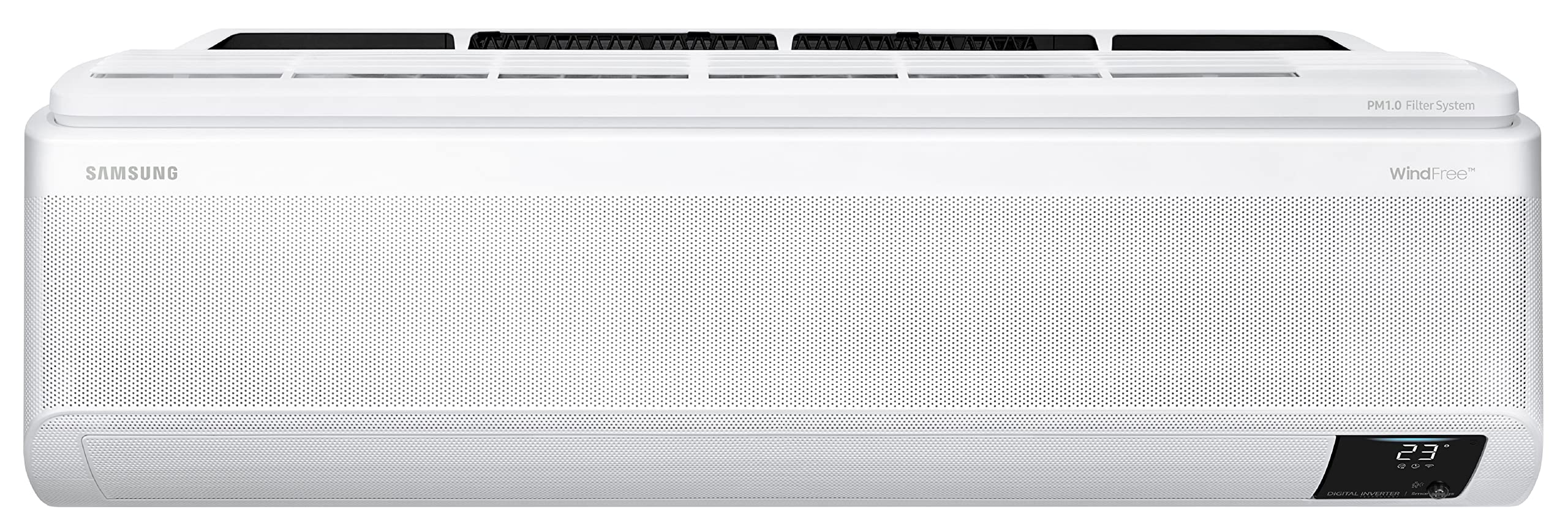
Image 1.1: Front view of the Samsung WindFree Split AC indoor unit.
2. Safety Information
Always follow basic safety precautions to reduce the risk of fire, electric shock, or injury. This appliance is designed for household use only. Do not attempt to repair or modify the unit yourself. Contact qualified service personnel for all repairs and maintenance.
- Ensure the power supply matches the specifications listed on the unit.
- Do not insert fingers or objects into the air inlet/outlet.
- Keep the outdoor unit clear of obstructions.
- Turn off the power before cleaning or performing maintenance.
3. Setup and Installation
The Samsung 1.5 Ton 4 Star Inverter Split AC requires professional installation. Ensure that the installation site meets the necessary requirements for proper airflow and drainage.
3.1 Unpacking
Carefully unpack all components. Verify that all items listed in the 'What's in the Box' section are present:
- 1 Indoor unit
- 1 Outdoor unit
- 1 Remote control
- 2 AAA batteries
- 1 Warranty Card
- 1 User manual (this document)
3.2 Indoor Unit Placement
The indoor unit should be mounted on a wall, ensuring sufficient space around it for air circulation. Refer to the dimensions below for planning.

Image 3.1: Indoor unit with approximate dimensions: 82 cm (width), 34.5 cm (height), 21.5 cm (depth).
3.3 Outdoor Unit Placement
The outdoor unit should be placed in a well-ventilated area, away from direct sunlight and rain, and on a stable surface. Consider the dimensions for proper installation.

Image 3.2: Outdoor unit with approximate dimensions: 72 cm (width), 54.8 cm (height), 26.5 cm (depth).
3.4 Electrical Connection
Ensure the AC is connected to a dedicated power circuit with appropriate voltage (230 Volts) and a suitable circuit breaker. Do not use extension cords.
4. Operating Instructions
Your Samsung AC is controlled via the included remote control. Familiarize yourself with its functions.
4.1 Remote Control Overview

Image 4.1: Layout of the remote control for the Samsung WindFree Split AC.
Key Remote Functions:
- Power Button (On/Off): Turns the unit on or off.
- Mode Button: Cycles through operating modes (Auto, Cool, Dry, Fan, Heat).
- Temp +/- Buttons: Adjusts the desired temperature.
- Fan Button: Adjusts fan speed.
- Timer Button: Sets on/off timers.
- Options Button: Accesses additional functions like Clean, WindFree, Fast.
- Set Button: Confirms selections.
4.2 Operating Modes
- Auto Mode: The AC automatically selects the appropriate operating mode (Cool, Fan, Dry) based on the room temperature.
- Cool Mode: Provides cooling. Adjust temperature and fan speed as desired.
- Dry Mode: Reduces humidity in the room without significant cooling.
- Fan Mode: Circulates air without cooling or heating.
- Heat Mode: Provides heating (if applicable to your model).
4.3 Special Features
- WindFree™ Cooling: This mode disperses air gently through 23,000 micro air holes, eliminating unpleasant cold drafts. Activate via the remote control.
- Fast Cooling: For rapid cooling, the AC operates at maximum fan speed and compressor output.
- Auto Clean: Prevents bacteria and odor buildup by automatically drying the heat exchanger.
- Dehumidifier: Integrated function to reduce moisture in the air.
- High Density Filter: Captures dust and allergens.
- Inverter Compressor: Adjusts power to maintain desired temperature efficiently, reducing energy consumption.
- Quiet Mode: Reduces operational noise for a quieter environment.
- Purify (PM1.0 Filter System): The integrated PM1.0 filter system captures ultrafine dust particles, improving indoor air quality.

Image 4.2: Diagram illustrating the Pre-Filter and PM1.0 Filter system for air purification.
4.4 Good Sleep Mode
This mode optimizes temperature and airflow for a comfortable sleep environment, adjusting through falling asleep, sound sleep, and wake-up stages.

Image 4.3: Graph showing temperature adjustments during Good Sleep mode for both cooling and heating.
5. Maintenance
Regular maintenance ensures optimal performance and longevity of your AC unit.
5.1 Filter Cleaning
The indoor unit is equipped with a Pre-Filter and a PM1.0 Filter. Clean them regularly to maintain air quality and efficiency.

Image 5.1: Top view of the indoor unit showing the filter access area.

Image 5.2: Illustration of how to open the indoor unit cover to access and remove filters for cleaning.
- Turn off the AC and disconnect power.
- Open the front panel of the indoor unit.
- Remove the Pre-Filter and PM1.0 Filter.
- Clean the filters with a vacuum cleaner or wash them with lukewarm water. Allow them to dry completely before reinserting.
- Close the front panel and restore power.
5.2 General Cleaning
- Wipe the indoor unit's exterior with a soft, damp cloth. Do not use harsh detergents or abrasive cleaners.
- Periodically check the outdoor unit for debris accumulation. Ensure the coils are clear for efficient operation.

Image 5.3: Rear view of the outdoor unit, showing the condenser coils that require periodic cleaning.
6. Troubleshooting
If you encounter issues, refer to this section before contacting service.
| Problem | Possible Cause | Solution |
|---|---|---|
| AC does not turn on | No power, remote batteries low, circuit breaker tripped | Check power supply, replace remote batteries, reset circuit breaker. |
| Insufficient cooling | Dirty filters, blocked outdoor unit, wrong mode selected, room too large | Clean filters, clear obstructions, select Cool mode, ensure room size is appropriate. |
| Unusual noise | Loose parts, foreign objects, normal operating sounds | Check for loose parts. Some sounds (e.g., refrigerant flow) are normal. If persistent or loud, contact service. |
| Water leakage from indoor unit | Blocked drain pipe, improper installation | Check and clear drain pipe. If issue persists, contact professional service. |
If the problem persists after attempting these solutions, please contact Samsung customer support.
7. Specifications
Detailed technical specifications for the Samsung 1.5 Ton 4 Star Inverter Split AC (Model: AR18AY4ACWK).
| Feature | Specification |
|---|---|
| Brand | Samsung |
| Model Name | AR18AY4ACWKNNA |
| Capacity | 1.5 tons |
| Energy Rating | 4 Star (BEE Star Rating) |
| Annual Energy Consumption | 1044 Kilowatt Hours |
| ISEER Value | 3.34 (as per product description), 4.45 (as per energy label) |
| Refrigerant | R-32 |
| Compressor Type | Inverter Compressor (Variable Speed) |
| Condenser Coil Material | Copper |
| Noise Level (Indoor) | 45 Decibels |
| Voltage | 230 Volts |
| Wattage | 1495 KW |
| Item Weight | 41200 Grams |
| Floor Area Suitability | 111 to 150 sq ft |
| Special Features | Auto Clean, Dehumidifier, High Density Filter, Inverter Compressor, Remote Controlled, WindFree |

Image 7.1: Power Savings Guide label for the AC unit. For more details, refer to document DB68-09944H.
8. Warranty and Support
Your Samsung AC comes with a comprehensive warranty and dedicated customer support.
8.1 Warranty Information
The product includes a 5 Year warranty on the product and 10 Years on the Compressor. Please retain your purchase receipt for warranty claims.
8.2 Customer Support
For service, technical assistance, or warranty inquiries, please contact Samsung customer care:
- Samsung India Pvt Ltd: 180040 7267864 or 1800 5 7267864