1. Introduction
This manual provides essential information for setting up, operating, and maintaining your Samsung Galaxy S21 Ultra 5G. Please read this guide thoroughly to ensure proper use and to maximize the device's features.

Image 1.1: Front view of the Samsung Galaxy S21 Ultra 5G.
2. What's in the Box
Upon unboxing your Samsung Galaxy S21 Ultra 5G, verify that the following items are included:
- Samsung Galaxy S21 Ultra 5G Device
- Data Cable (USB-C)
- Standard Battery (pre-installed)
- Cling (protective film)
Note: Additional accessories may be sold separately.
3. Setup
3.1. Powering On/Off
- To power on: Press and hold the Power/Side key until the Samsung logo appears.
- To power off: Press and hold the Power/Side key and Volume Down button simultaneously, then tap "Power off" on the screen. Alternatively, swipe down from the top of the screen to open the Quick Panel, then tap the Power icon and select "Power off".
3.2. Inserting the SIM Card
Locate the SIM card tray on the bottom edge of the device. Use the provided ejection tool to open the tray. Insert your Nano-SIM card with the gold contacts facing down. Close the tray securely.
3.3. Initial Setup
Follow the on-screen prompts to complete the initial setup, including:
- Language selection
- Wi-Fi network connection
- Google account sign-in
- Data transfer from a previous device (optional)
- Setting up security features (fingerprint, face recognition, PIN/pattern)
4. Operating Your Device
4.1. Navigating the Interface
- Home Screen: Your main screen for accessing apps and widgets.
- App Drawer: Swipe up from the Home screen to view all installed applications.
- Notifications Panel: Swipe down from the top of the screen to access notifications and quick settings.
- Edge Panel: Swipe from the curved edge of the screen to access frequently used apps and contacts.
4.2. Camera Features
The Samsung Galaxy S21 Ultra 5G features a versatile camera system. To open the camera, tap the Camera icon on the Home screen or App Drawer.
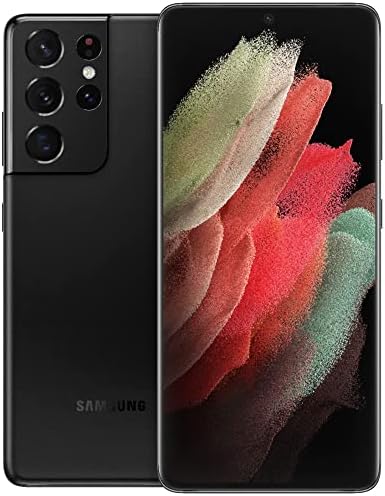
Image 4.1: Detailed view of the multi-lens rear camera system.
- Photo Mode: Standard mode for capturing still images.
- Video Mode: Record high-resolution videos.
- Pro Mode: Manual control over camera settings like ISO, shutter speed, and white balance.
- Single Take: Capture multiple types of photos and videos with one tap.
- Space Zoom: Utilize the advanced zoom capabilities, including 100x Space Zoom.
4.3. Battery Management
The device is equipped with a 5000 mAh battery. To optimize battery life:
- Adjust screen brightness.
- Enable Power saving mode.
- Close unused apps running in the background.
- Utilize fast wireless charging or wired fast charging for quick power-ups.
5. Maintenance
5.1. Cleaning Your Device
Use a soft, lint-free cloth to clean the screen and body of your phone. Avoid harsh chemicals or abrasive materials.
5.2. Software Updates
Regularly check for and install software updates to ensure optimal performance and security. Go to Settings > Software update > Download and install.
6. Troubleshooting
6.1. Device Not Powering On
Ensure the battery is charged. Connect the device to a charger and wait a few minutes before attempting to power it on again.
6.2. Connectivity Issues
- Wi-Fi: Restart your router and device. Forget and reconnect to the Wi-Fi network.
- Mobile Data: Check if mobile data is enabled in Quick Settings. Verify your SIM card is properly inserted and your plan is active.
6.3. Screen Unresponsive
Perform a forced restart by pressing and holding the Power/Side key and Volume Down button for more than 7 seconds.
7. Specifications
Key technical specifications for the Samsung Galaxy S21 Ultra 5G:
| Feature | Specification |
|---|---|
| Model Name | Galaxy S21 Ultra 5G |
| Product Dimensions | 6.5 x 2.98 x 0.35 inches |
| Item Weight | 12.3 ounces |
| Operating System | Android |
| Screen Size | 6.8 Inches |
| Resolution | 3200 x 1440 |
| Refresh Rate | 120 Hz |
| CPU Model | Snapdragon / Exynos 2100 |
| CPU Speed | 2.42 GHz |
| RAM Memory Installed Size | 12 GB |
| Memory Storage Capacity | 128 GB |
| Battery Capacity | 5000 Milliamp Hours |
| Phone Talk Time | 18 Hours |
| Connectivity Technologies | Wi-Fi, GPS |
| Special Features | Wireless Charging Support, High Performance Processor, High Battery Capacity |
| Audio Jack | No headphone jack |
| Color | Phantom Black |
8. Warranty and Support
This product is an Amazon Renewed device. Amazon Renewed products are professionally inspected, tested, and cleaned by Amazon-qualified suppliers. They come with a 90-day return policy for refund or replacement.
For further assistance, please refer to the Amazon Renewed Store or contact Amazon customer support.

Image 8.1: General information regarding Amazon Renewed products.


