
Superbat CH-AC-SDI-64
Contents
Superbat 3G/6G/12G SDI Cable User Manual
Model: CH-AC-SDI-64 | Brand: Superbat
1. Introduction
This manual provides essential information for the proper use, installation, and maintenance of your Superbat 3G/6G/12G SDI Cable. This precision digital video coaxial cable is designed for high-definition video applications, ensuring reliable signal transmission.
Key Features:
- Supports 3G/6G/12G/HD-SDI video signals.
- Features BNC male connectors on both ends.
- Constructed with Belden 1694A cable, 18 AWG.
- Gold-plated connectors for optimal conductivity.
- Compatible with various professional SDI applications and equipment from brands like Blackmagic, AJA, Grass Valley, and more.

This image displays the Superbat 1ft blue SDI cable, featuring BNC male connectors on both ends, ready for high-definition video signal transmission.
2. Setup and Connection
The Superbat SDI cable is designed for straightforward plug-and-play connectivity. Ensure your devices are compatible with BNC connectors and the appropriate SDI signal type.
- Identify the SDI input and output ports on your video equipment (e.g., cameras, converters, monitors, DVRs).
- Connect one BNC male end of the Superbat SDI cable to the SDI output port of your source device.
- Connect the other BNC male end of the cable to the SDI input port of your receiving device.
- Ensure both connections are secure by twisting the BNC connector until it locks into place.

This diagram illustrates how to connect the BNC male end of the cable to a BNC female port on an HDMI to SDI converter, highlighting the secure bayonet connection mechanism.

This image displays a range of devices compatible with the SDI cable, including PTZ cameras, security cameras, SDI to HDMI converters, DVRs, monitors, and professional video cameras, demonstrating its versatility in various setups.
3. Operating the Cable
Once connected, the Superbat SDI cable facilitates the transmission of digital video signals between compatible devices. It supports a wide range of SDI standards, ensuring high-quality video output.
The cable is designed for various professional and home audio/video environments, including:
- Live broadcast setups
- Studio environments
- Post-production facilities
- Home theater systems requiring professional-grade connectivity
The cable's robust construction ensures stable signal integrity even over longer runs, making it suitable for demanding applications.

This image shows a professional video camera in a stadium, connected with blue SDI cables, illustrating the cable's use in high-stakes live event broadcasting and video production.
4. Maintenance and Care
To ensure the longevity and optimal performance of your Superbat SDI cable, follow these maintenance guidelines:
- Storage: Store the cable coiled loosely to prevent kinks and damage to the internal conductors. Avoid sharp bends.
- Cleaning: Keep the connectors clean and free of dust and debris. Use a soft, dry cloth to wipe the cable and connectors.
- Handling: Avoid pulling the cable by the wire itself; always grasp the connector when plugging or unplugging.
- Environment: Protect the cable from extreme temperatures, direct sunlight, and moisture.
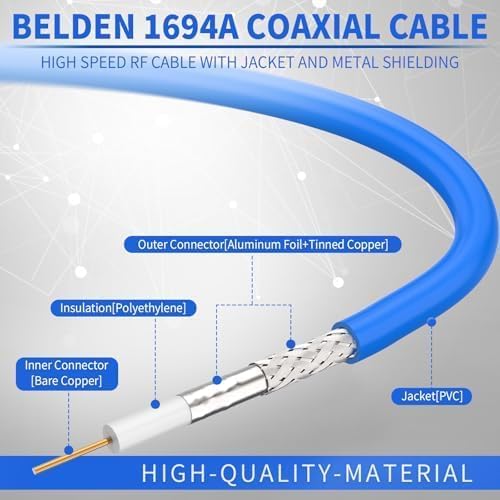
The Belden 1694A cable features a durable PVC jacket, aluminum foil, tinned copper outer conductor, polyethylene insulation, and a bare copper inner conductor, all contributing to its robust design.

This close-up image shows the blue jacket of the Belden 1694A cable, with visible markings indicating its specifications and compliance, confirming its quality and type.

This diagram breaks down the internal structure of the 1694A coaxial cable, showing its four main components: the PVC jacket, aluminum foil and tinned copper outer conductor, polyethylene insulation, and bare copper inner conductor, highlighting its high-quality material composition.
5. Troubleshooting
If you encounter issues with your Superbat SDI cable, consider the following common troubleshooting steps:
- No Signal/Intermittent Signal:
- Ensure both BNC connectors are fully seated and locked.
- Verify that the source device is outputting an SDI signal and the receiving device is configured to accept it.
- Test with a different known-good SDI cable if available to rule out the cable as the issue.
- Distorted/Colored Signal:
- Check for proper impedance matching. This cable is 75 Ohm. Using a 50 Ohm cable or connecting to a 50 Ohm device can cause signal degradation.
- Ensure the cable length is within the recommended transmission distance for the specific SDI data rate (refer to specifications).
- Inspect the cable for any visible damage or sharp bends.

This image highlights the visual difference between 50 Ohm and 75 Ohm BNC connectors, specifically focusing on the dielectric material and its absence, which is crucial for proper impedance matching in video applications.
6. Specifications
Detailed technical specifications for the Superbat 3G/6G/12G SDI Cable (Belden 1694A):
| Specification | Value |
|---|---|
| Brand | Superbat |
| Model Name | Belden 1694A Cable |
| Item Model Number | CH-AC-SDI-64 |
| Connector Type | BNC (Male-to-Male) |
| Cable Type | Coaxial, Component, Composite |
| Impedance | 75 Ohm |
| Gauge | 18 AWG |
| Data Transfer Rate | Up to 11.88 Gbps (12G-SDI) |
| Supported SDI Standards | SD-SDI (270 Mbps, ST 259), HD-SDI (1.483 Gbps, ST 292), 3G-SDI (2.97 Gbps, ST 424), 6G-SDI (5.94 Gbps, ST 2081), 12G-SDI (11.88 Gbps, ST 2083) |
| Nominal Attenuation | 0.240 dB/100 ft. @ 1 MHz |
| Overall Diameter | 0.274" |
| Item Weight | 1.44 ounces (for 1ft cable) |
| Manufacturer | wlaniot |

This diagram provides detailed electrical characteristics for the Belden 1694A cable, including conductor DCR, capacitance, inductance, impedance, and return loss, essential for understanding its performance.
This table outlines the maximum transmission distances for the Belden 1694A cable across different serial digital data rates and applications, providing crucial information for system design and cable length selection.
7. Warranty and Support
Superbat is committed to the quality of its products. If you receive a defective cable or experience any issues, please contact our customer support for assistance.
For further inquiries or support, please reach out to the manufacturer, wlaniot, or refer to the product listing on Amazon for contact details.
Documents and downloads
Ask a question about this manual
Ask about setup, troubleshooting, compatibility, parts, safety, or missing instructions. Manuals+ will review the question and use this page’s manual context to help answer it.