
Bluesound N130WHTUNV
Bluesound Node Wireless Multi-Room High Resolution Music Streamer
Model: N130WHTUNV
Introduction
The Bluesound Node is a versatile wireless multi-room high-resolution music streamer designed to connect to your existing stereo amplifier, AV receiver, or powered audio system. It brings 24-bit streaming capabilities to your home audio setup, allowing you to access internet radio stations, cloud music services, and your local music library with exceptional clarity.
Powered by a state-of-the-art Quad-Core 1.8GHz ARM Cortex A53 processor and a 32-bit/384khz premium DAC design, the Node ensures high-fidelity audio playback with minimal distortion. Its intuitive BluOS Controller app allows for seamless control and creation of a multi-room audio system.

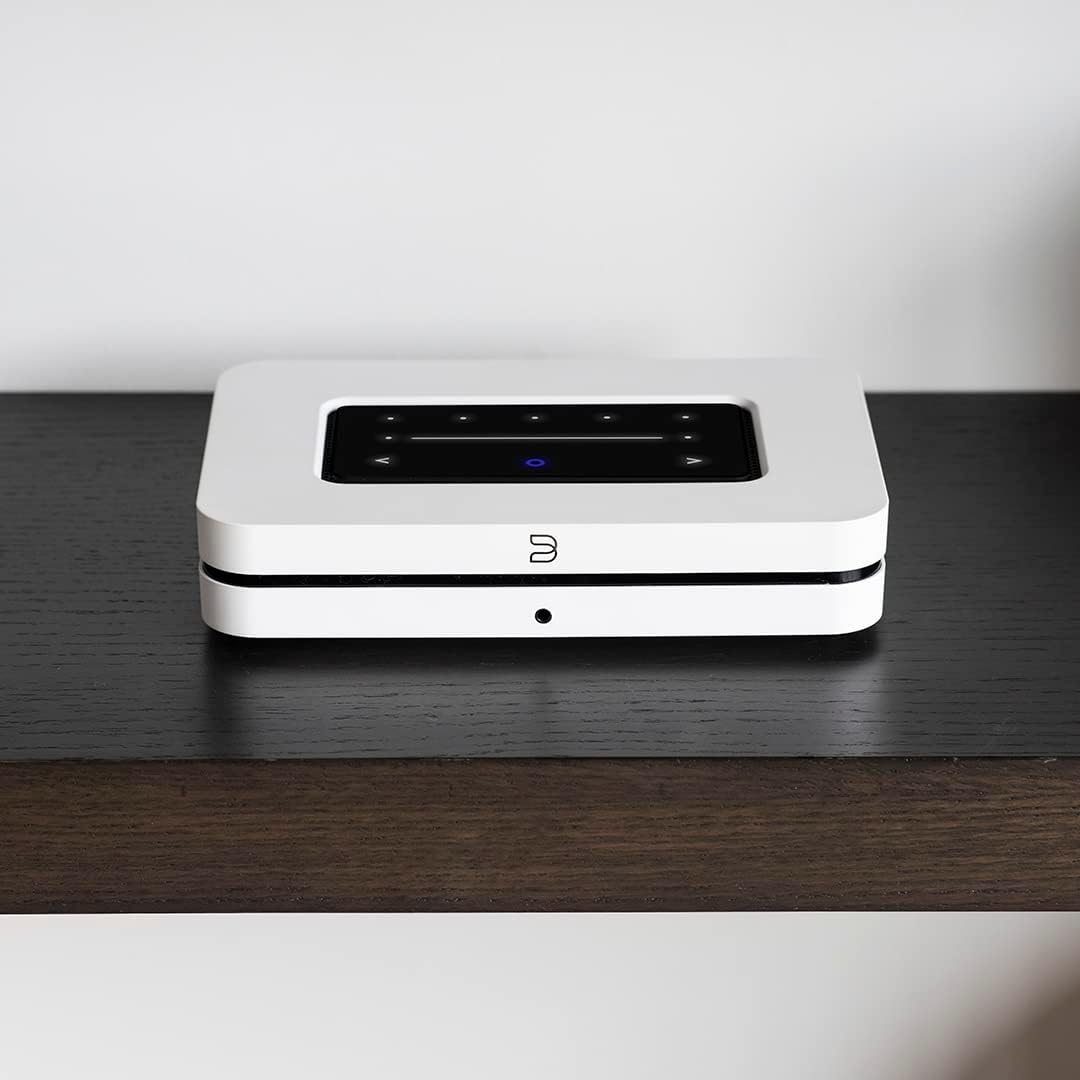
Front view of the Bluesound Node Wireless Multi-Room High Resolution Music Streamer in white.
What's in the Box
Upon unboxing your Bluesound Node, please ensure all the following components are present:
- Ethernet Cable
- 120V AC Power Cord
- Stereo RCA to RCA Cable
- OSLINK Optical to 3.5mm Mini Adaptor
Setup
Setting up your Bluesound Node is a straightforward process. Follow these steps to integrate it into your audio system:
- Placement: Position the Node on a stable, flat surface, away from direct heat sources or excessive moisture. Ensure adequate ventilation around the unit.
- Power Connection: Connect the provided 120V AC Power Cord to the AC input on the rear panel of the Node, then plug it into a wall outlet.
- Audio Connection:
Connect the Node to your existing stereo amplifier, AV receiver, or powered speakers using one of the following methods:
- Analog Output (RCA): Use the Stereo RCA to RCA Cable to connect the "AUDIO OUT" ports on the Node to the analog input (e.g., "AUX IN" or "CD IN") on your amplifier/receiver.
- Digital Optical Output: Use an optical cable (not included) to connect the "OPTICAL OUT" port on the Node to the optical input on your DAC or receiver. If your device has a 3.5mm optical input, use the OSLINK Optical to 3.5mm Mini Adaptor.
- Coaxial Output: Use a coaxial cable (not included) to connect the "COAX OUT" port on the Node to the coaxial input on your DAC or receiver.
- HDMI eARC: Connect an HDMI cable (not included) from the "HDMI eARC" port on the Node to the HDMI eARC port on your TV or AV receiver for high-quality audio return.
- Network Connection:
The Node supports both wired and wireless network connections:
- Wired (Ethernet): For the most stable connection, use the provided Ethernet Cable to connect the "LAN/USB" port on the Node to your router or network switch.
- Wireless (Wi-Fi): If using Wi-Fi, ensure your Node is within range of your wireless router. The setup process for Wi-Fi will be completed via the BluOS Controller app.
- Download BluOS Controller App: Download the BluOS Controller app on your smartphone, tablet, or computer. This app is essential for configuring and controlling your Node.
- Initial Setup via App: Open the BluOS Controller app and follow the on-screen instructions to connect your Node to your network and configure your music services.
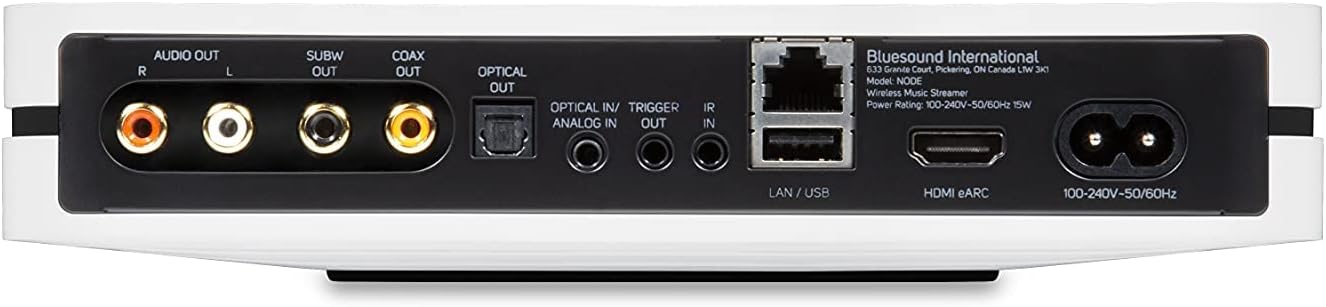
Rear panel of the Bluesound Node, showing various input and output ports for connectivity.
Detailed view of the Bluesound Node's rear panel with labels for each connection port, including Audio Out, Subwoofer Out, Coaxial Out, Optical Out, Optical In/Analog In, Trigger Out, IR In, LAN/USB, and HDMI eARC.
Operating Instructions
The Bluesound Node offers multiple ways to control your music playback and access various features:
BluOS Controller App
The primary method of control is through the BluOS Controller app, available for iOS, Android, and desktop operating systems. The app allows you to:
- Browse and play music from internet radio stations, cloud music services (e.g., Tidal, Spotify, Amazon Music), and your local music library.
- Create and manage playlists.
- Control volume and playback.
- Group multiple Bluesound players for a seamless multi-room audio experience.
- Access advanced settings and firmware updates.
Top Panel Touch Controls
The Node features a touch-sensitive top panel with built-in proximity sensing for quick access to basic controls:
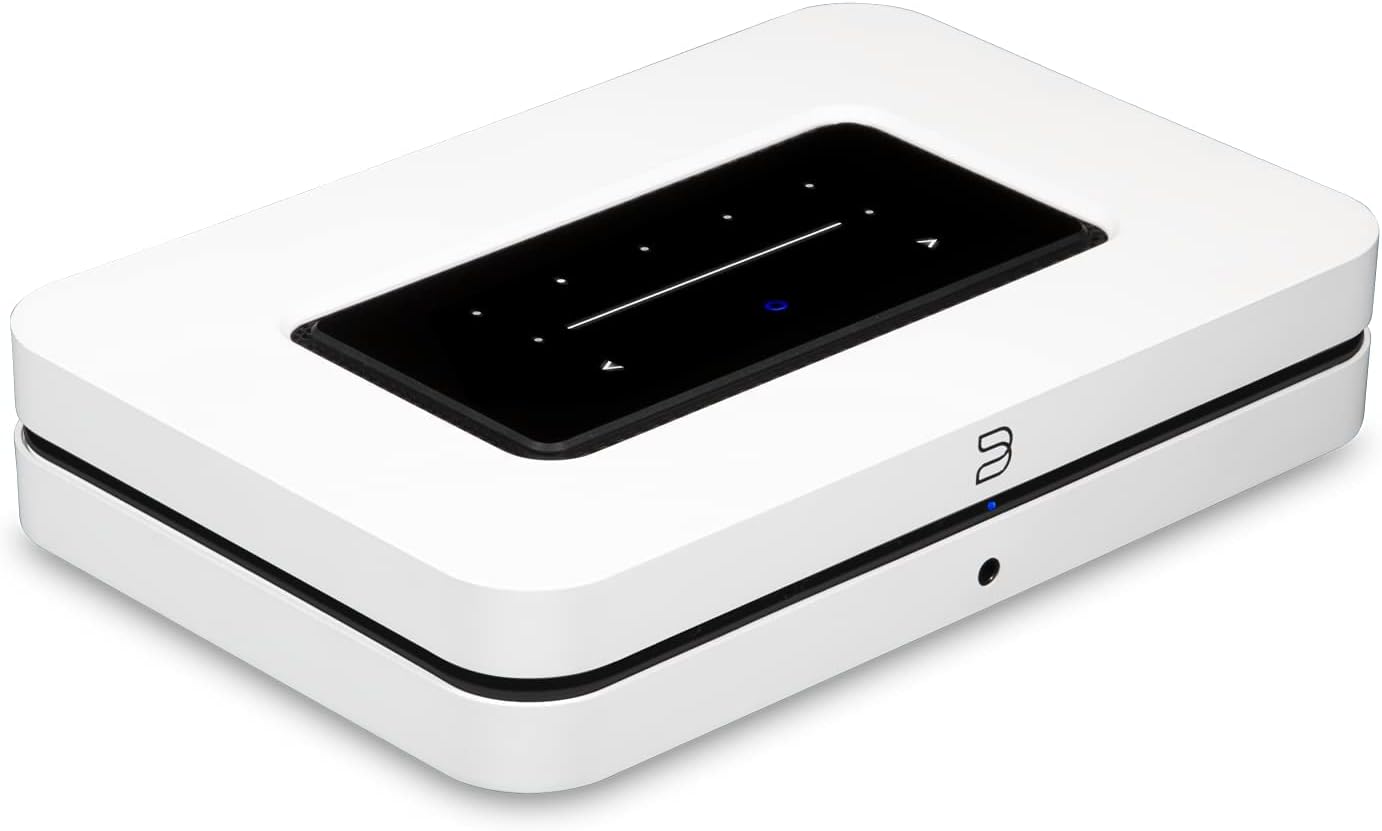
Top panel of the Bluesound Node, showing the touch-sensitive controls for playback and volume.
- Play/Pause: Tap the center button to play or pause music.
- Volume Control: Use the left and right arrows to adjust the volume.
- Track Skip: Use the forward and backward arrows to skip tracks.
- Presets: The top row of dots can be configured as custom presets for quick access to favorite stations or playlists via the BluOS app.
Voice Control and AirPlay 2
The Node supports modern control methods for enhanced convenience:
- Amazon Alexa: Connect with the BluVoice skill in the Alexa app to use Amazon's Alexa voice assistant to control your Node and other Bluesound Players around the home.
- Apple AirPlay 2: AirPlay 2 allows you to play music or podcasts from your Apple devices to the Node and other compatible wireless stereo components throughout your house, all in sync.
Official Product Video
An official product video showcasing the Bluesound Node Wireless Multi-Room Hi-Res Music Streamer, highlighting its features and design.
Maintenance
To ensure the longevity and optimal performance of your Bluesound Node, follow these simple maintenance guidelines:
- Cleaning: Use a soft, dry cloth to wipe the exterior surfaces of the Node. Avoid using abrasive cleaners, waxes, or solvents as they may damage the finish.
- Ventilation: Ensure that the ventilation openings on the unit are not blocked. Proper airflow is crucial to prevent overheating.
- Power Off: If the unit will be unused for an extended period, it is advisable to unplug it from the power outlet.
- Firmware Updates: Regularly check for and install firmware updates via the BluOS Controller app. These updates often include performance improvements and new features.
Troubleshooting
If you encounter issues with your Bluesound Node, refer to the following common troubleshooting tips. For more detailed assistance, consult the BluOS Controller app's help section or the official Bluesound support resources.
| Problem | Possible Solution |
|---|---|
| No power/Unit not turning on | Ensure the power cord is securely connected to both the Node and a working electrical outlet. Try a different outlet. |
| No sound output | Verify that the audio cables are correctly connected to your amplifier/receiver and the Node. Check the input selection on your amplifier/receiver. Ensure the volume on both the Node (via app) and your amplifier is not muted or too low. |
| Cannot connect to network (Wi-Fi/Ethernet) | For wired connection, ensure the Ethernet cable is properly connected to your router. For Wi-Fi, ensure the Node is within range of your router and that you have entered the correct Wi-Fi password in the BluOS app. Restart your router and the Node. |
| Music playback interruptions/dropouts | Check your network stability and internet speed. Ensure there are no strong interference sources near the Node or your router. For Wi-Fi, try moving the Node closer to the router or using a wired connection. |
| BluOS app not detecting Node | Ensure your mobile device and the Node are on the same network. Restart the BluOS app and the Node. |
Specifications
Key technical specifications for the Bluesound Node Wireless Multi-Room High Resolution Music Streamer:
- Brand: Bluesound
- Model Number: N130WHTUNV
- Color: White
- Item Weight: 5 Pounds
- Connectivity Technology: USB, Ethernet, Dual-band Wi-Fi, Bluetooth aptX HD
- Connector Types: HDMI eARC, RCA (Analog Audio Out), Optical (Digital Audio Out), Coaxial (Digital Audio Out), Subwoofer Out, Optical In/Analog In, Trigger Out, IR In, USB (Type-A)
- Processor: Quad-Core 1.8GHz ARM Cortex A53
- DAC Design: 32-bit/384khz Premium DAC
- Supported Audio Resolution: Up to 24-bit/192kHz
- Supported Internet Services: Access to Internet radio stations, cloud music services (e.g., Tidal, Spotify, Amazon Music), local music library.
- Control: BluOS Controller App (iOS, Android, Desktop), Top Panel Touch Controls, Voice Control (Amazon Alexa, Apple AirPlay 2), Optional Bluesound RC1 Remote Controller.
- Multi-room Capability: Yes, with BluOS ecosystem.
- First Available Date: April 30, 2021
Warranty and Support
The Bluesound Node comes with a manufacturer's warranty. For specific warranty terms and conditions, please refer to the documentation included with your product or visit the official Bluesound website.
For technical support, frequently asked questions, and additional resources, please visit the Bluesound official website or refer to the comprehensive User Manual (PDF) available online.
Related documentsN130WHTUNV


Ask a question about this manual
Ask about setup, troubleshooting, compatibility, parts, safety, or missing instructions. Manuals+ will review the question and use this page’s manual context to help answer it.