1. Introduction
This manual provides essential information for the setup, operation, maintenance, and troubleshooting of your Beelink T4 Pro Mini PC. Please read this manual thoroughly before using the device to ensure proper functionality and longevity.
2. Package Contents
Verify that all items listed below are included in your package:
- 1 x Beelink T4 Pro Mini PC
- 1 x HDMI Cable
- 1 x Power Adapter
- 1 x User Manual
3. Product Overview
The Beelink T4 Pro is a compact mini PC designed for various computing tasks. It features a Celeron N3350 processor, 4GB of RAM, and 64GB of storage, offering a balance of performance and portability. Its small form factor makes it suitable for home entertainment, office work, or as a dedicated server for light applications.
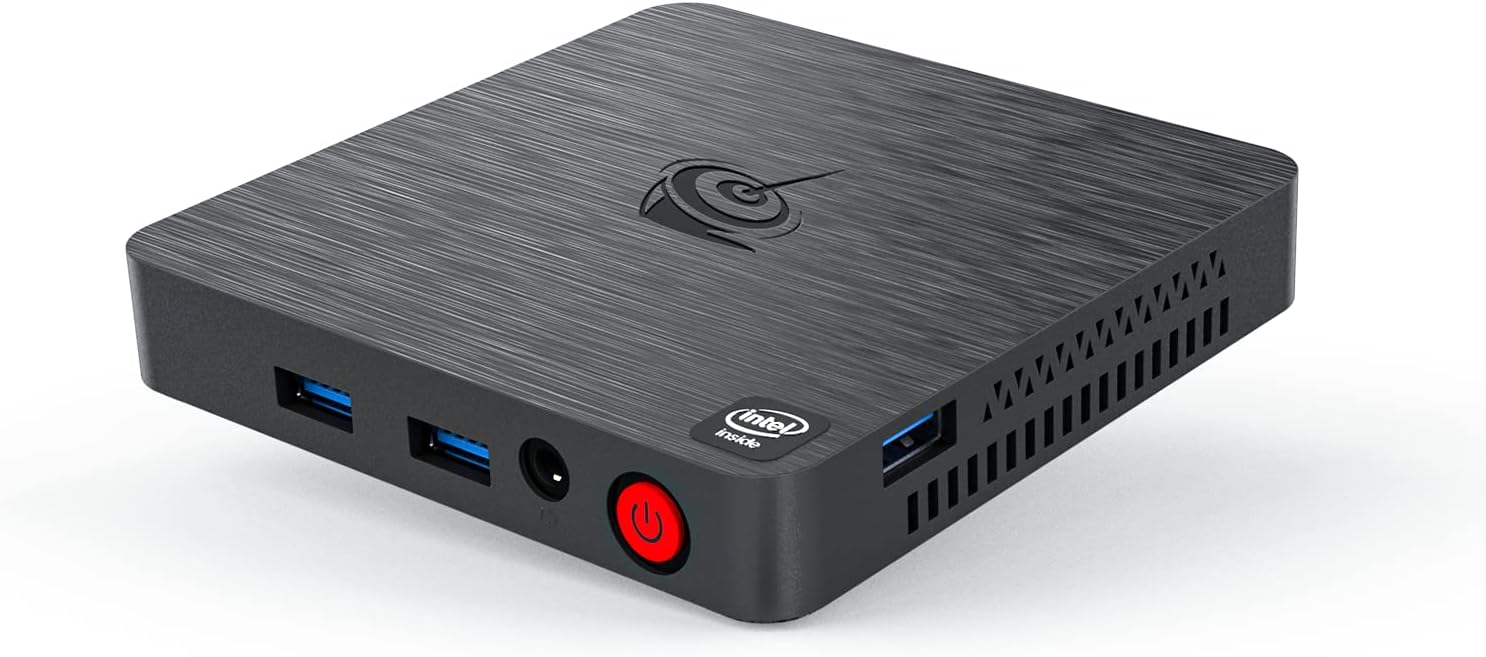
Figure 1: Beelink T4 Pro Mini PC. This image displays the compact design of the mini PC, highlighting its front and side panels with various ports including USB ports, audio jack, and power button.
4. Setup
- Connect to Display: Connect one end of the HDMI cable to the HDMI port on the Beelink T4 Pro and the other end to an HDMI input on your monitor or TV.
- Connect Peripherals: Plug in your USB keyboard and mouse into the available USB 3.0 ports on the mini PC.
- Connect Power: Connect the power adapter to the DC 12V port on the mini PC, then plug the adapter into a power outlet.
- Power On: Press the power button located on the front panel of the mini PC. The device will boot up, and the operating system (Linux) will load.
5. Operating Instructions
5.1 Basic Operation
- Power On/Off: Press the power button once to turn on the device. To turn off, use the operating system's shutdown option or press and hold the power button for a few seconds.
- Restart: Use the operating system's restart option.
- Sleep Mode: Use the operating system's sleep option or briefly press the power button.
5.2 Connecting to the Internet
- Wired Connection: Connect an Ethernet cable from your router or modem to the LAN port on the mini PC.
- Wireless Connection: Navigate to the network settings in your operating system, select your Wi-Fi network (supports 2.4 GHz and 5.8 GHz), and enter the password.
5.3 Using USB Devices
The Beelink T4 Pro features multiple USB 3.0 ports for connecting external devices such as USB drives, external hard drives, printers, and other peripherals. Simply plug the device into an available USB port.
6. Maintenance
- Cleaning: Regularly clean the exterior of the mini PC with a soft, dry cloth. Avoid using liquid cleaners or solvents. Ensure ventilation holes are free from dust and obstructions.
- Software Updates: Keep your operating system and applications updated to ensure optimal performance and security. Follow the update procedures provided by your operating system.
- Data Backup: Periodically back up important data to an external storage device or cloud service to prevent data loss.
7. Troubleshooting
| Issue | Possible Solution |
|---|---|
| No display on monitor | Ensure HDMI cable is securely connected to both the mini PC and the monitor. Verify the monitor is set to the correct input source. Try a different HDMI cable or monitor. |
| Mini PC does not power on | Check if the power adapter is correctly connected to the mini PC and the power outlet. Ensure the power outlet is functional. |
| No internet connection | For wired connection, check the Ethernet cable and router/modem status. For wireless, ensure Wi-Fi is enabled in settings and the correct password is entered. Restart your router/modem. |
| Peripherals (keyboard/mouse) not working | Try connecting to a different USB port. Ensure the devices are properly connected and powered (if applicable). Restart the mini PC. |
8. Specifications
| Feature | Detail |
|---|---|
| Model | T4 Pro |
| Processor | Intel Celeron N3350 (up to 2.4GHz) |
| RAM | 4 GB LPDDR3 |
| Storage | 64 GB Embedded MultiMediaCard |
| Graphics Coprocessor | Intel UHD Graphics |
| Operating System | Linux |
| Wireless Type | 2.4 GHz Radio Frequency, 5.8 GHz Radio Frequency |
| USB Ports | 3 x USB 3.0 Ports |
| Video Output | HDMI, VGA |
| Ethernet | 1000Mbps/LAN |
| Dimensions (LxWxH) | 3.15 x 4.72 x 4.72 inches |
| Weight | 1.1 pounds |
9. Warranty and Support
The Beelink T4 Pro Mini PC comes with a manufacturer's warranty. For detailed warranty information, technical support, or service inquiries, please refer to the documentation included in your package or visit the official Beelink website. Keep your proof of purchase for warranty claims.


