
ZOHAN EM033
Contents
ZOHAN 033 Bluetooth AM/FM Radio Headphones User Manual
Model: EM033
Introduction
Thank you for choosing the ZOHAN 033 Bluetooth AM/FM Radio Headphones. This manual provides detailed instructions for the proper use, setup, operation, and maintenance of your device. Please read this manual thoroughly before using the headphones to ensure optimal performance and safety.

Image: ZOHAN 033 Bluetooth AM/FM Radio Headphones, showcasing the main unit with its digital display, control buttons, and antenna.
Product Features
- Advanced Bluetooth 5.3 Technology: Offers exceptional connectivity, faster data transmission, and a wider range for seamless audio streaming and calls.
- Broad AM/FM Radio Reception: Captures both AM and FM signals with a broad frequency range, allowing storage of up to 10 AM and 10 FM stations.
- Superior Noise Reduction: NRR 25dB / SNR 30dB certified protection (ANSI S3.19-1974 and CE EN 352-1) effectively reduces noise in various environments.
- Long Battery Life: Built-in 2000mAh rechargeable battery provides up to 48 hours of playtime in Bluetooth mode and over 40 hours in wired/FM/AM mode.
- Comfortable Design: Features a wider, thicker, and softer headband with snap-in ear cushions for easy replacement and enhanced comfort.
- Hands-Free Calling: Multifunctional button and integrated microphone enable easy call management without removing the earmuffs.
- Hi-Fi Sound Quality: Delivers a crystal-clear listening experience for both music and radio.
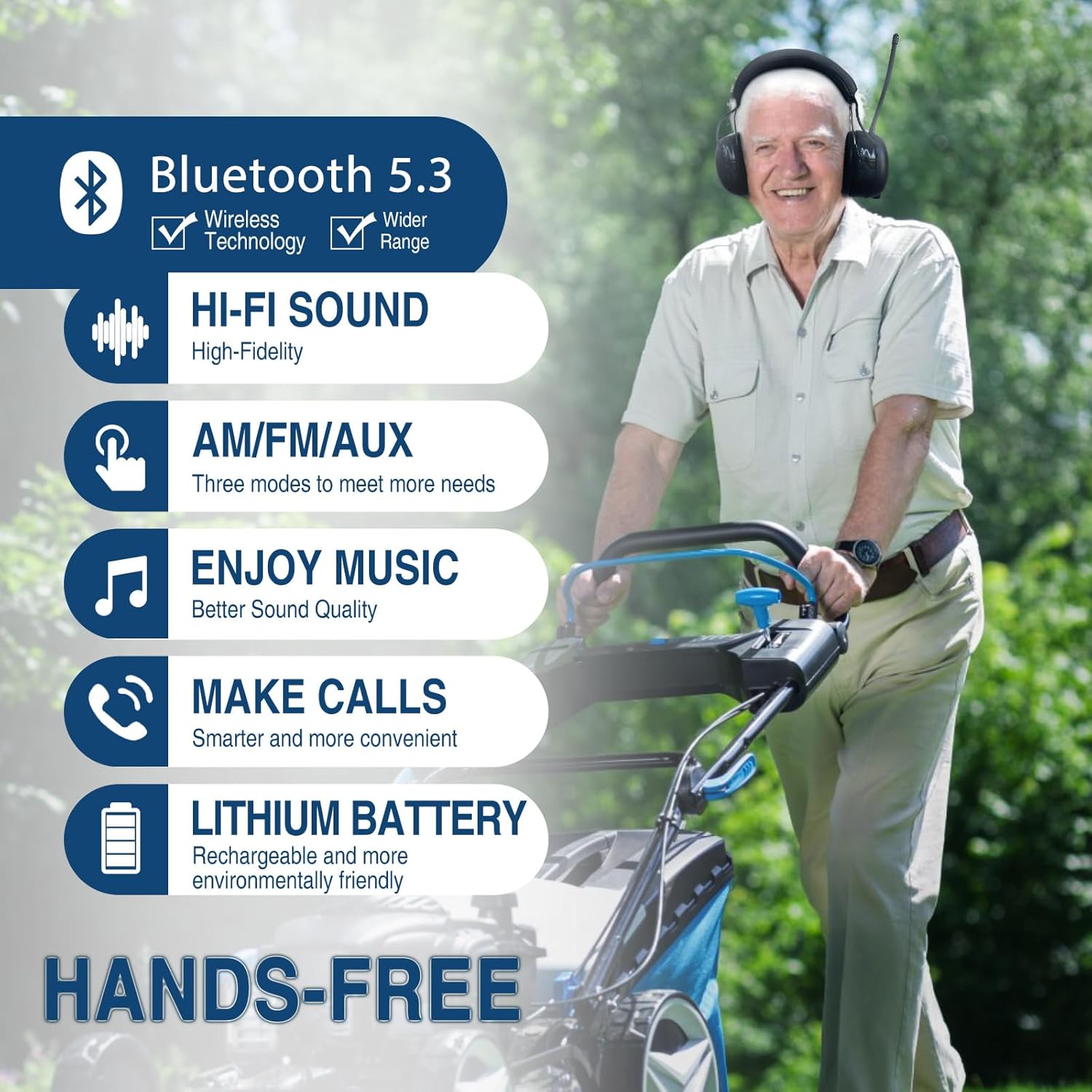
Image: Visual representation of key features including Bluetooth 5.3, Hi-Fi sound, AM/FM/AUX modes, music playback, call functionality, and rechargeable lithium battery.
Package Contents
Upon opening the package, please verify that all items are present and in good condition:
- ZOHAN 033 Bluetooth AM/FM Radio Headphones x 1
- USB Charging Cable x 1
- 3.5mm Audio Cable x 1
- User Manual x 1
- Carrying Bag x 1

Image: Diagram illustrating the items included in the ZOHAN 033 package: headphones, user manual, USB charging cable, 3.5mm audio cable, and a carrying bag.
Setup and Charging
Initial Charging
Before first use, fully charge the headphones. The built-in 2000mAh rechargeable battery provides extended usage time.
- Locate the charging port on the headphones.
- Connect the provided USB charging cable (3.5mm to USB) to the charging port.
- Connect the other end of the USB cable to a compatible USB power source (e.g., USB charger, power bank, laptop/PC, car charger).
- The digital LCD display will indicate charging status. A full charge typically takes approximately 5 hours.

Image: Close-up view of the charging port and the 3.5mm audio jack, illustrating the connection points for charging and wired audio input.

Image: Diagram showing the standard 3.5mm to USB charging cable and its compatibility with various USB power sources.
Battery Replacement
The headphones feature a detachable battery cover for easy installation or replacement of the 3.8V 7.6Wh 2000mAh lithium battery.

Image: View of the battery compartment with the battery installed, highlighting its detachable design for user convenience.
Operating Instructions
Controls Overview
The ZOHAN 033 headphones feature intuitive controls for easy operation:
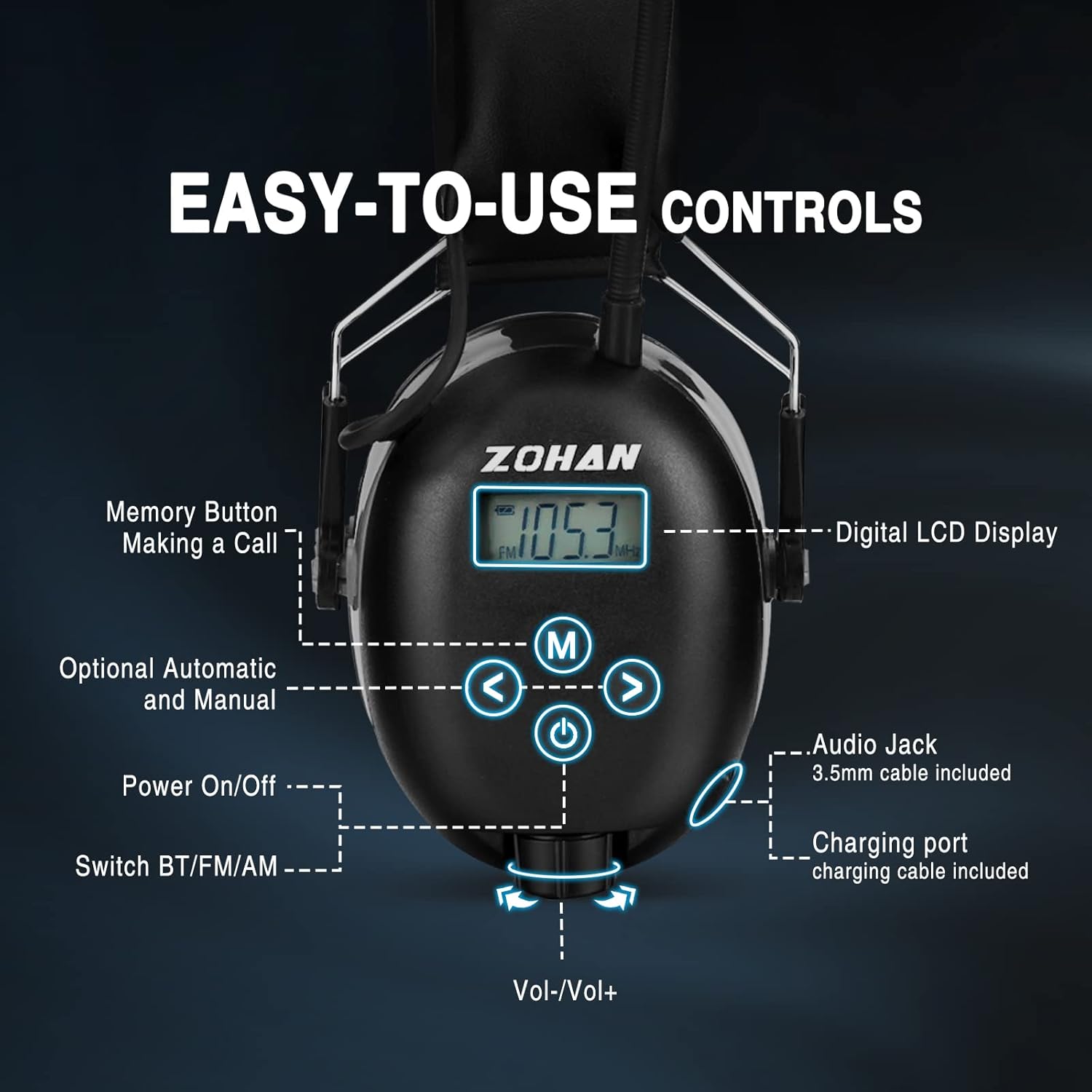
Image: Detailed diagram of the headphone controls, labeling the digital LCD display, Memory button, Optional Automatic and Manual tuning buttons, Power On/Off button, Switch BT/FM/AM button, Audio Jack, Charging port, and Volume control knob.
- Power On/Off: Press and hold the power button.
- Mode Switch (BT/FM/AM): Press the mode button to cycle between Bluetooth, FM Radio, and AM Radio modes.
- Volume Control: Rotate the knob at the bottom for volume adjustment (Vol-/Vol+).
- Tuning/Track Control: Use the left and right arrow buttons for manual tuning in radio mode or track navigation in Bluetooth mode.
- Memory Button (M): Used for saving radio stations or managing calls in Bluetooth mode.
Bluetooth Mode
- Ensure the headphones are powered on and in Bluetooth mode. The LCD display will show a Bluetooth icon.
- On your device (smartphone, tablet, etc.), enable Bluetooth and search for "ZOHAN 033".
- Select "ZOHAN 033" to pair. Once paired, you will hear a confirmation tone.
Bluetooth Music Control:
- Play/Pause: Single press the 'M' button.
- Next Song: Single press the right arrow (>) button.
- Previous Song: Single press the left arrow (<) button.
Bluetooth Telephone Control:
- Pick up/End Call: Single press the 'M' button.
- Reject Call: Long press the 'M' button for 3 seconds.
- Recall Last Number: Long press the 'M' button for 3 seconds (when not on a call).

Image: Visual guide detailing button functions for music playback and telephone calls in Bluetooth mode.
AM/FM Radio Mode
- Switch to FM or AM mode using the mode button.
- Auto Scan: Long press the 'M' button to automatically scan and save available stations. The headphones can store up to 10 AM and 10 FM stations.
- Manual Tuning: Use the left and right arrow buttons for precise manual tuning.
- Recall Saved Stations: Short press the 'M' button to cycle through saved stations.
Wired Audio (AUX) Mode
For devices without Bluetooth, use the provided 3.5mm audio cable:
- Connect one end of the 3.5mm audio cable to the audio jack on the headphones.
- Connect the other end to the audio output of your device.
- The headphones will automatically switch to AUX mode.
Noise Reduction Performance
The ZOHAN 033 headphones provide effective hearing protection with an NRR (Noise Reduction Rating) of 25dB and SNR (Single Number Rating) of 30dB. These ratings are backed by certified protection from ANSI S3.19-1974 (American National Standards Institute) and CE EN 352-1 (European standard).
They are suitable for various noisy environments, including:
- Mowing
- Cutting
- Construction
- Workshop activities
- Snowblowing
- Welding
- Drilling
- Leaves Blower operation
- Landscaping

Image: Illustration demonstrating the effectiveness of NRR 25dB noise reduction in various loud environments, showing a person wearing the headphones in a noisy setting and then giving a thumbs-up in a quieted state.

Image: Collage of various scenarios where the ZOHAN 033 headphones provide hearing protection and entertainment, including fishing, drilling, using a leaf blower, mowing, landscaping, and construction sites.
Maintenance
Cleaning
- Wipe the headphones with a soft, damp cloth. Do not use abrasive cleaners or solvents.
- Ensure the charging port and audio jack are free of dust and debris.
Ear Cushion Replacement
The ear cushions are designed for easy replacement to maintain hygiene and comfort. They feature a snap-in design.

Image: Close-up view of the ear pads, highlighting their soft, anti-sweat, and snug-fit design, along with the snap-in feature for easy maintenance and replacement.
Storage
Store the headphones in the provided carrying bag in a cool, dry place away from direct sunlight and extreme temperatures.
Troubleshooting
| Problem | Possible Cause | Solution |
|---|---|---|
| Headphones do not power on. | Low battery. | Charge the headphones fully. |
| Cannot pair via Bluetooth. | Headphones not in pairing mode; device Bluetooth off; too far from device. | Ensure headphones are in Bluetooth mode. Turn device Bluetooth off/on. Move closer to the device (within 50ft). |
| Poor radio reception. | Weak signal area; antenna not extended. | Extend the antenna fully. Try auto-scanning for stations. Move to an area with better reception. |
| No sound in AUX mode. | Cable not fully inserted; device volume too low. | Ensure 3.5mm cable is securely connected. Increase volume on both headphones and connected device. |
| Sound distortion. | Volume too high; weak signal; interference. | Lower volume. Check signal strength for radio. Move away from other electronic devices. |
Specifications
| Feature | Detail |
|---|---|
| Model Number | EM033 |
| Noise Reduction Rating (NRR) | 25dB |
| Single Number Rating (SNR) | 30dB |
| Bluetooth Version | 5.3 |
| Battery Capacity | 2000mAh (3.8V 7.6Wh) Rechargeable Lithium Battery |
| Playtime (Bluetooth Mode) | Up to 48 hours |
| Playtime (AM/FM/AUX Mode) | 40+ hours |
| Charging Time | Approx. 5 hours |
| Product Dimensions | 6.3 x 4.1 x 8.1 inches |
| Item Weight | 1.21 pounds |
| Certifications | ANSI S3.19-1974, CE EN 352-1, IC, CE, FC |

Image: Certificates of conformity for IC, CE, and FC, indicating the product meets international safety and quality standards.
Warranty and Support
ZOHAN products are designed for durability and performance. While specific warranty details should be confirmed with your point of purchase or the official ZOHAN website, customer reviews indicate a potential 3-year warranty period for this product. Please retain your proof of purchase for any warranty claims.
For technical support, troubleshooting assistance, or inquiries regarding parts and accessories, please visit the official ZOHAN website or contact their customer service department. Contact information can typically be found on the product packaging or the ZOHAN brand store on Amazon.
Note: Warranty terms may vary by region and retailer. Always refer to the official warranty statement provided with your product.
Ask a question about this manual
Ask about setup, troubleshooting, compatibility, parts, safety, or missing instructions. Manuals+ will review the question and use this page’s manual context to help answer it.