
Tronsmart Mega Pro
Tronsmart Mega Pro 60W Portable Bluetooth Speaker User Manual
Model: Mega Pro
Important Safety Instructions
Please read all instructions carefully before using the Tronsmart Mega Pro speaker. Keep this manual for future reference.
- Do not expose this product to rain, moisture, or any liquids.
- Do not disassemble or modify the speaker.
- Keep the speaker away from extreme temperatures.
- Do not use harsh chemicals or detergents to clean the speaker.
- Ensure the charging port is dry before connecting the charging cable.
- Dispose of batteries responsibly, following local regulations.
Package Contents
The Tronsmart Mega Pro package includes the following items:
- 1 x Mega Pro Indoor Speaker
- 1 x Warranty Card
- 1 x User Manual
- 1 x Storage Bag
- 1 x Type-C Charging Cable
- 1 x 3.5mm Audio Cable
Product Overview
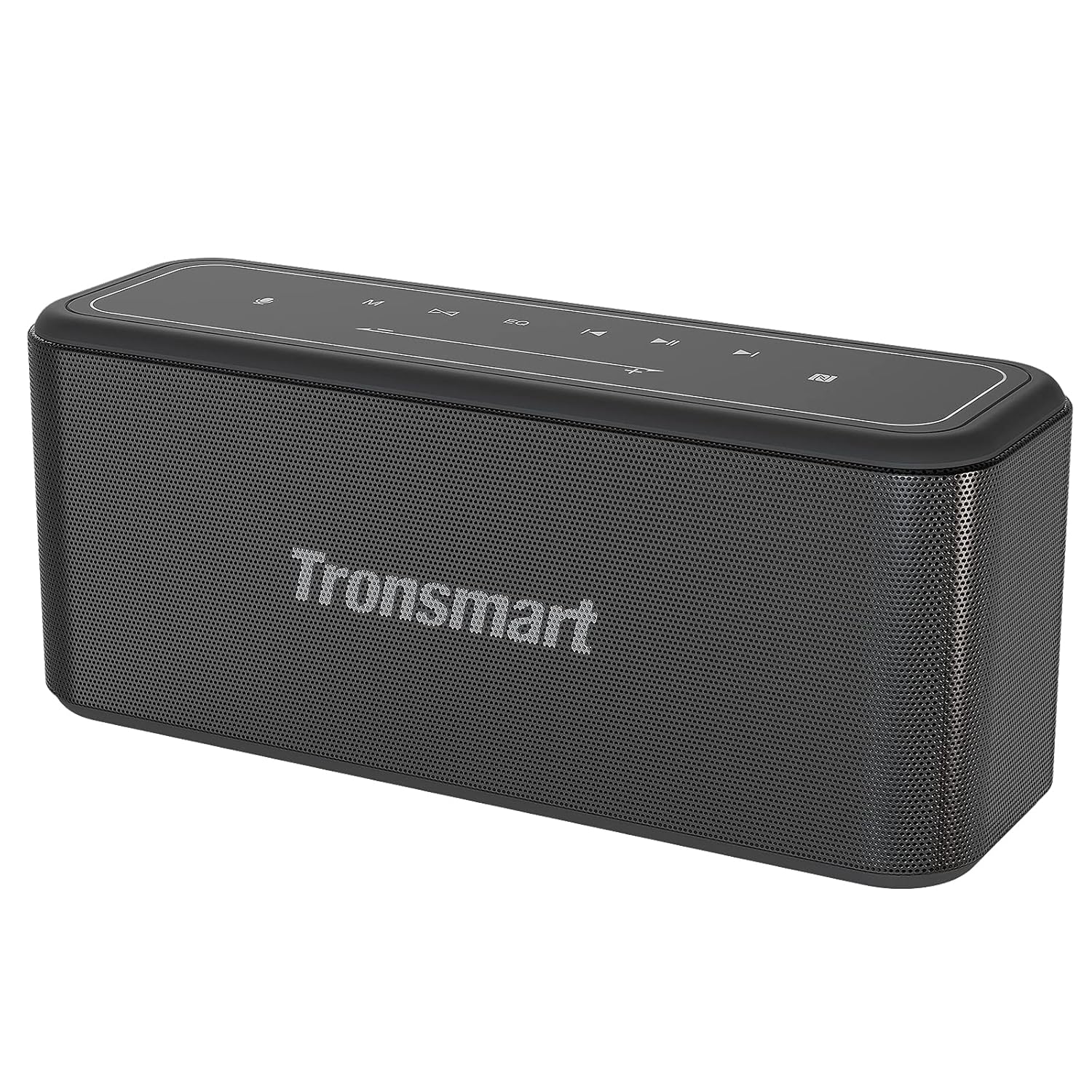
Front view of the Tronsmart Mega Pro speaker, showcasing its sleek design and mesh grille.

Top panel of the Tronsmart Mega Pro speaker with touch controls for power, volume, playback, EQ, and mode selection.
Control Panel Functions
- Power Button: Press and hold to turn the speaker on or off.
- Mode Button: Switch between Bluetooth, AUX, and TF Card modes.
- Volume Down (-): Decrease volume. Press and hold for previous track.
- Play/Pause Button: Play or pause audio. Answer/end calls.
- Volume Up (+): Increase volume. Press and hold for next track.
- EQ Button: Cycle through Deep Bass, Vocal, and 3D sound effects.
- TWS Button: Initiate True Wireless Stereo pairing.
- Voice Assistant Button: Activate your device's voice assistant.
Setup
Charging the Speaker
Before first use, fully charge the speaker. Connect the provided Type-C charging cable to the speaker's charging port and a USB power adapter (not included). The LED indicator will show charging status. A full charge takes approximately 3 hours and provides up to 10 hours of playtime at 50% volume.
Power On/Off
Press and hold the Power button on the top panel for 2-3 seconds to turn the speaker on or off.
Bluetooth Pairing
- Turn on the Tronsmart Mega Pro speaker. It will automatically enter Bluetooth pairing mode, indicated by a flashing blue LED.
- Enable Bluetooth on your device (smartphone, tablet, etc.).
- Search for 'Tronsmart Mega Pro' in your device's Bluetooth list and select it to connect.
- Once connected, the LED indicator will turn solid blue, and you will hear an audible confirmation.
- The speaker offers a stable and fast connection within 66 feet (20 meters).
NFC Pairing
If your device supports NFC, enable NFC on your device and gently tap it against the NFC area on the speaker (usually indicated by an NFC logo) to establish a connection.
AUX Connection
Connect one end of the 3.5mm audio cable to the speaker's AUX port and the other end to your audio device's headphone jack. The speaker will automatically switch to AUX mode.
TF Card Playback
Insert a TF/Micro SD card (with pre-loaded music) into the designated slot on the speaker. The speaker will automatically switch to TF Card mode and begin playing music.
Operating Instructions
Adjusting Volume and Playback
- Volume: Press the '+' button to increase volume, and '-' button to decrease volume.
- Play/Pause: Press the Play/Pause button once to play or pause music.
- Next Track: Press and hold the '+' button for 2 seconds.
- Previous Track: Press and hold the '-' button for 2 seconds.
EQ Modes

Visual representation of the three switchable EQ modes: Deep Bass, Vocal, and 3D.
The Mega Pro offers three distinct equalizer sound effects to suit your listening preference. Press the EQ button on the top panel to cycle through the modes:
- Deep Bass: Enhanced bass for powerful low-end sound (default).
- Vocal: Optimized for clear vocal reproduction.
- 3D: Creates a spacious, immersive sound experience.
True Wireless Stereo (TWS) Pairing
You can pair two Tronsmart Mega Pro speakers together to achieve a powerful 120 Watt 3D stereo sound experience.
- Ensure both speakers are powered on and not connected to any other Bluetooth device.
- On one speaker (this will be the primary speaker), press the TWS button. It will emit a prompt sound.
- The two speakers will automatically connect to each other. Once connected, the LED indicator on the primary speaker will flash blue, and the secondary speaker's LED will be solid blue.
- Connect your device to the primary speaker via Bluetooth.
Voice Assistant Activation
With a simple button tap, you can activate your device's voice assistant (Siri, Google Assistant, Cortana) directly from the speaker. Press the Voice Assistant button on the top panel to initiate the voice assistant function.
Built-in Power Bank Function
The Tronsmart Mega Pro features a built-in 10,400mAh battery that can also function as an emergency power bank for your mobile devices. Connect your device to the speaker's USB-A output port using a compatible charging cable.
Maintenance
Cleaning
Wipe the speaker with a soft, damp cloth. Do not use abrasive cleaners or solvents. Ensure all ports are dry before use or charging.
Storage
Store the speaker in a cool, dry place away from direct sunlight and extreme temperatures. If storing for an extended period, charge the battery to approximately 50% every few months to maintain battery health.
Waterproofing (IPX5)

The Tronsmart Mega Pro is rated IPX5, protecting it from water splashes and small water jets.
The Tronsmart Mega Pro is IPX5 rated, meaning it is protected against low-pressure water jets from any direction. This makes it suitable for use outdoors or near water, but it should not be submerged in water.
Troubleshooting
| Problem | Possible Cause | Solution |
|---|---|---|
| Speaker does not power on. | Low battery. | Charge the speaker fully. |
| Cannot pair with Bluetooth device. | Speaker is already connected to another device; Bluetooth is off on your device; Speaker is out of range. | Disconnect from other devices; Ensure Bluetooth is enabled; Move speaker closer to device (within 66ft/20m). |
| No sound. | Volume is too low; Incorrect input mode; Device not playing audio. | Increase volume; Press Mode button to select correct input (Bluetooth, AUX, TF Card); Check audio playback on your device. |
| TWS pairing fails. | Speakers are too far apart; One speaker is already connected to a device. | Ensure speakers are close to each other; Disconnect any Bluetooth devices from both speakers before TWS pairing. |
Specifications
| Feature | Detail |
|---|---|
| Model Name | Mega Pro |
| Speaker Type | Portable |
| Mounting Type | Freestanding |
| Material | Plastic or Metal Alloy |
| Special Features | Built-in Microphone, Built-In Powerbank |
| Recommended Uses | Music, Indoors |
| Compatible Devices | Gaming Console, Laptop, Personal Computer, Projector, Smartphone |
| Subwoofer Diameter | 5 Inches |
| Controller Type | Bluetooth/NFC |
| Surround Sound Channel Configuration | 2.0 |
| Colour | Black |
| Battery Life | Up to 10 Hours (at 50% volume) |
| Battery Capacity | 10400 Milliamp Hours |
| Charging Time | 3 Hours |
| Maximum Range | 65 Feet (20 meters) |
| Product Dimensions | 25.2D x 10.5W x 8.4H Centimeters |
| Item Weight | 1.78 kg |
| Waterproof Rating | IPX5 |
| Frequency Response | 20Hz-20000Hz |
| RMS Power Range | 60 Watts |
| Speaker Maximum Output Power | 80 Watts |
| Connectivity Technology | Bluetooth |
| Audio Output Mode | Stereo |
| Input Voltage | 5 Volts |
Warranty and Support
The Tronsmart Mega Pro speaker comes with a warranty card included in the package. Please refer to the warranty card for specific terms and conditions of your product's warranty.
For technical support, troubleshooting assistance, or warranty claims, please contact Tronsmart customer service through their official website or the contact information provided on your warranty card.
Related documentsMega Pro


Ask a question about this manual
Ask about setup, troubleshooting, compatibility, parts, safety, or missing instructions. Manuals+ will review the question and use this page’s manual context to help answer it.