1. Introduction
Thank you for choosing the GYMAX Under Desk Treadmill. This manual provides essential information for the safe and efficient operation, maintenance, and troubleshooting of your new treadmill. Please read it thoroughly before first use and keep it for future reference.
This 2-in-1 treadmill is designed for both walking and running, offering a versatile fitness solution for home or office use.
2. Safety Information
WARNING: To reduce the risk of serious injury, read all important precautions and instructions in this manual before using the treadmill.
General Safety Precautions:
- Always place the treadmill on a level surface.
- Keep children and pets away from the treadmill during operation.
- Wear appropriate athletic footwear and clothing.
- Do not operate the treadmill if it is damaged or malfunctioning.
- Use the safety key at all times. Attach it to your clothing before starting.
- Do not exceed the maximum weight capacity of 265 pounds (120 kg).
- Unplug the treadmill from the power outlet when not in use or before cleaning/maintenance.
- Consult a physician before starting any exercise program.
Electrical Safety:
- Ensure the power source is 110V 60Hz.
- Do not use extension cords or adapters.
- Keep the power cord away from heated surfaces.
3. Package Contents
Carefully unpack your GYMAX Under Desk Treadmill and verify that all items are present and undamaged. If any items are missing or damaged, please contact customer support.
- GYMAX Under Desk Treadmill (Main Unit)
- Remote Control
- Safety Key
- Power Cord
- Lubricant
- User Manual (this document)

Figure 3.1: Exploded view of treadmill components.
4. Setup
The GYMAX Under Desk Treadmill requires minimal assembly. Follow these steps to set up your treadmill:
- Unpack: Remove the treadmill from its packaging and place it on a flat, stable surface.
- Unfold (if applicable): If the riser is folded, gently lift it into the upright position until it locks securely.
- Attach Phone Holder: Secure the phone/iPad holder to the designated slot on the handlebar (if using the riser). This typically involves two screws.
- Connect Power: Plug the power cord into the treadmill's power socket and then into a grounded 110V 60Hz electrical outlet.
- Insert Safety Key: Attach the safety key to the designated area on the console. The treadmill will not operate without the safety key in place.

Figure 4.1: Treadmill in running and walking modes.

Figure 4.2: Foldable design for easy storage and transport.
5. Operating Instructions
Powering On/Off:
- To turn on, ensure the safety key is in place and press the power switch located near the power socket. The LED display will light up.
- To turn off, press the power switch again or remove the safety key.
Using the Remote Control:
The remote control allows you to start, stop, and adjust the speed of the treadmill.
- Start/Stop: Press the power button on the remote to start or stop the treadmill.
- Speed Adjustment: Use the '+' and '-' buttons to increase or decrease the speed.

Figure 5.1: LED Display and Remote Control.
Operating Modes:
- Walking Mode (Riser Folded Down): When the riser is folded down, the treadmill operates in walking mode with a speed range of 1 km/h to 4 km/h. This mode is ideal for under-desk use or light exercise.
- Running Mode (Riser Erected): With the riser in the upright position, the treadmill can operate at speeds from 1 km/h to 12 km/h, suitable for jogging and running.

Figure 5.2: 2-in-1 Treadmill for Walking & Running.
Smart App Control:
The treadmill can be controlled via a smart app on your smartphone. Download the "Gymax" app from Google Play or the App Store.
- Download and install the "Gymax" app.
- Enable Bluetooth on your smartphone.
- Open the app and follow the on-screen instructions to connect to your treadmill.
- Once connected, you can control the treadmill's functions and track your exercise data through the app.
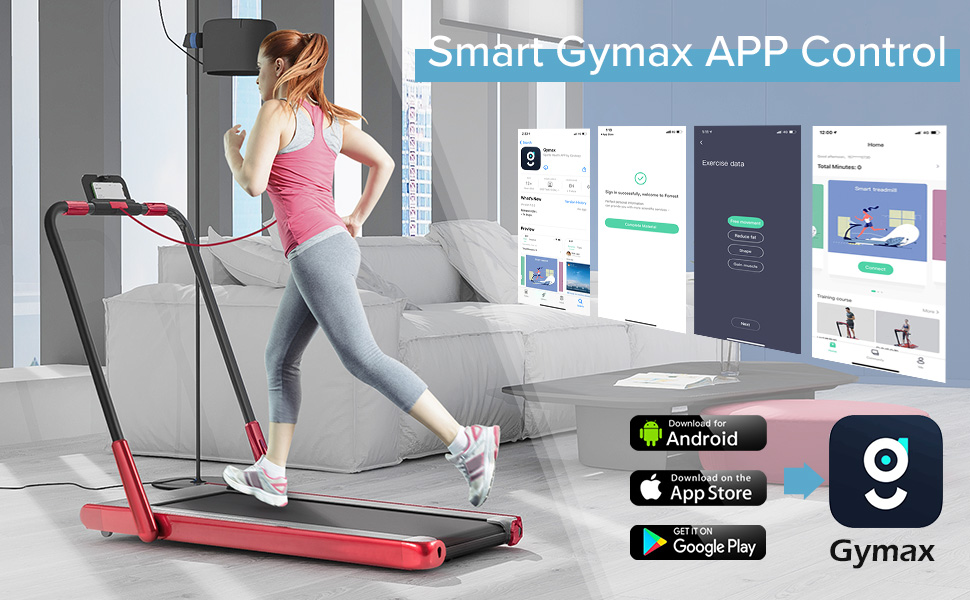
Figure 5.3: Smart Gymax App Control interface and download options.

Figure 5.4: Phone/iPad Holder for entertainment.
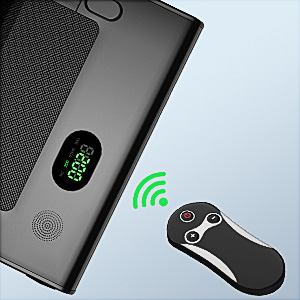
Figure 5.5: Bluetooth Speaker for audio playback.
6. Maintenance
Regular maintenance ensures the longevity and optimal performance of your treadmill.
Cleaning:
- Always unplug the treadmill before cleaning.
- Wipe down the surfaces with a damp cloth. Do not use abrasive cleaners or solvents.
- Keep the area around the treadmill clean and free of dust.
Lubrication:
The running belt requires periodic lubrication to reduce friction and extend its lifespan. Use the provided lubricant.
- Unplug the treadmill.
- Loosen the rear roller bolts slightly to lift the running belt.
- Apply a small amount of lubricant evenly under the center of the running belt.
- Tighten the rear roller bolts.
- Run the treadmill at a low speed (e.g., 1 km/h) for a few minutes to distribute the lubricant.
Belt Adjustment:
If the running belt slips or drifts to one side, it may need adjustment.
- Centering the Belt: If the belt drifts to the left, turn the left rear roller bolt clockwise a quarter turn. If it drifts to the right, turn the right rear roller bolt clockwise a quarter turn. Run the treadmill for a minute and re-check. Repeat if necessary.
- Tightening the Belt: If the belt slips during use, turn both left and right rear roller bolts clockwise a quarter turn simultaneously. Do not overtighten.
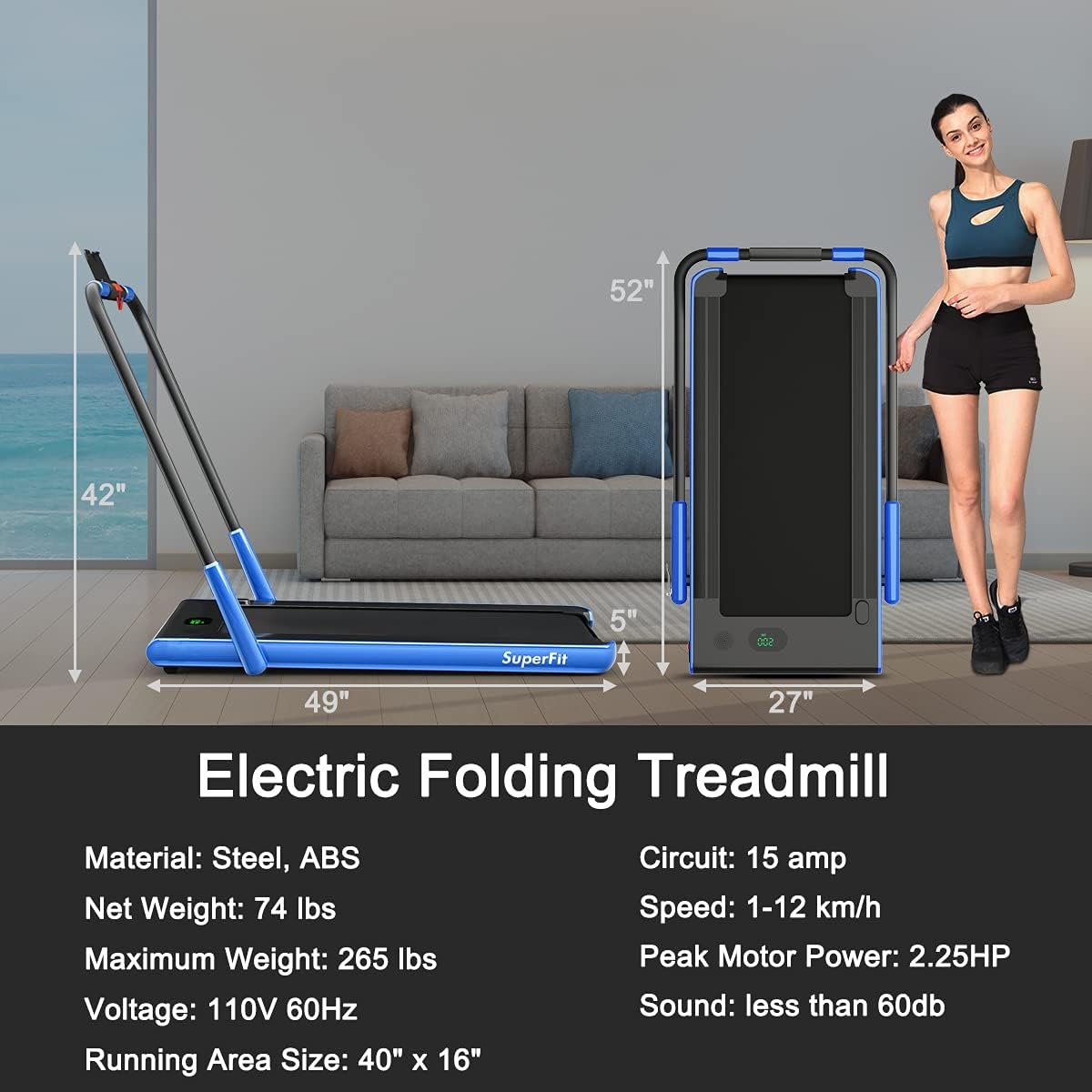
Figure 6.1: Multi-layer Running Belt for silent and shock absorption.
7. Troubleshooting
If you encounter issues with your treadmill, refer to the table below for common problems and solutions.
| Problem | Possible Cause | Solution |
|---|---|---|
| Treadmill does not power on. | Power cord not plugged in; Power switch off; Safety key not in place; Circuit breaker tripped. | Check power cord connection; Turn on power switch; Ensure safety key is fully inserted; Reset circuit breaker. |
| Running belt slips. | Belt too loose; Belt needs lubrication. | Adjust belt tension (see Maintenance section); Lubricate the running belt (see Maintenance section). |
| Running belt drifts to one side. | Belt alignment issue. | Adjust belt alignment (see Maintenance section). |
| Unusual noise during operation. | Loose parts; Lack of lubrication; Motor issue. | Check for and tighten any loose screws; Lubricate the belt; If noise persists, contact customer support. |
| Remote control not working. | Dead batteries; Obstruction between remote and sensor. | Replace remote control batteries; Ensure clear line of sight to the treadmill's sensor. |
If the problem persists after attempting these solutions, please contact GYMAX customer support for assistance.
8. Specifications
| Feature | Detail |
|---|---|
| Model Number | Folding Treadmill Walking Pad |
| Product Dimensions (L x W x H) | 125 x 69 x 107 cm (49 x 27 x 42 inches) |
| Folded Dimensions (L x W x H) | 132 x 69 x 13 cm (52 x 27 x 5 inches) |
| Item Weight | 33.57 kg (74 lbs) |
| Maximum Weight Capacity | 120 kg (265 lbs) |
| Motor Horsepower | 2.25 HP |
| Speed Range (Walking Mode) | 1 km/h - 4 km/h |
| Speed Range (Running Mode) | 1 km/h - 12 km/h (7.5 mph) |
| Running Area Size | 101.6 x 40.6 cm (40" x 16") |
| Material | Acrylonitrile Butadiene Styrene (ABS), Alloy Steel |
| Power Source | Corded Electric (110V 60Hz) |
| Display Type | LCD |
| Special Features | Built-In Speaker, Compact Design, Portable, Shock Absorbent, App Control |

Figure 8.1: Product Dimensions and Key Specifications.
9. Warranty and Support
For warranty information, technical support, or any questions not covered in this manual, please contact GYMAX customer service. Keep your purchase receipt as proof of purchase for warranty claims.
Manufacturer: GYMAX
Place of Business: GYMAX
First Available Date: April 23, 2021
For further assistance, visit the official GYMAX store: GYMAX Store on Amazon.ca


