
1. Introduction
Thank you for purchasing the JVC TH-S320B 30-Inch Bluetooth Sound Bar. This sound bar is designed to enhance your television audio and provide wireless audio streaming capabilities. With its versatile connectivity options and powerful sound output, it delivers an immersive listening experience for movies, music, and more.
Key Features
- Power output of 150 watts max, 60 watts RMS
- Frequency response: 45 Hz to 20 kHz for faithful sound reproduction
- 2.5 in. x 2 full-range drivers for stereo sound
- Bluetooth audio streaming from Bluetooth-enabled devices
- HDMI ARC, optical, USB, and 3.5 mm inputs
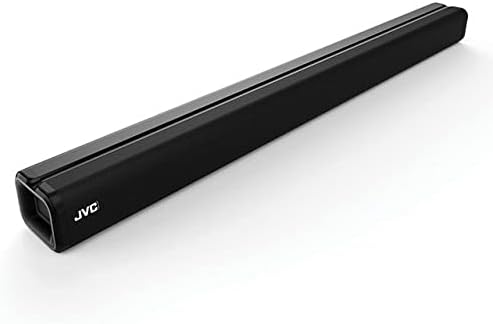
An angled view of the JVC TH-S320B sound bar, showcasing its sleek black design and the JVC logo on the front left side. The sound bar is long and rectangular, designed to sit horizontally.
2. Package Contents
Please check that all items are present and in good condition:
- JVC TH-S320B Sound Bar
- Remote Control
- Power Adapter
- RCA to 3.5 mm Adapter
- Wall Mount Kit
- User Manual (this document)
3. Important Safety Information
To reduce the risk of electric shock, fire, or injury, always follow basic safety precautions when using this product.
- Do not expose this appliance to dripping or splashing.
- Do not place objects filled with liquids, such as vases, on the apparatus.
- Ensure proper ventilation. Do not block any ventilation openings.
- Only use attachments/accessories specified by the manufacturer.
- Unplug this apparatus during lightning storms or when unused for long periods.
- Refer all servicing to qualified service personnel.
4. Connecting Your Sound Bar
Before connecting, ensure all devices are powered off.
4.1 HDMI ARC Connection (Recommended)
HDMI ARC (Audio Return Channel) allows audio to be sent from your TV to the sound bar using a single HDMI cable. This also enables control of the sound bar's power and volume using your TV remote.
- Connect one end of an HDMI cable (not included) to the HDMI ARC port on your TV.
- Connect the other end of the HDMI cable to the HDMI ARC port on your sound bar.
- Enable HDMI ARC on your TV's settings (refer to your TV's manual for specific instructions).
4.2 Optical Connection
Use an optical cable for high-quality digital audio if your TV does not support HDMI ARC or if you prefer this connection type.
- Connect one end of an optical cable (not included) to the Optical Digital Audio Out port on your TV.
- Connect the other end of the optical cable to the OPTICAL IN port on your sound bar.
- Ensure your TV's audio output is set to 'Optical' or 'PCM' format.
4.3 Auxiliary (3.5mm) Connection
For connecting devices with a 3.5mm audio output, such as smartphones or MP3 players.
- Connect the 3.5mm end of the included RCA to 3.5mm adapter to the AUX IN port on your sound bar.
- Connect the RCA ends of the adapter to the audio output of your source device (if applicable), or use a standard 3.5mm to 3.5mm cable (not included) directly.
4.4 USB Connection
For playing audio files directly from a USB storage device.
- Insert a USB flash drive (FAT32 format, max 32GB) into the USB port on the sound bar.
- The sound bar will automatically switch to USB input and begin playing compatible audio files.
5. Initial Setup
5.1 Placement
The sound bar can be placed on a flat surface in front of your TV or mounted on a wall.
- Tabletop Placement: Place the sound bar on a stable, flat surface directly below the center of your TV. Ensure there are no obstructions in front of the sound bar.
- Wall Mounting: Use the included wall mount kit and follow the instructions provided with the kit for secure installation. Ensure the wall can support the weight of the sound bar.
5.2 Power Connection
- Connect the power adapter to the DC IN port on the sound bar.
- Plug the other end of the power adapter into a wall outlet.
6. Operating Your Sound Bar
6.1 Power On/Off
Press the POWER button on the remote control or on the sound bar to turn the unit on or off.
6.2 Input Selection
Press the INPUT button on the remote control or on the sound bar repeatedly to cycle through the available input sources: HDMI ARC, OPTICAL, AUX, USB, and BLUETOOTH.
6.3 Volume Control
Press the VOL+ or VOL- buttons on the remote control or on the sound bar to adjust the volume level. Press the MUTE button to temporarily silence the audio.
6.4 Bluetooth Pairing
To stream audio wirelessly from a Bluetooth-enabled device:
- Turn on the sound bar and select the BLUETOOTH input. The LED indicator will flash, indicating it is in pairing mode.
- Enable Bluetooth on your mobile device (smartphone, tablet, etc.).
- Search for available Bluetooth devices and select "JVC TH-S320B" from the list.
- Once paired, the LED indicator will stop flashing and remain solid. You can now play audio from your device through the sound bar.
6.5 Remote Control
The included remote control provides full functionality for your sound bar. Ensure the batteries are correctly inserted. Point the remote control directly at the sound bar's front panel.
7. Care and Maintenance
- Cleaning: Use a soft, dry cloth to clean the surface of the sound bar. Do not use liquid cleaners or aerosol sprays.
- Ventilation: Ensure the ventilation openings are not blocked.
- Storage: If storing the sound bar for an extended period, disconnect it from the power outlet and store it in a cool, dry place.
8. Troubleshooting
If you experience issues with your sound bar, refer to the following table for common problems and solutions.
| Problem | Possible Cause | Solution |
|---|---|---|
| No power | Power cord not connected; Power outlet not active | Ensure power cord is securely connected; Try a different power outlet |
| No sound | Incorrect input selected; Volume too low; Mute is on; Incorrect TV audio settings | Select correct input; Increase volume; Press MUTE button; Adjust TV audio output settings (e.g., PCM for optical) |
| Bluetooth not connecting | Sound bar not in pairing mode; Device too far; Interference | Ensure sound bar is in Bluetooth input and flashing; Move device closer; Avoid other wireless devices |
| Remote control not working | Batteries are dead or incorrectly inserted; Obstruction between remote and sound bar | Replace batteries; Ensure correct polarity; Remove any obstructions |
9. Technical Specifications
| Feature | Specification |
|---|---|
| Model Name | TH-S320B |
| Speaker Type | Soundbar |
| Speaker Maximum Output Power | 150 Watts |
| Frequency Response | 45 Hz to 20 kHz |
| Connectivity Technology | RCA, Bluetooth, Auxiliary, USB, Optical, HDMI |
| Wireless Communication Technology | Bluetooth |
| Audio Output Mode | Stereo (2.0 Channel) |
| Color | Black |
| Item Weight | 5.64 pounds (2.56 kg) |
| Product Dimensions | 29.5 x 2.9 x 3.1 inches (74.9 x 7.4 x 7.9 cm) |
| Power Source | Corded Electric |
| Compatible Devices | Smartphone, Tablet, MP3 Player, Televisions |
| Mounting Type | Tabletop, Wall Mount |
10. Warranty and Customer Support
This JVC TH-S320B Sound Bar comes with a limited warranty. Please refer to the warranty card included in your product packaging for specific terms and conditions, including the duration and coverage of the warranty.
For technical support, troubleshooting assistance, or warranty claims, please contact JVC customer support through their official website or the contact information provided in your product documentation. Please have your model number (TH-S320B) and purchase details ready when contacting support.

