
1. Introduction
Thank you for choosing the NICRON N8F 800 Lumen Zoomable LED Flashlight. This manual provides essential information for the safe and efficient operation, maintenance, and troubleshooting of your device. Please read it thoroughly before use and retain it for future reference.
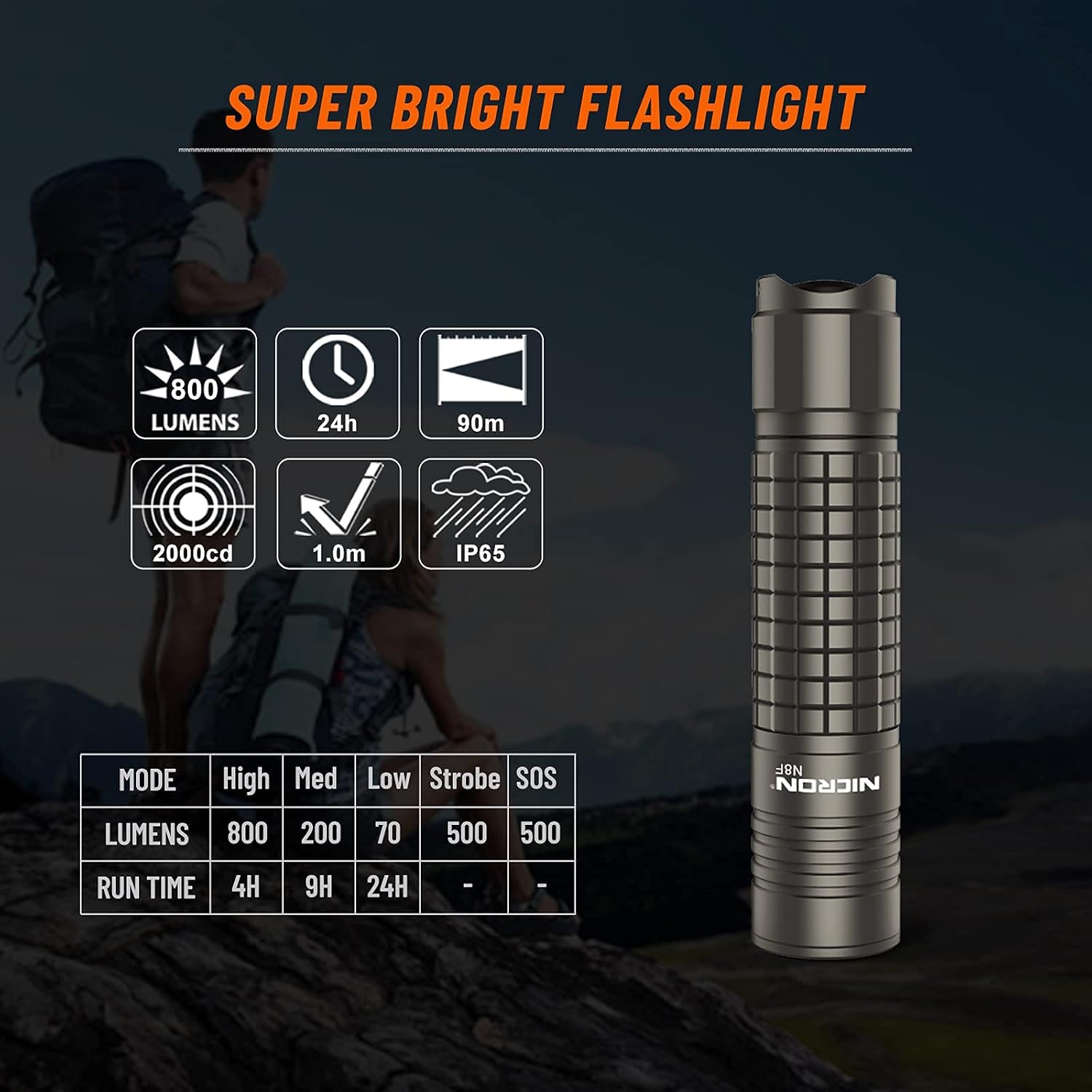
The NICRON N8F is a versatile and durable flashlight designed for various outdoor activities and general utility. It features 5 lighting modes, adjustable focus, a rechargeable battery, and IP65 water and dust resistance.
2. Safety Instructions
- Eye Safety: Do not shine the flashlight directly into eyes. The high intensity beam can cause temporary vision impairment or permanent eye damage.
- Battery Safety: Use only the specified rechargeable Lithium-Ion battery. Do not attempt to disassemble, puncture, or short-circuit the battery. Keep batteries away from fire or extreme heat.
- Heat: The flashlight head may become warm during prolonged use, especially on high brightness settings. Handle with care.
- Children: Keep the flashlight and its components out of reach of children to prevent accidents or misuse.
- Disassembly: Do not attempt to disassemble the flashlight beyond routine maintenance. This may void the warranty and cause damage.
3. Package Contents
Verify that all items are present in the package:
- NICRON N8F Flashlight
- Rechargeable Lithium-Ion Battery (pre-installed or separate)
- Micro-USB Charging Cable
- Tail Rope (Lanyard)
- Spare Waterproof Rubber O-ring
- User Manual (this document)
- Warranty Card
4. Product Overview
The NICRON N8F flashlight is constructed from durable aluminum alloy and features a zoomable head for adjustable beam focus. Key components are illustrated below:

- Battery Holder: Houses the rechargeable battery.
- Focus Head: Allows adjustment between wide flood and narrow spot beam.
- LED: High-performance Samsung LED light source.
- Lens: Designed for optimal light transmission and brightness.
- Head Cap: Protects the internal components and lens.

5. Setup
5.1 Battery Installation
- Unscrew the tail cap of the flashlight.
- Insert the provided Lithium-Ion battery with the positive (+) end facing towards the flashlight head.
- Screw the tail cap back on securely.
5.2 Initial Charging
Before first use, fully charge the battery.
- Locate the Micro-USB charging port on the battery itself.
- Connect the Micro-USB cable to the battery and the other end to a USB power source (e.g., computer, wall adapter).
- The indicator light on the battery will show red during charging and turn green when fully charged.

6. Operation
6.1 Power On/Off
To turn the flashlight ON or OFF, press the tail switch firmly until it clicks.
6.2 Switching Modes
The N8F flashlight features 5 lighting modes: High, Medium, Low, Strobe, and SOS.
- With the flashlight ON, gently half-press the tail switch (without clicking) to cycle through the modes in the order: High → Medium → Low → Strobe → SOS.
- Release the switch to select the desired mode.

6.3 Adjustable Focus (Zoom)
The N8F allows you to adjust the beam from a wide flood to a narrow spot:
- To adjust the focus, slide the head of the flashlight forward or backward.
- Sliding the head forward will narrow the beam for a longer throw (spotlight).
- Sliding the head backward will widen the beam for broader area illumination (floodlight).


7. Maintenance
7.1 Cleaning
- Wipe the flashlight body with a clean, soft cloth.
- For the lens, use a lens cleaning cloth to avoid scratches.
- Do not use abrasive cleaners or solvents.
7.2 Battery Care
- Recharge the battery regularly, even if not in frequent use, to maintain its lifespan.
- Store the flashlight and battery in a cool, dry place.
- If storing for extended periods, remove the battery from the flashlight.
7.3 Water Resistance (IP65)
The N8F flashlight is rated IP65, meaning it is protected against dust ingress and low-pressure water jets from any direction. It is not designed for submersion.
- Ensure the tail cap is fully tightened to maintain water resistance.
- Regularly inspect the O-rings for wear and tear. Replace them with the provided spare O-ring if necessary.

8. Troubleshooting
| Problem | Possible Cause | Solution |
|---|---|---|
| Flashlight does not turn on. | Battery is depleted. | Charge the battery fully. |
| Battery inserted incorrectly. | Ensure positive (+) end faces the head. | |
| Tail cap is loose. | Tighten the tail cap securely. | |
| Light is dim or flickers. | Low battery charge. | Recharge the battery. |
| Loose connections. | Ensure tail cap is tight and battery is seated correctly. | |
| Cannot switch modes. | Tail switch not being half-pressed correctly. | Practice gently half-pressing the tail switch. |
| Charging indicator not working. | Charging cable or USB source issue. | Try a different Micro-USB cable or USB power source. |
9. Specifications

| Feature | Specification |
|---|---|
| Model | N8F |
| Brightness | Max 800 Lumens |
| Light Source | Samsung LED |
| Beam Distance | Max 90 meters (295.2 ft) |
| Luminous Intensity | 2000cd |
| Modes | High, Medium, Low, Strobe, SOS |
| Run Time (Low) | Up to 24 hours |
| Battery Type | Rechargeable Lithium-Ion |
| Charging Port | Micro-USB (on battery) |
| Material | Aluminum Alloy |
| Water Resistance | IP65 (Dustproof, Water-resistant) |
| Impact Resistance | 1 meter |
| Dimensions | Approx. 4.8"D x 1"W x 1"H (126mm x 23mm x 23mm) |
| Weight | Approx. 56 grams (1.98 ounces) |
10. Warranty and Support
10.1 Limited Warranty
NICRON provides a two-year limited warranty for the N8F flashlight from the date of purchase. This warranty covers manufacturing defects and workmanship under normal use. It does not cover damage caused by misuse, accidents, unauthorized modifications, or normal wear and tear.
Please retain your proof of purchase for warranty claims.
10.2 Customer Support
For technical assistance, warranty claims, or any questions regarding your NICRON N8F flashlight, please refer to the contact information provided on your warranty card or visit the official NICRON website.


