
Samyang SYIO12AF-E
Samyang 12mm F2.0 AF Ultra Wide Lens User Manual
Model: SYIO12AF-E
Introduction
The Samyang 12mm F2.0 AF Ultra Wide Lens is a compact and high-performance lens designed for Sony E-mount mirrorless cameras (APS-C). It offers an expansive 99.1° angle of view, making it ideal for capturing wide landscapes, architectural interiors, and stunning astrophotography. Featuring advanced optical elements and a fast F2.0 aperture, this lens delivers sharp images with minimal distortion and excellent low-light performance. Its robust construction includes weather-sealing for durability in various shooting conditions.
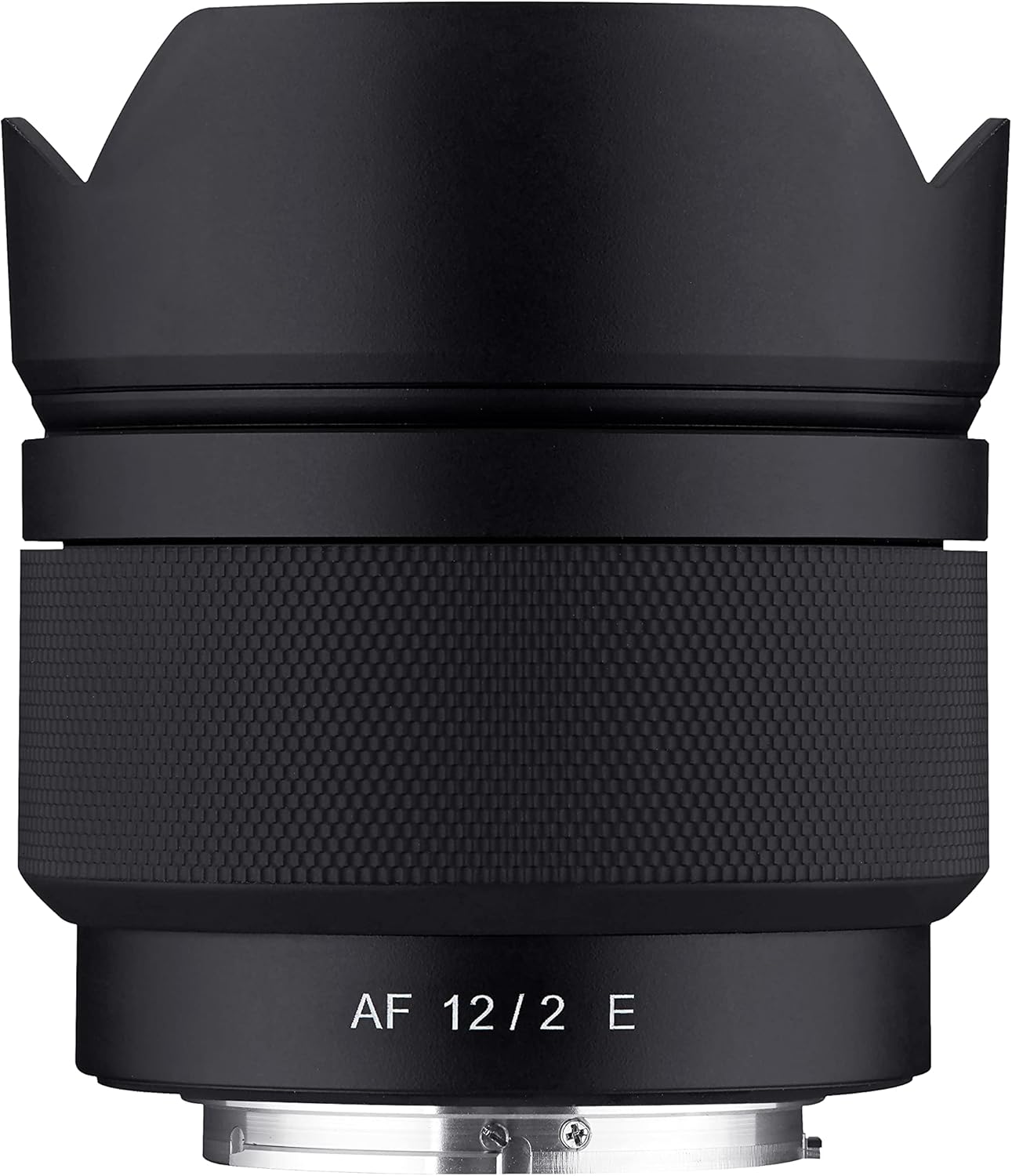
Figure 1: Samyang 12mm F2.0 AF Ultra Wide Lens with lens hood.
Package Contents
Upon opening the package, ensure all the following items are present:
- Samyang 12mm F2.0 AF Ultra Wide Lens
- Lens Hood (removable petal type)
- Front Lens Cap
- Rear Lens Cap
- Lens Case/Pouch
- Instruction Manual (this document)
- Warranty Information
Setup
Attaching the Lens to Your Camera
- Ensure your camera is turned off before attaching or detaching any lens.
- Remove the rear lens cap from the Samyang 12mm F2.0 AF lens and the body cap from your Sony E-mount camera.
- Align the white index mark on the lens barrel with the corresponding white index mark on your camera's lens mount.
- Gently insert the lens into the camera mount and rotate it clockwise until it clicks into place. Do not force the lens.
- Attach the petal-type lens hood by aligning its mark with the mark on the front of the lens and twisting until it locks. The lens hood helps to reduce flare and protect the front element.

Figure 2: Samyang 12mm F2.0 AF Ultra Wide Lens attached to a Sony camera body.
Operating the Lens
Autofocus (AF) Operation
The Samyang 12mm F2.0 AF lens features a Linear STM autofocus motor, providing fast, quiet, and precise focusing. This motor works seamlessly with Sony's phase and contrast detection systems, making it suitable for both still photography and video recording. For optimal performance, ensure your camera's autofocus mode is set appropriately (e.g., AF-S for single shot, AF-C for continuous, or AF-A for automatic switching).
Manual Focus Override
While primarily an autofocus lens, the Samyang 12mm F2.0 AF allows for manual focus override. This can be particularly useful in situations where precise focus is critical, such as astrophotography or macro-style wide-angle shots. Consult your camera's manual for instructions on enabling manual focus or direct manual focus (DMF) mode.
Aperture Control
The lens features a bright F2.0 maximum aperture, allowing for excellent low-light performance and the creation of images with shallow depth of field. The aperture can be controlled directly through your camera's settings, ranging from F2.0 to F22. A wider aperture (smaller f-number) is ideal for low light and subject isolation, while a narrower aperture (larger f-number) increases depth of field, suitable for landscapes.
Recommended Uses
- Landscapes: The ultra-wide 12mm focal length (18mm full-frame equivalent on APS-C) is perfect for capturing expansive scenes.
- Astrophotography: The fast F2.0 aperture is highly beneficial for capturing faint stars and the Milky Way in low-light conditions.
- Architecture/Interiors: Its wide field of view allows for comprehensive capture of large structures and indoor spaces.
- Vlogging/Talking Head: The wide angle and lightweight design make it suitable for handheld video recording, especially for self-filming.

Figure 3: Sample image demonstrating the lens's capability for astrophotography and low-light scenes.

Figure 4: Sample image demonstrating the lens's wide-angle perspective for interiors.
Maintenance
Proper maintenance ensures the longevity and optimal performance of your Samyang lens.
- Cleaning: Use a soft, lint-free cloth or a lens brush to remove dust from the lens surfaces. For smudges or fingerprints, use a specialized lens cleaning solution and a microfiber cloth. Never use harsh chemicals or abrasive materials.
- Storage: When not in use, always attach both the front and rear lens caps. Store the lens in its provided case or a dry, cool place away from direct sunlight and extreme temperatures. Avoid storing the lens in areas with high humidity to prevent mold growth.
- Handling: Avoid dropping or subjecting the lens to strong impacts. The lens features weather-sealing, but it is not fully waterproof; avoid direct exposure to heavy rain or submersion in water.
Troubleshooting
| Problem | Possible Cause | Solution |
|---|---|---|
| Autofocus hunting or slow focusing | Low light conditions; camera firmware not updated; lens firmware outdated; specific camera body compatibility issues (e.g., Sony A6700 reported issues). |
|
| Lens not recognized by camera | Improperly mounted lens; dirty electrical contacts. |
|
| Image quality issues (e.g., soft images, excessive vignetting) | Incorrect camera settings; dirty lens elements; lens hood improperly attached; shooting wide open in challenging conditions. |
|
Specifications
| Feature | Detail |
|---|---|
| Brand | Samyang |
| Model Number | SYIO12AF-E |
| Focal Length | 12mm (Ultra Wide Angle) |
| Compatible Mountings | Sony E (APS-C) |
| Maximum Aperture | F2.0 |
| Minimum Aperture | F22 |
| Optical Construction | 12 elements in 10 groups (including 1 ASP, 1 H-ASP, and 3 ED elements) |
| Coating | Ultra Multi-Coating (UMC) |
| Autofocus Motor | Linear STM (Smooth, Responsive, Near-Silent) |
| Angle of View | 99.1° (on APS-C) |
| Filter Size | 62mm |
| Minimum Focusing Distance | 0.2m / 0.66ft |
| Dimensions (Product) | 6.3 x 5.2 x 5.2 inches |
| Item Weight | 15.1 ounces (approx. 428g) |
| Weather Sealing | Yes, with rear protective glass |
Warranty and Support
Your Samyang 12mm F2.0 AF Ultra Wide Lens comes with a manufacturer's warranty. Please refer to the separate warranty card included in your package for specific terms, conditions, and duration. For technical support, service, or inquiries regarding firmware updates and accessories like the Samyang Lens Station, please visit the official Samyang website or contact their customer service department.
Additional protection plans may be available for purchase from authorized retailers, offering extended coverage beyond the standard manufacturer's warranty.
Related documentsSYIO12AF-E


Ask a question about this manual
Ask about setup, troubleshooting, compatibility, parts, safety, or missing instructions. Manuals+ will review the question and use this page’s manual context to help answer it.