
Introduction
This manual provides essential information for the assembly, operation, and maintenance of your Tvilum Bright 2 Drawer Shoe Cabinet. Please read these instructions carefully before beginning assembly and retain them for future reference. This shoe cabinet is designed to organize footwear, providing a clutter-free space in your entryway or other areas.

Image: The Tvilum Bright 2 Drawer Shoe Cabinet, featuring a sleek black matte finish and two tilting drawers, designed for shoe storage.
Safety Information
- Always follow the assembly instructions precisely to ensure structural integrity.
- Do not overload the drawers. The maximum weight capacity for the unit is 18 pounds.
- For safety, it is recommended to secure the cabinet to a wall to prevent tipping, especially in households with children or pets. Wall anchoring hardware may be included or sold separately.
- Keep small parts and packaging materials away from children during assembly.
Parts List and Tools Required
All necessary components for the unit are included in the packaging. Please verify all parts are present and undamaged before beginning assembly.
Tools Required (Not Included):
- Phillips head screwdriver
- Hammer (for dowels, if applicable)
- Measuring tape (optional, for placement)
Setup and Assembly
Assembly is required for this product. Please refer to the detailed step-by-step instructions provided in the separate assembly manual included with your purchase. Ensure you have a clear, spacious area for assembly.
- Unpack and Identify: Carefully unpack all components and hardware. Compare them against the parts list in your assembly manual.
- Follow Step-by-Step Instructions: Adhere strictly to the sequence of steps outlined in the assembly manual. Do not skip steps.
- Secure Connections: Ensure all screws, dowels, and fasteners are tightened securely, but do not overtighten to avoid damaging the engineered wood.
- Wall Anchoring: Once assembled, position the cabinet in its desired location. For stability and safety, attach the cabinet to the wall using the provided anti-tip hardware. This prevents accidental tipping.
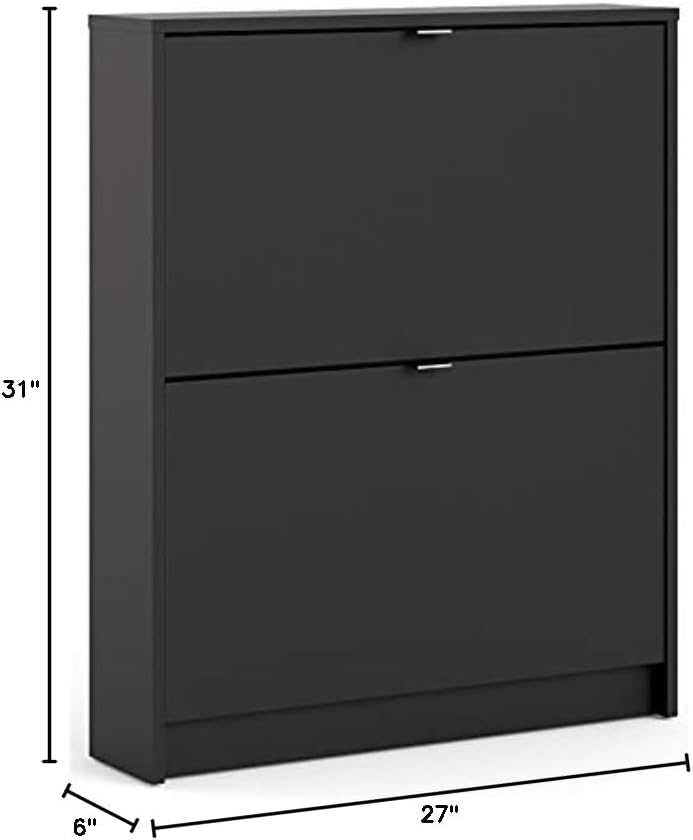
Image: Diagram showing the dimensions of the shoe cabinet: 31"H x 27"W x 6"D.

Image: The shoe cabinet shown in an entryway, illustrating its practical placement and design within a home environment.
Operating Instructions
The Tvilum Bright 2 Drawer Shoe Cabinet features two tilting drawers designed for easy access and storage of your footwear.
- Opening Drawers: Gently pull the handle on each drawer to tilt it open. The drawers are designed to tilt forward, revealing the shoe compartments.
- Storing Shoes: Each drawer compartment can accommodate one row of shoes. The cabinet is designed to hold approximately 6 pairs of shoes in total (3 pairs per drawer, depending on shoe size and style).
- Closing Drawers: Push the drawer back into the cabinet until it is fully closed and flush with the cabinet front.

Image: The shoe cabinet with its two drawers tilted open, showing the internal storage mechanism.
Maintenance
To ensure the longevity and appearance of your Tvilum Bright 2 Drawer Shoe Cabinet, follow these simple maintenance guidelines:
- Cleaning: The cabinet features a foil surface that is easy to clean. Use a soft, damp cloth for regular cleaning. Avoid abrasive cleaners or harsh chemicals, as these can damage the finish. Wipe dry immediately after cleaning.
- Spills: Wipe up spills immediately with a dry cloth to prevent moisture damage to the engineered wood.
- Inspection: Periodically check all fasteners and connections to ensure they remain tight. Retighten if necessary.
- Placement: Avoid placing the cabinet in direct sunlight or near heat sources, as this can cause fading or warping.
Troubleshooting
If you encounter any issues with your shoe cabinet, consider the following common solutions:
- Cabinet is Unstable/Wobbly:
- Ensure all assembly screws are tightened.
- Verify the cabinet is placed on a level surface.
- Confirm the wall anchoring hardware is properly installed and secured.
- Drawers Do Not Close Smoothly:
- Check for any obstructions inside the drawer compartments or along the tilting mechanism.
- Ensure shoes are not overfilling the compartments, preventing the drawer from closing.
- Re-check the assembly of the drawer mechanism as per the instruction manual.
- Missing or Damaged Parts:
- Refer to the contact information in the Support section to request replacement parts.
Specifications
| Brand | Tvilum |
| Model Number | 59001gmgm |
| Color | Black Matte |
| Material | Engineered Wood |
| Product Dimensions (D x W x H) | 6"D x 27"W x 31"H |
| Number of Drawers | 2 |
| Shoe Capacity | Approximately 6 pairs |
| Weight Capacity (Maximum) | 18 Pounds |
| Mounting Type | Floor Mount (with recommended wall anchoring) |
| Installation Type | Freestanding |
| Assembly Required | Yes |
Warranty
For detailed information regarding the manufacturer's warranty, please refer to the product description on the store page where you purchased the item or consult any warranty documentation included in the product packaging. Warranty terms and conditions may vary.
Support
If you have any questions, require assistance with assembly, or need to report missing/damaged parts, please contact Tvilum customer support. Contact information can typically be found on the Tvilum official website or on the packaging materials.
Visit the official Tvilum store for more information: Tvilum Store


