

Figure 0: ILM Model-X9 Full Face Bluetooth Motorcycle Helmet.
Introduction
Thank you for choosing the ILM Model-X9 Bluetooth Motorcycle Helmet. This manual provides essential information for the safe and effective use, maintenance, and care of your helmet. Please read it thoroughly before using your helmet.
Safety Information
Your safety is paramount. This helmet is designed to provide protection in the event of an impact, meeting DOT safety standards. Always wear your helmet correctly and ensure all straps are securely fastened.
Important Safety Guidelines:
- Always ensure the helmet fits snugly and comfortably.
- Never modify the helmet's structure, shell, or internal components.
- Do not use harsh chemicals or solvents for cleaning, as they can damage the helmet's materials.
- Replace your helmet immediately after any impact, even if visible damage is not apparent.
- Ensure the visor is clean and free from obstructions for clear vision.
- Be aware of your surroundings when using the Bluetooth features to avoid distractions.
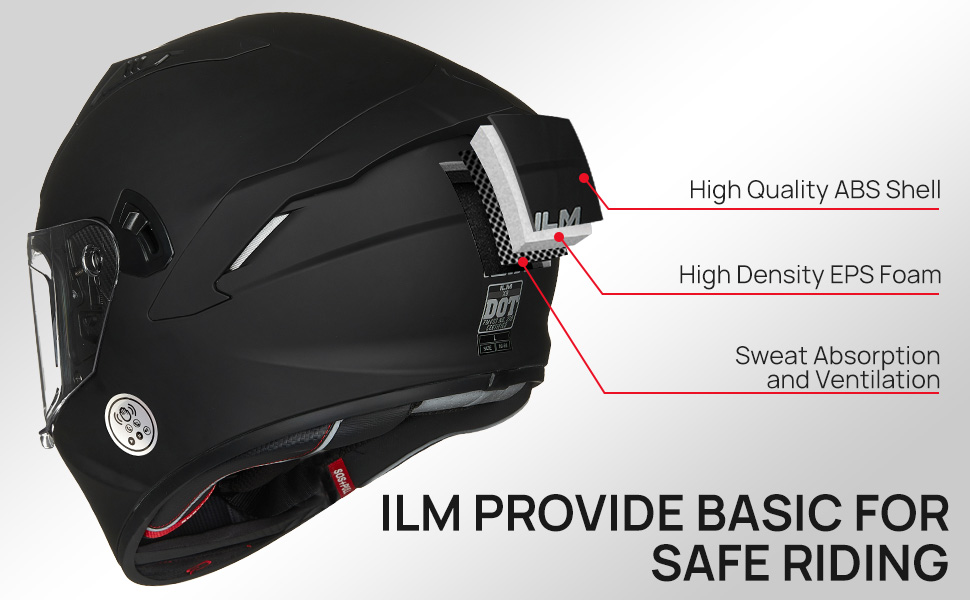
Figure 1: Helmet construction for safety and comfort.
Product Features
- DOT Safety Standards: Constructed with EPS foam and ABS material for high impact strength.
- Integrated Bluetooth 5.0: Offers 24-36 hours talk time with one-touch control for calls and music.
- Noise Prevention & Reduction: Advanced design for a comfortable riding experience.
- Dual Visor Design: Clear outer visor and retractable inner sun visor.
- Ventilation System: Features 5 air vents for optimal air circulation.
- Removable & Washable Liner: Cheek pads and liner are absorbent and easy to clean.
- Eyeglass Trough: Designed for comfortable use with spectacles.
- Emergency Helmet Removal Device (SOS+PULL): For quick and safe removal in emergencies.
Setup Guide
1. Initial Charge
Before first use, fully charge the helmet's built-in Bluetooth system. The charging port is located inside the helmet, near the function keys.
- Connect the provided USB charging cable to the charging port.
- Plug the other end into a compatible USB power source.
- A red indicator light typically signifies charging, turning off or changing color when fully charged.

Figure 2: Internal components including charging port.
2. Bluetooth Pairing
To pair your helmet with a mobile device:
- Ensure the helmet's Bluetooth is turned on (refer to Operating Instructions for power on/off).
- On your mobile device, go to Bluetooth settings and search for new devices.
- Select "ILM-X9" or a similar name from the list of available devices.
- Once connected, the helmet will usually provide an audio confirmation.

Figure 3: Bluetooth control panel and battery life indicators.
Operating Instructions
1. Visor Operation
The ILM Model-X9 features a dual visor system:
- Outer Clear Visor: Can be opened or closed manually. It is removable and replaceable.
- Inner Sun Visor: Operated by a switch located on the top of the helmet. Move the switch up to retract the sun visor and down to deploy it.

Figure 4: Dual Visor System operation.
2. Ventilation System
The helmet is equipped with multiple air vents to ensure proper air circulation and comfort:
- Front Vents: Located on the chin and forehead area. Open or close them to control airflow.
- Rear Vent: Located at the back of the helmet to exhaust warm air.

Figure 5: Ventilation and Eyeglass Trough features.
3. Bluetooth Controls
The integrated Bluetooth system features one-touch controls for ease of use while riding. The buttons are subtly integrated into the helmet's design.
- Power On/Off: Long press the main function key.
- Answer/End Call: Single click the call button.
- Play/Pause Music: Single click the play/pause button.
- Next/Previous Track: Double click or long press specific buttons (refer to the detailed diagram on the helmet for exact functions).
- Volume Adjustment: Use the dedicated volume buttons.
Video 1: Demonstration of the ILM Model-X9 Bluetooth Motorcycle Helmet features, including one-touch controls and design elements.
Maintenance and Care
Proper maintenance extends the life of your helmet and ensures continued safety.
- Cleaning the Shell: Use a soft cloth with mild soap and water. Avoid abrasive cleaners or solvents.
- Cleaning the Visors: Use a clean, soft cloth and warm water. For stubborn dirt, use a specialized helmet visor cleaner. Do not use ammonia-based cleaners.
- Liner Care: The cheek pads and liner are removable and washable. Hand wash with mild soap and air dry completely before reinserting.
- Storage: Store the helmet in a cool, dry place away from direct sunlight and extreme temperatures. Use a helmet bag to protect it from scratches.
- Bluetooth Unit: Keep the Bluetooth unit dry. If it gets wet, allow it to dry completely before use or charging.
Troubleshooting
| Problem | Possible Cause | Solution |
|---|---|---|
| Bluetooth not pairing | Bluetooth off; low battery; device too far; interference. | Ensure Bluetooth is on and charged. Move device closer. Restart both devices. |
| No sound from speakers | Volume too low; not connected; faulty speakers. | Increase volume. Re-pair Bluetooth. Contact support if speakers are faulty. |
| Charging issue | Loose connection; faulty cable/charger; damaged port. | Check connections. Try a different cable/charger. If port is damaged, contact support. |
| Excessive wind noise | Vents open; improper fit; visor not fully closed. | Close vents. Ensure proper helmet fit. Close visor completely. |
Specifications
| Feature | Detail |
|---|---|
| Model Name | ILM Touch Built in (Model-X9) |
| Safety Certification | DOT Certified |
| Shell Material | Acrylonitrile Butadiene Styrene (ABS) |
| Impact Absorption Material | Expanded Polystyrene (EPS) |
| Bluetooth Version | 5.0 |
| Bluetooth Talk Time | 24-36 hours |
| Item Weight | ~3.64 pounds (1650 grams) |
| Product Dimensions | 14 x 9 x 10 inches (approximate) |
| Battery Type | Lithium Ion (1 included) |
Warranty and Support
ILM provides a limited warranty for manufacturing defects. For warranty claims, technical support, or replacement parts, please contact ILM customer service through their official website or the retailer where the helmet was purchased. Keep your proof of purchase for warranty validation.
For more information, visit the ILM Store on Amazon.


