
1. Introduction
Thank you for choosing the Qlima PH635 Portable Reversible Air Conditioner. This manual provides essential information for the safe and efficient operation, maintenance, and troubleshooting of your appliance. Please read it thoroughly before use and keep it for future reference.
The Qlima PH635 is a versatile unit designed to provide comfort in various conditions, offering cooling, heating, dehumidification, and fan functions. It features automatic stop, programming backup in case of power interruption, and adjustable ventilation.
2. Safety Instructions
To prevent injury to the user or other people and property damage, the following instructions must be followed. Incorrect operation due to ignoring instructions may cause harm or damage.
- Always ensure the unit is placed on a flat, stable surface to prevent tipping.
- Do not operate the unit with a damaged power cord or plug. If the supply cord is damaged, it must be replaced by the manufacturer, its service agent, or similarly qualified persons to avoid a hazard.
- Do not insert fingers or foreign objects into the air inlets or outlets.
- Keep the unit away from flammable materials and open flames.
- Ensure proper ventilation around the unit; do not block air vents.
- Unplug the appliance before cleaning or performing any maintenance.
- This appliance can be used by children aged 8 years and above and persons with reduced physical, sensory or mental capabilities or lack of experience and knowledge if they have been given supervision or instruction concerning use of the appliance in a safe way and understand the hazards involved.
- Children should be supervised to ensure that they do not play with the appliance.
3. Package Contents
Please check that all items are present upon unpacking:
- Qlima PH635 Portable Air Conditioner Unit
- Exhaust Hose
- Window Sealing Kit (adaptor, window slide bar)
- Remote Control
- User Manual (this document)
4. Product Overview
4.1 Components
Familiarize yourself with the main parts of your Qlima PH635 unit:
- Control Panel (top of unit)
- Air Outlet (front, adjustable louvers)
- Air Inlet (rear/sides, with air filter)
- Exhaust Air Outlet (rear, for hose connection)
- Continuous Drainage Port (rear, for dehumidification)
- Casters (bottom, for mobility)
- Power Cord
4.2 Product Image
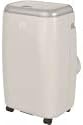
Image showing the Qlima PH635 portable reversible air conditioner from a slight angle, highlighting its compact, rectangular design with a light-colored casing and top control panel. The unit is equipped with casters for easy movement.
5. Setup
5.1 Unpacking
- Carefully remove the unit from its packaging.
- Remove all packing materials and dispose of them responsibly.
- Ensure no parts are missing or damaged.
5.2 Placement
- Place the air conditioner on a firm, level surface in a location that allows for proper air circulation.
- Maintain a minimum distance of 30 cm (12 inches) from walls or other objects to ensure adequate airflow.
- Avoid placing the unit in direct sunlight or near heat sources.
5.3 Exhaust Hose Installation
- Attach one end of the exhaust hose to the exhaust air outlet on the rear of the unit. Twist clockwise until secure.
- Extend the exhaust hose to the nearest window or vent opening. Keep the hose as short and straight as possible to maximize efficiency.
5.4 Window Kit Installation
For optimal performance, use the provided window sealing kit to prevent hot air from re-entering the room.
- Adjust the window slide bar to fit your window opening.
- Secure the slide bar in the window.
- Connect the other end of the exhaust hose to the adaptor on the window kit.
- Ensure all connections are sealed to prevent air leakage.
5.5 Drainage Setup (Dehumidification Mode)
When using the dehumidification function, continuous drainage is recommended. Connect a drainage hose (not supplied) to the continuous drainage port on the rear of the unit and lead it to a suitable drain or container.
6. Operating Instructions
6.1 Control Panel and Remote Control
The unit can be operated via the control panel on top of the unit or the supplied remote control. The functions are generally identical.
6.2 Power On/Off
Press the POWER button to turn the unit on or off.
6.3 Mode Selection
Press the MODE button to cycle through the available modes:
- Cooling Mode: For cooling the room. Set desired temperature.
- Heating Mode: For heating the room. Set desired temperature.
- Dehumidification Mode: Removes moisture from the air. Fan speed is typically fixed in this mode.
- Fan Mode: Circulates air without cooling or heating.
6.4 Temperature Adjustment
In Cooling or Heating mode, use the UP and DOWN arrow buttons to set your desired temperature. The temperature range is typically 16°C to 30°C (61°F to 86°F).
6.5 Fan Speed
Press the FAN SPEED button to select between Low, Medium, or High fan speeds. This function is available in Cooling, Heating, and Fan modes.
6.6 Timer Function
The timer allows you to set a specific time for the unit to turn on or off automatically.
- Press the TIMER button.
- Use the UP and DOWN arrow buttons to set the desired time (in hours).
- Press TIMER again to confirm.
6.7 Sleep Mode
Activate Sleep Mode for quieter operation and gradual temperature adjustment during sleep. Press the SLEEP button.
6.8 Automatic Stop and Programming Backup
The Qlima PH635 features an automatic stop function when the desired temperature is reached or the water tank is full (in dehumidification mode). In case of a power cut, the unit will automatically resume operation with the last settings once power is restored, thanks to its programming backup feature.
7. Maintenance
Regular maintenance ensures optimal performance and extends the lifespan of your air conditioner.
7.1 Cleaning the Unit
- Always unplug the unit before cleaning.
- Wipe the exterior with a soft, damp cloth. Do not use harsh chemicals or abrasive cleaners.
- Ensure no water enters the electrical components.
7.2 Cleaning Air Filters
The air filters should be cleaned every two weeks or more frequently depending on usage and air quality.
- Turn off and unplug the unit.
- Locate and remove the air filters from the rear/sides of the unit.
- Wash the filters under running water (warm, not hot) or use a vacuum cleaner to remove dust.
- Allow the filters to dry completely before reinstalling them.
7.3 Seasonal Storage
If the unit will not be used for an extended period:
- Drain any accumulated water from the unit.
- Clean the air filters and the exterior.
- Store the unit in a dry, cool place, covered to protect it from dust.
8. Troubleshooting
Before contacting customer support, please refer to the following table for common issues and their solutions.
| Problem | Possible Cause | Solution |
|---|---|---|
| Unit does not turn on | No power supply; Power cord not plugged in; Fuse blown; Water tank full (in dehumidification) | Check power outlet; Plug in power cord firmly; Replace fuse; Empty water tank. |
| No cooling/heating | Air filter clogged; Exhaust hose blocked or disconnected; Room temperature already reached; Doors/windows open; Room too large | Clean air filter; Check exhaust hose connection and ensure it's not blocked; Adjust desired temperature; Close doors/windows; Consider room size limitations. |
| Water leakage | Drainage plug loose; Unit not level; Continuous drainage hose blocked | Ensure drainage plug is secure; Place unit on a level surface; Check and clear continuous drainage hose. |
| Noisy operation | Unit not on a level surface; Air filter clogged; Foreign object in fan | Ensure unit is on a level surface; Clean air filter; Turn off and unplug, then check for obstructions (if safe to do so). |
9. Specifications
Key technical specifications for the Qlima PH635 Portable Reversible Air Conditioner:
| Feature | Specification |
|---|---|
| Brand | Qlima |
| Model Name | PH635 |
| Dimensions (L x W x H) | 71 x 33 x 44 cm |
| Weight | 31 Kilograms |
| Cooling Capacity | 3200 Watts (approx. 12000 BTU) |
| Heating Capacity | 3500 Watts (as per product title) |
| Noise Level | 55 Decibels |
| Voltage | 240 Volts |
| Special Features | Heating and Cooling Function, Programmable, Automatic Stop, Programming Backup |
| Seasonal Energy Efficiency Ratio (SEER) | 6.1 |
| Installation Type | Portable |
| Power Source | Corded Electric |
10. Warranty and Support
For warranty information and customer support, please refer to the documentation provided with your purchase or contact your retailer. Information regarding the availability of spare parts is currently unavailable.
When contacting support, please have your model number (PH635) and purchase details ready.


