
Browning BTC-5HD-MXP
Browning Strike Force HD Max Plus 20MP Trail Camera
User Manual
Product Overview
The Browning Strike Force HD Max Plus is a high-performance trail camera designed for outdoor surveillance and game monitoring. It captures high-resolution images and videos, featuring advanced detection and flash capabilities for both day and night use.

Figure 1: Front view of the Browning Strike Force HD Max Plus Trail Camera, showcasing its camouflage design and lens array.
Setup and Installation
Follow these steps to prepare your camera for use:
- Battery Installation: The camera requires 6 AA batteries. Locate the battery compartment, typically at the bottom or rear of the unit. Ensure correct polarity when inserting batteries.
- SD Card Insertion: Insert a compatible SD card (up to 512 GB SDXC) into the designated SD card slot. Ensure it clicks securely into place.
- Power On: Flip the power switch to the "ON" position. The internal display will illuminate, indicating the camera is ready for configuration.
- Mounting: Use the included camera strap to securely attach the camera to a tree or post. Position the camera to capture the desired area, ensuring it is stable and level.

Figure 2: Internal view of the camera with the front panel open, revealing the SD card slot, control buttons, and LCD screen.
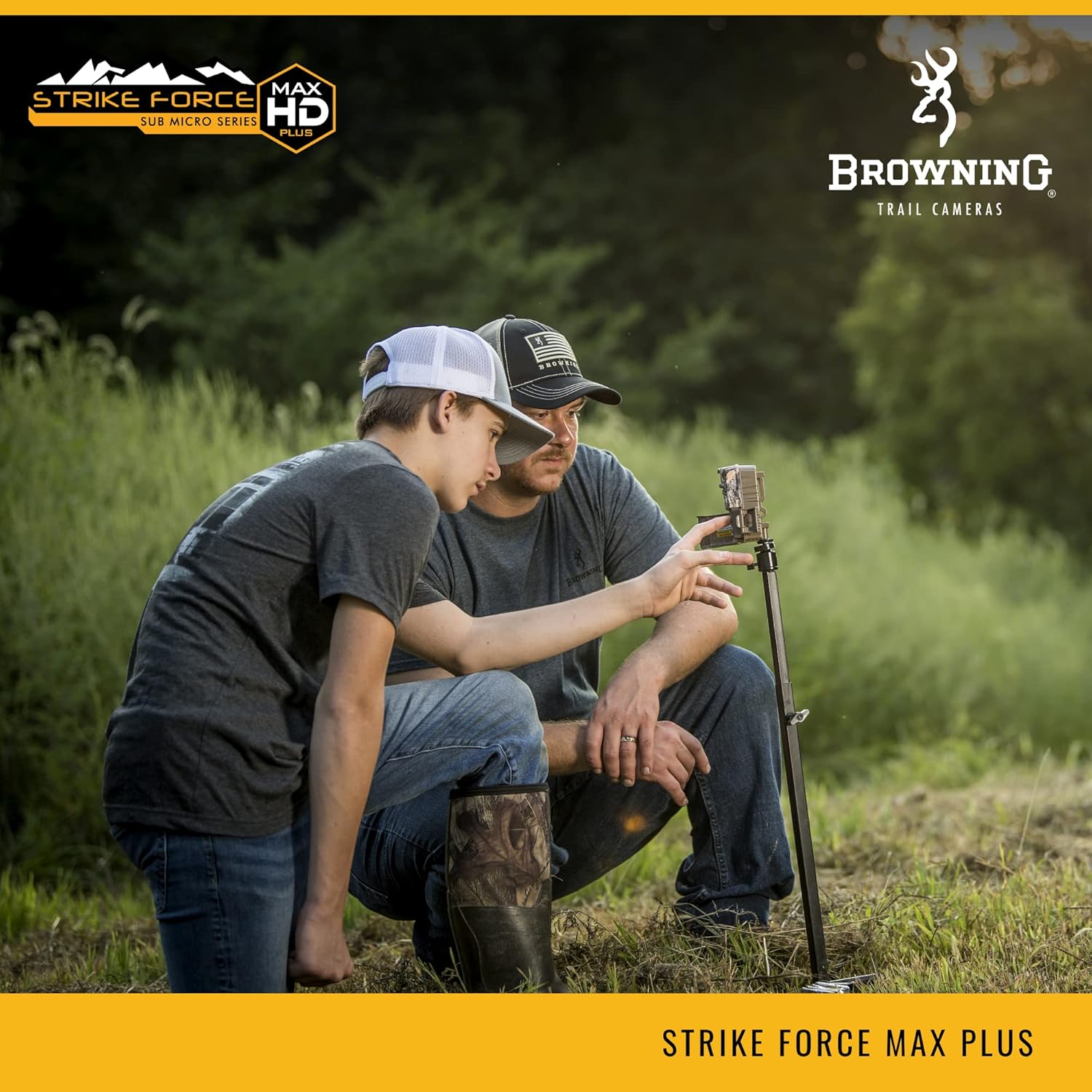
Figure 3: Demonstrates the process of setting up the trail camera in an outdoor setting, showing how it can be mounted.
Operating Instructions
The Strike Force HD Max Plus camera offers various settings to optimize performance:
- Trigger Speed: Adjustable from 0.135 to 0.7 seconds to capture fast-moving subjects.
- Recovery Time: Features a rapid 0.5-second recovery time between captures, minimizing missed events.
- Infrared Flash: Select between Long Range, Fast Motion, or Economy modes for optimal night illumination up to 100 feet. Illuma-Smart technology automatically adjusts IR flash.
- Smart IR Video: This feature allows the camera to continue recording video during the day when motion is detected, maximizing capture efficiency.
- Detection Range: The camera has an 80-foot detection range, ensuring a wide area of coverage.
- Image and Video Quality: Captures 20 MP still images and 1600 x 900p HD+ video clips with sound, providing clear and detailed recordings.

Figure 4: Highlights key camera features such as adjustable IR flash, programmable picture delay, and multi-shot options.

Figure 5: An example of a daytime image captured by the camera, demonstrating its clarity and detail.
Maintenance
Proper maintenance ensures the longevity and optimal performance of your trail camera:
- SD Card Management: Regularly check and manage your SD card. Delete old files or replace the card to ensure sufficient storage space for new captures.
- Battery Replacement: Monitor battery levels and replace all 6 AA batteries when indicated to prevent interruption of operation. The camera can operate for up to 1 year on a single set of batteries under optimal conditions.
- Cleaning: Periodically clean the camera lens and IR sensors with a soft, lint-free cloth to ensure clear images and proper sensor function. Keep the camera housing free of dirt and debris.
- Environmental Protection: The camera has an IP65 rating, indicating protection against dust and low-pressure water jets. While durable, avoid submerging the camera in water. Ensure the side lock is securely fastened to protect internal components from elements.
Troubleshooting
If you encounter issues with your camera, consider the following:
- Camera Not Powering On:
- Ensure batteries are correctly inserted with proper polarity.
- Replace old or depleted batteries with fresh ones.
- No Images/Videos Captured:
- Verify the SD card is properly inserted and not full.
- Check camera settings for proper trigger delay and operating mode.
- Ensure the detection range is clear of obstructions.
- Poor Image/Video Quality:
- Clean the camera lens and IR sensors.
- Adjust IR flash settings for night captures.
- Ensure the camera is stable and not subject to movement.
Specifications
| Feature | Detail |
|---|---|
| Model Name | STRIKE FORCE HD MAX PLUS |
| Part Number | BTC-5HD-MXP |
| Effective Still Resolution | 20 MP |
| Video Capture Resolution | 1600x900p HD+ |
| Trigger Speed | 0.135 - 0.7 Seconds (Adjustable) |
| Recovery Time | 0.5 Second |
| Detection Range | 80 Feet |
| Infrared Flash Range | 100 Feet |
| Power Source | 6 AA Batteries (up to 1 year battery life) |
| SD Card Capacity (Max) | 512 GB SDXC |
| Connectivity Protocol | Wi-Fi |
| International Protection Rating | IP65 |
| Dimensions (L x W x H) | 2.5 x 3 x 4.5 inches |
| Color | Camo |
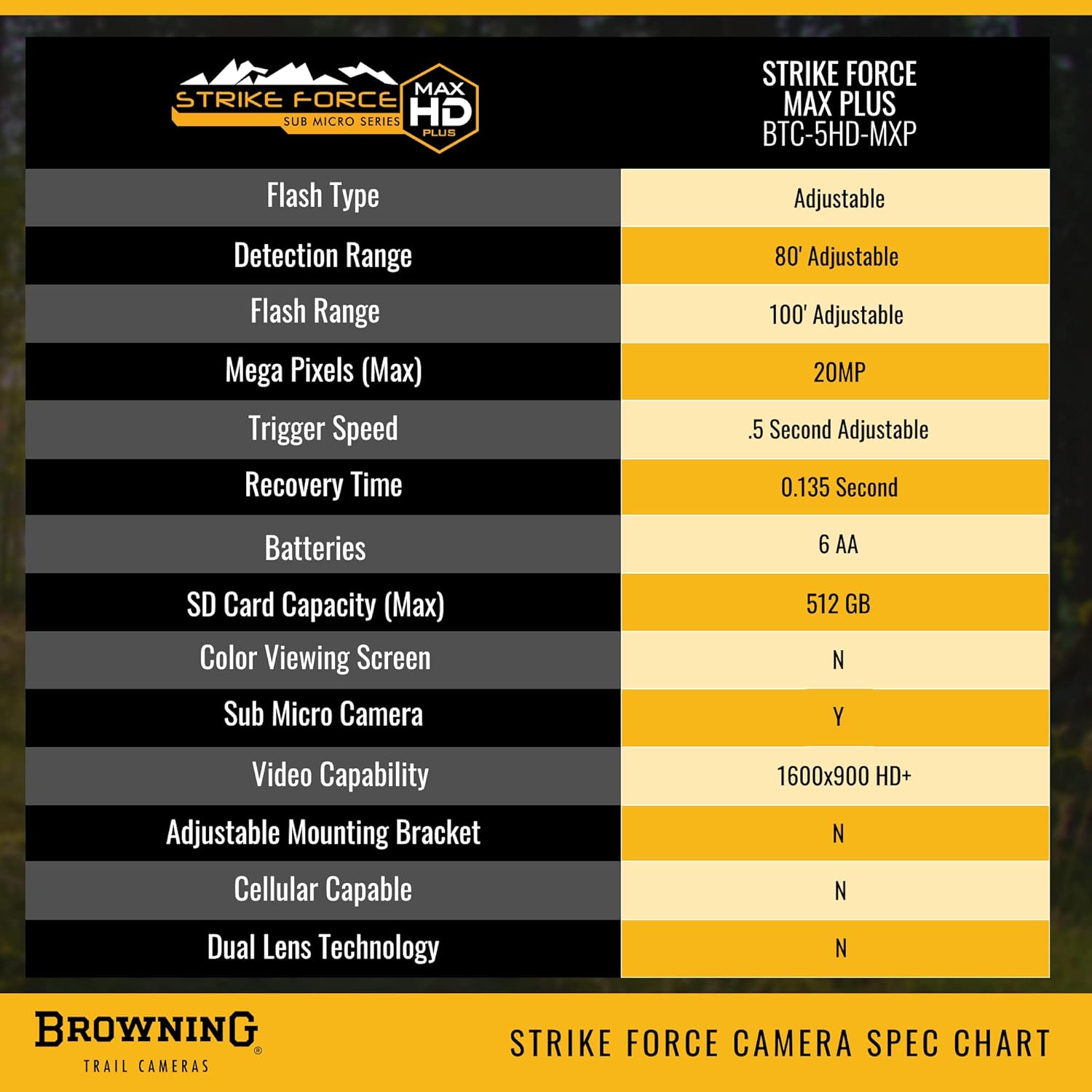
Figure 6: A detailed chart outlining the technical specifications of the Strike Force HD Max Plus camera.
Warranty Information
The Browning Strike Force HD Max Plus Trail Camera comes with a One Year Manufacturer Warranty against defects. For warranty claims or detailed terms and conditions, please refer to the official Browning website or contact customer support.
Support
For further assistance, technical support, or to explore other Browning products, please visit the official Browning store or contact their customer service department.
Official Browning Store: Browning Lifestyle Store on Amazon
Related documentsBTC-5HD-MXP


Ask a question about this manual
Ask about setup, troubleshooting, compatibility, parts, safety, or missing instructions. Manuals+ will review the question and use this page’s manual context to help answer it.