
1. Introduction
This manual provides essential information for setting up, operating, maintaining, and troubleshooting your HP EliteOne 800 G5 24-inch All-in-One Touchscreen PC. Please read this guide thoroughly before using your device to ensure proper functionality and longevity.

Figure 1: HP EliteOne 800 G5 All-in-One PC with included keyboard and mouse.
2. Package Contents
Verify that all items are present in the package:
- HP EliteOne 800 G5 All-in-One PC
- HP USB Keyboard
- HP USB Mouse
- Power Cord
- Documentation (this manual, safety information)
3. Product Overview
3.1 Front View

Figure 2: Front view of the HP EliteOne 800 G5, showing the 24-inch touchscreen display and integrated speakers.
- 23.8-inch FHD IPS WLED-backlit Touchscreen Display: Main interactive display area.
- 2 MP FHD Pop-up Webcam: Located at the top center, retracts when not in use.
- Integrated Dual Array Digital Microphone: For clear audio input during calls or recordings.
- Bang & Olufsen Speakers: Located below the screen for high-quality audio output.
3.2 Side View (Right)

Figure 3: Right side view illustrating the optical disk drive and audio ports.
- Optical Disk Drive: For reading and writing CDs/DVDs.
- Disc drive eject button: To open the optical disk drive tray.
- Standard lock slot (10 mm): For security cables.
- Universal Audio Jack with CTIA headset support: For connecting headsets with a microphone.
- Headphone connector: For connecting headphones.
3.3 Rear View and Ports
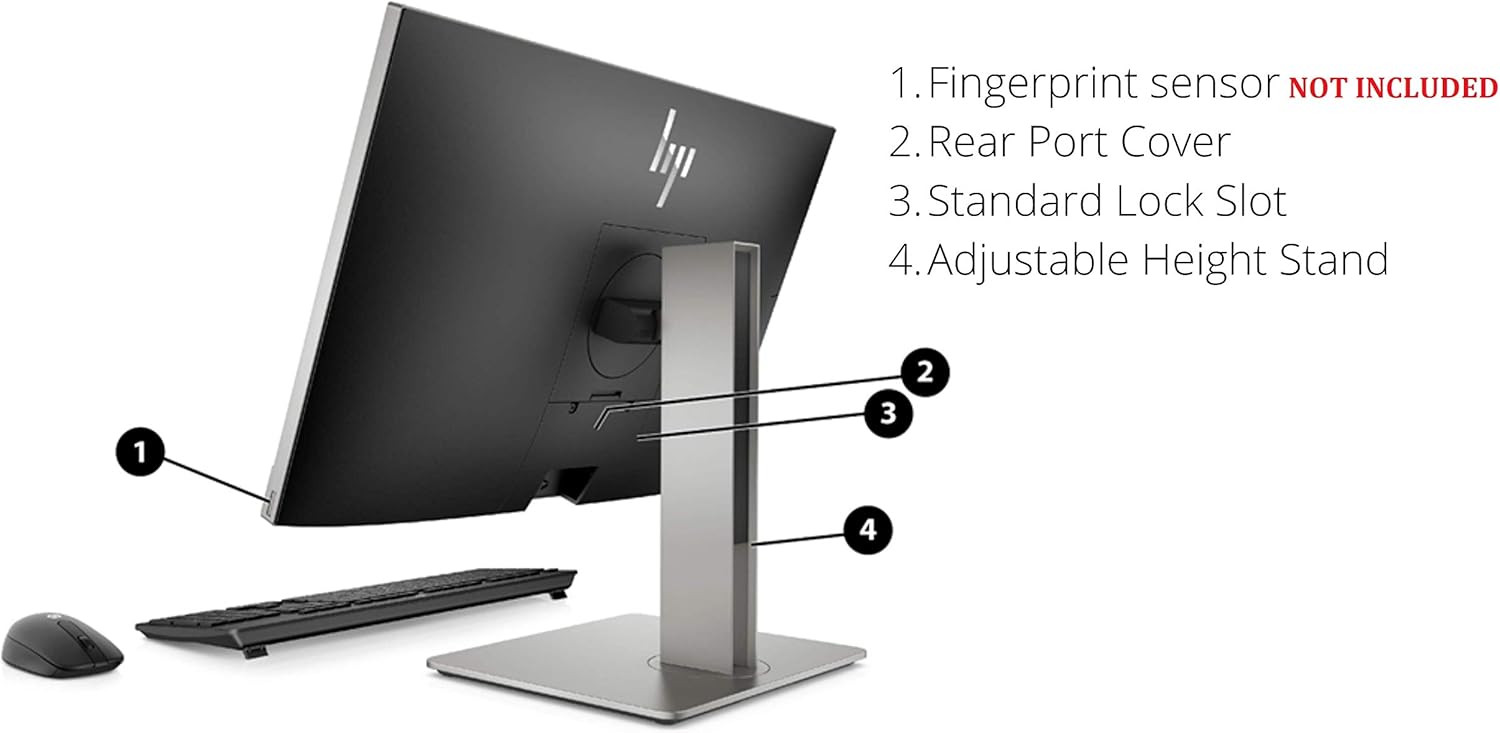
Figure 4: Detailed rear view showing all available ports and connections.
- USB 3.1 Gen 2 Type-A port: High-speed USB connection.
- USB 3.1 Gen 2 Type-A port (charge support up to 5V/1.5A): High-speed USB with charging capability.
- Audio line-out connector: For connecting external speakers or audio systems.
- USB 3.1 Gen 1 Type-A ports (2): Standard USB connections.
- RJ-45 (network) jack: For wired Ethernet connection.
- Power connector: For connecting the power cord.
- USB 3.1 Gen 2 Type-A ports (2) wake capable: High-speed USB ports that can wake the system.
- Dual-Mode DisplayPort™ 1.2 (DP++): For connecting external displays.
- HDMI 2.0a connector: For connecting external displays.
- SD card reader 4.0 (NOT INCLUDED on all models): For reading SD memory cards.
- USB 3.1 Type-C™ Gen 2 port (charge support up to 5V/3A): Reversible USB-C port with charging capability.
- Dual-state power button: To power on/off or put the system to sleep.
- Sure View Button (optional): Activates HP Sure View integrated privacy screen.

Figure 5: Rear view highlighting the adjustable height stand and other features.
- Fingerprint sensor (NOT INCLUDED on all models): For biometric authentication.
- Rear Port Cover: Conceals and protects rear ports.
- Standard Lock Slot: For security cables.
- Adjustable Height Stand: Allows for ergonomic positioning of the display.
4. Setup
Follow these steps to set up your HP EliteOne 800 G5 PC:
- Unpack the PC: Carefully remove all components from the packaging.
- Position the PC: Place the All-in-One PC on a stable, flat surface. Ensure adequate ventilation around the device.
- Connect Keyboard and Mouse: Plug the USB keyboard and mouse into any available USB Type-A ports on the rear of the PC.
- Connect Power: Connect the power cord to the power connector on the rear of the PC, then plug the other end into a grounded electrical outlet.
- Connect to Network (Optional): For a wired internet connection, connect an Ethernet cable from your router or modem to the RJ-45 (network) jack on the rear of the PC.
- Power On: Press the dual-state power button, located on the rear of the PC, to turn on the system.
- Initial Setup: Follow the on-screen instructions to complete the Windows 10 Pro setup, including language, region, network connection (if not wired), and user account creation.
5. Operating Instructions
5.1 Power Management
- Power On: Press the power button on the rear of the PC.
- Sleep Mode: Briefly press the power button or select 'Sleep' from the Windows Start menu.
- Shut Down: Select 'Shut down' from the Windows Start menu.
- Restart: Select 'Restart' from the Windows Start menu.
5.2 Using the Touchscreen
The 24-inch display supports multi-touch gestures. Common gestures include:
- Tap: Equivalent to a mouse click.
- Double-tap: Equivalent to a double-click.
- Press and hold: Equivalent to a right-click.
- Pinch/Stretch: Zoom in or out.
- Swipe: Scroll through content or navigate.
5.3 Webcam and Audio
- Webcam: The 2 MP FHD pop-up webcam automatically extends when an application requires it (e.g., video calls). Gently push it down to retract when not in use for privacy.
- Microphone: The integrated dual array digital microphone is active when the webcam is in use or when voice input is required.
- Speakers: The Bang & Olufsen speakers provide audio output. Volume can be adjusted via Windows settings or keyboard shortcuts.
5.4 Optical Disk Drive
To use the DVD+/-RW SM DL 9.5mm slim tray:
- Press the eject button on the right side of the PC.
- Place a CD or DVD onto the tray, ensuring it is seated correctly.
- Gently push the tray back into the PC until it clicks shut.
6. Maintenance
6.1 Cleaning
- Screen: Use a soft, lint-free cloth slightly dampened with water or a screen-cleaning solution. Do not spray liquid directly onto the screen.
- Chassis: Wipe with a soft, dry cloth. Avoid abrasive cleaners.
- Ventilation: Ensure the ventilation openings are clear of dust and obstructions to prevent overheating.
6.2 Software Updates
Regularly update your operating system and drivers to ensure optimal performance and security:
- Windows Updates: Go to Settings > Update & Security > Windows Update to check for and install updates.
- HP Support Assistant: Use the pre-installed HP Support Assistant software to check for driver and firmware updates specific to your HP EliteOne PC.
7. Troubleshooting
| Problem | Possible Cause | Solution |
|---|---|---|
| PC does not power on | No power, loose connection | Check power cord connection to PC and outlet. Ensure outlet is functional. |
| No display on screen | PC in sleep mode, display settings issue | Press any key or move mouse to wake. If connected to external display, check display input source. |
| Touchscreen unresponsive | Software glitch, dirty screen | Restart the PC. Clean the screen with a soft, lint-free cloth. |
| No audio from speakers | Volume muted, incorrect audio output device | Check volume levels in Windows. Ensure 'Speakers (Bang & Olufsen)' is selected as the default playback device. |
| Webcam not working | Webcam retracted, privacy settings, driver issue | Ensure webcam is extended. Check Windows privacy settings for camera access. Update webcam drivers via HP Support Assistant. |
8. Specifications
Key technical specifications for the HP EliteOne 800 G5 24-inch All-in-One PC:
| Feature | Detail |
|---|---|
| Model Number | 2D9S5UW#ABA |
| Display | 23.8" diagonal FHD IPS widescreen WLED-backlit touch screen (1920 x 1080) |
| Processor | Intel Core i5-9500 (9M Cache, up to 4.40 GHz) |
| Graphics | Intel UHD Graphics 630 (Integrated) |
| RAM | 8 GB DDR4-2666 SDRAM |
| Storage | 256 GB M.2 2280 PCIe NVMe TLC SSD |
| Operating System | Windows 10 Pro |
| Webcam | 2 MP FHD pop-up webcam |
| Audio | Bang & Olufsen Speakers, Integrated Dual Array Digital Microphone |
| Optical Drive | DVD+/-RW SM DL 9.5mm slim tray |
| Ports (Rear) | USB 3.1 Gen 2 Type-A (x3), USB 3.1 Gen 1 Type-A (x2), USB 3.1 Type-C Gen 2 (x1), DisplayPort 1.2 (x1), HDMI 2.0a (x1), RJ-45 (x1), Audio line-out (x1), Power connector (x1) |
| Ports (Side) | Universal Audio Jack (x1), Headphone connector (x1) |
| Dimensions (LxWxH) | 18.4 x 7.1 x 21.2 inches |
| Weight | 19.24 pounds |
9. Warranty and Support
Your HP EliteOne 800 G5 PC comes with a standard manufacturer's warranty. Please refer to the warranty card included in your package for specific terms and conditions, including coverage duration and service options.
For technical support, driver downloads, and additional product information, please visit the official HP support website:
When contacting support, have your product model number (2D9S5UW#ABA) and serial number ready.


