1. Introduction
Thank you for purchasing the Mainstay 6 Cube Storage Computer Desk. This manual provides essential information for the safe assembly, operation, and maintenance of your new desk. Please read these instructions carefully before beginning assembly and retain them for future reference.
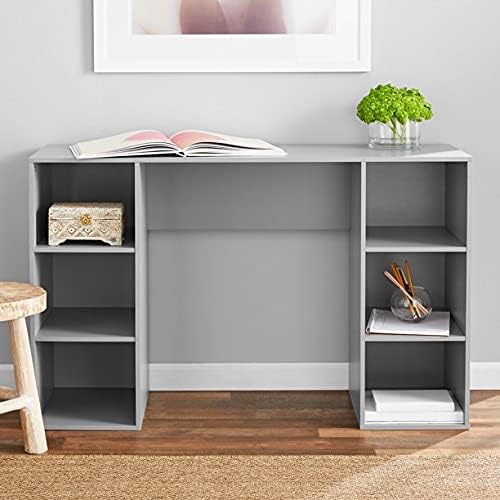
Image 1.1: The Mainstay 6 Cube Storage Computer Desk, showcasing its design and storage capabilities. The desk is gray, with a book on the main surface and various items in the side storage compartments.
2. Safety Information
- Read all instructions: Ensure you understand all assembly steps before proceeding.
- Adult Assembly Required: This product requires adult assembly.
- Weight Limits: Do not exceed the maximum weight capacity. The top shelf supports up to 33 lbs (15 kg). Each storage cube supports up to 11 lbs (5 kg).
- Stable Surface: Place the desk on a flat, stable, and level surface to prevent tipping.
- Keep away from children: Small parts can be a choking hazard. Keep assembly hardware out of reach of children.
- Inspect Regularly: Periodically check all connections and fasteners to ensure they remain tight.
- Avoid Moisture: Do not expose the desk to excessive moisture or direct sunlight, which can cause damage.
3. Package Contents
Before beginning assembly, verify that all components and hardware are present and undamaged. Refer to the parts list included in your product packaging. Typically, your package should contain:
- Desk panels (top, sides, shelves)
- Assembly hardware (screws, dowels, cam locks, etc.)
- Assembly instructions sheet
If any parts are missing or damaged, do not proceed with assembly. Contact Mainstay customer support for assistance.
4. Setup and Assembly
The Mainstay 6 Cube Storage Computer Desk is designed for straightforward assembly. It is recommended to assemble the desk in the room where it will be used to avoid moving it after completion.
Tools Required (Not Included):
- Phillips head screwdriver
- Hammer (optional, for dowels)
General Assembly Steps:
- Unpack Components: Carefully remove all parts from the packaging and lay them out on a soft, clean surface (e.g., a blanket or carpet) to prevent scratches.
- Identify Parts: Match each part to the corresponding labels in the included assembly diagram.
- Assemble Side Panels: Attach the fixed shelves to the side panels using the provided hardware (e.g., dowels and screws/cam locks). Ensure all connections are secure.
- Attach Top Panel: Secure the top desk surface to the assembled side and shelf structures.
- Insert Back Panel (if applicable): If a back panel is included, slide or fasten it into place.
- Final Tightening: Once fully assembled, gently tighten all screws and fasteners. Do not overtighten, as this can damage the material.
- Positioning: Carefully move the assembled desk to its desired location.
For detailed, step-by-step instructions, please refer to the specific assembly guide included in your product packaging.
5. Operating Instructions (Usage)
The Mainstay 6 Cube Storage Computer Desk is designed for versatile use in various home environments, including living rooms, dens, guest rooms, and home offices.
- Workspace: Utilize the spacious desktop for a laptop, small desktop PC, or as a writing surface. Ensure items are placed centrally to distribute weight evenly.
- Storage Cubes: The six open storage cubes provide convenient organization for books, office supplies, decorative items, or small storage bins. Distribute weight evenly across shelves and avoid overloading.
- Placement: Position the desk in a location that allows for easy access and does not obstruct pathways. Ensure adequate clearance for chairs and movement.
- Weight Distribution: Always distribute weight evenly across the desk surface and within the storage cubes to maintain stability and prevent damage.
6. Maintenance
- Cleaning: Wipe the desk surfaces with a soft, damp cloth. Avoid using harsh chemicals, abrasive cleaners, or polishes that may damage the finish. Dry immediately with a clean cloth.
- Spills: Clean up spills immediately to prevent staining or damage to the wood material.
- Hardware Check: Periodically check all screws and fasteners to ensure they are tight. Loose hardware can compromise the desk's stability.
- Avoid Heat and Moisture: Do not place hot items directly on the surface without protection. Keep the desk away from direct heat sources and areas of high humidity.
7. Troubleshooting
If you encounter issues with your Mainstay 6 Cube Storage Computer Desk, refer to the following common solutions:
- Desk is wobbly:
- Ensure all assembly hardware (screws, cam locks) are fully tightened.
- Verify the desk is placed on a flat, level surface. Adjust if necessary.
- Parts do not fit together:
- Double-check the assembly instructions to ensure you are using the correct parts and orientation for each step.
- Do not force parts. If a part seems incorrect, contact customer support.
- Scratches or minor damage:
- For minor scratches, furniture repair pens or kits designed for wood finishes may be used.
- If damage occurred during shipping or is significant, contact customer support immediately.
For issues not covered here, please contact Mainstay customer support.
8. Specifications
| Brand: | Mainstay |
| Model: | 6 Cube Storage Computer Desk |
| Product Dimensions (D x W x H): | 15.75"D x 47.24"W x 29.53"H |
| Material: | Wood |
| Number of Storage Cubes: | 6 |
| Top Shelf Weight Capacity: | 33 lbs (15 kg) |
| Each Cube Weight Capacity: | 11 lbs (5 kg) |
| Assembly Required: | Yes |
| UPC: | 746705887569 |
| ASIN: | B092R8VV14 |
9. Warranty and Support
Mainstay products are manufactured to high-quality standards. For specific warranty information, please refer to the documentation included with your purchase. If you have any questions, require replacement parts, or need assistance with assembly or troubleshooting, please contact Mainstay customer support through their official website or the retailer where the product was purchased.
Please have your model number (6 Cube Storage Computer Desk) and purchase information ready when contacting support.


