
MOOKA RD-823
MOOKA WiFi Projector User Manual
Model: RD-823
Introduction
Thank you for choosing the MOOKA WiFi Projector. This manual provides essential information for setting up, operating, and maintaining your projector to ensure optimal performance and longevity. Please read this manual thoroughly before using the product.

MOOKA WiFi Projector with a smartphone displaying content, indicating wireless connectivity and 1080P support.
Setup Guide
1. Initial Placement and Power
Place the projector on a stable, flat surface. Ensure adequate ventilation around the device. Connect the power adapter to the projector and then to a power outlet.
2. Wireless Connection (WiFi)
The MOOKA WiFi Projector features built-in WiFi technology for seamless screen mirroring from your iOS or Android devices. Follow these steps for a one-time WiFi connection:
- Connect the projector to your home Wi-Fi network.
- Connect your iOS/Android device to the same home Wi-Fi network.
- Open the Screen Mirroring function on your iOS/Android device and select the projector.
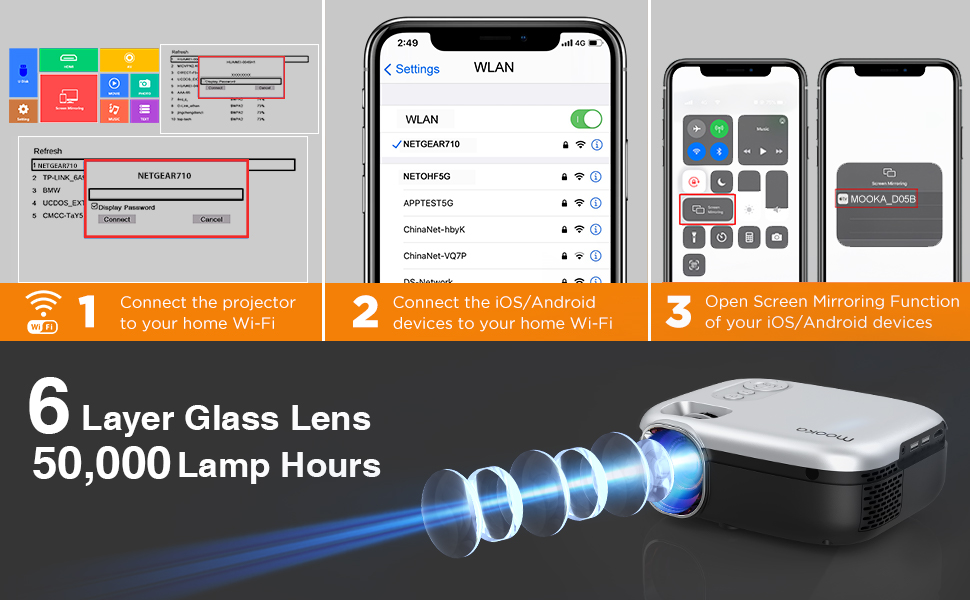
Step-by-step instructions for connecting the projector to Wi-Fi and mirroring screens from iOS/Android devices.
3. Multiple Device Connection
The projector is equipped with various ports for connecting a wide range of devices:
- HDMI: Connect TV Box, TV Stick, Chromecast, PC, Laptop, Playstation, DVD Player.
- USB: Connect U Disk, Card Reader, Media Player.
- AV: Connect older devices with AV output.
- 3.5MM Audio Out: Connect external speakers for enhanced audio.

Overview of various devices that can be connected to the MOOKA projector, including PCs, laptops, game consoles, and streaming devices, along with available ports (HDMI, USB, AV, Audio Out).
Operating Instructions
1. Image Adjustment
For optimal image clarity, adjust the focus and keystone correction:
- Focus: Rotate the focus ring on the projector lens until the image appears sharp.
- Keystone Correction: Use the manual ±15° keystone correction to adjust the image shape if it appears trapezoidal.

Visual guide demonstrating manual focus adjustment and ±15° keystone correction for optimal image alignment.
2. Projection Quality and Screen Size
The MOOKA projector supports 1080P Full HD resolution and offers enhanced brightness for a clear picture. It can project a large screen size up to 200 inches, providing an immersive viewing experience.

Comparison showing the superior brightness and clarity of the MOOKA projector (8000 Lumen) versus other projectors (4500 Lumen).

Illustration of the MOOKA projector's capability to project large screen sizes, up to 200 inches, with recommended viewing distances.
3. Audio Output
The projector is equipped with an SRS Stereo Speaker for integrated audio. For a more robust sound experience, connect external speakers via the 3.5mm audio out port.
Maintenance
Proper maintenance ensures the longevity of your MOOKA projector:
- Lamp Life: The projector utilizes sarcoma technology and a heat dissipation window to extend lamp life up to 50,000 hours.
- Cleaning: Regularly clean the lens with a soft, lint-free cloth. Keep the projector free from dust and debris.
- Ventilation: Ensure the heat dissipation vents are not blocked to prevent overheating.
Troubleshooting
| Problem | Possible Cause | Solution |
|---|---|---|
| No image/Power off | Power cable loose; Overheating | Check power connection; Ensure proper ventilation. |
| Blurred image | Focus not adjusted; Keystone not adjusted | Adjust focus ring; Adjust keystone correction. |
| No sound | Volume too low; External speaker issue | Increase volume; Check external speaker connection. |
| WiFi connection unstable/slow | Network interference; Distance from router | Ensure strong WiFi signal; Reduce distance to router; Try wired connection if possible. |
Specifications
| Feature | Detail |
|---|---|
| Brand | MOOKA |
| Model | RD-823 |
| Display Resolution | 1920 x 1080 (Supported) |
| Brightness | 8000L |
| Connectivity Technology | HDMI, USB, AV, WiFi |
| Speaker Type | Built-In, Stereo, Surround |
| Lamp Life | 50,000 hours |
| Item Weight | 4 pounds |
| Product Dimensions | 8.58 x 6.85 x 3.77 inches |
| Color | Grey |
| Visible Screen Diagonal | 200" / 508 cm |
Warranty and Support
The MOOKA WiFi Projector is backed by a 12-month repair warranty. For any technical issues or support inquiries, please do not hesitate to contact our customer service. We provide 24-hour lifetime technical support to ensure your satisfaction.
Related documentsRD-823

Ask a question about this manual
Ask about setup, troubleshooting, compatibility, parts, safety, or missing instructions. Manuals+ will review the question and use this page’s manual context to help answer it.