
Caliber HPG319DAB
Caliber HPG319DAB Mini Portable DAB+ FM Radio with Alarm Function User Manual
Introduction
This manual provides detailed instructions for the safe and efficient operation of your Caliber HPG319DAB Mini Portable DAB+ FM Radio. Please read this manual thoroughly before using the device and retain it for future reference.
The Caliber HPG319DAB is a compact and versatile portable radio featuring DAB+ and FM reception, an integrated alarm clock, and a rechargeable battery for extended playback. Its lightweight design makes it suitable for various environments, from your bedroom to outdoor settings.
Product Overview
Package Contents
- Caliber HPG319DAB Radio
- USB Charging Cable
- Power Adapter
- User Manual
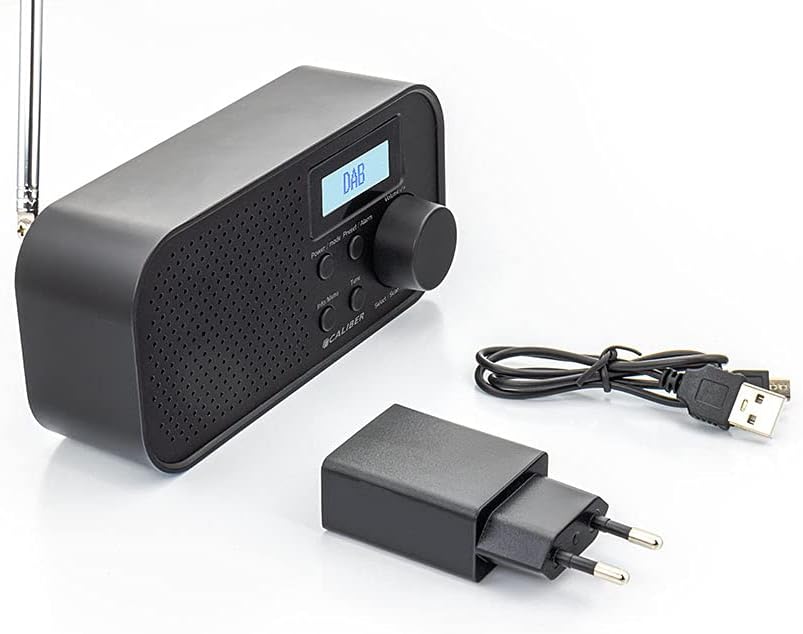
Image: The Caliber HPG319DAB radio shown with its included USB charging cable and power adapter.
Device Layout and Controls
Familiarize yourself with the buttons and ports on your radio for optimal use.

Image: Front view of the Caliber HPG319DAB radio, displaying the speaker grille, LCD screen, and control buttons.
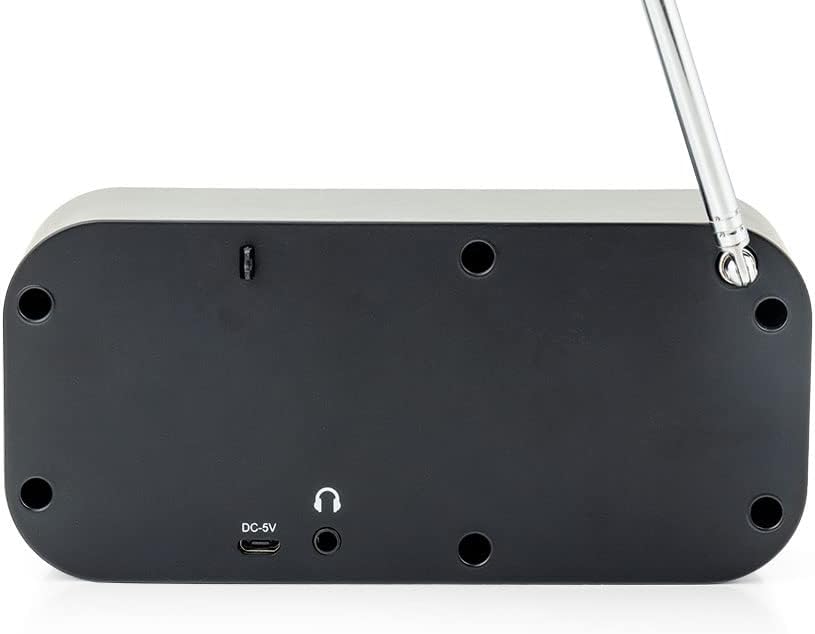
Image: Bottom view of the Caliber HPG319DAB radio, highlighting the DC-5V charging port and 3.5mm headphone jack.
- Power/Mode Button: Press and hold to turn the radio on or off. Short press to switch between DAB+ and FM radio modes.
- Preset/Alarm Button: Short press to access saved presets. Press and hold to enter alarm settings.
- Info/Menu Button: Short press to display station information. Press and hold to enter the main menu for settings.
- Tune Button: Used for manual frequency adjustment in FM mode or for navigating options within menus.
- Volume -/+ Knob: Rotate to adjust the audio volume. Press to select an option, initiate a scan, or activate the snooze function when an alarm sounds.
- LCD Display: Shows current time, radio station details, and menu selections.
- Telescopic Antenna: Extend fully for optimal radio signal reception.
- DC-5V Charging Port: Connect the provided USB charging cable here to power the device or recharge the internal battery.
- 3.5mm Headphone Jack: Connect standard headphones for private listening.
Setup
Initial Charging
Before using your radio for the first time, ensure it is fully charged. Connect the supplied USB charging cable to the DC-5V port on the radio and the other end to the power adapter. Plug the adapter into a standard wall outlet. The charging indicator will illuminate. A complete charge provides approximately 8 hours of continuous playback.
First Power On and Automatic Scan
- Extend the telescopic antenna completely for the best possible reception.
- Press and hold the Power/Mode button to turn on the radio.
- Upon its initial power-on, the radio will automatically initiate a scan for available DAB+ stations. This process may take a few minutes to complete.
- Once the scan is finished, the radio will automatically tune to the first available station found.
Operating Instructions
Power On/Off
- To turn on: Press and hold the Power/Mode button.
- To turn off: Press and hold the Power/Mode button again.
Switching Radio Modes (DAB+/FM)
Short press the Power/Mode button to toggle between DAB+ and FM radio modes.
DAB+ Radio Operation
Scanning for Stations
The radio performs an automatic scan upon first use. To perform a full scan manually:
- In DAB+ mode, press and hold the Info/Menu button to enter the menu.
- Rotate the Volume -/+ knob to navigate to "Full Scan" and press the knob to select.
- The radio will then scan for all available DAB+ stations.
Selecting Stations
Rotate the Volume -/+ knob to browse through the list of available DAB+ stations. Press the knob to select and tune to a station.
Saving Presets (DAB+)
The radio supports storing up to 10 preset DAB+ stations.
- Tune to the desired DAB+ station.
- Press and hold the Preset/Alarm button until "Preset Store" appears on the display.
- Rotate the Volume -/+ knob to select a preset number (1-10).
- Press the Volume -/+ knob to confirm and save the station to the selected preset.
Recalling Presets (DAB+)
Short press the Preset/Alarm button. Rotate the Volume -/+ knob to select the desired preset number and press the knob to tune to it.
FM Radio Operation
Scanning for Stations
- In FM mode, press and hold the Info/Menu button to enter the menu.
- Rotate the Volume -/+ knob to navigate to "Auto Scan" and press the knob to select.
- The radio will scan for and automatically save strong FM stations to presets.
Manual Tuning
- In FM mode, short press the Tune button.
- Rotate the Volume -/+ knob to manually adjust the frequency.
- Press the Tune button again to exit manual tuning.
Saving Presets (FM)
The radio supports storing up to 10 preset FM stations.
- Tune to the desired FM station (either manually or via auto-scan).
- Press and hold the Preset/Alarm button until "Preset Store" appears on the display.
- Rotate the Volume -/+ knob to select a preset number (1-10).
- Press the Volume -/+ knob to confirm and save the station to the selected preset.
Recalling Presets (FM)
Short press the Preset/Alarm button. Rotate the Volume -/+ knob to select the desired preset number and press the knob to tune to it.
Setting the Alarm
For reliable alarm operation, the radio should be connected to power via the USB cable and adapter.
- Press and hold the Preset/Alarm button to enter the alarm settings menu.
- Rotate the Volume -/+ knob to adjust the hour, then press the knob to confirm.
- Repeat the process for setting the minutes.
- Select the desired alarm source (DAB+, FM, or Buzzer) by rotating and pressing the knob.
- Choose the alarm frequency (e.g., Once, Daily, Weekdays, Weekends).
- Adjust the alarm volume to your preference.
- Confirm your settings to activate the alarm.
Snooze Function
When the alarm sounds, press the Volume -/+ knob to activate the snooze function. The alarm will pause for a short period and then sound again.
Stopping the Alarm
To completely stop the alarm, press any button other than the Volume -/+ knob (snooze).
Sleep Timer Function
The sleep timer allows the radio to automatically turn off after a predetermined period.
- Press and hold the Info/Menu button to enter the menu.
- Rotate the Volume -/+ knob to navigate to "Sleep" and press the knob to select.
- Rotate the knob to choose the desired sleep duration (e.g., 15, 30, 45, 60, 90 minutes, or Off).
- Press the knob to confirm your selection.
Maintenance
- Clean the radio's exterior with a soft, dry cloth. Avoid using abrasive cleaners, solvents, or strong detergents.
- Keep the device away from water, excessive moisture, and direct sunlight to prevent damage.
- Do not attempt to disassemble or repair the radio yourself, as this will void the product warranty and may cause damage.
- Ensure the telescopic antenna is fully extended for optimal reception, but handle it gently to prevent bending or breaking.
Troubleshooting
| Problem | Possible Cause | Solution |
|---|---|---|
| No power / Radio does not turn on. | Battery is depleted. | Connect the radio to power using the USB cable and adapter and allow it to charge fully. |
| Poor radio reception (DAB+/FM). | Antenna not extended or poor signal area. | Fully extend the telescopic antenna. Try repositioning the radio or moving to a different location. Perform a full scan for stations. |
| Alarm does not sound. | Radio not connected to power; alarm not set correctly. | Ensure the radio is connected to power for reliable alarm function. Verify alarm settings (time, source, frequency, volume). |
| No sound from speaker. | Volume is too low; headphones connected. | Increase the volume using the Volume -/+ knob. Disconnect headphones if connected to the 3.5mm jack. |
| Display is blank or frozen. | Temporary software glitch. | Press and hold the Power/Mode button for 10 seconds to perform a hard reset. If the issue persists, contact customer support. |
Specifications
- Model Number: HPG319DAB
- Brand: Caliber
- Color: Black
- Radio Bands Supported: DAB+, FM
- Special Features: DAB+/FM Radio, Telescopic Antenna, Alarm Function, Sleep Timer
- Power Source: Battery Powered (Rechargeable Lithium-ion)
- Battery Life: Up to 8 hours
- Charging: USB (DC-5V)
- Dimensions (L x W x H): 15 x 5 x 7 centimeters
- Compatible Devices: Headphones, External Speakers (via 3.5mm jack)
- Components Included: HPG319DAB Radio, USB Charging Cable, Power Adapter, User Manual
Warranty and Support
Warranty Information
This Caliber HPG319DAB radio comes with a 2-year manufacturer's warranty from the date of purchase. Please retain your proof of purchase for all warranty claims.
The warranty covers defects in materials and workmanship under normal use. It does not cover damage resulting from misuse, accidents, unauthorized modifications, or normal wear and tear.
Customer Support
For technical assistance, troubleshooting, or warranty inquiries, please contact Caliber customer support through their official website or the retailer where the product was purchased.
For more information, visit the official Caliber Brand Store.
Ask a question about this manual
Ask about setup, troubleshooting, compatibility, parts, safety, or missing instructions. Manuals+ will review the question and use this page’s manual context to help answer it.