
Moukey MEP-110
Moukey MEP-110 Digital Piano User Manual
Model: MEP-110 | Brand: Moukey
1. Introduction
Thank you for choosing the Moukey MEP-110 Digital Piano. This 88-key full-size semi-weighted electric keyboard is designed for beginners and experienced players alike, offering a rich sound experience and versatile functions for practice and performance. This manual provides essential information for the proper setup, operation, and maintenance of your new digital piano.
2. Safety Instructions
- Power Supply: Use only the specified power adapter. Ensure the voltage matches the requirements of your region.
- Water and Moisture: Do not expose the instrument to rain, moisture, or excessive humidity. Keep liquids away from the piano.
- Heat Sources: Avoid placing the piano near heat sources such as radiators, heat registers, stoves, or other heat-producing appliances.
- Ventilation: Do not block any ventilation openings. Ensure proper airflow around the instrument.
- Cleaning: Clean only with a dry cloth. Avoid using harsh chemicals or abrasive cleaners.
- Handling: Handle the piano with care. Avoid dropping or subjecting it to strong impacts.
- Servicing: Do not attempt to service this product yourself. Refer all servicing to qualified service personnel.
3. Package Contents
Verify that all items listed below are included in your package:
- Moukey MEP-110 Digital Piano x 1
- Power Adapter x 1
- Sustain Pedal x 1
- Music Stand x 1
- Piano Stand x 1
- User Manual x 1

Figure 3.1: Complete package contents including the digital piano, stand, power adapter, and sustain pedal.
4. Setup
4.1 Assembling the Piano Stand
Carefully unpack all components. Assemble the X-style piano stand according to the included instructions. Ensure all screws are tightened securely for stability.
4.2 Placing the Digital Piano
Place the Moukey MEP-110 Digital Piano securely on the assembled stand. Ensure it is centered and stable to prevent accidental falls.
4.3 Connecting Power and Accessories
- Power: Connect the power adapter to the DC 12V 3A port on the rear panel of the piano and then plug it into a wall outlet.
- Sustain Pedal: Insert the sustain pedal cable into the "PEDAL" or "SUSTAIN" socket on the rear panel.
- Headphones: For silent practice, connect 3.5mm headphones to the "PHONE" jack.
- USB-MIDI: Use a USB-MIDI cable to connect the piano to a computer or other MIDI-compatible device for recording or software integration.
- Audio Output: Connect external speakers or an amplifier to the "OUTPUT" jacks for amplified sound.
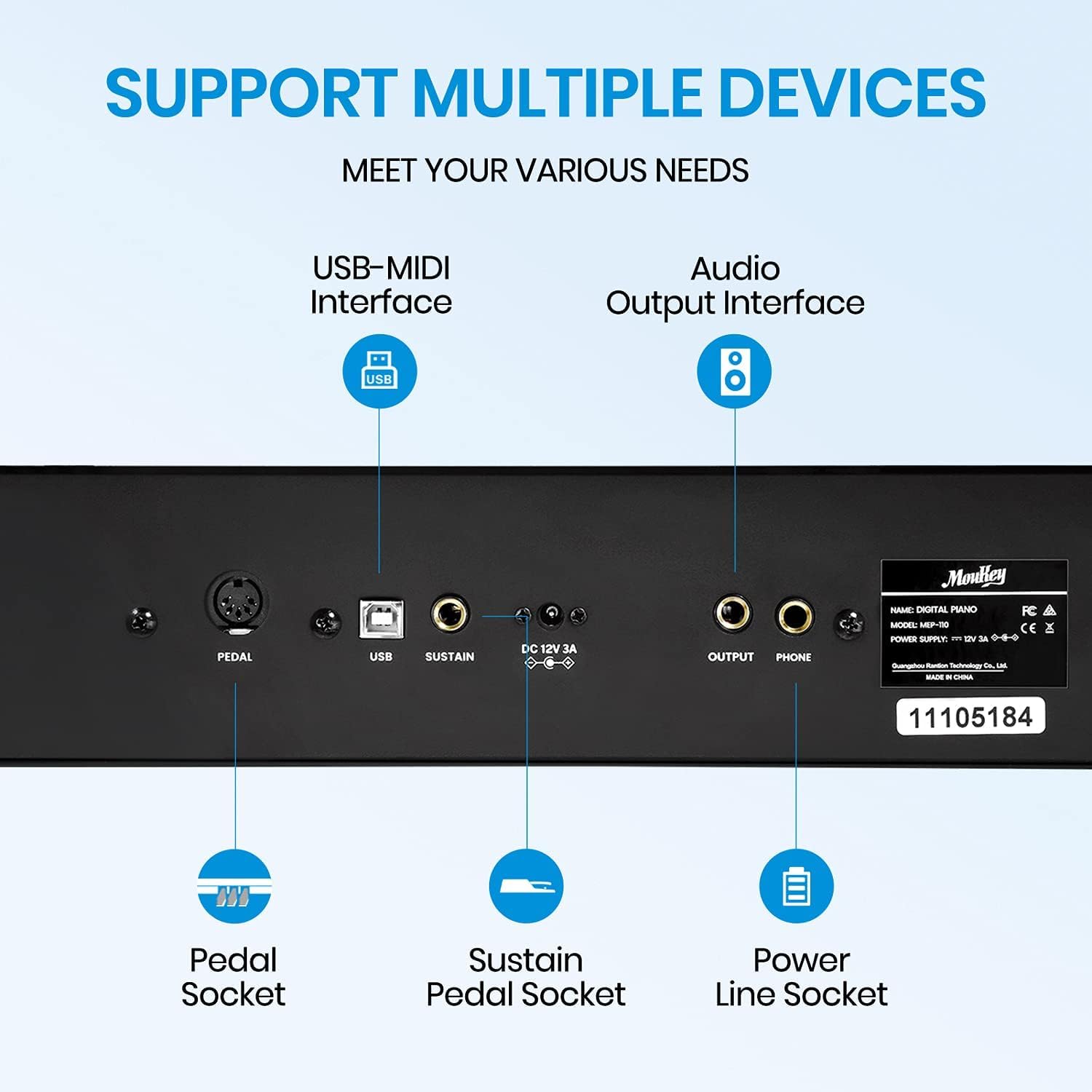
Figure 4.1: Rear panel connections for power, pedals, USB-MIDI, and audio output.
5. Operating Instructions
5.1 Power On/Off and Volume Control
Press the power button to turn the piano on or off. Adjust the master volume using the dedicated volume knob on the control panel. For quiet practice, use headphones connected to the 'PHONE' jack.

Figure 5.1: Silent practice mode with headphones for undisturbed playing.
5.2 Timbre, Rhythm, and Demonstration Tracks
The MEP-110 offers a wide selection of 128 premium tones and 83 rhythms. Use the 'TONE/DEMO/RHYTHM' controls to browse and select different instrument sounds and rhythmic accompaniments. The piano also includes 43 demonstration songs for learning or enjoyment.

Figure 5.2: Explore a variety of tones, rhythms, and demo songs.
5.3 Touch Response (Semi-Weighted Keys)
The 88 semi-weighted keys provide a realistic piano feel, allowing for expressive playing. The intensity of your key press will affect the volume and nuance of the sound, mimicking an acoustic piano's dynamic range. This feature enhances the playing experience by allowing for subtle variations in musical expression.

Figure 5.3: The semi-weighted keys offer a responsive and dynamic playing experience.
5.4 Teaching Functions (Dual Keyboard Mode)
The MEP-110 is equipped with teaching functions, including a dual keyboard mode. This mode splits the keyboard into two identical pitch ranges, allowing a student and teacher to play simultaneously on the same instrument without interfering with each other's range. This is ideal for piano lessons and collaborative practice.

Figure 5.4: Utilize the dual keyboard function for effective teaching and learning.
5.5 Additional Features
- Metronome: Use the built-in metronome for timing practice.
- Keyboard Percussion: Access various percussion sounds directly from the keys.
- Auto Chord: Simplify playing chords with automatic chord generation.
- Recording: Record your performances directly on the piano.

Figure 5.5: The piano's speaker system delivers superior sound quality, supporting various functions.
6. Maintenance
- Cleaning: Wipe the piano's surface with a soft, dry cloth. Do not use liquid cleaners, waxes, or solvents.
- Storage: When not in use for extended periods, store the piano in a cool, dry place away from direct sunlight and extreme temperatures.
- Transportation: If transporting the piano, ensure it is properly packed to prevent damage from impacts. The portable design allows for easy transport.

Figure 6.1: The lightweight and portable design makes the piano easy to transport and store.
7. Troubleshooting
| Problem | Possible Cause | Solution |
|---|---|---|
| No sound from speakers/headphones. | Volume too low; power not connected; headphones not fully inserted. | Increase volume. Ensure power adapter is securely connected. Re-insert headphones firmly. |
| Keys not responding or sticking. | Dust or debris under keys; minor manufacturing imperfection. | Gently clean around the keys. If a key sticks, gently work it to free it. If problem persists, contact support. |
| Sustain pedal not working. | Pedal not connected properly. | Ensure the sustain pedal is fully inserted into the correct port. |
| Distorted sound. | Volume too high; external speakers/amplifier issues. | Lower the volume. Check connections and settings of external audio equipment. |
8. Specifications
- Model Name: Beginner Digital Piano 88 Key Full-Size Semi-Weighted Electric Keyboard
- Model Number: MEP-110
- Brand: Moukey
- Number of Keys: 88
- Key Type: Semi-Weighted
- Dimensions: 58.4 x 17 x 6.7 inches (Package Dimensions)
- Item Weight: 19.8 pounds (9 Kilograms)
- Power Source: Corded Electric (DC 12V 3A)
- Connectivity: MIDI USB, Auxiliary, 3.5mm Headphone Jack
- Tones: 128 Premium Tones
- Rhythms: 83 Rhythms
- Demo Songs: 43 Demonstration Songs
- Special Features: Adjustable Touch Response, Weighted Keyboard, Dual Keyboard Function, Teaching Mode, Metronome, Keyboard Percussion, Auto Chord, Recording.
- UPC: 611851736477
9. Warranty and Support
For warranty information and technical support, please refer to the warranty card included in your product packaging or visit the official Moukey website. Keep your purchase receipt as proof of purchase for any warranty claims.
Online Resources: For additional resources, FAQs, and software updates, please visit the Moukey support page or contact their customer service directly.
Related documentsMEP-110

Ask a question about this manual
Ask about setup, troubleshooting, compatibility, parts, safety, or missing instructions. Manuals+ will review the question and use this page’s manual context to help answer it.