
1. Introduction
This manual provides essential information for the safe and efficient operation of your GIANDEL Pure Sine Wave Power Inverter 1500W, Model PS-1500SAR. This device converts 12V DC battery power into 120V AC household power, suitable for various applications including RVs, trucks, boats, and emergency power needs. Please read this manual thoroughly before installation and use.
2. Safety Information
WARNING: Failure to follow these safety instructions may result in injury or damage to the inverter or connected devices.
- Connect the inverter only to a 12V battery with a minimum capacity of 200 Ah using the provided cables. Ensure all connections are secure.
- Do not exceed the inverter's rated continuous power output of 1500 Watts. Overload protection activates between 1501-1650 Watts.
- Do not leave the power inverter in the ON position when your vehicle's engine is off to prevent battery drain.
- Always disconnect the positive battery terminal before performing any wiring or maintenance on the inverter.
- Install the inverter in a cool, dry, and well-ventilated environment. Avoid direct sunlight and moisture.
- Do not use the inverter with appliances that draw more wattage than the inverter can provide, as this may cause damage to both the inverter and the appliance.
3. Package Contents
Verify that all items are present in the package:
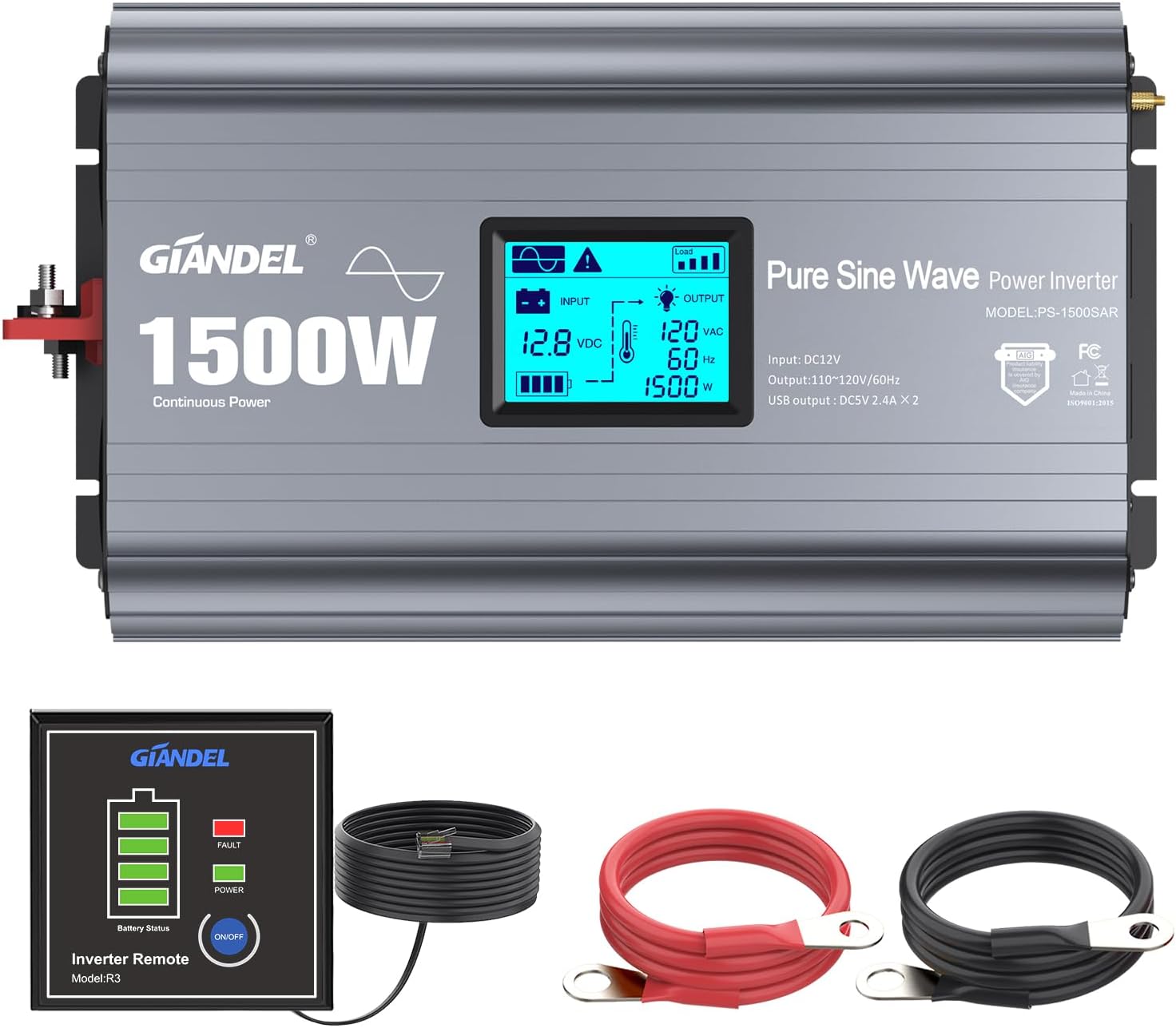
- 1x GIANDEL 1500 Watt Pure Sine Wave Power Inverter (Model PS-1500SAR)
- 2x Battery Cables (one black, one red)
- 1x Remote Controller with 15ft cable
- 1x User Manual
4. Product Features and Overview




5. Specifications
| Feature | Specification |
|---|---|
| Model | PS-1500SAR |
| Continuous Power | 1500 Watts |
| Overload Protection | 1501-1650 Watts |
| Output Waveform | Pure Sine Wave |
| Total Harmonic Distortion (ITHD) | < 3% |
| Input Voltage Range | 9.8-16VDC |
| Output Voltage | 120 Vac ±10% |
| Output Frequency | 60 Hz |
| Efficiency | Up to 90% |
| AC Outlets | 3x Standard AC Outlets |
| USB Ports | 2x 2.4A USB Ports |
| LCD Display | Input voltage, load power, protection modes |
| Remote Controller | Included, with 15ft cable |
| Cooling Fan | Intelligent, automatic operation |
| Over-temperature Protection | Activates around 149°F (65°C) |
| Over-voltage Shutdown | 16V ±0.5VDC |
| Under-voltage Alarm | 9.8V ±0.5VDC |
| Under-voltage Shutdown | 9.5V ±0.5VDC |
| Dimensions (L x W x H) | 17.9 x 8.07 x 3.78 inches (45.5 x 20.5 x 9.6 cm) |
| Weight | 13.27 pounds (6.02 kg) |
6. Setup and Installation
6.1 Choosing a Location
Select a location that is:
- Dry and protected from water splashes.
- Cool and well-ventilated. Avoid direct sunlight or heat sources.
- Secure, to prevent accidental movement or damage.
- Accessible for connections and monitoring the LCD display.
6.2 Connecting to a Battery
The inverter requires a 12V DC power source, typically a deep-cycle battery. A minimum battery capacity of 200 Ah is recommended for optimal performance.
- Ensure the inverter is switched OFF.
- Disconnect the positive terminal of your battery before proceeding with wiring.
- Connect the red battery cable to the positive (+) terminal of the inverter and then to the positive (+) terminal of the 12V battery.
- Connect the black battery cable to the negative (-) terminal of the inverter and then to the negative (-) terminal of the 12V battery.
- Ensure all connections are tight and secure to prevent voltage drops and overheating.
- Connect the remote controller cable to the designated RJ10 port on the inverter.
- Optionally, connect an earth wire to the earth terminal on the inverter for additional safety.

Important: The included cables are designed for the inverter's capacity. For longer runs or specific high-current applications, consult an expert for appropriate cable gauge selection.
7. Operation
7.1 Powering On the Inverter
- After ensuring all connections are secure, reconnect the positive battery terminal.
- Press the power switch on the inverter or the remote controller to turn the unit ON.
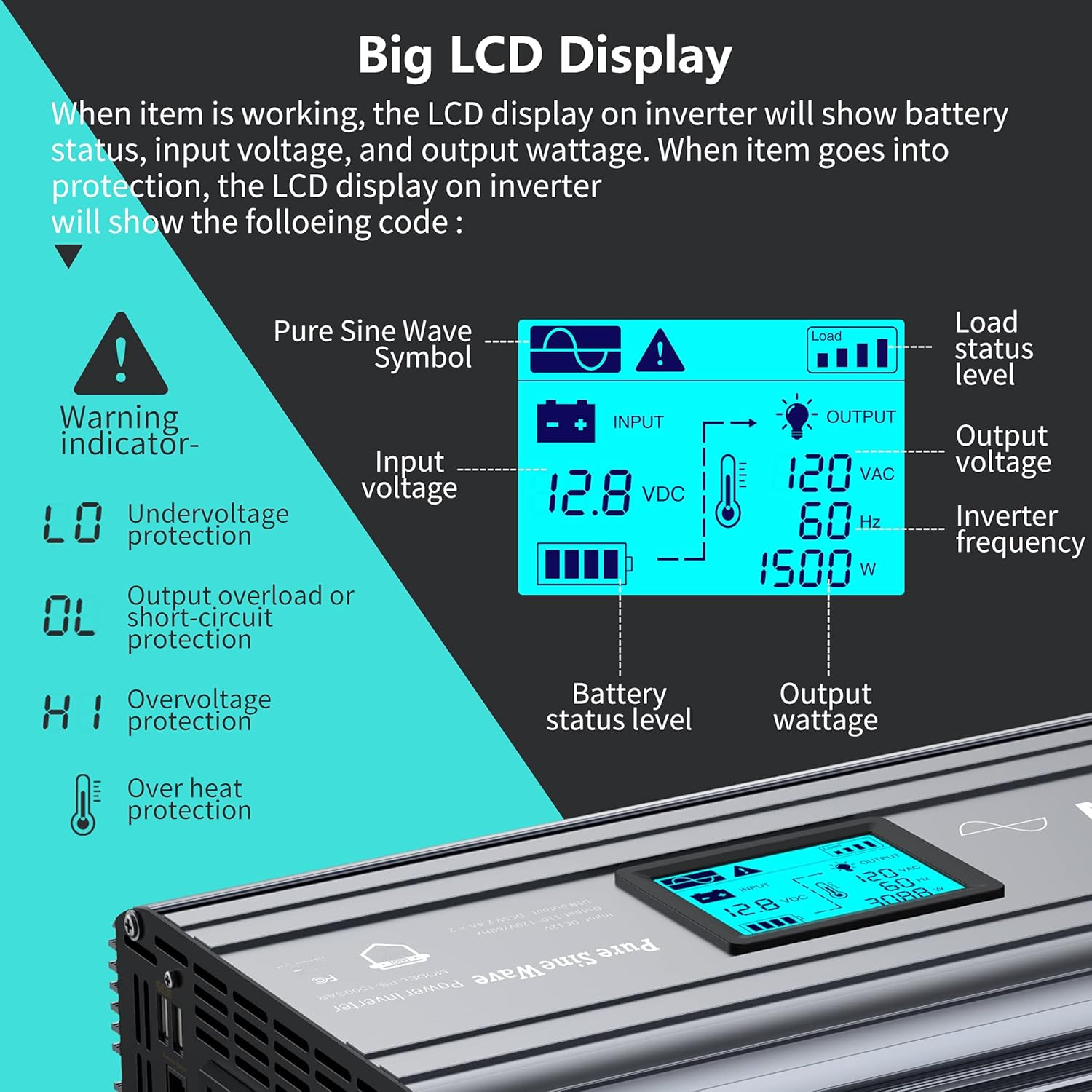
- The LCD display will illuminate, showing the input voltage, output voltage, frequency, and battery status.
7.2 Connecting AC Devices
- Plug your AC devices into the three AC outlets on the inverter.
- For USB charging, connect devices to the two 2.4A USB ports.
- Monitor the LCD display for real-time load wattage. Ensure the total wattage of connected devices does not exceed 1500 Watts.
7.3 Cooling Fan Operation
The intelligent cooling fan will activate automatically when the internal temperature reaches approximately 104°F (40°C) or when the load power exceeds 40% of the rated power (600W). This ensures optimal operating temperature and extends the inverter's lifespan.
8. Maintenance
- Regularly check all cable connections to ensure they remain tight and free from corrosion.
- Keep the inverter clean and free from dust and debris, especially around the cooling vents.
- Store the inverter in a cool, dry place when not in use.
- Ensure adequate ventilation around the inverter during operation to prevent overheating.
9. Troubleshooting
The LCD display provides warning indicators for various protection modes. Refer to the display for specific error codes:
- LO (Undervoltage Protection): The input voltage is too low (below 9.8VDC alarm, 9.5VDC shutdown). Recharge or replace the battery.
- OL (Output Overload or Short-circuit Protection): The connected load exceeds the inverter's capacity or there is a short circuit. Disconnect some appliances or check for short circuits.
- HI (Overvoltage Protection): The input voltage is too high (above 16VDC shutdown). Check the battery charging system.
- Over Heat Protection: The inverter's internal temperature is too high (around 149°F / 65°C). Allow the inverter to cool down, ensure proper ventilation, and reduce the load.
If the issue persists after addressing the indicated problem, contact customer support.
10. Warranty and Support
The GIANDEL Pure Sine Wave Power Inverter 1500W comes with an 18-month warranty from the date of purchase. This warranty covers manufacturing defects under normal use.
For technical assistance, warranty claims, or any questions regarding your product, please refer to the contact information provided in your purchase documentation or visit the official GIANDEL website.
GIANDEL products are covered by product liability insurance through AIG company, ensuring reliability and customer confidence.


