1. Important Safety Instructions
Please read all instructions carefully before operating the VIVOHOME Heat Press Machine. Retain this manual for future reference.
- Always connect the machine to a grounded electrical outlet.
- Do not operate the machine with a damaged cord or plug.
- Keep hands and body parts away from the heating platen during operation to prevent burns. The platen reaches high temperatures.
- Ensure the machine is placed on a stable, heat-resistant surface.
- Do not leave the machine unattended while it is powered on or operating.
- Unplug the machine from the power source when not in use or before cleaning.
- Keep children and pets away from the machine.
- Use the provided heat-resistant gloves when handling hot items or components.
- Do not immerse the machine or its electrical components in water or other liquids.
2. Product Overview
The VIVOHOME 6-in-1 Heat Press Machine is designed for transferring images onto various items such as T-shirts, mugs, hats, and plates. It features a 12x15 inch main platen with a 360-degree swing-away design for even heating and safe operation. The included mini heart-shaped heat press is ideal for smaller, intricate designs and hard-to-reach areas.

Figure 2.1: Overview of the VIVOHOME 6-in-1 Heat Press Machine and Mini Heart-Shaped Heat Press, including various attachments and accessories like gloves, spray bottle, and storage bag.
Key Features:
- 360-Degree Rotation: The swing-away design allows for safe placement of items and even pressure distribution.
- LCD Screen Display: Features a large digital display with silicone buttons for easy temperature and time settings, including a counting function.
- Double Heating Tube Design: Ensures more uniform heating across the platen, minimizing temperature differences between the center and edges.
- Switchable Expert Mode: Offers flexible temperature (284°F to 410°F) and time (10-999 seconds) settings beyond the default simple mode.
- Versatile Attachments: Includes platens for T-shirts, mugs, hats, and plates, along with a mini heat press for small items.
3. Package Contents
Verify that all components are present upon unpacking:
- 1 x Main 12x15 Inch Heat Press Machine
- 1 x Mini Heart-Shaped Heat Press Machine
- 1 x Hat Press Attachment
- 2 x Plate Press Attachments (various sizes)
- 1 x Mug Press Attachment
- 1 x Silicone Pad
- 1 x Cotton Pad
- 1 x Pair of Heat-Resistant Gloves
- 1 x Spray Bottle
- 1 x Storage Bag (for mini press)
- 1 x Power Cord
- 1 x User Manual (this document)
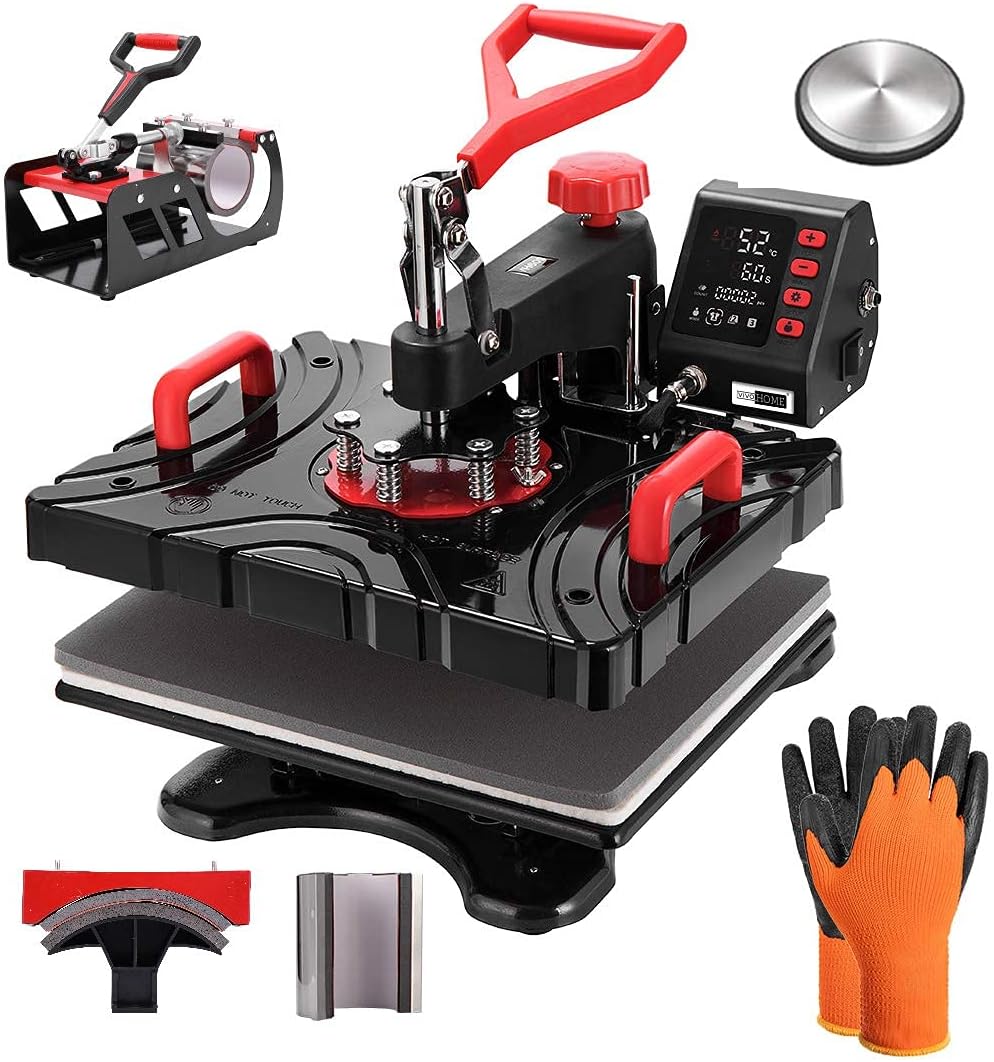
Figure 3.1: The main heat press unit shown with the mug press and hat press attachments, along with heat-resistant gloves.

Figure 3.2: The mini heart-shaped heat press machine, its base, a storage bag, spray bottle, and a small mat.
4. Setup
4.1 Main Heat Press Assembly
- Place the main heat press base on a sturdy, flat, and heat-resistant surface.
- Ensure adequate clearance around the machine for the swing-away function.
- Attach the desired platen (e.g., T-shirt platen, mug press, hat press, plate press) to the main unit according to the specific attachment instructions. Each attachment typically slides into place and is secured with screws or clamps.
- Connect the power cord to the machine and then to a grounded electrical outlet.

Figure 4.1: Illustration of the main heat press with different interchangeable platforms for cups, clothes, hats, and plates.
4.2 Pressure Adjustment
The pressure knob, usually located on top of the heating platen, allows you to adjust the downward pressure. Turn clockwise for more pressure and counter-clockwise for less. Test the pressure on a scrap item before applying to your final product.
5. Operating Instructions
5.1 Main Heat Press Operation
- Power On: Press the power button on the control panel.
- Set Temperature and Time:
- Simple Mode: The machine defaults to 4 preset temperature levels. Use the '+' and '-' buttons to select the desired temperature. The working time can be set between 10 to 120 seconds.
- Expert Mode: To enter expert mode, refer to the detailed instructions in the manual (usually a specific button combination or long press). In expert mode, temperature can be set anywhere between 284°F to 410°F and time between 10-999 seconds.
- Preheat: Allow the machine to reach the set temperature. The display will indicate when it's ready.
- Prepare Item: Place your item (e.g., T-shirt, mug) on the appropriate platen. Position your transfer material (e.g., vinyl, sublimation paper) onto the item.
- Press: Swing the heating platen over the item and lower the handle to apply pressure. The timer will begin counting down.
- Finish: Once the timer reaches zero, lift the handle and swing the heating platen away. Carefully remove the item using heat-resistant gloves.

Figure 5.1: Illustration demonstrating the improved heat insulation and uniform surface temperature of the VIVOHOME heat press compared to others.

Figure 5.2: Visual representation of the double heating tube design, highlighting its efficiency and even temperature distribution compared to older designs.
5.2 Mini Heart-Shaped Heat Press Operation
- Power On: Connect the mini heat press to a power outlet. Press the power button.
- Set Temperature and Time: Use the dedicated buttons on the control panel to adjust temperature and time settings. Refer to the specific instructions for the mini press for detailed button functions.
- Preheat: Allow the mini press to reach the desired temperature.
- Prepare Item: Place your small item (e.g., patch, small logo area) on a heat-resistant surface. Position your transfer material.
- Press: Gently press the heated platen of the mini press onto the transfer area. Apply even pressure for the set duration.
- Finish: Lift the mini press and carefully remove the item.

Figure 5.3: A user demonstrating the application of the mini heart-shaped heat press on a white garment, highlighting its compact size and ease of control.

Figure 5.4: Detailed view of the mini heat press's chromium electroplating heating platform, indicating its fast and safe working area of 3.5"x2.3".

Figure 5.5: The control panel of the mini heat press, showing buttons for On/Off, Set Time, and Set Temperature, with a digital value screen.
6. Maintenance
- Cleaning: After each use, allow the machine to cool completely. Wipe the heating platen with a soft, damp cloth. For stubborn residue, use a specialized heat press platen cleaner. Do not use abrasive cleaners or solvents.
- Storage: Store the machine in a dry, dust-free environment. Keep all attachments organized.
- Inspection: Regularly inspect the power cord for any signs of damage. Check all connections and moving parts for proper function.
7. Troubleshooting
Common Issues and Solutions:
- Machine Not Powering On:
- Check if the power cord is securely plugged into both the machine and the electrical outlet.
- Ensure the outlet is functional by testing it with another appliance.
- Check for tripped circuit breakers.
- Uneven Heat Distribution:
- Ensure the item is centered on the platen.
- Verify that the pressure is evenly applied across the platen. Adjust the pressure knob if necessary.
- Allow sufficient preheating time.
- Transfer Not Sticking/Peeling:
- Confirm that the temperature and time settings are appropriate for your specific transfer material and item. Refer to the transfer material manufacturer's recommendations.
- Increase pressure if needed.
- Ensure the item is clean and dry before pressing.
- Over-pressing/Burning:
- Reduce temperature or pressing time.
- Use a Teflon sheet or parchment paper to protect the item and platen.
8. Specifications
- Main Heat Press Platen Size: 12 x 15 inches
- Mini Heat Press Transfer Area: Approximately 3.5 x 2.3 inches
- Temperature Range (Main Press Expert Mode): 284°F - 410°F (140°C - 210°C)
- Time Range (Main Press Expert Mode): 10 - 999 seconds
- Rotation: 360-degree swing-away
- ASIN: B092M43DWP
- Date First Available: April 15, 2021
9. Warranty and Support
VIVOHOME products are designed for quality and reliability. For warranty information, technical support, or replacement parts, please contact VIVOHOME customer service through their official website or the retailer where the product was purchased.
You can visit the VIVOHOME Store for more information: VIVOHOME Store on Amazon


