
1. Safety Information
Read all instructions carefully before using the appliance. Keep this manual for future reference. Always follow basic safety precautions to reduce the risk of fire, electric shock, or injury.
Electrical Safety
- Ensure the refrigerator is connected to a properly grounded 240 Volt AC outlet.
- Do not use extension cords or ungrounded adapters.
- Never unplug the appliance by pulling the power cord. Always grasp the plug firmly.
General Safety
- This appliance is not intended for use by persons (including children) with reduced physical, sensory or mental capabilities, or lack of experience and knowledge, unless they have been given supervision or instruction concerning use of the appliance by a person responsible for their safety.
- Keep ventilation openings, in the appliance enclosure or in the built-in structure, clear of obstruction.
- Do not damage the refrigerant circuit.
- Do not use electrical appliances inside the food storage compartments of the appliance, unless they are of the type recommended by the manufacturer.
- Do not store explosive substances such as aerosol cans with a flammable propellant in this appliance.
2. Setup and Installation
Unpacking
Carefully remove all packaging materials, including tape and protective films. Dispose of packaging responsibly. Inspect the refrigerator for any shipping damage.
Placement
Place the refrigerator on a firm, level floor. Ensure there is adequate space around the appliance for proper ventilation (at least 10 cm on sides and back, 30 cm above). Avoid direct sunlight or heat sources.
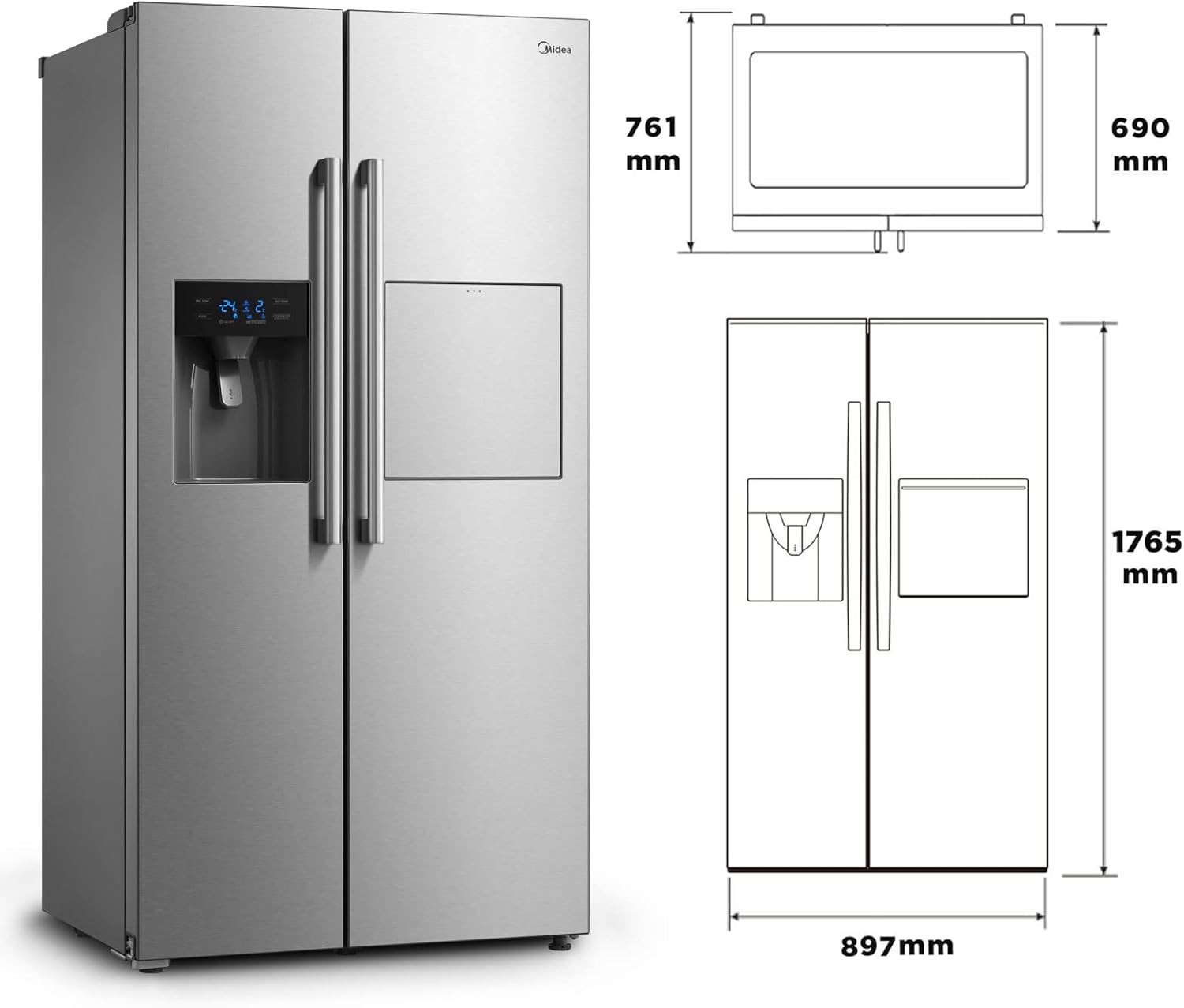
Image: Front view of the Midea KS-EIX 6.23 Side-by-Side Refrigerator with key dimensions (761mm depth, 690mm width, 1765mm height, 897mm total width). This image illustrates the overall size and design of the appliance.
Electrical Connection
Plug the refrigerator into a dedicated, grounded 240 Volt AC outlet. Do not share the outlet with other appliances.
Water Connection (for Dispenser)
For the water and ice dispenser to function, connect the refrigerator to a fixed water supply. Use the provided water line and follow local plumbing codes. Ensure all connections are secure and leak-free.
Initial Cleaning
Before first use, clean the interior of the refrigerator and freezer compartments with a mild detergent and warm water. Wipe dry thoroughly.
3. Operating Instructions
Control Panel
The refrigerator features a dual control system, allowing independent temperature adjustment for the refrigerator and freezer compartments. The digital display on the door provides current temperature readings and dispenser status.
Temperature Settings
- Refrigerator Compartment: Use the 'REF TEMP' button to adjust the temperature. Recommended setting is between 2°C and 8°C.
- Freezer Compartment: Use the 'FRZ TEMP' button to adjust the temperature. Recommended setting is between -16°C and -24°C.
- Allow several hours for the appliance to reach desired temperatures after initial setup or adjustment.

Image: Interior view of the Midea Side-by-Side Refrigerator with both doors open. The freezer compartment (left) shows a capacity of 182 liters, and the refrigerator compartment (right) shows a capacity of 334 liters, highlighting the internal storage layout.
Water and Ice Dispenser
The 3-in-1 dispenser provides chilled water, crushed ice, and ice cubes. Ensure the water supply is connected and the ice maker is activated.
- Water: Press the 'WATER' button and place a glass under the dispenser nozzle.
- Crushed Ice: Press the 'CRUSHED ICE' button and place a glass under the dispenser.
- Ice Cubes: Press the 'ICE CUBES' button and place a glass under the dispenser.
- Use the 'LOCK/UNLOCK' button to prevent accidental dispensing.
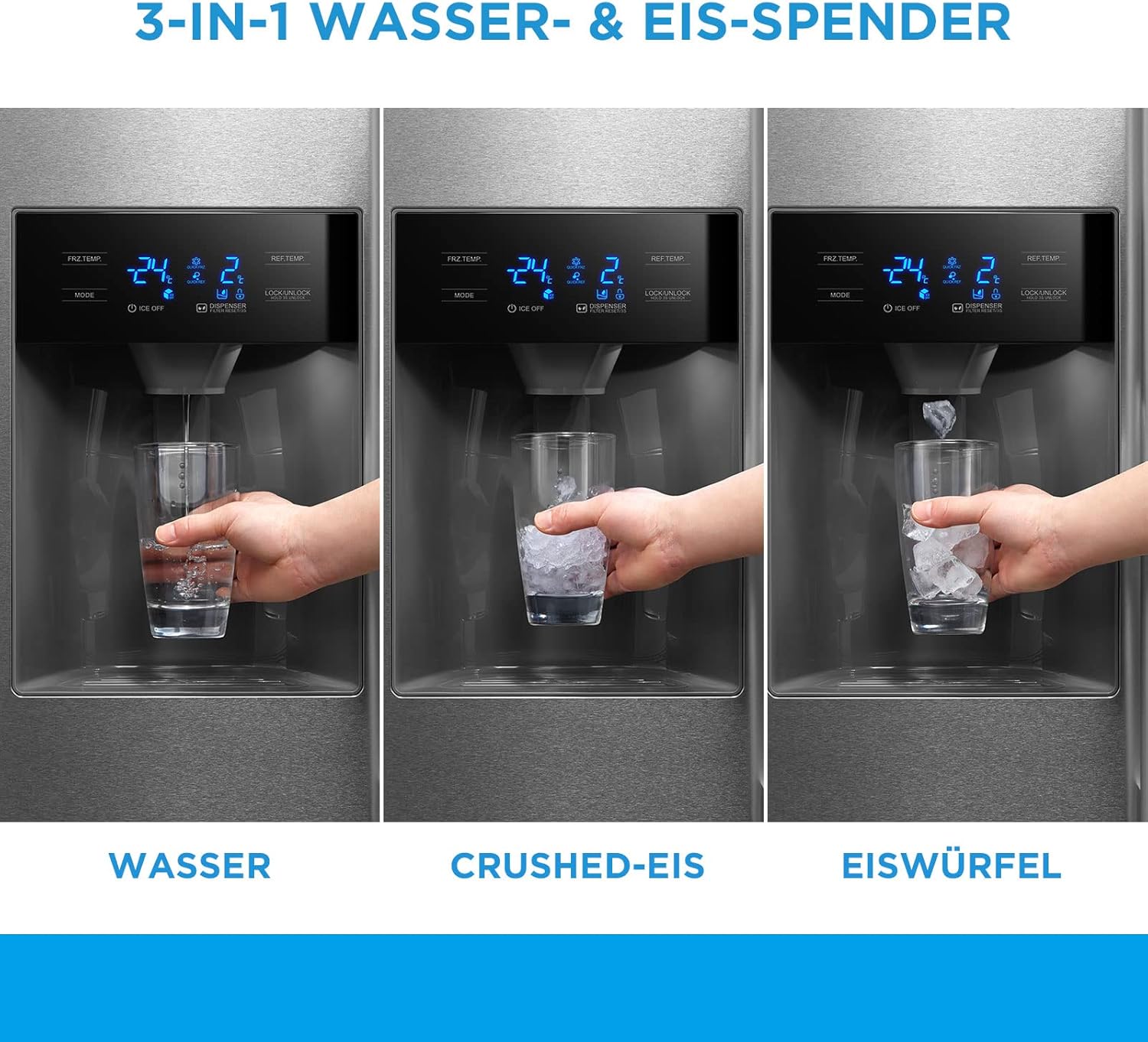
Image: Close-up view of the Midea refrigerator's door-mounted dispenser, illustrating the three functions: dispensing water, crushed ice, and ice cubes, with corresponding labels and a hand holding a glass for each action.
Bar Compartment
The integrated bar compartment allows quick access to beverages without opening the main refrigerator door, helping to maintain internal temperature and save energy.

Image: A close-up of the Midea refrigerator's home bar compartment, showing a small door that opens to reveal bottles and a glass, allowing access to drinks without fully opening the main refrigerator door.
No Frost and Inverter Technology
- The No Frost system prevents ice buildup in both the freezer and refrigerator compartments, eliminating the need for manual defrosting.
- The Inverter compressor technology provides efficient and quiet cooling, adjusting its speed to maintain stable temperatures and reduce energy consumption.

Image: Interior view of the Midea Side-by-Side Refrigerator with doors open, showing various shelves and storage boxes. The image also highlights the energy efficiency class E and an annual consumption of 318 kWh/year.
4. Maintenance
Cleaning the Interior
Clean the interior regularly with a solution of mild detergent and warm water. Avoid abrasive cleaners or solvents. Remove shelves and drawers for thorough cleaning. Ensure the appliance is unplugged before cleaning.
Cleaning the Exterior
Wipe the exterior surfaces with a soft cloth and mild detergent. For the matte finish, avoid harsh chemicals that could damage the surface. Clean door seals regularly to ensure a tight seal.
Water Filter Replacement
The water dispenser system includes a filter that should be replaced periodically (typically every 6 months or as indicated by the filter indicator, if present). Refer to the filter replacement instructions provided with the filter cartridge.
Automatic Defrost System
This refrigerator features an automatic defrost system, so manual defrosting is not required. Ensure the drain hole at the back of the refrigerator compartment is clear to allow defrost water to escape.
5. Troubleshooting
Before contacting service, check the following common issues:
| Problem | Possible Cause | Solution |
|---|---|---|
| Refrigerator not cooling | Power cord unplugged; temperature setting too high; door not closed properly; poor ventilation. | Check power connection; adjust temperature; ensure doors are sealed; clear obstructions around appliance. |
| Water dispenser not working | Water supply turned off; water filter clogged; dispenser locked. | Check water supply valve; replace water filter; unlock dispenser. |
| Excessive noise | Appliance not level; objects vibrating against the unit; normal compressor operation. | Adjust leveling feet; remove vibrating objects; some operational sounds are normal for inverter compressors. |
| Water leakage | Clogged defrost drain; loose water line connection. | Clear defrost drain; tighten water line connections. |
6. Specifications
| Feature | Specification |
|---|---|
| Brand | Midea |
| Model Number | KS-EIX 6.23 |
| Configuration | Side-by-Side |
| Total Capacity | 516 Liters |
| Installation Type | Freestanding |
| Number of Doors | 2 |
| Defrost System | Automatic (No Frost) |
| Voltage | 240 Volts |
| Finish Type | Matte |
| Cooling Method | Compressor (Inverter) |
| Adjustable Temperature Control | Yes |
| Item Weight | 100 Kilograms |
| Water & Ice Dispenser | Yes, with fixed water connection |
| Bar Compartment | Yes |
7. Warranty Information
Midea appliances come with a standard manufacturer's warranty. Please refer to the warranty card included with your purchase for specific terms, conditions, and duration. Keep your proof of purchase for warranty claims.
8. Customer Support
For technical assistance, spare parts, or service requests, please contact Midea customer support. You can find contact details on the Midea official website or in your warranty documentation.
- Midea Official Website: www.midea.com
- Customer Service: Refer to your regional Midea website for local contact numbers.


