1. Introduction
The Posunitech MG01 Finger Trigger Glove is an ergonomic accessory designed to improve the efficiency and comfort of barcode scanning operations. This glove allows users to wear a compatible barcode scanner on their hand, enabling hands-free scanning and reducing fatigue during prolonged use. Its durable and dust-proof design ensures reliable performance in various work environments.
2. Safety Information
- Ensure the glove is properly fitted to avoid discomfort or interference with scanning operations.
- Do not attempt to modify the glove or its attachment mechanism.
- Keep the glove clean and dry. Avoid exposure to extreme temperatures or corrosive substances.
- This product is a glove only. The barcode scanner (e.g., NS02) must be purchased separately and handled according to its own safety guidelines.
3. Package Contents
Please verify that your package contains the following item:
- 1 x Posunitech MG01 Finger Trigger Glove (Right Hand)
Note: The barcode scanner is not included with this glove and must be acquired separately.
4. Product Overview
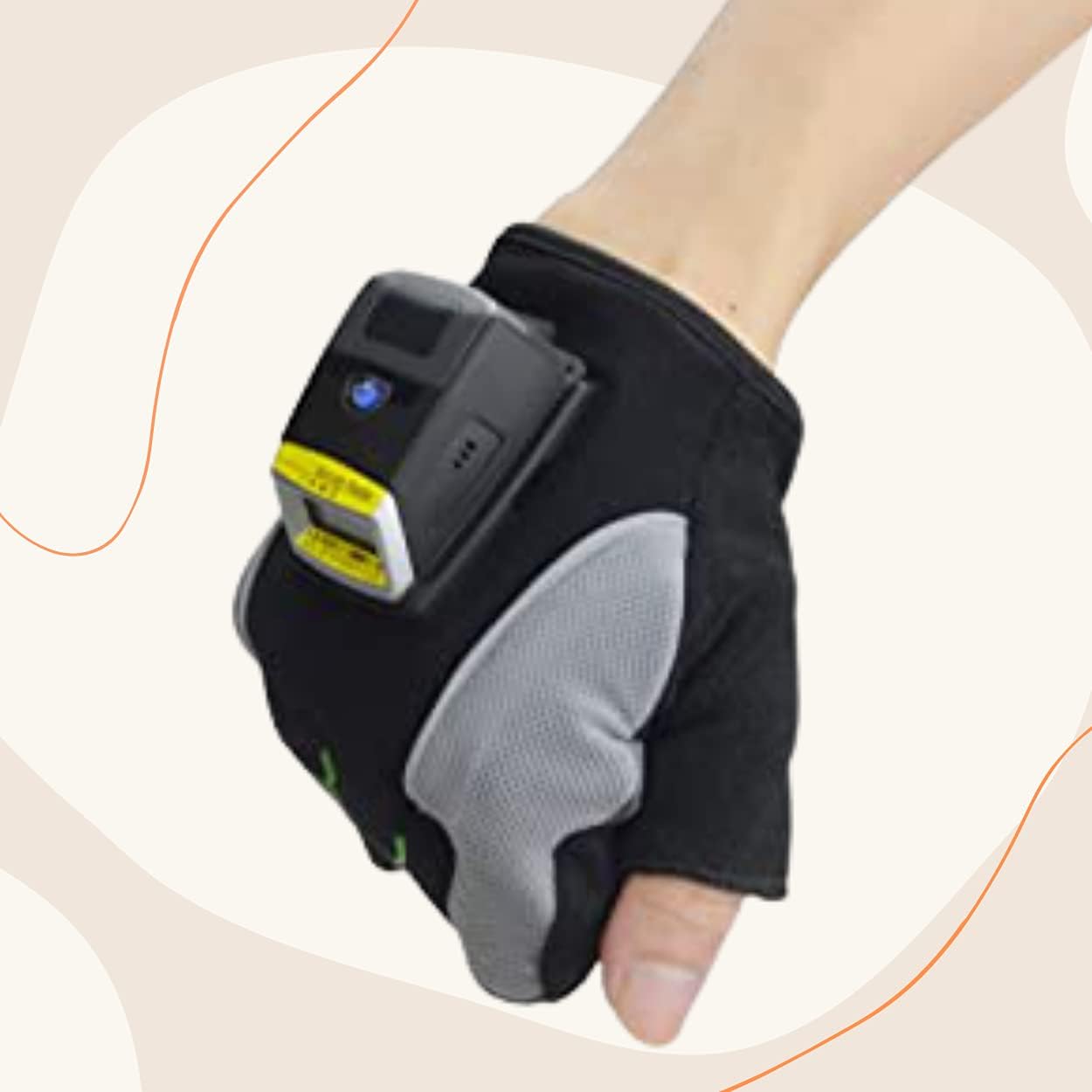
The MG01 glove is designed for seamless integration with compatible barcode scanners, providing a secure and comfortable fit for hands-free operation.


5. Setup
Follow these steps to properly set up your MG01 Finger Trigger Glove with a compatible barcode scanner:
- Wear the Glove: Slide your right hand into the glove, ensuring a snug and comfortable fit. Adjust the wrist strap if present for security.
- Attach the Scanner: Align your compatible barcode scanner (e.g., Posunitech NS02) with the designated mounting area on the back of the glove. Secure the scanner firmly using its integrated attachment mechanism. Refer to your scanner's manual for specific attachment instructions.
- Verify Connection: Ensure the scanner is securely attached and does not wobble. A stable connection is crucial for reliable operation.
6. Operating Instructions
Once the barcode scanner is securely attached to the MG01 glove, you can begin hands-free scanning.

- Hands-Free Scanning: The glove positions the scanner conveniently on the back of your hand, allowing you to pick up, move, and scan items without needing to put down or pick up a separate handheld scanner.
- Trigger Mechanism: Utilize the scanner's integrated trigger or button, typically accessible by your thumb or index finger, to activate the scan.
- Data Transfer: Data scanned by the attached barcode reader will be transferred to your connected device (Laptop, Desktop, etc.) via the scanner's wireless or USB connection. Data can be stored internally by the scanner if out of wireless range and uploaded later.
- Enhanced Efficiency: The ergonomic design and hands-free capability significantly improve scanning speed and accuracy, reducing common picking errors and saving time in inventory management and other tasks.
7. Connectivity (Scanner Dependent)
The MG01 glove itself does not have connectivity features. It facilitates the use of a barcode scanner that supports various connectivity modes:
- HID Mode: Human Interface Device mode, often used for direct data input into applications without requiring special drivers.
- SPP Mode: Serial Port Profile mode, which emulates a serial port connection over Bluetooth, requiring software to interpret the data.
- USB Mode: Direct connection via USB cable for data transfer and charging (if applicable to the scanner).
Compatible with Android, iOS, and Windows operating systems.
8. Maintenance
To ensure the longevity and optimal performance of your MG01 Finger Trigger Glove, follow these maintenance guidelines:
- Cleaning: Wipe the glove with a damp cloth and mild soap if necessary. Do not use harsh chemicals or abrasive cleaners. Allow to air dry completely before re-use.
- Storage: Store the glove in a cool, dry place away from direct sunlight and extreme temperatures when not in use.
- Inspection: Periodically inspect the glove for any signs of wear, tear, or damage to the material or stitching.
- Dust-Proof Feature: The glove is designed to be dust-proof, but regular cleaning will help maintain its appearance and hygiene.
9. Troubleshooting
If you encounter issues while using the MG01 Finger Trigger Glove, consider the following:
- Glove feels uncomfortable: Ensure the glove is the correct size and is worn properly. Adjust the wrist strap for a secure but not overly tight fit.
- Scanner not stable on glove: Verify that the scanner is correctly and firmly attached to the mounting point on the glove. Refer to the scanner's manual for proper attachment.
- Scanning issues: If you experience problems with scanning, the issue is likely with the barcode scanner itself or its connection to your device. Refer to the scanner's user manual for troubleshooting connectivity, power, or scanning performance.
For further assistance, please contact Posunitech customer support.
10. Specifications
| Feature | Detail |
|---|---|
| Model | MG01 |
| Brand | Posunitech |
| Item Weight | 2.39 ounces |
| Package Dimensions | 7.52 x 4.49 x 1.14 inches |
| Compatible Devices | Barcode Scanners (e.g., NS02) |
| Material | Premium Leather / Microfiber |
| Country of Origin | China |
| UPC | 791328225687 |
11. Warranty and Support
For information regarding product warranty, please refer to the documentation provided with your purchase or contact Posunitech customer service directly. If you encounter any issues or have questions about your MG01 Finger Trigger Glove, please do not hesitate to contact us. Our support team is available to assist you.
Manufacturer: POSUNITECH
Contact: Please refer to the official Posunitech website or your purchase platform for current contact information.


