
1. Introduction
Thank you for choosing the UMAY LONTEK Treadmill Model 502. This manual provides essential information for the safe assembly, operation, and maintenance of your new fitness equipment. Please read this manual thoroughly before using the treadmill to ensure proper function and to prevent injury.

Image 1: The UMAY LONTEK Treadmill Model 502, shown in both its operational and folded storage configurations. This illustrates the compact design for space-saving.
2. Important Safety Instructions
To reduce the risk of serious injury, read all instructions before using the UMAY LONTEK Treadmill. Keep this manual for future reference.
- Consult your physician before starting any exercise program.
- Keep children and pets away from the treadmill during operation.
- Place the treadmill on a flat, stable surface with adequate clearance around it.
- Wear appropriate exercise clothing and athletic shoes.
- Use the safety key at all times. In case of emergency, the safety key will stop the treadmill.
- Do not operate the treadmill if it has a damaged cord or plug, or if it is not working properly.
- Do not attempt to service the treadmill yourself. Contact customer support for assistance.
- Maximum user weight capacity is 100 kg (220 lbs).
- The treadmill has a fixed incline of 5%, designed to protect your knees and reduce joint pressure.
3. Setup and Assembly
The UMAY LONTEK Treadmill Model 502 is designed for minimal assembly. Follow these steps to prepare your treadmill for use:
- Unpacking: Carefully remove all components from the packaging. Ensure all parts listed in the packing list are present. The included components are a safety key, user manual, and tool kit.
- Placement: Choose a suitable location with a stable, level floor. Ensure there is at least 2 meters (6.5 feet) of clear space behind the treadmill and 0.5 meters (1.6 feet) on each side.
- Unfolding:
- Gently lift the running deck from its folded position.
- Lower the running deck until it locks securely into place.
- Ensure the uprights are fully extended and secured.
- Securing Components: Tighten any pre-installed screws or bolts that may have loosened during shipping. The included tool kit contains necessary wrenches.
- Power Connection: Plug the power cord into a grounded electrical outlet.

Image 2: Illustration of the treadmill's folding mechanism, demonstrating how to transition it from an upright storage position to an operational state. This highlights its space-saving design.

Image 3: The treadmill features integrated wheels, allowing for easy movement and convenient storage in small spaces (less than 0.5 m²).
4. Operating Instructions
4.1 Control Panel Overview
The treadmill features an LCD display and control buttons to manage your workout. The display shows key metrics such as Time, Speed, Distance, Heart Rate, and Calories burned.
4.2 Starting a Workout
- Attach Safety Key: Clip the safety key to your clothing and insert the other end into the designated slot on the control panel. The treadmill will not operate without the safety key.
- Power On: Press the START button. The treadmill will begin at a low speed.
- Adjust Speed: Use the '+' and '-' buttons to increase or decrease the speed. The speed range is 0.8 to 10 km/h.
- Heart Rate Monitoring: Grip the heart rate sensors on the handlebars to monitor your pulse.
- Stopping: Press the STOP button to gradually slow down and stop the treadmill. Pulling the safety key will immediately stop the treadmill.
4.3 Pre-set Programs
The treadmill includes 12 pre-set programs designed for various fitness goals, such as improving physical condition, weight loss, or rehabilitation. Refer to the program chart (if available in the physical manual) for details on each program's intensity and duration.
4.4 Bluetooth and APP Connectivity
Connect your smart device via Bluetooth to the treadmill and use the dedicated APP (e.g., SPAX) for an enhanced workout experience. The APP allows you to:
- Track your workout data in detail.
- Access various exercise classes.
- Compare results with other users.
- Share your fitness progress.

Image 4: The treadmill's compatibility with the SPAX app, offering virtual training courses and enhanced workout tracking via Bluetooth connectivity.
4.5 Speed Recommendations
Adjust the treadmill speed according to your fitness level and goals:
- 1-4 km/h: Walking (e.g., after dinner walk, rehabilitation training).
- 5-7 km/h: Jogging, physical training.
- 8-10 km/h: Fast running, calorie burning.

Image 5: A visual guide illustrating recommended speed settings for various exercise intensities, from walking to fast running.
4.6 Quiet Operation
The treadmill is designed with advanced motor technology to ensure quiet operation. The noise level is typically below 55 dB, which is comparable to a normal conversation. This allows for exercise without disturbing others.

Image 6: Illustration depicting the treadmill's quiet operation, maintaining a noise level below 55 dB, suitable for use in shared living spaces without causing disturbance.
5. Maintenance
Regular maintenance ensures the longevity and optimal performance of your treadmill.
5.1 Automatic Lubrication System
The UMAY LONTEK Treadmill features an automatic lubrication port for convenient maintenance. This system simplifies the lubrication process, which is crucial for the running belt's lifespan and smooth operation.
- Locate the automatic lubrication port on the side of the running deck.
- Pour the appropriate amount of lubricating oil (provided with the treadmill) into the port.
- The system will distribute the lubricant evenly, extending the service life of the treadmill.
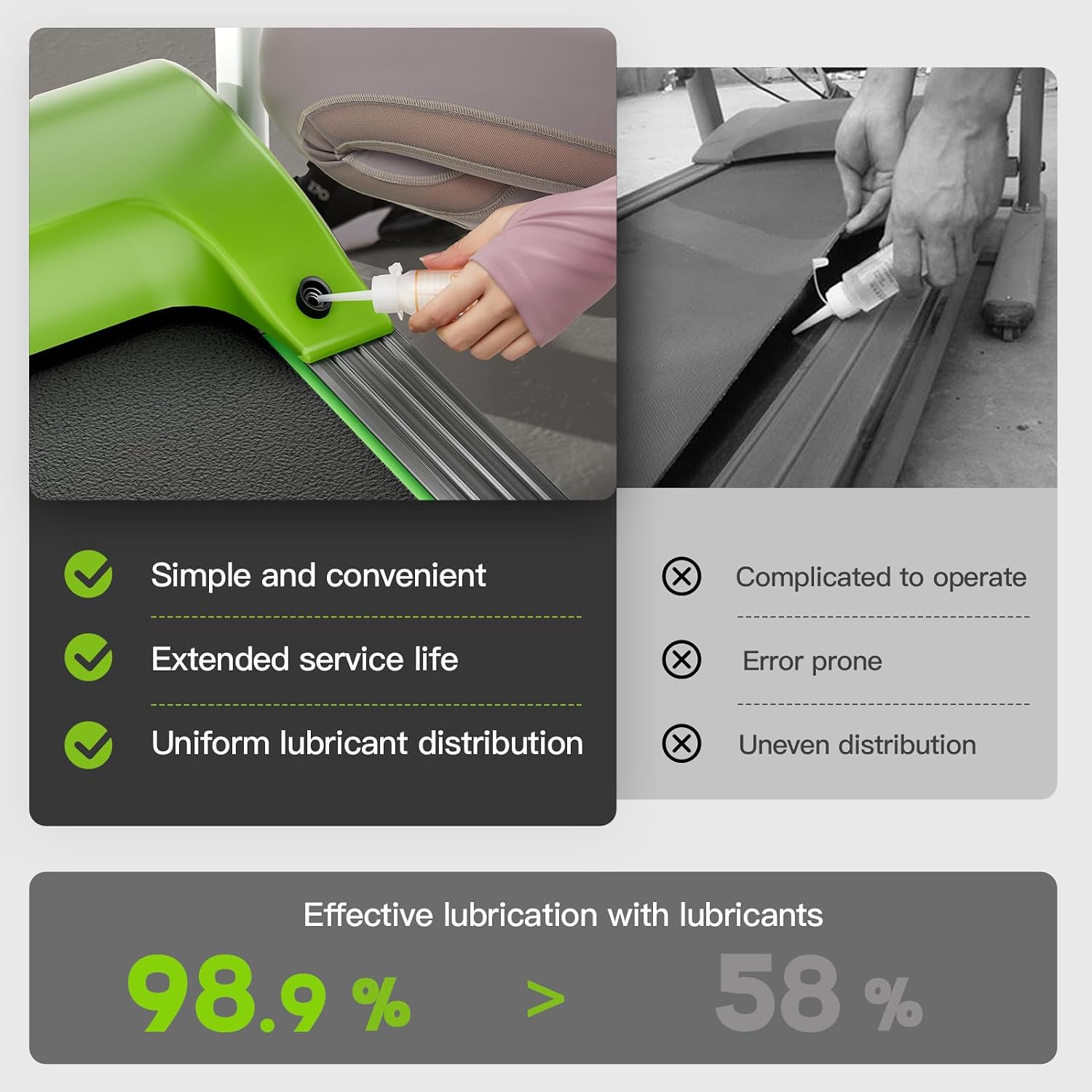
Image 7: Detailed view of the automatic lubrication port, demonstrating the simple process of adding lubricant to maintain the treadmill's running belt.
5.2 Cleaning
- Wipe down the treadmill surfaces with a damp cloth after each use to remove sweat and dust.
- Do not use abrasive cleaners or solvents.
- Regularly vacuum underneath the treadmill to prevent dust buildup.
5.3 Storage
To store the treadmill, fold the running deck upwards until it locks into the vertical position. The integrated wheels allow for easy relocation. Store in a dry, cool place away from direct sunlight.
6. Troubleshooting
If you encounter issues with your UMAY LONTEK Treadmill, refer to the following common problems and solutions:
- Treadmill does not power on:
- Ensure the power cord is securely plugged into a grounded outlet.
- Check if the safety key is correctly inserted into its slot.
- Verify the power switch (if present) is in the 'ON' position.
- Running belt slips or hesitates:
- The running belt may require lubrication. Follow the automatic lubrication instructions in Section 5.1.
- The belt tension may need adjustment. Refer to the full manual or contact customer support.
- Unusual noise during operation:
- Ensure all bolts and screws are tightened.
- Check for any foreign objects under the running belt.
- Lubricate the running belt if necessary.
- If the noise persists, contact customer support.
- Heart rate monitor not working:
- Ensure your hands are clean and firmly gripping both sensors.
- Moisture on hands can improve contact.
7. Specifications
| Brand | UMAY |
| Model Number | 502 |
| Material | Alloy Steel |
| Unfolded Dimensions (L x W x H) | 139.5 cm x 59.9 cm x 118 cm (54.9 x 23.6 x 46.5 inches) |
| Folded Dimensions (L x W x H) | 137.5 cm x 63 cm x 25.5 cm (54.1 x 24.8 x 10 inches) |
| Item Weight | 30 kg (66 lbs) |
| Maximum Weight Capacity | 100 kg (220 lbs) |
| Speed Range | 0.8 - 10 km/h (0.5 - 6.2 mph) |
| Motor Horsepower | 1.5 Kilowatt |
| Display Type | LCD (4.0 inch screen size) |
| Number of Programs | 12 |
| Fixed Incline | 5% |
| Noise Level | Below 55 dB |
| Special Features | Shock absorber, Integrated wheels, Preloaded training, Automatic lubrication, Heart rate monitor, Bluetooth, APP connectivity |
| Included Components | Safety key, User manual, Tool kit |

Image 8: Overview of key product specifications, including dimensions, weight, and speed range, alongside a display of the treadmill in various available colors.
8. Warranty and Support
For information regarding warranty coverage, please refer to the warranty card included with your product or visit the official UMAY website. If you require technical assistance, replacement parts, or have any questions not covered in this manual, please contact UMAY customer support.
Customer Support Contact: Please refer to the contact information provided on the product packaging or the official UMAY website.