1. Introduction
This manual provides essential information for the proper setup, operation, and maintenance of your TOSHIBA TS312 Sound Bar. Please read these instructions thoroughly before using the product to ensure optimal performance and safety.

Image 1: The TOSHIBA TS312 Sound Bar and its accompanying wireless subwoofer.
2. Setup
2.1 Unpacking
Carefully remove all components from the packaging. Ensure all items listed below are present:
- TOSHIBA TS312 Sound Bar
- Wireless Subwoofer
- Power Adapter/Cables
- Remote Control (with batteries)
- User Manual (this document)
2.2 Placement
Place the sound bar on a stable, flat surface directly in front of your television. Ensure there are no obstructions blocking the front of the sound bar. The wireless subwoofer can be placed anywhere in the room, preferably near a power outlet, for optimal bass performance. Maintain a minimum distance of 1 meter (3 feet) between the sound bar and the subwoofer for best wireless connection.
2.3 Connections
Before making any connections, ensure all devices are powered off.
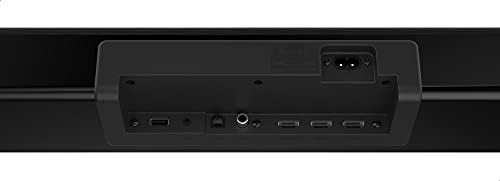
Image 2: Rear panel connections of the TOSHIBA TS312 Sound Bar, showing USB, optical, HDMI, and power inputs.
2.3.1 Power Connection
- Connect the power cable to the AC IN port on the sound bar.
- Connect the power cable to the AC IN port on the subwoofer.
- Plug both power cables into a wall outlet.
2.3.2 Audio Connections
Choose one of the following methods to connect your audio source:
- HDMI (ARC): Connect an HDMI cable from the HDMI ARC port on the sound bar to the HDMI ARC port on your TV. This allows audio to be sent from the TV to the sound bar and enables TV remote control of the sound bar's volume.
- Optical: Connect an optical cable from the OPTICAL IN port on the sound bar to the optical output port on your TV or other audio device.
- USB: Insert a USB drive into the USB port for direct audio playback.
3. Operating Instructions
3.1 Basic Operation

Image 3: Top-panel control buttons on the TOSHIBA TS312 Sound Bar, including power, input, and volume controls.
- Power On/Off: Press the Power button on the sound bar or remote control.
- Volume Control: Use the Volume + and Volume - buttons on the sound bar or remote control.
- Input Selection: Press the Input button on the sound bar or remote control to cycle through available input sources (HDMI, Optical, Bluetooth, USB).
3.2 Bluetooth Pairing
- Turn on the sound bar and select the Bluetooth input mode. The indicator light will flash.
- Enable Bluetooth on your mobile device (smartphone, tablet, etc.).
- Search for 'TOSHIBA TS312' in the list of available devices and select it to pair.
- Once paired, the indicator light on the sound bar will stop flashing and remain solid. You can now play audio from your device through the sound bar.
3.3 USB Playback
- Insert a USB flash drive containing audio files into the USB port on the sound bar.
- Select the USB input mode using the Input button.
- The sound bar will automatically begin playing compatible audio files from the USB drive. Use the remote control for playback controls (play/pause, skip track).
4. Maintenance
4.1 Cleaning
To clean the sound bar and subwoofer, use a soft, dry cloth. Do not use liquid cleaners, abrasive cleaners, or solvents, as these can damage the finish. Ensure the device is unplugged before cleaning.
4.2 Storage
If storing the unit for an extended period, unplug it from the power outlet and store it in a cool, dry place away from direct sunlight and extreme temperatures. It is recommended to keep the original packaging for storage.
5. Troubleshooting
Refer to the table below for common issues and their solutions.
| Problem | Possible Cause | Solution |
|---|---|---|
| No power | Power cable not connected; Power outlet not working | Ensure power cables are securely connected to the sound bar, subwoofer, and a working wall outlet. |
| No sound | Incorrect input selected; Volume too low; Audio cable not connected properly | Select the correct input source. Increase the volume. Check all audio cable connections. |
| Bluetooth pairing fails | Sound bar not in pairing mode; Device too far; Interference | Ensure sound bar is in Bluetooth pairing mode. Move device closer to sound bar. Turn off other Bluetooth devices. |
| Subwoofer not connecting | Subwoofer not powered on; Interference | Ensure subwoofer is plugged in and powered on. Move subwoofer closer to the sound bar. |
6. Specifications
Key technical specifications for the TOSHIBA TS312 Sound Bar:
| Feature | Specification |
|---|---|
| Brand Name | TOSHIBA |
| Model Number | TS312 |
| Speaker Maximum Output Power | 300 Watts |
| Frequency Response | 20 KHz |
| Connectivity Technology | Bluetooth, USB |
| Audio Output Mode | Surround |
| Mounting Type | Tabletop |
| Speaker Type | Soundbar |
| Special Features | Bluetooth |
| Recommended Uses For Product | For Televisions, For Smartphones or Tablets, For Computers, For Gaming Consoles |
| Package Dimensions | 115 x 35 x 14 cm |
| Item Weight | 11 kg |
7. Warranty and Support
For warranty information and customer support, please refer to the warranty card included with your product or visit the official TOSHIBA website. Keep your proof of purchase for any warranty claims.


