
Important Safety Information
This flotation vest is specifically designed for infants weighing 9-25 lbs (4-12 kg). Adherence to these safety guidelines is crucial for the user's well-being.
WARNING: This device is not a substitute for adult supervision. Always keep children within arm's reach when in or near water. Drowning can occur quickly and silently.
CAUTION: Ensure the vest is properly fitted and all buckles are securely fastened before use. An improperly fitted vest may not provide adequate flotation or head support. Regularly inspect the vest for damage or wear. Discontinue use immediately if any damage is found.
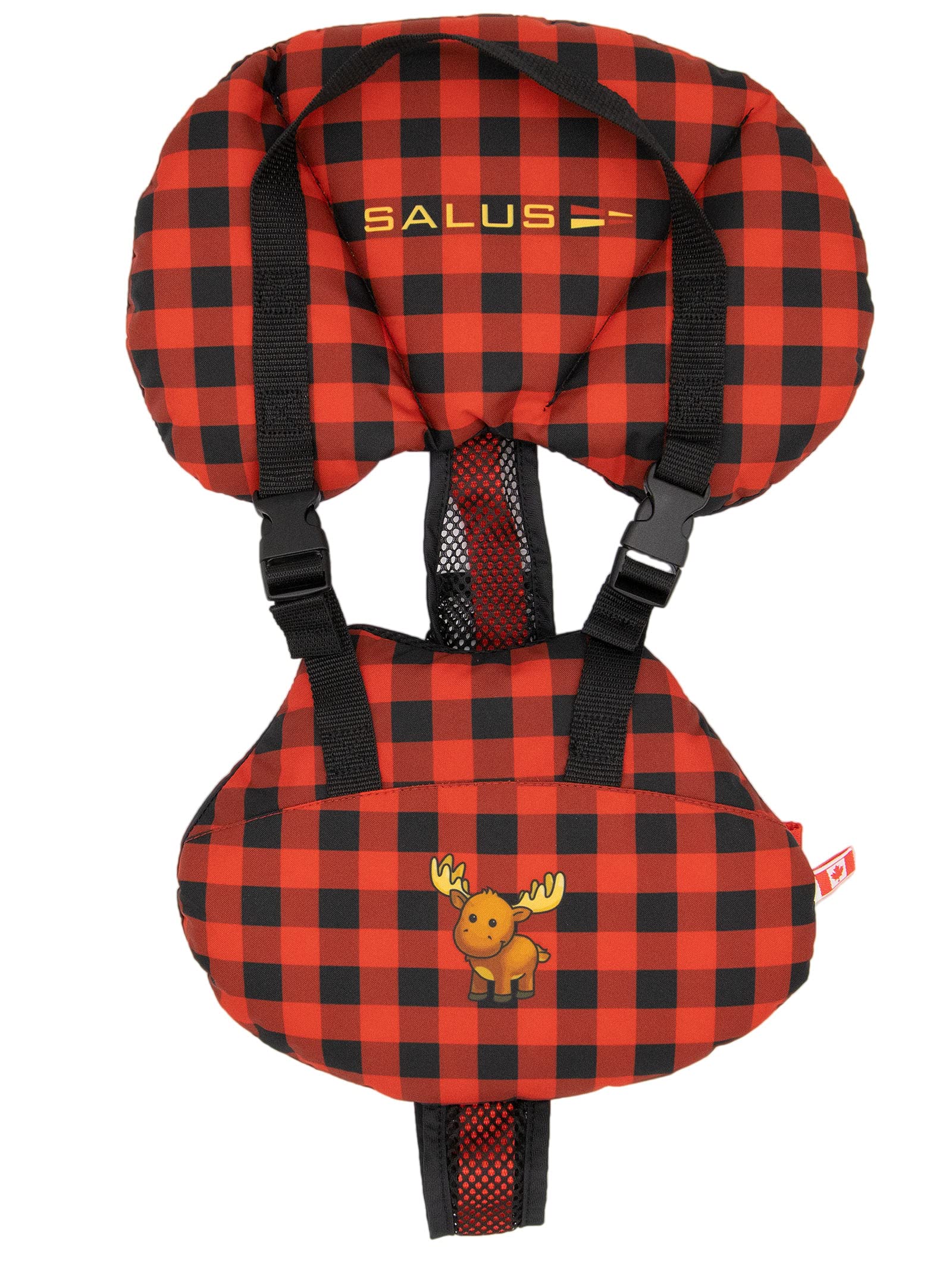
Image: Rear view of the Salus Marine Bijoux Floatation Vest, highlighting the mesh harness, adjustable straps, and the product label. The label clearly states 'BABY FLOTATION VEST BIJOUX CN-440' and 'Size: To Fit: 4-12 KG/9-25LBS', along with important safety notices in English and French.
Product Overview
The Salus Marine Bijoux Floatation Vest, model CN-440, is engineered to provide safety and comfort for infants weighing between 9 and 25 lbs (4-12 kg). Its design incorporates features specifically tailored for infant use in aquatic environments.
- Face-Up Design: The vest's front design is intended to assist in turning an infant face-up from a face-forward position in the water, enhancing safety.
- Head Support Collar: A supportive collar is integrated to cradle the infant's head, providing stability when lifted by the vest's strap or while floating.
- Comfortable Harness: Features a breathable mesh harness and a short front design to maximize comfort for the infant, whether sitting upright, lying down, or positioned in a baby carrier.
- Adjustable Fit: Equipped with multiple adjustable straps and secure buckle closures to ensure a snug and customized fit for various infant sizes within the specified weight range.
- Durable Materials: Constructed from robust polyester for the outer shell and a Dry-Lex Aerospacer lining for improved breathability and quick-drying properties.
Fitting Instructions
Proper fitting of the flotation vest is critical for its effectiveness and the infant's safety. Follow these steps carefully:
- Prepare the Vest: Unfasten all buckles and loosen all adjustable straps on the vest to their maximum length.
- Position the Infant: Gently place the infant into the vest. Ensure their arms pass through the armholes and the vest is centered on their body. The head support collar should be positioned comfortably behind the infant's head.
- Fasten Buckles: Securely fasten all buckles. Listen for a distinct click to confirm they are properly engaged.
- Adjust Straps: Systematically tighten each adjustable strap. Start with the lower straps and work upwards. The vest should fit snugly around the infant's body without causing discomfort or restricting movement.
- Check Fit: To verify the fit, gently lift the vest by the shoulders. The vest should not ride up to the infant's ears. There should be no excessive slack, and the vest should remain securely in place. The collar should provide head support without obstructing the infant's vision or breathing.
Always test the vest's fit and the infant's comfort in a controlled, shallow water environment under close adult supervision before extended use.
Usage Guidelines
- Always ensure the infant is wearing the vest correctly and all buckles are securely fastened before entering any body of water.
- Never leave an infant unattended, even for a moment, while they are wearing the flotation vest. Constant, direct adult supervision is mandatory.
- The vest is designed to aid in flotation and to help turn the infant face-up; however, it is not a guarantee against drowning. It is a buoyancy aid, not a life preserver.
- Familiarize the infant with the vest in a calm, shallow water environment under close supervision to ensure comfort and proper function.
- Avoid using the vest if it shows any signs of wear, tear, punctures, or other damage that could compromise its integrity.
Maintenance and Care
Proper maintenance extends the life of your flotation vest and ensures its continued effectiveness.
- Cleaning: After each use, especially after exposure to salt water or chlorinated water, rinse the vest thoroughly with fresh, cool water.
- Drying: Hang the vest to air dry completely in a well-ventilated area, away from direct sunlight or artificial heat sources. Do not machine wash or machine dry.
- Storage: Store the vest in a cool, dry place when not in use. Avoid folding or compressing the vest for extended periods, as this can damage the flotation material and reduce its buoyancy.
- Inspection: Periodically inspect the vest for any signs of damage, including tears, punctures, frayed straps, loose stitching, or broken buckles. Ensure all seams are intact.
- Do not use harsh chemicals, solvents, or bleach for cleaning, as these substances can degrade the material and compromise the vest's structural integrity and flotation properties.
Troubleshooting
| Problem | Possible Cause | Solution |
|---|---|---|
| Vest rides up excessively on infant. | Straps are too loose or not properly adjusted. | Tighten all adjustable straps until the vest fits snugly. Ensure all buckles are securely fastened. Re-check fit by lifting at shoulders. |
| Infant appears uncomfortable or restricted. | Vest is too tight, improperly positioned, or infant is not accustomed to wearing it. | Loosen straps slightly for comfort, ensuring a secure fit is maintained. Re-position the vest to ensure it is centered and not twisted. Allow infant time to adjust. |
| Vest shows visible signs of damage (tears, punctures, frayed straps). | Normal wear and tear, improper storage, or accidental damage. | Discontinue use immediately. A damaged vest may not provide adequate flotation or safety. Replace the vest with a new one. |
Specifications
- Model: Bijoux CN-440
- Brand: Salus Marine
- Weight Capacity: 9-25 lbs (4-12 kg)
- Outer Material: Polyester
- Lining Material: Dry-Lex Aerospacer
- Closure Type: Buckle with Adjustable Straps
- Color: Canadiana
- Item Weight: Approximately 331 Grams
- Manufacturer Part Number: CN-440-CANADIANA
- GTIN/UPC: 628353004140
Warranty Information
For specific warranty details regarding your Salus Marine Bijoux Floatation Vest, please refer to the documentation included with your purchase. Warranty terms typically cover manufacturing defects under normal use and conditions. Keep your proof of purchase for any warranty claims.
Customer Support
If you have any questions, require assistance, or need to report an issue with your Salus Marine Bijoux Floatation Vest, please contact Salus Marine customer support. Contact information can typically be found on the product packaging, the official Salus Marine website, or through your retailer.