
1. Introduction
This manual provides essential information for the safe and efficient operation of your Panasonic NN-SN67HST 1.2 cu. ft. 1200W Inverter Countertop Microwave Oven. Please read all instructions carefully before use and retain this manual for future reference.
The Panasonic NN-SN67HST microwave oven features Inverter Technology for consistent cooking power, a Turbo Defrost function for quick and even defrosting, and a clear Cool Blue LED display. It also includes various automatic cooking programs and a child lock feature for enhanced safety.
2. Important Safety Information
WARNING: To reduce the risk of fire, electric shock, exposure to excessive microwave energy, or injury to persons when using your appliance, follow basic precautions, including the following:
- Read all instructions before using the appliance.
- Read and follow the specific "PRECAUTIONS TO AVOID POSSIBLE EXPOSURE TO EXCESSIVE MICROWAVE ENERGY" found on page 3 of the full owner's manual.
- This appliance must be grounded. Connect only to properly grounded outlets. See "GROUNDING INSTRUCTIONS" on page 4 of the full owner's manual.
- Install or locate this appliance only in accordance with the provided installation instructions.
- Do not heat whole eggs or sealed containers (e.g., closed glass jars) as they may explode.
- Use this appliance only for its intended use as described in this manual. Do not use corrosive chemicals or vapors in this appliance.
- As with any appliance, close supervision is necessary when used by children.
- Do not operate this appliance if it has a damaged cord or plug, if it is not working properly, or if it has been damaged or dropped.
- Do not cover or block any openings on the appliance.
- Do not store this appliance outdoors. Do not use this product near water – for example, near a kitchen sink, in a wet basement, or near a swimming pool.
- Do not immerse cord or plug in water.
- Keep cord away from heated surfaces.
- Do not let cord hang over edge of table or counter.
- When cleaning surfaces of door and oven that come together on closing the door, use only mild, non-abrasive soaps or detergents applied with a sponge or soft cloth.
3. Product Overview
Key Features
- 1.2 cu. ft. Capacity: Ideal for cooking and reheating for individuals and small families.
- 1200W Inverter Cooking Power: Delivers consistent power for faster and more even cooking results.
- Turbo Defrost Function: Quickly and evenly defrosts frozen foods, saving time and energy.
- Cool Blue LED Display: Provides an easy-to-read and navigate interface, even in low light conditions.
- Automatic Cooking Programs: Pre-set options for common items like popcorn, pizza, and frozen vegetables.
- Child Lock Feature: Helps prevent accidental use by children, enhancing household safety.
- ENERGY STAR Certified: Designed for energy efficiency, helping to reduce electricity consumption.
Components
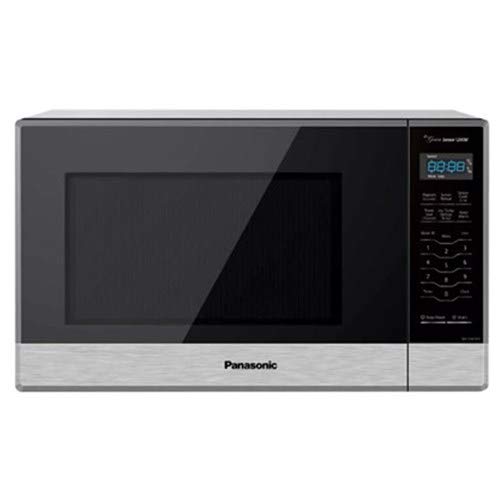
Figure 1: Front view of the Panasonic NN-SN67HST microwave oven, showing the door, control panel, and LED display.
- Oven Cavity: The interior space where food is placed for cooking.
- Glass Turntable: A removable, rotating glass tray that ensures even cooking.
- Control Panel: Features the Cool Blue LED display, numeric keypad, and function buttons.
- Oven Door: Equipped with a viewing window and a handle for opening.
- Door Latch System: Secures the door during operation.
4. Setup
Unpacking and Placement
- Remove all packing materials from inside the oven cavity and from the oven door.
- Inspect the oven for any damage, such as a misaligned or bent door, damaged door seals and sealing surface, broken or loose door hinges and latches, or dents inside the cavity or on the door. If any damage is present, do not operate the oven and contact customer service.
- Place the microwave oven on a flat, stable surface that can support its weight and the heaviest food item likely to be cooked in it.
- Ensure adequate ventilation. Leave a minimum of 4 inches (10 cm) of space around the sides, top, and rear of the oven for proper airflow. Do not block any ventilation openings.
- Do not place the oven near heat sources such as a range, oven, or radiator.
- Plug the power cord into a grounded electrical outlet. Ensure the outlet meets the electrical requirements specified in the "Specifications" section.
Turntable Installation
The glass turntable and turntable ring must be in place when cooking. Ensure they are correctly seated before operating the microwave.
- Place the turntable ring in the circular indentation on the oven floor.
- Carefully place the glass turntable on top of the ring, ensuring it sits securely on the center hub.
5. Operating Instructions
Basic Microwave Cooking
- Place food in a microwave-safe container on the glass turntable.
- Close the oven door securely.
- Enter the desired cooking time using the numeric keypad. For example, for 1 minute and 30 seconds, press '1', '3', '0'.
- Press the START button. The oven will begin cooking at full power.
- To stop cooking at any time, open the door or press the STOP/CLEAR button.
Setting Power Level
The microwave offers 11 power levels. To adjust the power level:
- Enter the desired cooking time.
- Press the POWER LEVEL button.
- Enter the desired power level (e.g., '7' for 70% power).
- Press the START button.
Turbo Defrost
The Turbo Defrost function allows for quick and even defrosting of various food types.
- Place the frozen food on the turntable.
- Press the TURBO DEFROST button.
- Enter the weight of the food in pounds or kilograms using the numeric keypad.
- Press the START button. The oven will automatically calculate the defrosting time and power level.
Automatic Cooking Programs
The microwave includes pre-set programs for convenience. Refer to the label inside the oven door or the full owner's manual for a complete list and instructions.
- Popcorn: Press the POPCORN button and select the desired level (e.g., 3 levels).
- Pizza: Use the FROZEN PIZZA button for single servings.
- Frozen Vegetables: Select the appropriate option from the automatic cooking menu.
Child Lock Feature
To activate the child lock, press and hold the STOP/CLEAR button for 3 seconds. The display will show a lock indicator. To deactivate, press and hold the STOP/CLEAR button again for 3 seconds.
6. Maintenance and Cleaning
General Cleaning
- Always unplug the microwave oven before cleaning.
- Clean the oven cavity regularly with a damp cloth and mild detergent. Avoid abrasive cleaners or scouring pads.
- The glass turntable and turntable ring can be removed and washed in warm, soapy water or in a dishwasher.
- Wipe the exterior surfaces with a soft, damp cloth. For stainless steel surfaces, use a stainless steel cleaner.
- Clean the door seals and sealing surfaces to ensure proper closure and operation.
Care for Stainless Steel
To maintain the appearance of the stainless steel finish, wipe regularly with a soft cloth and a non-abrasive stainless steel cleaner. Always wipe in the direction of the grain.
7. Troubleshooting
| Problem | Possible Cause | Solution |
|---|---|---|
| Oven does not start | Power cord not securely plugged in; Door not closed properly; Fuse blown or circuit breaker tripped. | Ensure plug is firmly in outlet; Close door completely; Check household fuse/circuit breaker. |
| Food not heating | Incorrect cooking time or power level set; Microwave-safe dish not used. | Adjust cooking time/power; Use only microwave-safe cookware. |
| Turntable not rotating | Turntable not properly seated; Obstruction under turntable. | Re-seat turntable and ring; Remove any debris from under the turntable. |
| Oven light not working | Bulb needs replacement. | Contact qualified service personnel for bulb replacement. |
| Unusual noise during operation | Food container touching oven walls; Turntable not correctly positioned. | Ensure container clears walls; Adjust turntable position. |
For more complex issues, please refer to the complete owner's manual or contact Panasonic customer support.
8. Specifications
| Feature | Detail |
|---|---|
| Brand | Panasonic |
| Model Number | NN-SN67HST |
| Capacity | 1.2 Cubic Feet |
| Wattage | 1200 Watts |
| Installation Type | Countertop |
| Product Dimensions (D x W x H) | 15.82 x 20.69 x 12.25 inches |
| Item Weight | 27.8 pounds (12.66 Kilograms) |
| Color | Blue, Stainless Steel |
| Material Type | Stainless Steel |
| Special Features | Defrost, Turntable, Inverter Technology, Cool Blue LED Display, Child Lock |
| Included Components | Turntable |
| Energy Certification | ENERGY STAR Certified |
9. Warranty and Support
For warranty information and customer support, please refer to the warranty card included with your product or visit the official Panasonic website. Keep your proof of purchase for any warranty claims.
Panasonic Customer Support:
- Website: na.panasonic.com/us/support
- Phone: Refer to your product documentation for regional support numbers.