
1. Product Overview
The Sumsour 8586 is a versatile 2-in-1 rework soldering station, combining a hot air heat gun and a soldering iron. Designed for precision work, it is suitable for mounting and reworking SMD components, as well as various heating applications like desoldering, shrinking, and drying. The unit features independent operation for both tools, digital temperature displays, and intelligent safety functions.

Figure 1: Sumsour 8586 Hot Air Heat Gun and Soldering Station main unit with hot air gun and soldering iron.
Key Features:
- 2-in-1 design: Hot air gun and soldering iron for diverse applications.
- Independent operation of hot air gun and soldering iron.
- LCD digital displays for precise temperature monitoring.
- Microcomputer control and PID technology for rapid heating and stable temperature.
- Adjustable airflow and temperature control.
- Handle with sensor switch for automatic operating/standby mode.
- Automatic cooling function to extend heater life.
- ESD safe design for soldering iron to protect sensitive components.
- Suitable for desoldering SOIC, CHIP, QFP, PLCC, BGA, and temperature-sensitive components.
- Applications include heat shrinking, drying, paint removal, defrosting, pre-heating, and glue soldering.
Package Contents:
The Sumsour 8586 SET-3 package typically includes the following items:
- 1 x 2-in-1 Soldering Station Unit (Main Unit)
- 1 x Hot Air Gun (heater)
- 1 x Soldering Iron (heater)
- 5 x Iron Tips (I, B, K, 3C, 2.4D)
- 3 x Hot Air Nozzles
- 1 x Soldering Iron Stand
- 1 x Hot Air Gun Bracket
- 1 x Electric Tape
- 3 x Tweezers (ESD-12, ESD-14, ESD-15)
- 1 x Scraper
- 1 x 939 Suction Pen
- 2 x Fly Line
- 3 x Brushes (black, red, yellow)
- 1 x Sucker (desoldering pump)
- 1 x 0.5mm Soldering Wire
- 1 x CP-2015 Desoldering Wire (solder wick)
- 1 x High Temperature Tape
2. Safety Information
Please read and understand all safety instructions before operating this device. Failure to follow these instructions may result in electric shock, fire, or serious injury.
- Electrical Safety: Ensure the power supply matches the specified voltage (110V). Do not operate with wet hands or in damp environments. Always unplug the unit when not in use or before cleaning/maintenance.
- Heat Hazards: The hot air gun and soldering iron reach very high temperatures. Avoid direct contact with skin or flammable materials. Allow tools to cool completely before storing.
- Fume Inhalation: Soldering and desoldering processes produce fumes that can be harmful. Always operate in a well-ventilated area or use a fume extractor.
- Eye Protection: Always wear safety glasses to protect against solder splashes or flying debris.
- ESD Protection: The soldering iron features an ESD safe design. When working with sensitive electronic components, ensure proper grounding practices are followed to prevent electrostatic discharge damage.
- Stable Placement: Place the unit on a stable, heat-resistant surface. Use the provided stands for the hot air gun and soldering iron to prevent accidental contact with hot elements.
- Children and Pets: Keep the device out of reach of children and pets.
3. Setup Instructions
Follow these steps to set up your Sumsour 8586 rework station:
- Unpack Components: Carefully remove all items from the packaging. Verify that all accessories listed in the package content are present.
- Position the Unit: Place the main control unit on a stable, flat, and heat-resistant workbench. Ensure there is adequate space around the unit for ventilation.
- Connect Hot Air Gun: Connect the hot air gun's cable to the "REWORK" port on the front panel of the main unit. Ensure the connection is secure. Place the hot air gun in its bracket on the side of the main unit.
- Connect Soldering Iron: Connect the soldering iron's cable to the "SOLDER" port on the front panel. Ensure the connection is secure. Place the soldering iron in its metal stand.
- Install Nozzles (Hot Air Gun): Select the appropriate hot air nozzle for your task and securely attach it to the hot air gun.
- Power Connection: Ensure the power switch on the back of the unit is in the OFF position. Connect the power cord to the unit's power inlet and then plug it into a grounded 110V AC outlet.

Figure 2: Main unit with hot air gun and soldering iron connected.
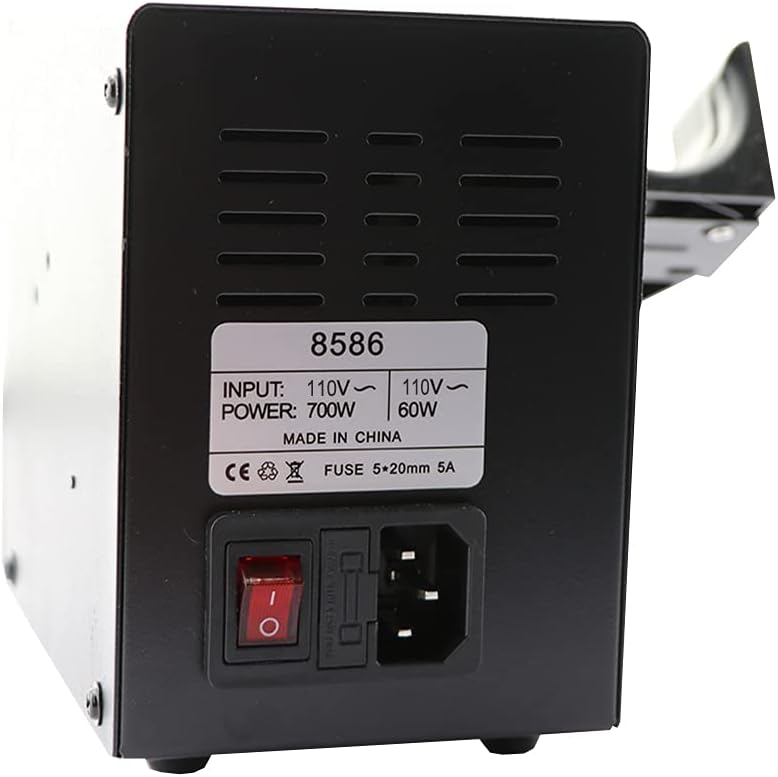
Figure 3: Rear view showing power switch and fuse holder.
4. Operating Instructions
This section details the operation of both the hot air gun and the soldering iron.
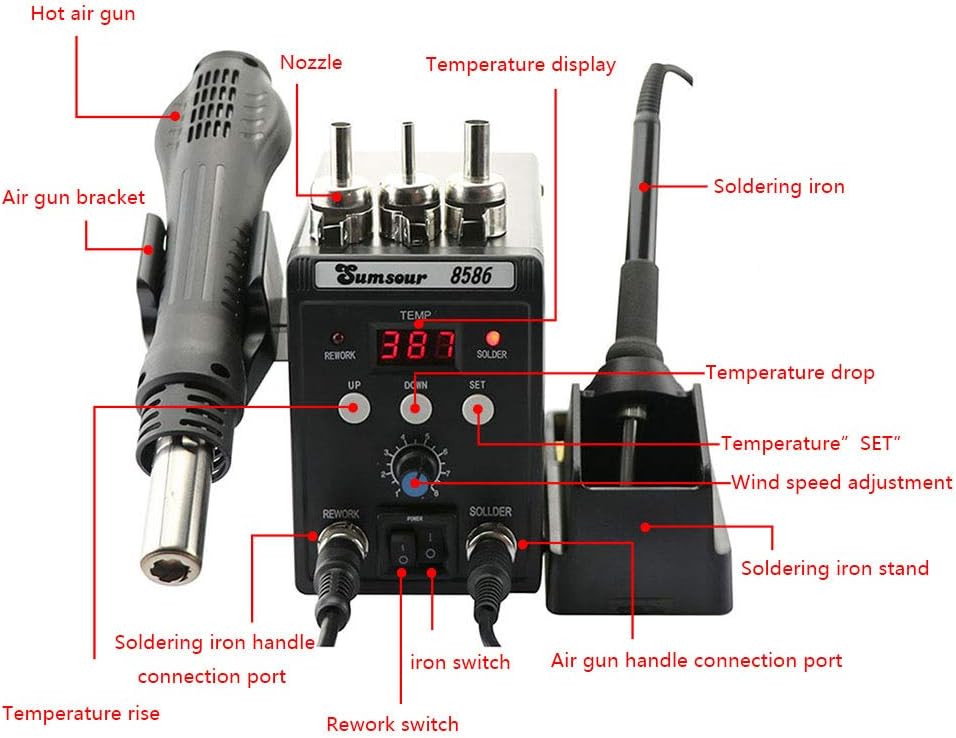
Figure 4: Labeled diagram of the Sumsour 8586 control panel and components.
4.1 Powering On/Off
- To power on, flip the main power switch on the back of the unit to the ON position.
- To power off, flip the main power switch to the OFF position. The hot air gun will enter an automatic cooling cycle before shutting down completely.
4.2 Hot Air Gun Operation
- Activate Hot Air Function: Ensure the "REWORK" switch on the front panel is ON.
- Set Temperature: Use the "UP" and "DOWN" buttons under "REWORK TEMP" to adjust the desired hot air temperature. The LCD display will show the set temperature.
- Adjust Airflow: Rotate the "AIR" knob to control the airflow rate. Start with a lower setting and increase as needed.
- Handle Sensor: When you pick up the hot air gun from its bracket, the system will automatically enter operating mode and begin heating to the set temperature. When placed back in the bracket, it will enter standby mode and initiate an automatic cooling cycle.
- Usage: Direct the hot air stream towards the component to be reworked. Maintain a safe distance to avoid damaging surrounding components.

Figure 5: The hot air gun component.

Figure 6: Assorted hot air gun nozzles for different applications.
4.3 Soldering Iron Operation
- Activate Soldering Function: Ensure the "SOLDER" switch on the front panel is ON.
- Set Temperature: Use the "SET" button and the "UP" and "DOWN" buttons under "SOLDER TEMP" to adjust the desired soldering iron temperature. The LCD display will show the set temperature.
- Pre-tinning: Before first use or after cleaning, pre-tin the soldering iron tip with a small amount of solder to prevent oxidation and ensure efficient heat transfer.
- Usage: Apply the heated tip to the joint, then feed solder onto the joint, not directly onto the iron tip. Allow the solder to flow evenly.

Figure 7: The soldering iron component.

Figure 8: Soldering iron stand with cleaning sponge.
5. Maintenance
Proper maintenance ensures the longevity and optimal performance of your rework station.
- Soldering Iron Tip Care:
- Always keep the tip tinned with solder when not in use to prevent oxidation.
- Clean the tip frequently using a damp sponge or brass wool.
- Replace tips when they become heavily oxidized or pitted, as this affects heat transfer.
- Hot Air Nozzle Cleaning: Periodically inspect hot air nozzles for blockages or debris. Clean gently with a soft brush if necessary, ensuring the unit is cool and unplugged.
- Unit Cleaning: Wipe the main unit and tools with a soft, dry cloth. Do not use abrasive cleaners or solvents. Ensure the unit is unplugged and cool before cleaning.
- Fuse Replacement: If the unit fails to power on, check the fuse located on the back panel (refer to Figure 3). Replace with a fuse of the same type and rating (5x20mm 5A).
6. Troubleshooting
This section addresses common issues you might encounter.
| Problem | Possible Cause | Solution |
|---|---|---|
| Unit does not power on. | No power supply; Blown fuse; Faulty power cord. | Check power outlet and cord connection. Inspect and replace fuse if necessary (5x20mm 5A). |
| Hot air gun not heating or unstable temperature. | Incorrect temperature setting; Handle not properly seated in bracket (sensor issue); Heater element failure. | Verify temperature setting. Ensure hot air gun is picked up from its bracket to activate. If issue persists, contact support. |
| Soldering iron not heating or unstable temperature. | Incorrect temperature setting; Loose connection; Heater element failure. | Verify temperature setting. Check soldering iron cable connection. If issue persists, contact support. |
| Low or no airflow from hot air gun. | Airflow knob set too low; Fan malfunction; Blocked nozzle. | Adjust airflow knob. Check nozzle for obstructions. If fan is not operating, contact support. |
| Soldering iron tip not taking solder. | Oxidized tip; Insufficient temperature. | Clean and re-tin the tip. Increase soldering iron temperature. Replace tip if severely oxidized. |
7. Specifications
| Feature | Specification |
|---|---|
| Brand | Sumsour |
| Model Number | 8586 |
| Voltage | 110 Volts |
| Total Wattage | 750 Watts (Hot Air Gun: 700W, Soldering Iron: 50W) |
| Display Type | LCD |
| Hot Air Gun Temperature Range | 100°C to 450°C |
| Soldering Iron Temperature Range | 200°C to 480°C |
| Temperature Stability | ±1°C |
| Airflow Type | Brushless ball fan |
| Max Airflow | 120 L/min |
| Number of Channels | 2 (Hot Air, Soldering Iron) |
| Item Weight | 1600 Grams |
| UPC | 600821709351 |

Figure 9: Approximate dimensions of the main unit.
8. Warranty and Support
The Sumsour 8586 rework station comes with a host warranty for one year from the date of purchase.
For technical support, warranty claims, or inquiries regarding replacement parts, please contact your retailer or the manufacturer directly. Please have your model number (8586) and proof of purchase available when contacting support.


