1. Introduction
This manual provides instructions for the safe and proper installation and use of the HXJNLDC 602535 3.7V 600mAh lithium polymer battery. This battery is designed as a replacement for various Logitech wireless mice models, including MX Master 2, MX Master 2s, MX Master 3, MX Master 3s, MX Anywhere 2, MX Anywhere 2S, MX Anywhere 3, MX Anywhere 3s, and MX ERGO. It is also suitable for other 3.7-5V electronic products with power less than 2.22Wh (600mAh).
Note: Batteries numbered 533-000088 or AHB303450 in some MX Master mice are not compatible with this replacement battery.
2. Safety Information and Precautions
Read all safety warnings and instructions before installing or using the battery. Failure to follow these instructions may result in electric shock, fire, or serious injury.
- The red wire is the positive (+) terminal, and the black wire is the negative (-) terminal. The white wire is for NTC (Negative Temperature Coefficient).
- Do not reverse-charge or reverse-connect the battery. Incorrect polarity can cause damage to the battery and the device.
- Do not use the battery if it shows conspicuous damage or deformation.
- Do not use leaky batteries.
- Do not expose the battery to fire, water, or wet conditions.
- Do not puncture the battery with nails, strike it with a hammer, or step on it.
- Avoid charging the battery near a fire or in direct sunlight.
- Keep the battery out of reach of children.
3. Product Overview and Compatibility
The HXJNLDC 602535 battery is a rechargeable lithium-ion polymer battery designed for specific Logitech wireless mice. It features built-in protection against overcharge, overdischarge, overcurrent, and short circuits.
3.1 Key Features
- Nominal Voltage: 3.7V
- Full Charge Voltage: 4.2V
- Capacity: 600mAh
- Power: 2.22Wh
- Dimensions (L×W×T): 36 × 25 × 6 mm (1.417 × 0.984 × 0.236 inches)
- Weight: 12.6g (0.44oz)
- Maximum Current: 0.6A
- Cable Specifications: 3302-26 high temperature resistant silicone cable
- Connector: Genuine JST Pitch 1.5mm 3-pin connector module
3.2 Compatibility
This battery is compatible with the following Logitech wireless mouse models:
- Logitech MX Master 2
- Logitech MX Master 2s
- Logitech MX Master 3
- Logitech MX Master 3s
- Logitech MX Anywhere 2
- Logitech MX Anywhere 2S
- Logitech MX Anywhere 3
- Logitech MX Anywhere 3s
- Logitech MX ERGO Wireless Mouse
- Part Numbers: AHB572535, 910-004362, 910-004374, 533-000120, 533-000121, 533-000171
It can also be used in other 3.7-5V electronic products with power less than 2.22Wh (600mAh).

Image 1: The HXJNLDC 602535 battery, showing its label with voltage, capacity, and model number, along with the attached 3-pin connector.

Image 2: Detailed specifications of the battery including length, width, height, nominal voltage, full charge voltage, capacity, weight, maximum current, and cable/connector specifications. It also lists compatible Logitech MX series mice.
4. Setup and Installation
Battery replacement in electronic devices requires careful attention to detail. It is recommended to consult device-specific disassembly guides or videos for your particular mouse model before proceeding.
4.1 Polarity and Connector Verification
Before installation, carefully compare the connector specifications and polarity of the new battery with your device's original battery. Ensure the red wire connects to the positive (+) terminal and the black wire to the negative (-) terminal. The white wire is for NTC.
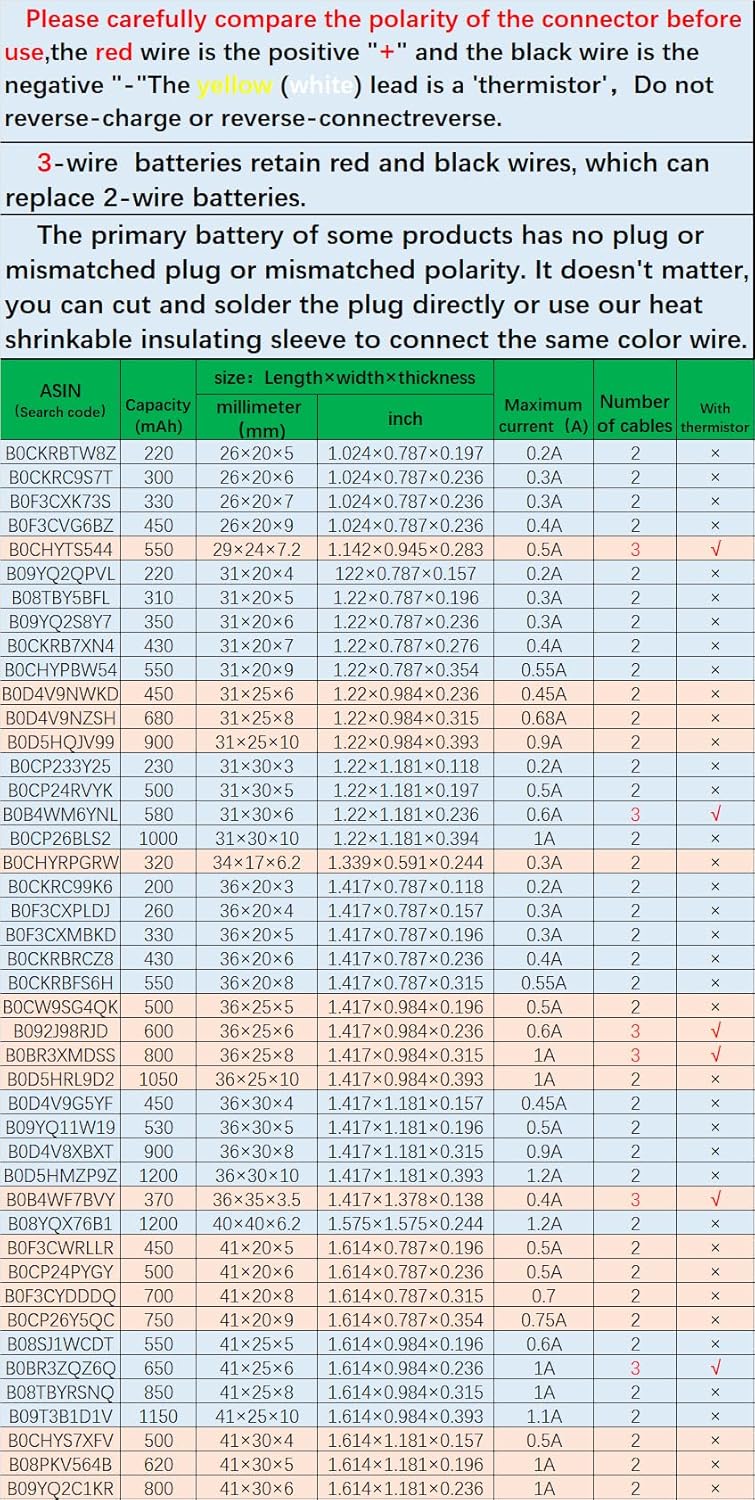
Image 3: Diagram illustrating the front, back, and side views of the 3-pin connector, emphasizing the importance of verifying specifications and polarity (red wire positive, black wire negative, white wire NTC).

Image 4: Further clarification on connector polarity and handling. It notes that 3-wire batteries retain red and black wires, which can replace 2-wire batteries. It also provides guidance for situations where the primary battery has no plug or a mismatched plug/polarity, suggesting cutting and soldering or using a heat shrinkable insulating sleeve.
4.2 Installation Steps (General Guidance)
- Disassemble Device: Carefully open your device (e.g., mouse) according to its specific service manual or online guides. This often involves removing screws hidden under feet or pads.
- Disconnect Old Battery: Gently disconnect the old battery's connector from the device's circuit board.
- Address Connector Mismatch (if applicable): If the new battery's connector does not match the device's port, or if the original battery had no connector, you may need to carefully cut the wires and solder them directly, ensuring correct polarity. Use the provided heat shrinkable insulating sleeve to secure and insulate connections if soldering.
- Connect New Battery: Connect the new HXJNLDC battery's plug to the device's circuit board, ensuring correct orientation and a secure fit.
- Position Battery: Place the new battery securely within the device's battery compartment.
- Reassemble Device: Carefully reassemble your device, ensuring all components are properly seated and screws are tightened.

Image 5: A schematic diagram illustrating how to connect a new battery if the original connector is mismatched or absent. It shows cutting the wires, connecting them, and using a heat shrinkable insulating sleeve for protection.
5. Operating Instructions
Once the battery is successfully installed, your device should power on and function as expected. The battery is typically shipped with a partial charge. For optimal performance and longevity, it is recommended to fully charge the battery before its first use.
- Initial Charge: Connect your device to its charger and allow it to charge until the battery indicator shows a full charge.
- Normal Use: Use your device as usual. The battery is designed to provide reliable power for extended periods.
- Charging: Recharge the battery when the device indicates low power. Avoid completely draining the battery frequently, as this can reduce its overall lifespan.
6. Maintenance
Proper maintenance can extend the life of your battery.
- Temperature: Store and operate the battery within recommended temperature ranges. Extreme heat or cold can degrade battery performance and lifespan.
- Storage: If storing the device for an extended period, ensure the battery is charged to approximately 50-70% capacity. Avoid storing a fully charged or completely depleted battery.
- Cleaning: Keep the battery and its contacts clean and dry.
7. Troubleshooting
If you encounter issues after battery replacement, consider the following:
- Device Not Powering On: Double-check all connections, especially the battery connector, to ensure it is securely and correctly attached. Verify polarity if you performed any soldering.
- Battery Not Charging: Ensure the device's charging cable and port are functional. Confirm the battery is correctly installed.
- Short Battery Life: While this battery has a 600mAh capacity, actual battery life can vary based on device usage and settings. If battery life is significantly shorter than expected, ensure the battery is fully charging.
- Physical Damage: If the battery or device was damaged during installation, discontinue use and seek professional assistance or replacement.
8. Specifications
Detailed technical specifications for the HXJNLDC 602535 battery:
| Specification | Value |
|---|---|
| Product Dimensions (L×W×T) | 36 × 25 × 6 mm (1.417 × 0.984 × 0.236 inches) |
| Item Weight | 12.6g (0.44 ounces) |
| Item Model Number | 602535 |
| Battery Cell Composition | Lithium Polymer |
| Nominal Voltage | 3.7V |
| Full Charge Voltage | 4.2V |
| Battery Capacity | 600 mAh |
| Power | 2.22 Wh |
| Maximum Current | 0.6A |
| Manufacturer | HXJN |

Image 6: A graph displaying the discharge curve of a sample battery, indicating a measured capacity of 613.7mAh, which is consistent with the advertised 600mAh.
8.1 Other Compatible Battery Sizes
The following tables provide information on various battery sizes and their specifications, which may be compatible with other devices. Please verify dimensions and electrical specifications before purchasing.
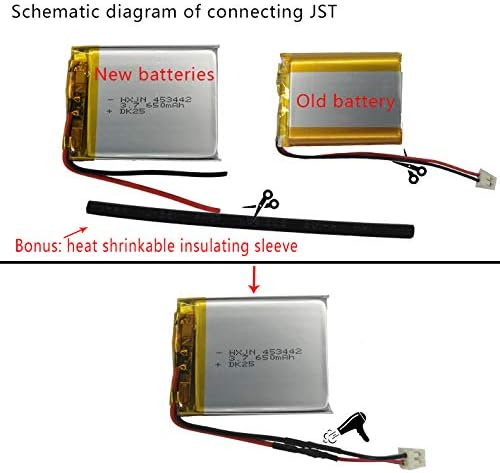
Image 7: Part 1 of a table listing various battery models by ASIN, capacity, dimensions (mm and inch), maximum current, number of cables, and presence of a thermistor.

Image 8: Part 2 of a table listing various battery models by ASIN, capacity, dimensions (mm and inch), maximum current, number of cables, and presence of a thermistor.
9. Warranty and Support
If there are any quality issues with the HXJNLDC 602535 battery within one year of purchase, please contact us via email for replacement. Our customer support team is available to assist with any product-related inquiries or concerns.