
CONTEC CONTEC08A
CONTEC-08A Blood Pressure Monitor User Manual
Automatic Digital BP Machine with 3 Sizes Cuff for Home Use
1. Introduction
The CONTEC-08A is a desktop electronic sphygmomanometer designed for fully automatic blood pressure measurement. It features a high-definition color LCD display and supports both English and Chinese interfaces for strong visibility. This device is suitable for household use and can measure blood pressure for adults, pediatric, and neonatal patients. It offers convenient storage of readings for multiple users, making it ideal for family use.
2. Safety Information
Please read this manual carefully before using the CONTEC-08A Blood Pressure Monitor. Keep this manual for future reference.
- This device is intended for non-invasive measurement of blood pressure and pulse rate.
- Do not use this device on infants or individuals who cannot express their consent.
- Consult your physician for interpretation of blood pressure measurements. Self-diagnosis and treatment based on measurements can be dangerous.
- Do not use the device in the presence of flammable gases or liquids.
- Keep the device and cuffs out of reach of children.
- Do not disassemble or attempt to repair the device yourself. Refer to qualified service personnel.
- Statements regarding dietary supplements have not been evaluated by the FDA and are not intended to diagnose, treat, cure, or prevent any disease or health condition.
3. Package Contents
Verify that all the following items are included in your package:
- One (1) CONTEC-08A Main Unit Monitor
- One (1) USB Cable
- Three (3) Blood Pressure Cuffs (Adult, Pediatric, Infant)
- One (1) User Manual
- PC Software (available for download, no CD included)
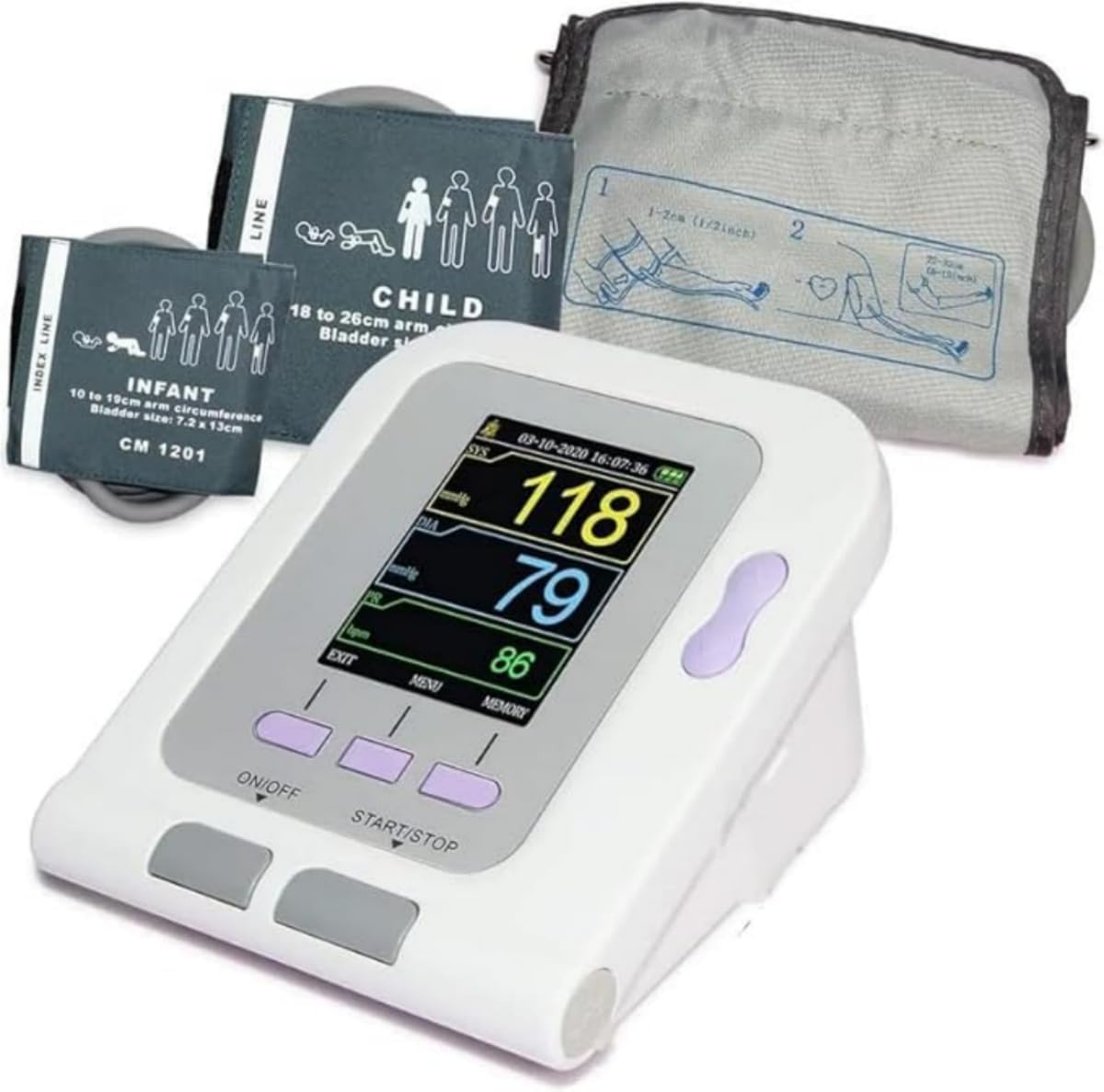
Image: The CONTEC-08A monitor shown with the adult, pediatric, and infant cuffs included in the package.
4. Product Overview
Familiarize yourself with the components and display of your CONTEC-08A Blood Pressure Monitor.

Image: A detailed view of the monitor's display, indicating Systolic Pressure, Diastolic Pressure, Pulse Rate, Arm Reminder, Power Display, Up/Down Button, Menu Button, On/Off Button, and Start/Stop Button.
4.1. Display Indicators
- SYS (Systolic Pressure): The top number in a blood pressure reading, indicating the pressure in your arteries when your heart beats.
- DIA (Diastolic Pressure): The bottom number in a blood pressure reading, indicating the pressure in your arteries between beats.
- PR (Pulse Rate): Your heart rate, measured in beats per minute (bpm).
- Arm Reminder: An icon indicating proper arm positioning.
- Power Display: Shows the current battery level.
4.2. Buttons
- ON/OFF Button: Powers the device on or off.
- START/STOP Button: Initiates or stops a blood pressure measurement.
- MENU Button: Accesses the system settings and other functions.
- Up/Down Button: Navigates through menu options and adjusts settings.
4.3. Cuffs
The CONTEC-08A comes with three different cuff sizes to accommodate various users:
- Adult Cuff: For arm circumference 8.7-12.6 inches (22-32 cm).
- Child Cuff: For arm circumference 7.1-10.2 inches (18-26 cm).
- Infant Cuff: For arm circumference 3.9-7.5 inches (10-19 cm).

Image: Visual representation of the three cuff sizes and their corresponding arm circumference ranges for accurate measurement.
5. Setup
5.1. Powering the Device
The CONTEC-08A can be powered by either batteries or an AC adapter.
- Battery Powered:
Choose four (4) "AA" batteries. The battery specification is DC 1.5V. For rechargeable batteries, please choose 1.5V specification. Install batteries as shown in the diagram below, ensuring correct polarity.
- AC Adapter Powered:
Connect the sphygmomanometer to the power adapter. Insert the power adapter plug into the power adapter socket on the right side of the device.
Note:
- The power adapter does not have the function of charging the battery.
- When regulated power supply and batteries are both used at the same time, the battery power will not be consumed.
- Switch regulated power supply and battery as power supply when the device is off, otherwise, the device may shut down due to power failure.
- When switching between the power adapter and the battery, please do it when the device is off, otherwise the instrument may shut down due to power failure.

Image: Instructions for battery installation and AC adapter connection.
5.2. Cuff Connection
Select the appropriate cuff size for the user. Connect the cuff's air tube securely to the air jack on the side of the monitor.
Video: An official product video demonstrating the connection of the cuff to the CONTEC-08A monitor and the measurement process.
6. Operating Instructions
6.1. Before Measurement
- Rest for at least 5 minutes before measurement.
- Avoid eating, drinking alcohol, smoking, exercising, and bathing for 30 minutes before measurement.
- Sit in a comfortable position with your back supported and feet flat on the floor.
- Place the cuff on your bare upper arm, ensuring the center of the cuff is at the same height as your heart.
- Do not talk or move your body during the measurement.

Image: Proper posture and cuff placement for accurate blood pressure measurement. A tip is included to measure three times for more data points to reduce effects of breathing or exercise.
6.2. Performing a Measurement
- Press the ON/OFF button to turn on the device.
- Ensure the correct user profile is selected (see "User Type Selection" below).
- Press the START/STOP button to begin the measurement. The cuff will inflate automatically.
- Remain still and quiet until the measurement is complete and the results are displayed on the screen.
- The device will display Systolic Pressure (SYS), Diastolic Pressure (DIA), and Pulse Rate (PR).
- The measurement will automatically be saved to the selected user's memory.
6.3. User Type Selection
The CONTEC-08A allows you to select the user type (Adult, Neonatal, Pediatric) to ensure appropriate measurement parameters.
- Press the MENU button to enter the system setup.
- Use the Up/Down buttons to navigate to "USER TYPE".
- Press the ENTER button (often the middle button) to select.
- Use the Up/Down buttons to choose between ADU (Adult), NEO (Neonatal), or PED (Pediatric).
- Press ENTER to confirm your selection.

Image: The system setup screen, illustrating how to select the user type (Adult, Neonatal, Pediatric) for accurate readings.
6.4. Physiological Alarm Function
The device has a physiological alarm function that can be set to alert you if blood pressure readings exceed high limits or fall below low limits.
- Access the alarm settings through the MENU.
- Set the desired high and low blood pressure limits.
- The alarm switch can be turned on or off as needed.
7. Data Management
7.1. Memory Storage
The CONTEC-08A can store up to 300 readings, with 100 readings for each of the three user profiles. This allows for convenient tracking of blood pressure trends over time for your entire family.
- To view stored readings, press the MEMORY button.
- Use the Up/Down buttons to scroll through past measurements.

Image: Illustration of the device's memory capacity, storing 100 readings per user for up to three users.
7.2. PC Software and Data Upload
The CONTEC-08A supports data upload to a PC for further analysis and reporting. The software is available for download from the manufacturer's website.
Software Download: http://www.dlsoftw.com (INDEX CODE: 06SFB031)
A. Software use steps:
- Click "Open the software".
- Open the machine, connect the right square port with a USB cable to PC.
- Open the software. Click "Download the data".
- Click the icon, choose the case in storage path when setting.
- Open the data, choose the different function for analysis.

Image: The software interface, highlighting features such as four graph display modes, data upload and download, statistics by period, and print report functionality.
8. Maintenance
8.1. Cleaning
- Clean the device and cuff with a soft, dry cloth.
- If necessary, use a cloth lightly dampened with water or a mild detergent. Do not use abrasive cleaners or immerse the device in water.
8.2. Storage
- Store the device in a clean, dry place away from direct sunlight, extreme temperatures, and humidity.
- If not using the device for an extended period, remove the batteries to prevent leakage.
8.3. Battery Replacement
When the power display indicates low battery, replace all four "AA" batteries with new ones, ensuring correct polarity.
9. Troubleshooting
| Problem | Possible Cause | Solution |
|---|---|---|
| Device does not turn on. | Batteries are dead or incorrectly inserted; AC adapter not connected properly. | Replace batteries or ensure correct polarity. Check AC adapter connection. |
| "Leak" error message. | Cuff is not properly connected or there is a leak in the cuff/tube. | Ensure cuff tube is securely connected to the monitor. Check cuff and tube for any visible damage or holes. |
| Inaccurate or inconsistent readings. | Improper cuff placement; movement or talking during measurement; incorrect cuff size; physiological factors. | Ensure correct cuff placement and size. Remain still and quiet during measurement. Consult a healthcare professional if readings remain inconsistent. |
| "Power Low" message when plugged in. | Faulty AC adapter or internal power issue. | Ensure you are using the correct AC adapter. If the issue persists, contact customer support. |
10. Specifications
- Model: CONTEC08A
- Display Type: LCD
- Power Source: Corded Electric (AC Adapter) or 4x AA Batteries (DC 1.5V)
- Included Components: Main Unit, USB Cable, 3 Cuffs (Adult, Pediatric, Infant)
- Cuff Sizes:
- Adult: 8.7-12.6 inches (22-32 cm) arm circumference
- Child: 7.1-10.2 inches (18-26 cm) arm circumference
- Infant: 3.9-7.5 inches (10-19 cm) arm circumference
- Memory: Up to 300 readings (100 per user for 3 users)
- Manufacturer: CONTEC MEDICAL SYSTEMS CO., LTD
- Package Dimensions: 6.42 x 4.8 x 4.72 inches
- Item Weight: 1.48 Pounds
11. Warranty and Support
For any questions, technical support, or warranty claims, please contact CONTEC customer service. While specific warranty details are not provided here, it is recommended to retain your purchase receipt for proof of purchase.
Please note that customer reviews indicate potential challenges with direct manufacturer support from China. For issues, it is often best to contact the retailer where the product was purchased.
Related documentsCONTEC08A


Ask a question about this manual
Ask about setup, troubleshooting, compatibility, parts, safety, or missing instructions. Manuals+ will review the question and use this page’s manual context to help answer it.