
1. Introduction
This manual provides instructions for the proper installation and maintenance of the PRO+AQUA FC-9-PF SED/GAC Filter Replacement cartridge. This filter is specifically designed for use with the PRO+AQUA WS-P-REG-KITV2 Portable RV Water Softener Regeneration Kit. The FC-9-PF cartridge features a 2-in-1 filtration design, combining a sediment pre-filter with granular activated carbon (GAC) to reduce sediment, chlorine, bad taste, and odors from your water supply.

Image 1.1: The PRO+AQUA FC-9-PF SED/GAC Filter Replacement cartridge.
2. Important Safety Information
- Always turn off the main water supply before attempting any installation or maintenance on your water filtration system.
- Depressurize the system before opening any filter housings to prevent water spray and potential injury.
- Use appropriate tools and follow all instructions carefully.
- Ensure all connections are secure to prevent leaks.
- Do not use with water that is microbiologically unsafe or of unknown quality without adequate disinfection before or after the system.
3. Product Compatibility
The PRO+AQUA FC-9-PF filter cartridge is designed exclusively for the PRO+AQUA WS-P-REG-KITV2 RV water filtration system. It is not compatible with older WS-P-REG-KIT models that feature white caps or use standard-sized filters. Verify your system has a black-cap housing for proper fit and function.

Image 3.1: Visual guide for system compatibility. The FC-9-PF filter is compatible only with black-cap systems (top) and not with white-cap systems (bottom).
4. Installation Instructions (Filter Replacement)
Follow these steps to replace the FC-9-PF filter cartridge in your WS-P-REG-KITV2 system:
- Turn Off Water Supply: Locate the main water inlet valve to your RV or the water source connected to your WS-P-REG-KITV2 system and turn it off completely.
- Depressurize System: Open a nearby faucet or the pressure relief button on the filter housing (if available) to release any built-up pressure in the system.
- Unscrew Filter Housing: Using the provided filter wrench (if applicable) or by hand, carefully unscrew the filter housing from the system. Place a bucket underneath to catch any residual water.
- Remove Old Filter: Discard the old FC-9-PF filter cartridge.
- Clean Housing: Rinse the inside of the filter housing with clean water. Inspect the O-ring for any damage or wear. Replace if necessary.
- Insert New Filter: Unwrap the new PRO+AQUA FC-9-PF filter cartridge and carefully insert it into the filter housing. Ensure it is seated correctly in the center.
- Lubricate O-ring: Apply a thin layer of food-grade silicone grease to the O-ring to ensure a proper seal.
- Reattach Housing: Screw the filter housing back onto the system. Hand-tighten until snug, then use the filter wrench for an additional quarter to half turn. Do not overtighten.
- Restore Water Supply: Slowly turn on the main water supply. Check for any leaks around the filter housing. If leaks occur, turn off the water, depressurize, and re-tighten the housing.
- Flush System: Allow water to run through the system for several minutes (e.g., 5-10 minutes) to flush out any air and fine carbon particles. The water may appear cloudy initially; this is normal and will clear up.
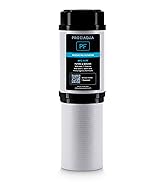
Image 4.1: The FC-9-PF filter cartridge, ready for installation.
5. Operation
Once installed and flushed, the PRO+AQUA FC-9-PF filter operates automatically as water flows through your WS-P-REG-KITV2 system. The filter will continuously reduce sediment, chlorine, and improve taste and odor. Monitor water flow and quality to determine when filter replacement is needed.
6. Maintenance
The FC-9-PF filter cartridge is designed for long-lasting use, typically a full camping season, depending on water quality and usage. Replace the filter when you notice a decrease in water flow, a return of unpleasant tastes or odors, or at the beginning of each new camping season to ensure optimal performance.
7. Troubleshooting
- Reduced Water Flow: This often indicates a clogged filter. Replace the FC-9-PF cartridge. Ensure the main water supply is fully open and there are no kinks in hoses.
- Unusual Taste or Odor: If tastes or odors return, the carbon media in the filter may be exhausted. Replace the FC-9-PF cartridge. Ensure the system was properly flushed after the last installation.
- Leaks from Housing: Turn off water supply, depressurize, and check the O-ring for proper seating, damage, or dryness. Lubricate with food-grade silicone grease if dry. Ensure the housing is tightened securely but not overtightened.
8. Specifications
| Model Number | FC-9-PF |
| Brand | PRO+AQUA |
| Compatible System | PRO+AQUA WS-P-REG-KITV2 |
| Material | Carbon |
| Product Dimensions | 2.5"D x 2.5"W x 10"H |
| Item Weight | 8 ounces |
| Filtration Stages | 2-in-1 (Sediment & GAC) |
| External Testing Certification | NSF |
9. Customer Support
For further assistance, technical support, or warranty inquiries regarding your PRO+AQUA FC-9-PF filter or WS-P-REG-KITV2 system, please contact PRO+AQUA customer service. Refer to the contact information provided with your original product purchase or visit the official PRO+AQUA website.