
Introduction
Welcome to the user manual for your new Alesis Prestige Artist 88-Key Digital Piano. This instrument is designed to provide an authentic piano playing experience with its full-size graded hammer action weighted keys and a rich selection of built-in sounds. This manual will guide you through the setup, operation, and maintenance of your digital piano, ensuring you get the most out of its features.

Image Description: The Alesis Prestige Artist digital piano, viewed from an angle, showcasing its 88 full-sized keys, control panel, and a music rest holding a tablet. The tablet displays a music lesson interface, highlighting the piano's integration with learning tools.
What's in the Box
Upon unpacking your Alesis Prestige Artist, please ensure all the following items are present:
- Prestige Artist Digital Piano
- Power Adapter
- Music Rest
- Software Download Card
- Sustain Pedal
- User Guide (this manual)
- Safety & Warranty Manual
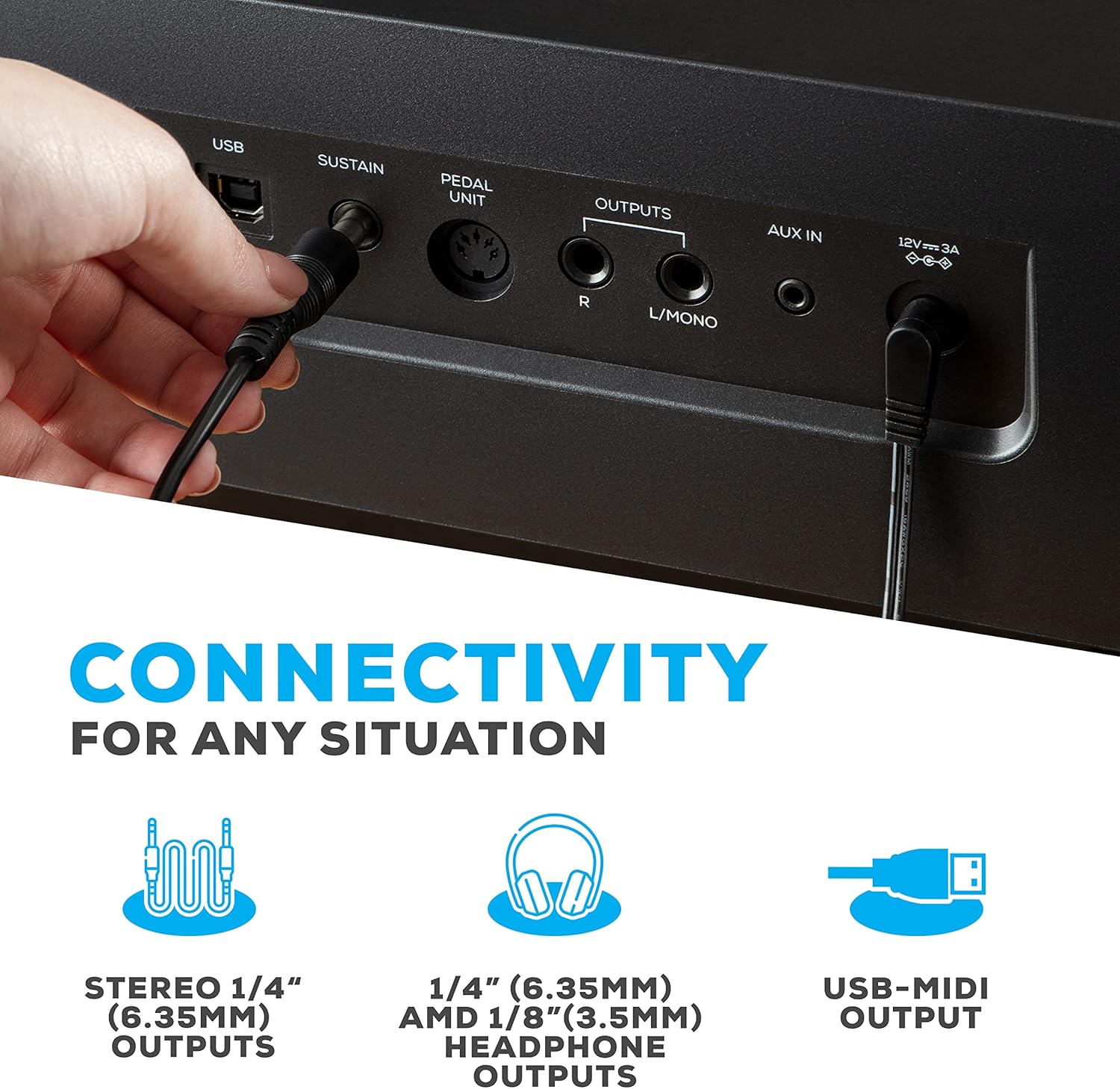
Image Description: A flat lay image showing the Alesis Prestige Artist's essential accessories: a black power adapter, a black music rest, and a black piano-style sustain pedal with a chrome-plated pedal. These are the items typically included in the product packaging.
Setup
Follow these steps to set up your Alesis Prestige Artist digital piano:
- Placement: Place the digital piano on a stable, flat surface or a compatible keyboard stand. Ensure there is adequate space for the music rest and connections.
- Music Rest Installation: Slide the music rest into the designated slot on the top panel of the piano.
- Sustain Pedal Connection: Connect the included sustain pedal to the "SUSTAIN" input on the rear panel of the piano.
- Power Connection: Connect the power adapter to the "12V DC" input on the rear panel of the piano, then plug the adapter into a power outlet.
- Audio Output (Optional): If connecting to external speakers or an amplifier, use standard 1/4" (6.35mm) TS cables to connect the "OUTPUTS" (L/MONO and R) to your audio system.
- Headphone Connection (Optional): For private practice, connect 1/4" (6.35mm) or 1/8" (3.5mm) headphones to the respective headphone jacks on the rear panel.
- USB-MIDI Connection (Optional): To use the piano with computer software, connect a standard USB cable from the "USB" port on the piano to your computer.

Image Description: A close-up view of the rear connectivity panel of the Alesis Prestige Artist. Visible ports include USB, Sustain, Pedal Unit, Outputs (R, L/MONO), Aux In, and 12V DC power input. A hand is shown plugging a cable into the USB port.
Operation
The Alesis Prestige Artist offers a range of features for an expressive playing experience.
Power On/Off
Press the Power button located on the top panel to turn the piano on or off.
Key Action and Touch Response
The Prestige Artist features 88 full-size graded hammer action weighted keys, providing a realistic piano feel. The adjustable touch response allows you to customize the sensitivity of the keys to match your playing style.

Image Description: A woman is seated, playing the Alesis Prestige Artist digital piano. Overlayed graphics emphasize key features: "88 Full Sized Keys," an illustration of "Graded Hammer Action Keys," and a graph demonstrating "Adjustable Touch Response" from heavy to light.
Voices and Polyphony
The piano includes 30 multi-sampled voices, such as Grand Piano, Electric Piano, Organ, and Synthesizers. With 256 max polyphony, you can play complex pieces without notes cutting off.

Image Description: A close-up of hands playing the keys of the Alesis Prestige Artist. Informational graphics highlight "5x Adjustable Reverb FX," "256 max Polyphony," and "30x Multi-Sampled Voices" including Grand Piano, Electric Piano, Organ, and Synthesizers.
Modes and Effects
Explore various playing modes and effects:
- Split Mode: Play with different tones simultaneously across the keyboard.
- Layer Mode: Stack two sounds together for a richer, more complex tone.
- Lesson Mode: Divides the keyboard into two zones with the same pitch and voice, ideal for student and teacher practice.
- Record Mode: Record your performance and listen back to review your playing.
- Reverb FX: Apply 5 adjustable reverb effects to add depth and ambiance to your sound.
- Built-in Arpeggiator: Create rhythmic patterns automatically.

Image Description: A close-up of the Alesis Prestige Artist's control panel, showing a hand interacting with the buttons. Graphics below illustrate four key modes: Split Mode (playing with different tones), Layer Mode (stacking sounds), Lesson Mode (dividing the keyboard), and Record Mode (recording performance).
OLED Screen and Speaker System
The intuitive OLED screen provides clear feedback for settings and selections. The 50W micro-array speaker system delivers loud, clear, and realistic sound in any environment.

Image Description: A split image showing a close-up of the Alesis Prestige Artist's OLED display, which reads "USER SONG: RECORDING...", and a foot pressing the sustain pedal. Graphics below highlight the "Built-in Arpeggiator," "OLED Display," and "Piano-Style Sustain Pedal."

Image Description: A detailed close-up of the Alesis Prestige Artist's micro-array speaker system, showing the speaker grille and the Alesis logo. The text "MICRO-ARRAY SPEAKER SYSTEM" is prominently displayed, indicating its sound quality.
Maintenance
Proper care and maintenance will ensure the longevity and optimal performance of your Alesis Prestige Artist digital piano.
- Cleaning: Use a soft, dry cloth to wipe down the surface of the piano. For stubborn dirt, slightly dampen the cloth with water. Avoid using abrasive cleaners, solvents, or waxes, as these can damage the finish.
- Key Cleaning: For keys, use a soft cloth dampened with a mild soap solution, then wipe dry immediately. Do not allow liquid to seep between the keys.
- Storage: When not in use, cover the piano with a dust cover to protect it from dust and debris. Store in a cool, dry place away from direct sunlight, extreme temperatures, and high humidity.
- Transportation: When moving the piano, ensure it is powered off and all cables are disconnected. Handle with care to avoid dropping or impacting the instrument.
- Power Supply: Always use the original power adapter provided with your Alesis Prestige Artist. Using an incorrect adapter can damage the unit and void your warranty.
Troubleshooting
If you encounter any issues with your Alesis Prestige Artist, refer to the following common troubleshooting steps:
| Problem | Possible Cause | Solution |
|---|---|---|
| No Sound |
|
|
| Keys not responding or inconsistent sound |
|
|
| Sustain pedal not working |
|
|
| Distorted sound |
|
|
If these steps do not resolve your issue, please refer to the official Alesis support resources.
Specifications
| Feature | Detail |
|---|---|
| Model Name | Prestige Artist |
| Number of Keys | 88 |
| Key Action | Graded Hammer Action Weighted Keys |
| Polyphony | 256 max |
| Voices | 30 Multi-Sampled Voices |
| Effects | 5 Adjustable Reverb FX, Built-in Arpeggiator |
| Display | OLED Screen |
| Speaker Output | 50 Watts (Micro-Array Speaker System) |
| Connectivity | Stereo 1/4" Outputs, 1/4" & 1/8" (3.5mm) Headphone Outputs, USB-MIDI Output, Sustain Pedal Input, Aux In |
| Power Source | Corded Electric (12V DC) |
| Dimensions (D x W x H) | 11.69"D x 52.04"W x 5.87"H |
| Item Weight | 28.2 pounds (12.8 Kilograms) |
| Color | Black |
| UPC | 694318025499 |
Warranty and Support
For detailed warranty information, please refer to the Safety & Warranty Manual included in your product packaging.
Additional Resources:
- Official User Manual (PDF): For the most comprehensive and up-to-date information, you can download the official PDF user manual from the Alesis website or via this direct link: Alesis Prestige Artist User Manual PDF
- Alesis Brand Store: Explore other Alesis products and find more support resources by visiting the official Alesis store on Amazon: Alesis Store
- Educational Software: Your Alesis Prestige Artist includes access to premium educational content:
- Skoove Premium: 3 months of Skoove Premium for in-depth online courses. Visit Skoove.com for more details.
- Melodics Premium: 1 month of Melodics Premium and 100 keys lessons. Download Melodics from Melodics.com.

Image Description: A close-up of the Alesis Prestige Artist's control panel and keys, with prominent logos for "Melodics" and "Skoove" displayed above, indicating the inclusion of premium subscriptions for these music learning platforms.