
1. Introduction
The CallToU Wireless Caregiver Pager System is designed to provide reliable communication between caregivers and individuals requiring assistance, such as the elderly, patients, or those with hearing impairments. This system offers peace of mind through its extended range, multiple alert options, and user-friendly design.
2. Key Features
- Extended Wireless Range: Up to 1000 feet (300 meters) in open areas, ensuring reliable signal transmission throughout homes and yards.
- Multiple Alert Modes: Receivers feature adjustable volume (0-110dB), LED light, and vibration functions, suitable for various needs, including hard-of-hearing caregivers.
- User-Friendly Call Buttons: Simple one-touch SOS call buttons are waterproof (IP55 rated) and can be worn with a lanyard or mounted.
- Flexible Receiver Options: Includes both a portable battery-powered receiver with a belt clip and a plug-in receiver.
- Expandable System: Supports pairing with up to 20 additional receivers or call buttons.
3. What's in the Box
- 1 x Plug-in Receiver
- 1 x Portable Battery-Powered Receiver
- 2 x Call Buttons (Waterproof)
- 2 x Lanyards
- 2 x Double-sided Adhesive Pads
- 1 x Small Screwdriver (for battery replacement)
- Batteries (included for both receivers and call buttons)
- User Manual
4. Setup Guide
4.1. Call Button Battery Installation and Lanyard Attachment
The call buttons come with a pre-installed 23A 12V battery. To replace the battery or attach the lanyard:
- Use the provided small screwdriver to open the back cover of the call button.
- If replacing, carefully remove the old battery and insert a new 23A 12V battery, ensuring correct polarity.
- To attach the lanyard, thread the small loop of the lanyard through the designated hole on the back cover. Pass the larger part of the lanyard through the small loop to secure it.
- Close the back cover and re-tighten the screws.
Video: Instructions on how to change the battery of the call button and attach the lanyard.
4.2. Portable Receiver Battery Installation and Clip Attachment
The portable receiver requires 2 AAA batteries (included). To install batteries and attach the belt clip:
- Slide off the battery cover on the back of the portable receiver.
- Insert 2 AAA batteries, observing the correct polarity (+/-).
- Reattach the battery cover. The belt clip can be slid into the designated slots on the back of the receiver.
Video: Demonstrates the setup and use of the CallToU Wireless Caregiver Pager, including battery installation for the portable receiver.
4.3. Pairing Call Buttons with Receivers
The system is typically pre-paired. If re-pairing is needed or for additional buttons:
- Plug in the plug-in receiver or ensure the portable receiver has batteries.
- On the receiver, press and hold the "Set" button (often indicated by a gear icon or "SET" text) for approximately 5 seconds until the receiver emits a "ding-dong" sound or flashes an LED.
- While the receiver is in pairing mode, press the call button you wish to pair. The receiver should confirm successful pairing with another sound or flash.
- Repeat for all call buttons.
5. Operating Instructions
5.1. Using the Call Button
To request assistance, simply press the large red "CALL" button on the transmitter. The button will illuminate briefly, and a signal will be sent to the paired receivers.

Image: The CallToU call button, featuring a prominent red 'CALL' button for easy activation.
5.2. Receiver Functions
Both receivers provide audible alerts, and the portable receiver also offers a vibration mode.
- Volume Adjustment: Use the volume buttons on the side of the plug-in receiver or the internal buttons on the portable receiver to adjust the alert volume (5 levels, 0-110dB).
- Ringtone Selection: Cycle through the available ringtones using the music selection buttons on the receivers. The plug-in receiver has 55 ringtones, and the portable receiver has 15.
- Vibration Mode (Portable Receiver): The portable receiver can be set to vibrate silently, ideal for hard-of-hearing users or quiet environments.
- LED Indicator: Both receivers feature an LED light that flashes when a call signal is received.
- Stop Button (Portable Receiver): A dedicated "STOP" switch on the side of the portable receiver allows you to quickly silence an ongoing alert.
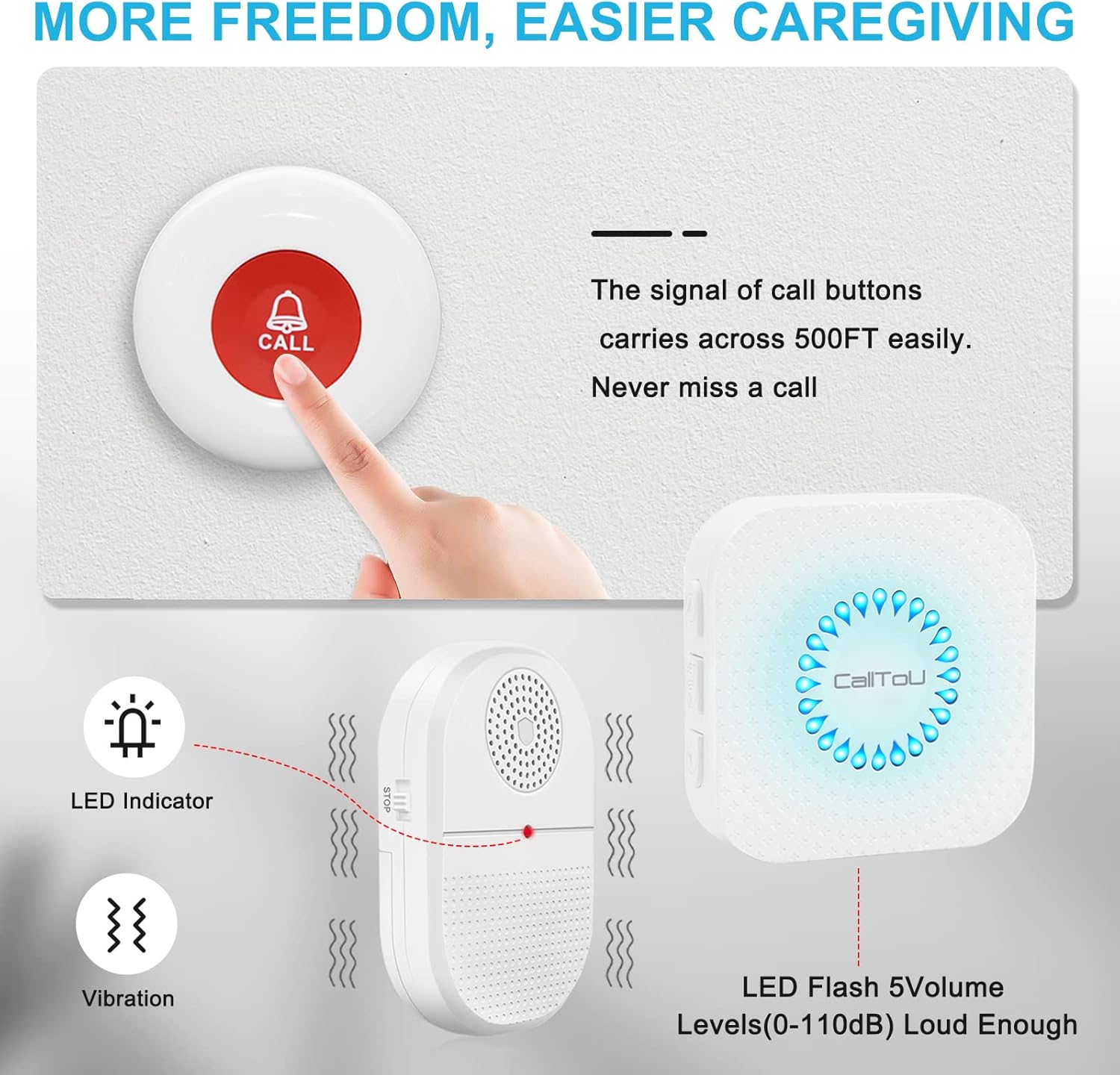
Image: The portable receiver highlighting its LED indicator, vibration function, and speaker for audible alerts.
6. Maintenance
- Battery Replacement: Replace batteries in the call buttons (23A 12V) and portable receiver (AAA 1.5V) as needed. Battery life depends on usage frequency.
- Cleaning: Wipe the devices with a soft, dry cloth. Do not use abrasive cleaners or immerse in water.
- Water Resistance: Call buttons are IP55 waterproof, meaning they are splash-proof but should not be immersed in water.
7. Troubleshooting
- No Signal/Receiver Not Alerting:
- Check if receiver batteries are dead or if the plug-in receiver is properly connected to power.
- Ensure call button battery is not depleted.
- Re-pair the call button with the receiver following the setup instructions.
- Verify that the receiver is not in silent mode (check volume level and vibration setting).
- Reduce distance between call button and receiver, or remove obstacles that may interfere with the signal.
- Short Range:
- Thick walls, metal structures, or other electronic devices can reduce range. Try repositioning receivers.
- Ensure batteries are fresh in both the call button and portable receiver.
8. Specifications
| Feature | Detail |
|---|---|
| Brand | CallToU |
| Model Number | CDVP 2-2 U |
| Control Method | Touch |
| Noise Level | Up to 110 Decibels |
| Mounting Type | Wall Mount (for plug-in receiver), Clip/Adhesive (for call buttons) |
| Maximum Range | 1000 Feet (approx. 300 meters) in open area |
| Sensor Technology | Vibration Sensor (in portable receiver) |
| Call Button Battery | 1 x 23A 12V Alkaline (included) |
| Portable Receiver Battery | 2 x AAA 1.5V Alkaline (included) |
| Waterproof Rating | IP55 (Call Buttons) |
| Operating Temperature | -30°C to +70°C |
| Product Dimensions | Call Button: 2.24 x 2.24 x 0.75 inches; Portable Receiver: 3.62 x 2.44 x 0.79 inches |
| Item Weight | 9.6 ounces (total package) |
9. Warranty and Support
For warranty information, technical support, or further inquiries, please refer to the contact information provided in your product packaging or visit the official CallToU website.
The product includes a 30-day return/replacement policy through Amazon. Extended protection plans may be available for purchase.
Official CallToU Store: CallToU Store on Amazon


