
Danfoss 015G4550
Danfoss Aero RAVL Thermostatic Radiator Valve
Model: 015G4550
Introduction
This manual provides essential information for the installation, operation, and maintenance of your Danfoss Aero RAVL Thermostatic Radiator Valve, Model 015G4550. This device is designed to regulate room temperature efficiently, contributing to energy savings and enhanced comfort. Please read these instructions carefully before installation and use to ensure proper function and safety.
Safety Information
- Always ensure the heating system is depressurized and cooled before attempting any installation or maintenance.
- Installation should be performed by a qualified professional if you are unsure about any steps.
- Do not attempt to modify the valve or its components. Use only genuine Danfoss parts for replacements.
- Keep packaging materials out of reach of children to prevent suffocation hazards.
- Ensure the valve is not exposed to extreme temperatures outside its operating range (7-28°C).
Product Overview
The Danfoss Aero RAVL Thermostatic Radiator Valve is a modern, gas-filled thermostatic head designed for precise temperature control. It features a fast response time of approximately 10 minutes and offers tactile feedback for every 0.5°C temperature change. The design allows for easy, tool-free mounting and is compatible with Danfoss RAVL type valve housings.
Key Features:
- Gas-filled thermostatic bellow for rapid response.
- Integrated sensor for accurate temperature detection.
- Temperature range: 7°C to 28°C.
- Tactile feedback for precise temperature adjustments.
- Tool-free mounting with audible click confirmation.
- Optimized temperature scale with a 3°C gap between values.
Components:
- Thermostatic Head (Aero RAVL)
- Mounting Ring/Clamp
- Integrated Sensor

Figure 1: Front view of the Danfoss Aero RAVL Thermostatic Radiator Valve. This image displays the main body of the valve head with its temperature setting dial and the red indicator for the current setting.

Figure 2: Side view of the Danfoss Aero RAVL Thermostatic Radiator Valve, highlighting its compatibility with RAVL 26mm connections. The image shows the connection mechanism at the base of the thermostatic head.
Installation
Proper installation is crucial for the optimal performance of your thermostatic radiator valve. Follow these steps carefully.
Compatibility Check:
The Danfoss Aero RAVL thermostatic head is specifically designed for Danfoss RAVL valve bodies with a 26 mm mounting diameter. Ensure your existing valve body is compatible before proceeding with installation.
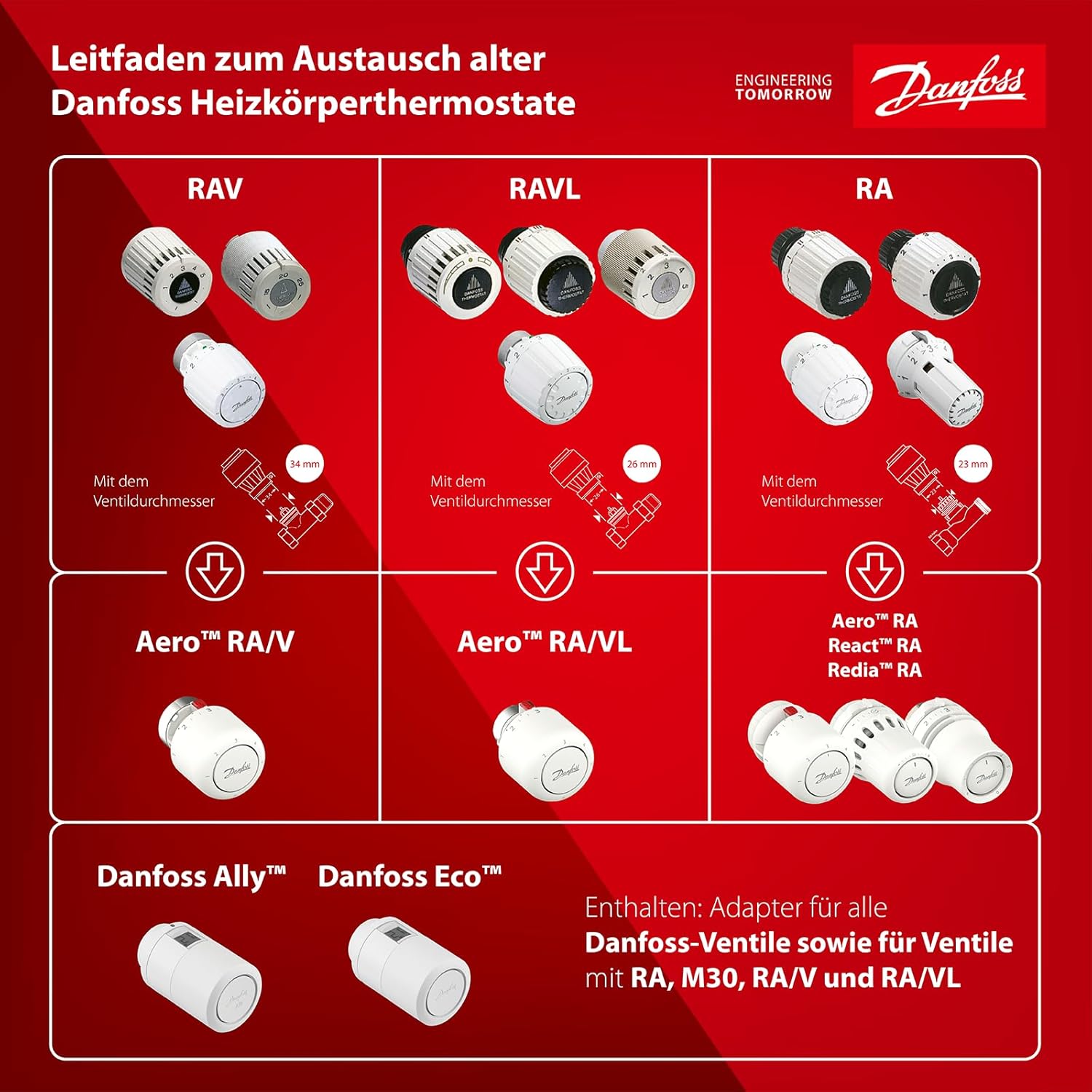
Figure 3: Compatibility guide for replacing old Danfoss radiator thermostats. This chart illustrates that the Aero™ RA/VL head is suitable for RAVL valve bodies with a 26 mm valve diameter.

Figure 4: Technical diagram of a Danfoss RAVL valve body, indicating the 26 mm diameter for proper head attachment. This diagram helps identify the correct valve type.

Figure 5: Installation diagram showing the Danfoss Aero™ RA/VL thermostatic head fitting onto an old Danfoss RA/VL valve with a 26 mm mounting diameter. The image highlights the clamp ring connection for identification.
Mounting Instructions:
- Prepare the Valve Body: Ensure the existing RAVL valve body is clean and free from debris. If replacing an old thermostatic head, remove it carefully.
- Set the Thermostatic Head: Turn the setting dial on the new Aero RAVL head to its maximum setting (usually '5' or '28°C') to fully retract the pin.
- Position the Head: Place the Aero RAVL thermostatic head onto the RAVL valve body. Ensure it is aligned correctly.
- Secure the Mounting Ring: Push the mounting ring firmly onto the valve body until you hear an audible 'click'. This confirms the head is securely attached. No tools are required for this step.
- Verify Installation: Gently try to rotate the head. It should be firmly attached and not wobble.
Operating Instructions
The Danfoss Aero RAVL valve allows for manual temperature control to maintain your desired room temperature.
Setting the Temperature:
- The thermostatic head features a numbered dial (typically 1 to 5, or a temperature scale from 7°C to 28°C).
- Rotate the dial to your desired temperature setting. Each click provides tactile feedback, indicating a 0.5°C change in the set point.
- Setting '❄' (Frost Protection): This setting maintains a minimum temperature (around 7°C) to prevent pipes from freezing.
- Setting '1' (Approx. 14°C): A lower comfort temperature.
- Setting '3' (Approx. 20°C): A common comfort temperature for living areas.
- Setting '5' (Approx. 28°C): Maximum heating.
- The valve will automatically adjust the flow of hot water to the radiator to maintain the selected room temperature.

Figure 6: The Danfoss Aero RAVL thermostatic valve installed on a radiator within a room setting. This illustrates the product's appearance when in use.
Maintenance
The Danfoss Aero RAVL thermostatic valve requires minimal maintenance to ensure long-term performance.
- Cleaning: Wipe the exterior of the thermostatic head with a soft, damp cloth. Do not use abrasive cleaners or solvents, as these can damage the surface.
- Dust Removal: Periodically remove any dust accumulation from the valve and radiator to ensure proper air circulation around the integrated sensor.
- Function Check: Annually, rotate the dial through its full range of settings to ensure smooth operation and prevent internal components from sticking.
- Avoid Obstruction: Ensure that curtains, furniture, or other objects do not obstruct the thermostatic head, as this can interfere with accurate temperature sensing.
Troubleshooting
If you experience issues with your thermostatic radiator valve, consult the table below for common problems and solutions.
| Problem | Possible Cause | Solution |
|---|---|---|
| Radiator remains cold despite high setting. | Valve pin stuck in closed position; air in the system; system pressure too low. | Remove the thermostatic head and gently press the valve pin several times to free it. Bleed the radiator. Check system pressure and refill if necessary. |
| Room is too cold/hot, inconsistent temperature. | Thermostatic head obstructed; incorrect setting; external heat sources/drafts. | Ensure the head is not covered by curtains or furniture. Adjust the setting. Eliminate drafts or reposition heat-emitting objects. |
| Valve head is loose or falls off. | Mounting ring not fully engaged. | Re-attach the thermostatic head, ensuring the mounting ring clicks securely into place. |
| No tactile feedback when adjusting dial. | Internal mechanism issue. | Contact Danfoss support or a qualified technician for inspection. |
Specifications
| Feature | Detail |
|---|---|
| Model Name | Danfoss Aero RAVL |
| Model Number | 015G4550 |
| Product Dimensions | 4.33"D x 5.12"W x 10.63"H |
| Item Weight | 0.15 Kilograms (5.3 ounces) |
| Controller Type | Hand Control |
| Temperature Control Type | Manual |
| Temperature Range | 7°C - 28°C |
| Response Time | Up to 10 minutes |
| Control Accuracy | 0.2 K |
| Mounting Type | Direct valve mount (RAVL 26mm) |
| Material | Plastic |
| Color | White |
| Special Feature | Energy efficiency |
Warranty and Support
Danfoss products are manufactured to high-quality standards. For information regarding warranty terms and conditions, please refer to the documentation provided with your purchase or visit the official Danfoss website. For technical support, spare parts, or service inquiries, please contact your local Danfoss representative or authorized dealer.
You can find more information and support resources on the Danfoss Store on Amazon.
Related documents015G4550


Ask a question about this manual
Ask about setup, troubleshooting, compatibility, parts, safety, or missing instructions. Manuals+ will review the question and use this page’s manual context to help answer it.