
Introduction
This manual provides comprehensive instructions for the safe installation, operation, and maintenance of your SUNTHIN Outdoor White String Lights with 240W Outdoor Dimmer. Please read this manual thoroughly before installation and use, and retain it for future reference. Proper installation and adherence to these guidelines will ensure optimal performance and longevity of your product.
Important Safety Instructions
To reduce the risk of fire, electric shock, or injury to persons, please observe the following:
- Read all instructions before installation and use.
- Do not exceed the maximum wattage of 240W for the dimmer. Refer to the dimmer compatibility chart for bulb types and quantities.
- Ensure the power source is disconnected before installation, maintenance, or bulb replacement.
- Use only with dimmable bulbs if connecting to the dimmer.
- This product is designed for both indoor and outdoor use. Ensure all connections are secure and waterproof for outdoor applications.
- Do not submerge the string lights or dimmer in water.
- Keep away from flammable materials.
- Do not attempt to repair or modify the product. Contact customer support for assistance.
- Always use appropriate mounting hardware to secure the string lights.
Package Contents
Verify that all components are present and undamaged:
- SUNTHIN Outdoor White String Lights (96FT length, with S14 LED bulbs)
- 240W Outdoor Dimmer
- Wireless Remote Control
- User Manual (this document)
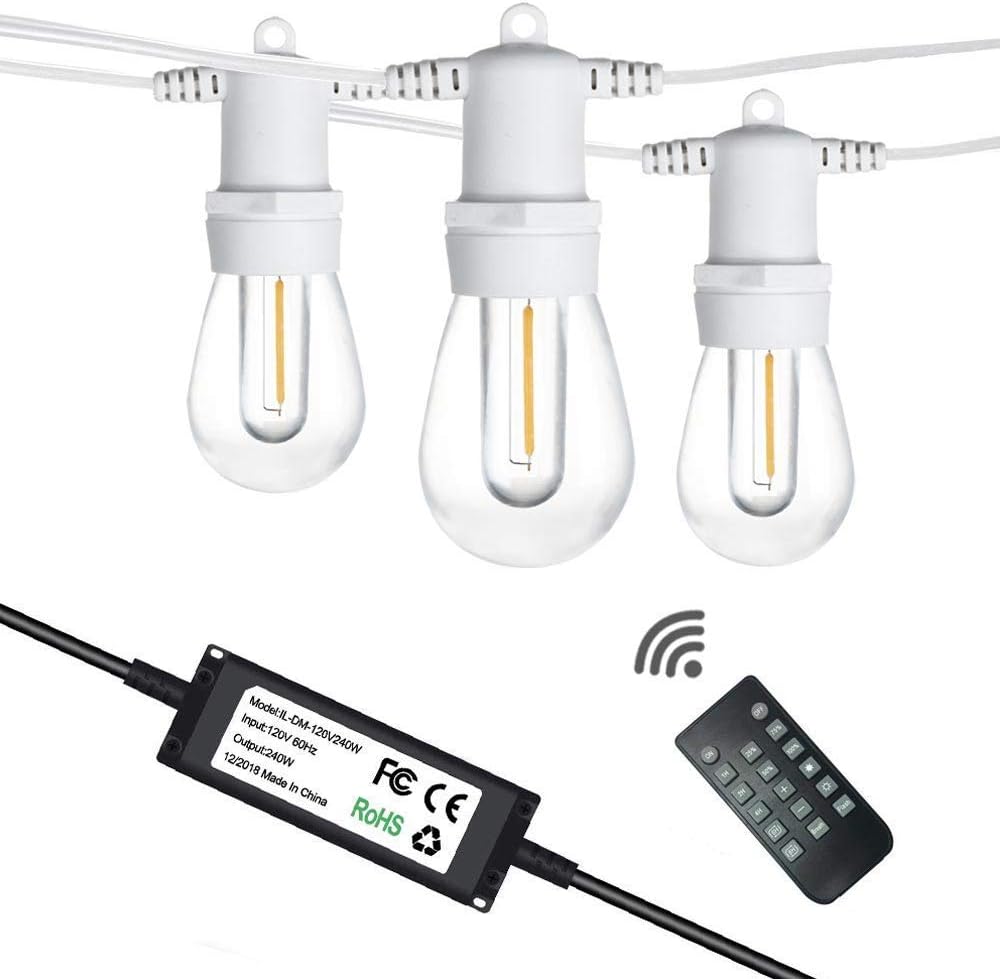
Image: Components of the SUNTHIN Outdoor White String Lights system, including the string lights, the dimmer unit, and the wireless remote control.
Setup and Installation
Follow these steps for proper installation:
- Plan the Layout: Determine the desired path for your string lights. Ensure the total length is appropriate for the area. The 96FT string lights can be connected end-to-end with up to 18 strands for extended coverage.
- Secure the String Lights: Use appropriate hooks, clips, or guide wires (not included) to securely hang the string lights. Each bulb socket has a hanging loop for easy installation. Ensure the lights are not under excessive tension.
- Connect the Dimmer: Plug the string light's male connector into the female connector of the 240W outdoor dimmer. Ensure the connection is tight and secure.
- Power Connection: Plug the dimmer's power cord into a standard 120V AC outdoor-rated electrical outlet. Ensure the outlet is protected from direct water exposure.
- Verify Operation: Once connected, the lights should illuminate. Use the remote control to test the on/off and dimming functions.

Image: Illustration of the plug-and-play connection process, showing the string lights connecting to the dimmer, which then plugs into a power outlet, and the remote control for operation.

Image: Close-up view highlighting key features such as the two-layer shatterproof bulb design, super heavy-duty cord, ETL approval, and energy-saving LED technology.
Operating Instructions
The included wireless remote control allows for convenient operation of your string lights.
Remote Control Functions:
- ON/OFF: Press the "ON" button to turn the lights on, and "OFF" to turn them off.
- Dimming:
- Preset Levels: Buttons for 25%, 50%, 75%, and 100% brightness.
- Stepless Dimming: Use the "+" and "-" buttons to gradually increase or decrease brightness.
- Timer: Buttons for 1H, 2H, 4H, and 8H. Pressing a timer button will set the lights to automatically turn off after the selected duration.
- Flash/Fade Modes: The remote may include buttons for various lighting effects such as "Flash" or "Fade". Refer to the remote's specific markings for these functions.

Image: Visual representation of the string lights at different brightness levels (25%, 50%, 75%, 100%), demonstrating the dimmer's functionality.

Image: A hand holding the remote control, illustrating the stepless dimming capability of the string lights.

Image: Close-up of the wireless remote control, highlighting buttons for on/off, dimming presets, timer functions (1H, 2H, 4H, 8H), and a warning about not exceeding 240W.
Maintenance
- Cleaning: Disconnect power before cleaning. Wipe the bulbs and cord with a soft, damp cloth. Do not use harsh chemicals or abrasive cleaners.
- Bulb Replacement: While the LED bulbs are designed for long life, if a bulb needs replacement, ensure the power is off. Unscrew the old bulb and screw in a new S14 LED bulb of the same wattage. The bulbs are shatterproof plastic.
- Storage: If storing the lights for an extended period, clean them thoroughly, coil them neatly, and store them in a cool, dry place away from direct sunlight.
- Inspection: Periodically inspect the cord, dimmer, and bulbs for any signs of damage, wear, or loose connections. Address any issues promptly.
Troubleshooting
| Problem | Possible Cause | Solution |
|---|---|---|
| Lights do not turn on. | No power to the outlet. Loose connection. Dimmer or remote malfunction. | Check the power outlet with another device. Ensure all connections (string to dimmer, dimmer to outlet) are secure. Verify remote battery. Try operating the dimmer directly if possible (not applicable for this model as it's remote-controlled). |
| Lights flicker or dim unexpectedly. | Loose bulb. Overloaded dimmer (exceeding 240W). Faulty dimmer. | Tighten all bulbs. Ensure total wattage of connected bulbs does not exceed 240W. Refer to the dimmer compatibility chart. Contact customer support if the issue persists. |
| Remote control not working. | Dead battery. Obstruction between remote and dimmer. Remote not paired (if applicable). | Replace the remote control battery. Ensure a clear line of sight to the dimmer unit. Refer to specific remote pairing instructions if provided with the product (not detailed in current data). |
| Some bulbs are not lighting up. | Loose bulb. Damaged bulb. | Tighten the bulb in its socket. Replace the faulty bulb with a new S14 LED bulb. |
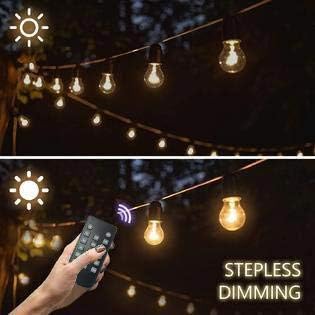
Image: A chart illustrating the maximum number of different bulb types (S14, ST64, G40, CA10, LED Christmas Lights) that can be connected to the dimmer, emphasizing that the dimmer only works with dimmable bulbs.
Specifications
- Brand: SUNTHIN
- Model: B0928LFLSL
- String Light Length: 96 feet
- Bulb Type: S14 LED, Shatterproof Plastic
- Light Color: White
- Dimmer Wattage: 240W (Maximum)
- Input Voltage: 120V AC, 60Hz
- Control Method: Wireless Remote Control (50ft distance)
- Special Features: Dimmable, Connectable (up to 18 strands), ETL Certified, Waterproof
- Usage: Indoor/Outdoor
Warranty and Customer Support
For warranty information or technical assistance, please contact SUNTHIN customer support through the retailer's platform or the official SUNTHIN website. Please have your model number (B0928LFLSL) and purchase date available when contacting support.
Website: Visit the SUNTHIN Store on Amazon
