
1. Introduction
The GOOLOO GP3000 is a versatile and powerful portable car jump starter designed to provide reliable starting power for a wide range of vehicles. Beyond its primary function of jump starting, it also serves as a portable power bank for electronic devices and features an integrated LED flashlight. This manual provides essential information for the safe and effective operation, maintenance, and troubleshooting of your GP3000 unit.
2. Package Contents
Please check the package for the following items:
- GOOLOO GP3000 SuperSafe Portable Car Battery Jump Starter
- Heavy-Duty Jumper Cables
- USB to Type-C Cable
- Type C to Type C Cable
- Storage Bag
- User Manual
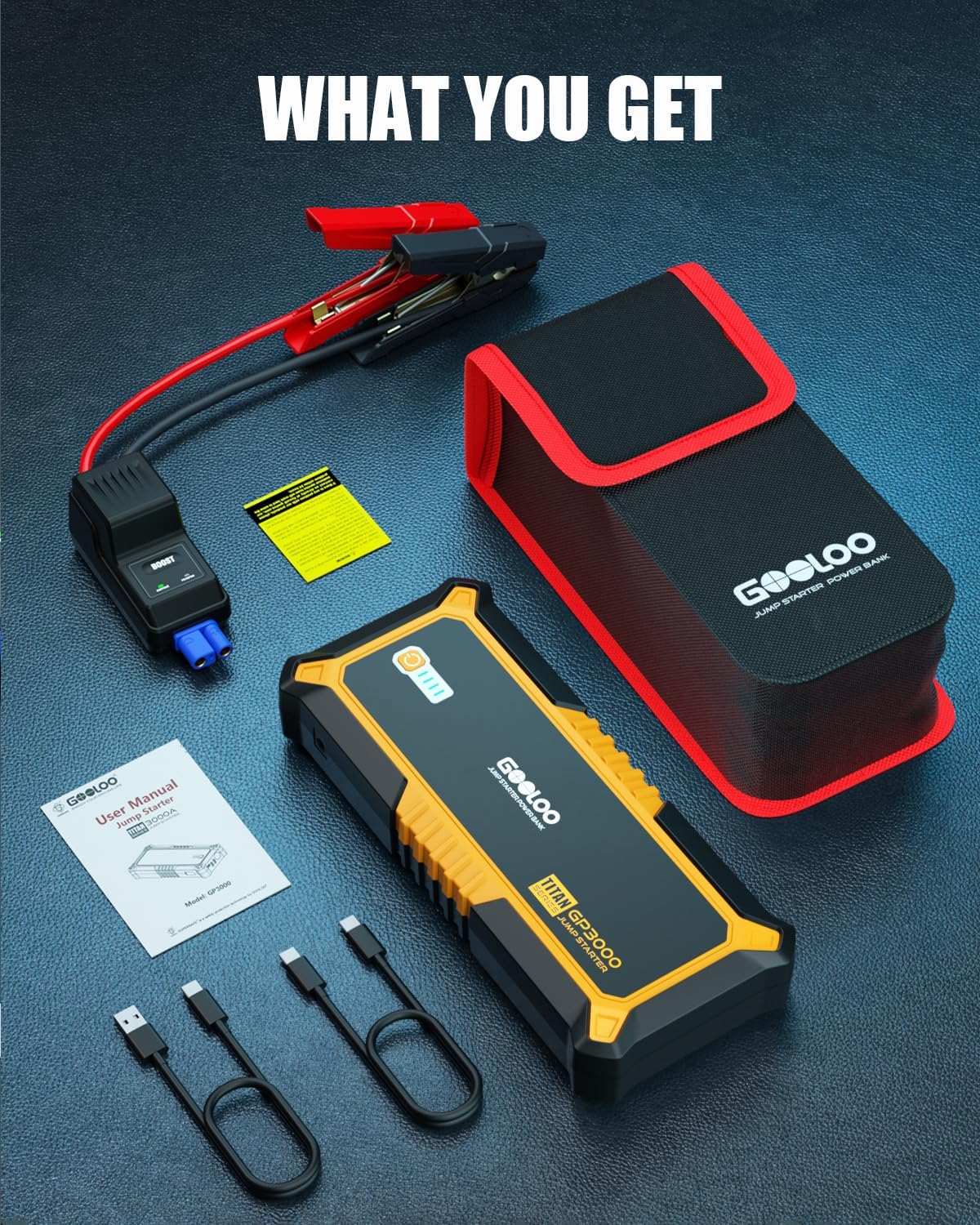
Figure 2.1: All items included in the GOOLOO GP3000 package
3. Product Overview
Familiarize yourself with the components and ports of your GOOLOO GP3000 unit.

Figure 3.1: GOOLOO GP3000 Jump Starter with Smart Jumper Cables

Figure 3.2: Detailed view of GOOLOO GP3000 ports and LED indicators
- Jumper Cable Port: Connects the heavy-duty jumper cables for vehicle jump starting.
- Output 15V/10A: Provides power for 12V DC devices such as tire inflators or car refrigerators.
- In/Out Type-C (15W): Used for charging the jump starter itself or charging compatible electronic devices.
- USB 5V/2.1A Output: Standard USB port for charging electronic devices.
- USB 5V/9V/12V Quick Charge Output: Quick charge port for compatible devices, offering faster charging speeds.
- LED Light: Integrated flashlight with multiple modes.
- Power Button & LED Indicators: Activates the unit and displays the battery charge level.
4. Charging the Jump Starter
Before initial use, fully charge your GOOLOO GP3000. To charge the unit:
- Connect the provided Type-C cable to the 'In/Out Type-C' port on the jump starter.
- Connect the other end of the Type-C cable to a compatible USB wall charger (not included) or car charger (not included).
- The LED indicators will illuminate to show the charging progress. All four lights will be solid when fully charged.
For optimal performance and longevity, it is recommended to recharge the unit every 1-3 months, especially during its 24-month standby time.
5. Operating Instructions: Jump Starting a Vehicle
The GOOLOO GP3000 is designed to safely jump start vehicles with up to 9.0L gasoline engines and 7.0L diesel engines.
Safety Precautions:
- Ensure the jump starter is adequately charged before use.
- Always connect the clamps to the correct battery terminals (red to positive, black to negative). The SUPERSAFE technology automatically detects reverse polarity to prevent damage.
- Do not crank the engine for more than 3 seconds per attempt. Wait at least 30 seconds between attempts.
- Do not leave the jump starter connected to the vehicle battery after the vehicle has started.
Jump Starting Steps:
- Connect Jumper Cables: Insert the blue plug of the heavy-duty jumper cables into the jumper cable port on the GOOLOO GP3000.
- Connect to Vehicle Battery: Attach the red (+) clamp to the positive terminal of the vehicle's battery. Attach the black (-) clamp to the negative terminal of the vehicle's battery.
- Check Indicator: The indicator light on the smart jumper cable will show green if the connection is correct and the battery voltage is sufficient for a normal start. If the battery voltage is very low or there is no battery, the indicator might not show green immediately.
- Start Vehicle: Once the green light is solid (or if using BOOST mode, see below), start your vehicle.
- Remove Cables: After the vehicle starts, immediately remove the black (-) clamp from the vehicle battery, then the red (+) clamp, and finally disconnect the jumper cables from the jump starter.
Using the "BOOST" Function (for very low/dead batteries):
If your vehicle's battery voltage is extremely low (below 8V) or completely dead, the smart jumper cable might not show a green light. In this case, you can use the "BOOST" function:
- Connect the jumper cables to the jump starter and then to the vehicle battery as described above.
- Press and hold the "BOOST" button on the smart jumper cable for 3 seconds. The indicator light will turn solid green.
- Start your vehicle within 30 seconds.
- Once the vehicle starts, immediately remove the clamps in reverse order.

Figure 5.1: GOOLOO GP3000 connected to a car battery for jump starting

Figure 5.2: GOOLOO GP3000 Smart Jumper Cables with reverse polarity protection
Video Demonstration:
Video 5.1: Demonstration of the GOOLOO Portable Car Battery Jump Starter (GP2000 model shown) in action, highlighting its ease of use for starting a vehicle.
Video 5.2: Overview of the GOOLOO portable car jump starter battery pack (GP2000 model shown), showcasing its features and accessories.
6. Using as a Portable Power Bank
The GP3000 features multiple USB ports to charge your electronic devices.

Figure 6.1: GOOLOO GP3000 charging multiple electronic devices
- Connect your device's charging cable to either the USB 5V/2.1A port, the USB 5V/9V/12V Quick Charge port, or the In/Out Type-C port.
- Press the power button on the GP3000 to begin charging.
- The 15V/10A output port can power 12V DC devices like tire inflators or car refrigerators (adapter cable may be required).
7. LED Flashlight Functions
The integrated LED light provides illumination for various situations.

Figure 7.1: User utilizing the GOOLOO GP3000's integrated LED flashlight
- To Turn On/Off: Press and hold the power button for 3 seconds.
- To Cycle Modes: Once the light is on, short press the power button to cycle through modes: Flashlight (steady light) → Strobe Light → SOS Signal.
8. Specifications
| Feature | Specification |
|---|---|
| Peak Amperage | 3000 Amps |
| Engine Compatibility | Up to 9.0L Gas & 7.0L Diesel |
| Battery Type | Lithium Polymer |
| Voltage | 12 Volts |
| USB-C Input/Output | 15W |
| USB Quick Charge Output | 5V/9V/12V |
| USB Output | 5V/2.1A |
| DC Output | 15V/10A |
| LED Light Modes | Flashlight, SOS, Strobe |
| Operating Temperature | -4℉ to 140℉ (-20℃ to 60℃) |
| Standby Time | 24 Months (recharge every 1-3 months) |
| Battery Life Cycles | 1000+ Cycles |
| Dimensions | 3.92"D x 8.97"W x 1.49"H |
| Weight | 2.64 pounds |
9. Maintenance and Storage
- Store the jump starter in a cool, dry place away from direct sunlight and high temperatures.
- Recharge the unit every 1-3 months to maintain optimal battery health, even if not in use.
- Clean the unit with a dry, soft cloth. Do not use harsh chemicals or abrasive materials.
- Keep the ports free from dust and debris.
10. Troubleshooting
| Problem | Possible Cause | Solution |
|---|---|---|
| Unit does not turn on. | Battery is completely discharged. | Charge the unit fully using the provided Type-C cable. |
| Vehicle does not start. | Incorrect clamp connection. | Ensure clamps are connected correctly (red to +, black to -). Check smart cable indicator. |
| Vehicle does not start. | Vehicle battery is extremely low/dead. | Use the "BOOST" function on the smart jumper cable. |
| Vehicle does not start. | Jump starter battery is low. | Recharge the jump starter. |
| LED flashlight does not turn on. | Power button not held long enough. | Press and hold the power button for 3 seconds to activate. |
11. Warranty and Support
GOOLOO offers a comprehensive warranty for your GP3000 jump starter:
- 30-Day Money Back Guarantee: Within the first 30 days after your purchase, you can apply for a return for a full refund if you are not satisfied.
- 30 Days to 12 Months (18 Months for Member Customers): We will replace the defective unit due to manufacturing issues with a new one within 12 months (18 months for registered member customers).
For further assistance or to extend your warranty, please refer to the contact information provided in your warranty card or visit the official GOOLOO website.


