
1. Introduction
The Dixell D3000 Car HUD (Head-Up Display) projects essential driving data onto your car's front windshield. This system allows drivers to view information such as speed, RPM, fuel consumption, water temperature, and voltage without diverting their eyes from the road. This manual provides detailed instructions for installation, operation, and maintenance of your D3000 HUD.
2. Product Overview
The D3000 HUD is designed to enhance driving safety by presenting critical vehicle data directly in the driver's line of sight. It connects to your vehicle's On-Board Diagnostics II (OBDII) port.

Image: Dixell D3000 Car HUD device. This image shows the compact design of the HUD unit, including its display screen, power button, setting button, and USB port on the side.
Key Components and Functions:
- Multi-Functions Area: Displays RPM, driving mileage, voltage, water temperature, fuel consumption, and driving time.
- RPM Icon: Indicates the engine RPM value.
- Light Sensor: Automatically adjusts display brightness based on ambient light conditions.
- Power Button: For turning the device on/off.
- Setting Button: Used to access and adjust various settings.
- USB Port: For power connection and data transfer.
- Speed Display: Shows current speed in numerical format.
- Speed Unit: Displays speed in KM/H or MPH.
- Indicator Icons: For Voltage, Water temperature, Buzzer, and Settings.
- Unit Icons: L/H (Liters/Hour), L/100KM, MIN (Driving time), Trip (Driving mileage), RPM.
3. Installation
3.1 Vehicle Compatibility
- Identify your vehicle's brand. The D3000 HUD is compatible with cars featuring an OBDII or EU OBD agreement.
- Open the engine hood and locate the vehicle information sticker. Verify if it states "OBDII CERTIFIED." If this certification is present, the HUD can be installed.
3.2 Connecting the HUD
- Locate the vehicle's 16-pin diagnostic link. This port is typically found under the dashboard on the driver's side.
- Connect the provided OBDII connecting line securely to the vehicle's diagnostic link and to the USB port on the HUD unit.
3.3 Reflective Film Application
To ensure optimal display clarity, apply the reflective film to your windshield as follows:
- Spray a small amount of water on the area of the windshield where the film will be placed. Clean the area thoroughly with a dry cloth.
- Peel off the backing (marked '1') from the reflective film. Carefully position and paste the film onto the cleaned window glass.
- Once the film is in the desired location, use a scratch card or a similar flat object to smooth out the film, pushing any water or air bubbles outwards until the film is flat and clear.
- Remove the protective film (marked '2') from the front of the reflective film.
- If the display information appears incomplete or misaligned, adjust the position of the non-slip mat under the HUD unit to fine-tune the projection.
4. Operation
Once installed and powered on, the D3000 HUD will automatically display driving data. The display features various indicators and numerical readouts.
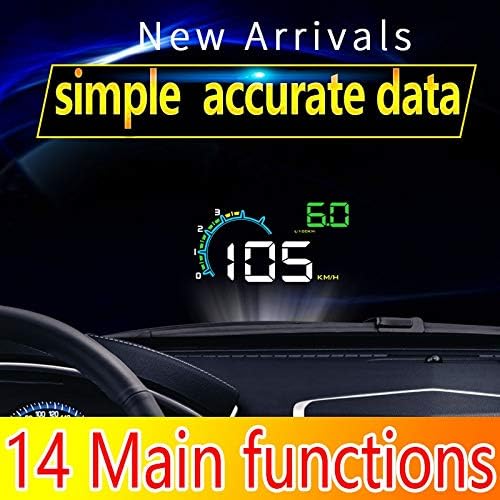
Image: Dixell D3000 Car HUD in operation. This image illustrates the projected display on the windshield, showing digital speed, RPM gauge, and fuel consumption data.
4.1 Display Functions
- Speed: The large central number indicates your current driving speed.
- RPM: The arc-shaped gauge and numerical value show engine revolutions per minute.
- Fuel Consumption: Displayed as L/H (Liters per Hour) or L/100KM (Liters per 100 Kilometers).
- Voltage: Shows the vehicle's battery voltage.
- Water Temperature: Indicates engine coolant temperature.
- Driving Mileage (Trip): Displays the distance covered during the current trip.
- Driving Time (MIN): Shows the duration of the current trip.
4.2 Brightness Adjustment
The D3000 HUD features both automatic and manual brightness adjustment modes. The built-in light sensor automatically adapts the display brightness to the surrounding environment. For manual adjustment, use the setting button to cycle through brightness levels as needed.
5. Maintenance
To ensure the longevity and optimal performance of your Dixell D3000 HUD, follow these maintenance guidelines:
- Cleaning the Unit: Use a soft, dry cloth to wipe the exterior of the HUD unit. Avoid using abrasive cleaners or solvents, which can damage the surface.
- Cleaning the Reflective Film: Gently wipe the reflective film on your windshield with a clean, damp cloth. Do not use harsh chemicals that could degrade the film's reflective properties.
- Cable Care: Ensure the OBDII cable is not pinched or excessively bent, as this can damage the internal wiring.
- Environmental Conditions: Avoid exposing the HUD to extreme temperatures or direct sunlight for prolonged periods when the vehicle is parked, as this may affect its electronic components.
6. Troubleshooting
If you encounter issues with your D3000 HUD, refer to the following common problems and solutions:
- No Display/Power:
- Ensure the OBDII cable is securely connected to both the vehicle's diagnostic port and the HUD unit.
- Verify that your vehicle is OBDII certified.
- Check the vehicle's ignition status; the HUD typically powers on with the ignition.
- Incomplete or Misaligned Display:
- Adjust the position of the non-slip mat under the HUD unit to change the projection angle and alignment on the reflective film.
- Ensure the reflective film is applied smoothly without bubbles or creases.
- Inaccurate Speed/RPM Readings:
- The HUD should automatically calibrate with your vehicle's OBDII system. If discrepancies persist, consult the advanced settings menu (using the setting button) for calibration options, if available.
- Display Too Dim or Too Bright:
- The light sensor automatically adjusts brightness. If manual adjustment is preferred, use the setting button to override automatic mode and set your desired brightness level.
7. Specifications
Technical specifications for the Dixell D3000 Car HUD:
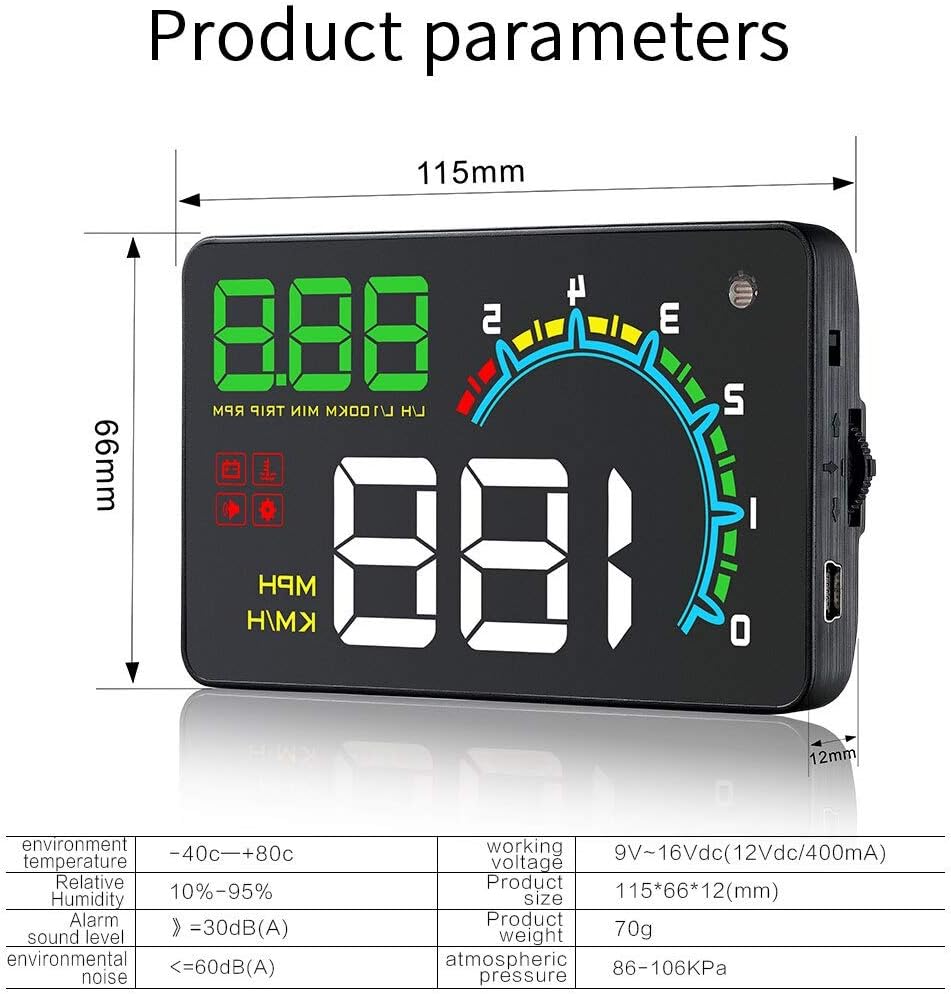
Image: Dixell D3000 Car HUD product parameters. This image provides a visual representation of the device's dimensions and a table of its technical specifications.
| Feature | Specification |
|---|---|
| Brand | Dixell |
| Model Number | Dixell-0082 |
| ASIN | B0925W896L |
| GTIN / UPC | 791974134821 |
| Material | Glass (for reflective film) |
| Working Voltage | 9V~16Vdc (12Vdc/400mA) |
| Product Size | 115 * 66 * 12 (mm) |
| Product Weight | 70g |
| Environment Temperature | -40°C ~ +80°C |
| Relative Humidity | 10% ~ 95% |
| Atmospheric Pressure | 86 ~ 106KPa |
| Alarm Sound Level | >= 30dB(A) |
| Environmental Noise | <= 60dB(A) |
8. Package Contents
The Dixell D3000 Car HUD package includes the following items:
- 1x Car HUD Unit (D3000)
- 1x Reflective Film
- 1x User Manual (this document)
- 1x OBDII Connecting Cable
- 1x Non-slip Mat
9. Warranty and Support
For warranty information and technical support, please refer to the documentation provided at the point of purchase or contact your retailer. Keep your purchase receipt as proof of purchase for any warranty claims.