
Vont VNT-SSL01
Vont Smart LED Strip Lights User Manual
Model: VNT-SSL01 | Brand: Vont
Introduction
Thank you for choosing Vont Smart LED Strip Lights. This manual provides essential information for setting up, operating, and maintaining your new LED strip lights. These lights offer versatile illumination with smart control features, allowing you to transform any space with vibrant colors and dynamic lighting effects.
Key Features:
- Adjustable Lighting: The strip can be cut to any desired length and adhered to various surfaces.
- Smart Control: Compatible with Alexa and Google Assistant for voice-activated control.
- Color Changing: Access to 16 million colors and music synchronization modes.
- Voice Activated: Control power, dimming, and brightening with simple voice commands.
- Easy Scheduling: Customize lighting schedules and explore DIY modes through the Vont app.
What's in the Box
- LED Strip Light
- Light Kit (includes power adapter and controller)

Image: Vont Smart LED Strip Lights, showing the strip, remote, and app interface.
Setup Instructions
- Prepare the Surface: Ensure the surface where you plan to install the LED strip is clean, dry, and smooth. Wipe the area with rubbing alcohol and let it dry completely to ensure optimal adhesion.
- Connect the Strip: Connect the LED light strip to the controller. Ensure the clip is securely locked to maintain a stable connection.
- Apply the Strip: Slowly unroll the strip from the reel as you stick it to the prepared surface. Press firmly along the entire length to ensure strong adhesion.
- Reinforce Corners (Optional): For corners or areas requiring extra stability, use the provided clips to reinforce the strip. This helps prevent bending on the LED beads and ensures longevity.
- Cut to Length (If needed): If the strip is too long for your application, you can cut it along the designated gold segments. Do not cut elsewhere, as this may damage the strip.
- Power On: Plug the power adapter into a wall outlet. The lights should illuminate.

Image: A hand cleaning a surface to prepare for LED strip installation.

Image: Diagram illustrating the connection of the LED strip to its controller.

Image: The LED strip being carefully unrolled and pressed onto a surface.
Image: Diagram illustrating the proper use of clips for securing LED strip corners.
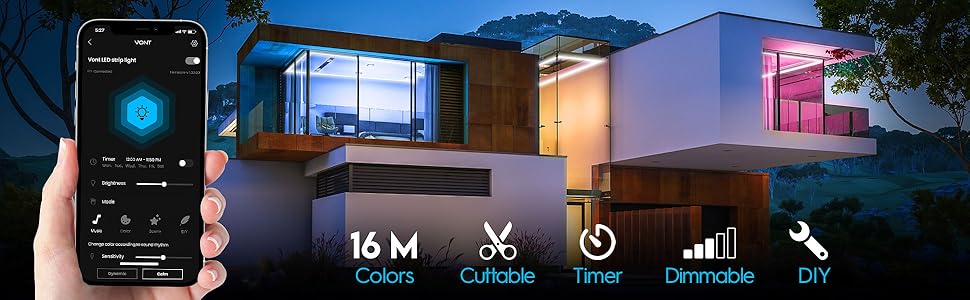
Image: Diagram showing the correct points (gold segments) to cut the LED strip.
No Hub Required:
The Vont Smart LED Strip Lights do not require a separate hub for operation. Simply plug them in and connect via the Vont Home App.

Image: Vont LED Strip Lights highlighting the 'No Hub Required' feature.
Operating Instructions
Using the Vont Home App:
Download the Vont Home App from the App Store (iOS) or Google Play Store (Android) to unlock the full range of features for your LED strip lights.

Image: Screenshot of the Vont Home App interface on a smartphone.
- Power On/Off: Toggle the lights on or off directly from the app.
- Brightness Adjustment: Adjust the brightness level to suit your preference.
- Color Selection: Choose from 16 million colors using the color picker or preset options.
- Music Sync Mode: Synchronize the lights with your music for dynamic visual effects.
- Scene Modes: Select from various pre-programmed scene modes for different moods or occasions.
- DIY Mode: Create and save your own custom lighting effects.
- Scheduling: Set schedules for the lights to automatically turn on/off or change settings at specific times.

Image: LED lights changing colors in sync with music, enhancing the ambiance.
Voice Control with Alexa & Google Assistant:
Connect your Vont Smart LED Strip Lights to your Amazon Alexa or Google Assistant device for convenient voice control.

Image: A woman using voice commands to control the LED lights via Alexa.
- Enable Skill/Action: Follow the instructions in your Alexa or Google Home app to enable the Vont skill or action.
- Voice Commands: Use commands such as:
- "Alexa/Hey Google, turn on/off [Light Name]."
- "Alexa/Hey Google, dim/brighten [Light Name]."
- "Alexa/Hey Google, set [Light Name] to [color]."
Manual Control (Inline Controller):
The inline controller provides basic manual control over your LED strip lights.

Image: The Vont LED Strip Lights showing the inline remote control and app interface.
- Power Button: Press to turn the lights on or off.
- Color Cycle Button: Press to cycle through various preset colors.
- Brightness Button: Press to adjust the brightness levels.
Maintenance
To ensure the longevity and optimal performance of your Vont Smart LED Strip Lights, follow these maintenance guidelines:
- Cleaning: Gently wipe the LED strip with a soft, dry cloth to remove dust. For stubborn dirt, slightly dampen the cloth with water. Do not use harsh chemicals or abrasive cleaners.
- Adhesion: If the strip begins to lose adhesion, ensure the surface is clean and dry. You may use additional adhesive clips (not included) for reinforcement if necessary.
- Storage: If storing the lights for an extended period, ensure they are clean, dry, and rolled neatly to prevent damage to the strip or LEDs.
Troubleshooting
| Problem | Possible Cause | Solution |
|---|---|---|
| Lights do not turn on. | Power connection is loose or disconnected. | Check all power connections, including the adapter and the strip-to-controller connection. Ensure the power outlet is functional. |
| Lights are not responding to app/voice commands. | Bluetooth/Wi-Fi connectivity issue; App not properly linked to device. | Ensure Bluetooth is enabled on your device and the strip is within range. Verify Wi-Fi connection. Re-link the device in the Vont Home App or your smart assistant app (Alexa/Google Home). |
| Lights are flickering or showing incorrect colors. | Loose connection; Damaged LED segment. | Check all connections for tightness. If a segment is damaged, it may need replacement or careful re-cutting if possible. |
| Adhesion is failing. | Surface not clean or smooth; Environmental factors (humidity, temperature). | Clean and dry the surface thoroughly before re-applying. Consider using additional adhesive clips for better support. |
Specifications
| Feature | Detail |
|---|---|
| Model Number | VNT-SSL01 |
| Length | 16.4 FT (196.8 inches) |
| Color | Multi-color (RGB) |
| Light Source Type | LED (5050 RGB LEDs) |
| Number of Light Sources | 150 |
| Power Source | Corded Electric |
| Voltage | 12 Volts |
| Wattage | 18 watts |
| Control Method | App (Vont Home App), Voice (Alexa, Google Assistant), Inline Controller |
| Connectivity Technology | Bluetooth, Wi-Fi |
| Material | Aluminum, Plastic |
| Indoor/Outdoor Usage | Indoor Use Only |
| Item Weight | 7.2 Ounces |
| Product Dimensions (L x W x H) | 196.8 x 0.5 x 0.2 inches |
| First Available Date | September 26, 2021 |
Warranty & Support
Vont offers a lifetime warranty for its products. To activate your warranty and enjoy all its amazing perks, you typically need to register your product within 72 hours of purchase.
For detailed warranty information and to complete your activation, please refer to the official Vont website or the user manual PDF provided with your product.
An online instruction manual is available to reduce paper waste and ensure your devices are always ready for use.
For further assistance or technical support, please visit the Vont support page or contact their customer service.
Note: Some customer reviews indicate responsive seller support for product issues.
Related documentsVNT-SSL01


Ask a question about this manual
Ask about setup, troubleshooting, compatibility, parts, safety, or missing instructions. Manuals+ will review the question and use this page’s manual context to help answer it.