
1. Introduction
The SOLEM LR-IP-FL is a sophisticated, battery-powered irrigation controller designed for efficient water management. This waterproof device features Bluetooth and LoRa connectivity, allowing for remote control and monitoring. It integrates flow control capabilities by connecting to a water meter's pulse counter, enabling precise monitoring of water consumption and detection of leaks or flow anomalies. For remote operation, the LR-IP-FL must be paired with a SOLEM LR-MB (Wi-Fi/LoRa relay) or LR-BST (3G gateway) and managed via the MySOLEM application.
2. Safety Information
- Read all instructions carefully before installation and operation.
- Ensure the battery compartment is sealed correctly to maintain the IP68 waterproof rating.
- Use only a standard 9V battery. Do not use rechargeable batteries unless specified.
- Keep the device away from extreme temperatures and direct sunlight for prolonged periods.
- Do not attempt to disassemble or repair the unit yourself. Contact qualified personnel for service.
- Dispose of batteries according to local regulations.
3. Package Contents
Verify that all items are present in the package:
- SOLEM LR-IP-FL 6-Station Irrigation Controller
- User Manual (this document)
- (Battery not included, requires 1x standard 9V battery)
4. Product Overview
The LR-IP-FL controller is designed for outdoor use, featuring a robust, waterproof casing. It includes connections for up to 6 irrigation stations, a 9V battery compartment, and an input for a rain sensor or water meter pulse counter.
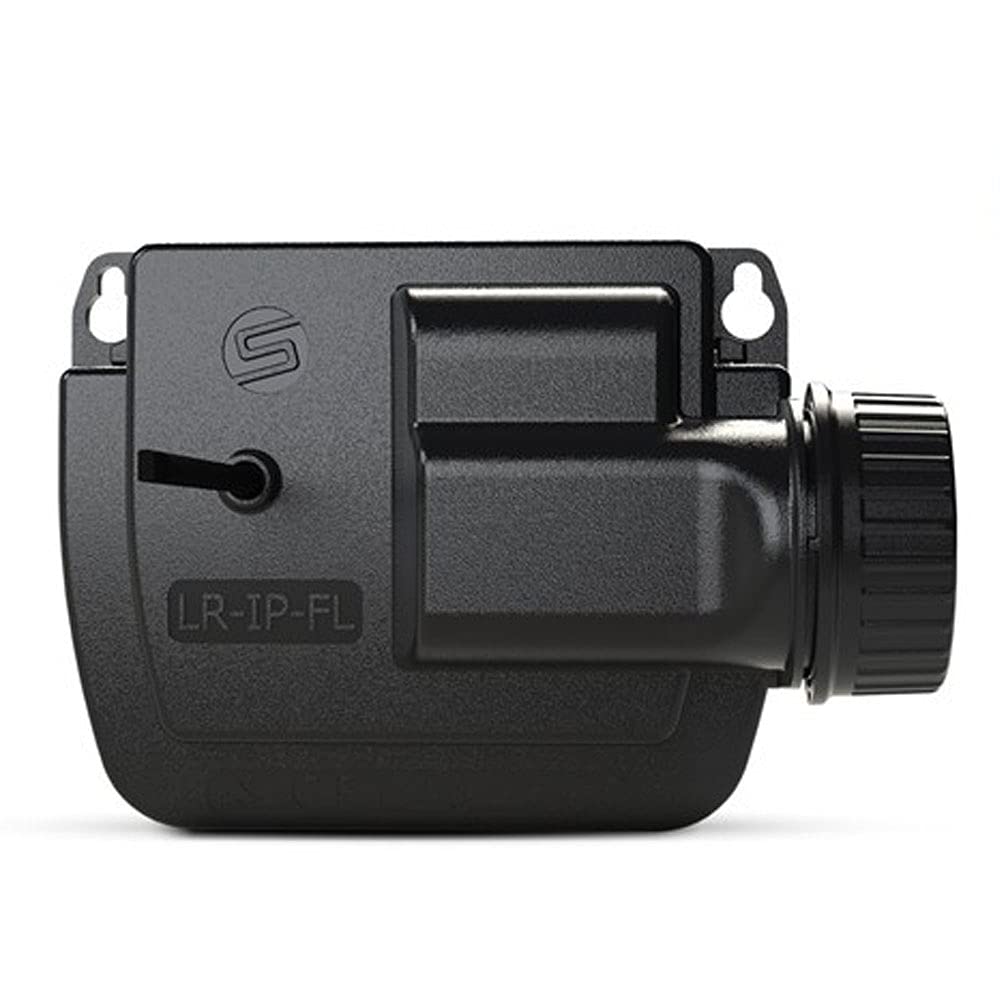
Figure 1: SOLEM LR-IP-FL Irrigation Controller. This image shows the compact, waterproof design of the device, typically with connection ports visible.
5. Setup
5.1. Battery Installation
- Locate the battery compartment on the device.
- Open the compartment cover carefully.
- Insert a new standard 9V alkaline battery, ensuring correct polarity.
- Securely close the battery compartment cover to maintain the waterproof seal.
5.2. Wiring Irrigation Valves
- Connect the common wire from your irrigation valves to the "COMMON" terminal on the controller.
- Connect each individual valve wire to the corresponding station terminal (1-6).
- Ensure all connections are secure and waterproof.
5.3. Connecting Sensors (Optional)
- For a rain sensor: Connect the rain sensor wires to the designated sensor input terminals.
- For a water meter pulse counter: Connect the pulse counter wires to the sensor input terminals. The controller supports pulse frequencies up to 10 Hz.
- Refer to the sensor's specific instructions for wiring details.
5.4. Pairing with Gateway (for Remote Control)
To enable remote control via the MySOLEM app, the LR-IP-FL must be paired with a SOLEM LR-MB (Wi-Fi/LoRa relay) or LR-BST (3G gateway).
- Ensure your LR-MB or LR-BST gateway is powered on and connected to the internet.
- Follow the pairing instructions provided with your SOLEM gateway and the MySOLEM application.
- The LR-IP-FL will communicate with the gateway using LoRa technology for long-range connectivity.
6. Operating Instructions
6.1. Local Control (Bluetooth)
- Download and install the MySOLEM application on your smartphone or tablet.
- Enable Bluetooth on your mobile device.
- Open the MySOLEM app and follow the on-screen instructions to connect to your LR-IP-FL controller via Bluetooth.
- Once connected, you can configure irrigation programs, manually activate stations, and monitor status directly from the app.
6.2. Remote Control (LoRa via Gateway)
After successful pairing with an LR-MB or LR-BST gateway, you can control your LR-IP-FL from anywhere with an internet connection.
- Ensure your mobile device has an active internet connection.
- Open the MySOLEM app. The app will connect to your controller via the gateway.
- All functions available via local Bluetooth control are also accessible remotely.
6.3. Flow Monitoring
If a water meter pulse counter is connected, the LR-IP-FL will monitor water flow and consumption for each irrigation station.
- The MySOLEM app will display real-time flow data and historical consumption.
- Configure alerts within the app for abnormal flow rates (too high or too low) during irrigation periods.
- The system can also detect leaks outside of irrigation periods, triggering an alert.
7. Maintenance
7.1. Battery Replacement
The 9V battery typically lasts for an extended period, but its lifespan depends on usage and environmental conditions. Replace the battery when the MySOLEM app indicates a low battery level or if the controller becomes unresponsive.
- Follow the battery installation steps in Section 5.1.
- Always use a fresh, standard 9V alkaline battery.
7.2. Cleaning
Periodically clean the exterior of the controller with a damp cloth. Do not use abrasive cleaners or solvents. Ensure the battery compartment and connection ports are free of debris.
8. Troubleshooting
| Problem | Possible Cause | Solution |
|---|---|---|
| Controller not responding | Low or dead battery. | Replace the 9V battery. |
| Cannot connect via Bluetooth | Bluetooth disabled on mobile device; controller out of range; app issue. | Ensure Bluetooth is on. Move closer to the controller. Restart the MySOLEM app. |
| No remote control | Gateway not powered/connected; LR-IP-FL not paired with gateway; internet issue. | Check gateway power and internet connection. Verify LR-IP-FL is paired. |
| Irrigation station not activating | Wiring issue; faulty valve; low battery. | Check wiring connections. Test the valve manually. Replace battery. |
| Inaccurate flow readings | Pulse counter not connected correctly; faulty pulse counter. | Verify pulse counter wiring. Check pulse counter functionality. |
9. Specifications
| Feature | Detail |
|---|---|
| Model | LR-IP-FL |
| Number of Stations | 6 |
| Power Source | 1 x Standard 9V Battery |
| Waterproof Rating | IP68 (Fully waterproof) |
| Communication | Bluetooth, LoRa (via LR-MB/LR-BST gateway) |
| Sensor Input | Rain sensor or Water meter pulse counter (max 10 Hz) |
| Weight | 1 kilogram (approx.) |
| Manufacturer | SOLEM |
10. Warranty and Support
For warranty information and technical support, please refer to the official SOLEM website or contact your local distributor. Keep your purchase receipt as proof of purchase.
For further assistance, visit: www.solem.fr

