
1. Introduction
The HT Instruments HT9025 is a robust and durable digital clamp meter designed for professional electrical measurements. This device is categorized for safety under CAT III 1000 V, CAT IV 600 V, and CAT II 1500 V, ensuring reliable performance in various industrial and residential applications. It provides accurate readings for current, voltage, resistance, and continuity, making it an essential tool for electricians and technicians.
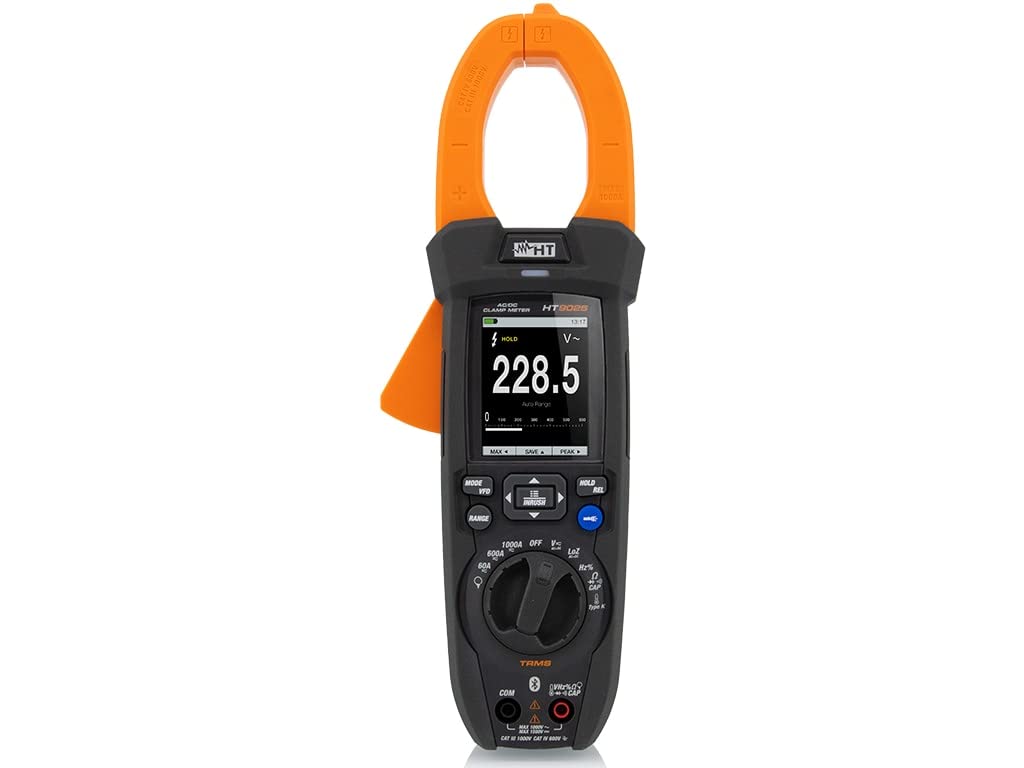
Front view of the HT Instruments HT9025 Digital Clamp Meter, featuring a green and black design with a large display and rotary dial.
2. Safety Information
Always adhere to local and national safety codes. Use appropriate personal protective equipment (PPE) such as insulated gloves and eye protection. Before any measurement, ensure the device is set to the correct function and range. Do not attempt to measure voltages or currents exceeding the specified maximum ratings. Verify the meter's operation on a known voltage source before use. Avoid using the device if it appears damaged or is operating abnormally.
3. Key Features
- Voltage DC measurement up to 1500 V
- Voltage AC measurement up to 1000 V
- AC/DC Current measurement up to 1000 A
- Resistance and Continuity testing
- True RMS measurement for accurate readings on non-sinusoidal waveforms
- Non-Contact Voltage (NCV) detection
- Frequency and Duty Cycle measurement
- Temperature measurement (with appropriate probe, if included)
- MAX/MIN, REL (Relative), and ZERO functions
- Data Hold function
- Built-in LED light for illuminating dark work areas
- Backlight for the display
- Bluetooth connectivity (Bluetooth is a registered trademark of Bluetooth SIG, Inc.)
4. Package Contents
Verify that all items are present and undamaged upon opening the package:
- HT Instruments HT9025 Digital Clamp Meter
- Test Leads (Red and Black)
- Carrying Pouch
- User Manual
- Batteries (if included)
- Type K Thermocouple (for temperature models)
5. Setup
- Battery Installation: Open the battery compartment cover on the back of the meter. Insert the required batteries, observing correct polarity. Securely close the cover.
- Test Lead Connection: For voltage, resistance, continuity, and frequency measurements, insert the red test lead into the VΩHz input jack and the black test lead into the COM input jack.
- Power On: Rotate the rotary switch from the 'OFF' position to the desired measurement function.
6. Operating Instructions
6.1. AC/DC Current Measurement
Rotate the dial to the AC A or DC A position. Open the clamp jaws by pressing the trigger. Enclose a single conductor within the jaws. Ensure the jaws are fully closed. The current reading will be displayed. For DC current, observe the polarity indicated on the display.
6.2. AC/DC Voltage Measurement
Rotate the dial to the V~ (AC Voltage) or V- (DC Voltage) position. Connect the test leads to the circuit points where voltage is to be measured. The voltage reading will be displayed.
Video demonstrating the features of the DCM series clamp meters, including Max/Min, Relative, Zero functions, temperature measurement, frequency, duty cycle, and NCV sensing.
6.3. Resistance and Continuity Measurement
Rotate the dial to the Ω (Resistance) or Continuity position. For resistance, connect the test leads across the component. For continuity, touch the probes to the points to be tested; an audible tone indicates continuity.
6.4. Non-Contact Voltage (NCV) Detection
Rotate the dial to the NCV position. Bring the top of the clamp meter near a live conductor. The NCV sensing antenna will detect the presence of AC voltage, indicated by an audible beep and/or visual alert.
Short video demonstrating various features of a KPS clamp meter, including Max/Min, Relative, Zero functions, temperature measurement, NCV detection, AC/DC voltage measurement, jaw size, and backlight operation.
6.5. Other Functions
- MAX/MIN: Press the MAX/MIN button to record the maximum and minimum readings.
- REL (Relative): Press the REL button to set the current reading as a reference and display subsequent measurements as a deviation from this reference.
- ZERO: Used to zero out the display for DC current measurements to compensate for residual magnetism.
- HOLD: Press the HOLD button to freeze the current reading on the display.
- Backlight/LED Light: Activate the display backlight or the built-in LED flashlight for improved visibility in low-light conditions.
Video showcasing the professional TRMS DCM series clamp meters, highlighting features such as Max/Min, Relative, Zero functions, temperature measurement, NCV, AC/DC voltage, jaw size, backlight, built-in LED light, and a 3-year warranty.
7. Maintenance
- Cleaning: Wipe the meter with a damp cloth and mild detergent. Do not use abrasives or solvents.
- Battery Replacement: Replace batteries when the low battery indicator appears on the display. Use only the specified battery type.
- Storage: If the meter is not used for an extended period, remove the batteries to prevent leakage. Store in a cool, dry place.
8. Troubleshooting
- No Display/Erratic Readings: Check battery condition and replace if necessary. Ensure test leads are properly connected. Verify the function switch is in the correct position.
- Incorrect Current Reading: Ensure only one conductor is within the clamp jaws. Use the ZERO function for DC current if needed.
- No Continuity Beep: Check if the circuit is de-energized. Ensure probes make good contact.
9. Specifications
| Feature | Specification |
|---|---|
| Manufacturer | HT Instruments |
| Model Number | 1009025 |
| Product Weight | 505 g |
| Product Dimensions | 10 x 18 x 28 cm |
| Color | Red and White |
| Material | Plastic |
| Power Source | Battery |
| Measurement System | Metric |
| Safety Compliance | CAT III 1000V, CAT IV 600V, CE |
| Maximum Operating Voltage | 1500 Volts |
10. Warranty and Support
The HT Instruments HT9025 Digital Clamp Meter comes with a 3-year warranty. For technical support, service, or warranty claims, please contact your local distributor or the manufacturer directly. Ensure you have your product model number (HT9025) and proof of purchase available.


