
Introduction
The Mackie SRT212 is a 1600W powered PA loudspeaker designed for musicians, DJs, and venues requiring high-quality audio. It features a 12-inch woofer, a custom Sym-X Horn tweeter, and a 4-channel digital mixer. Advanced Impulse DSP ensures optimal sound quality and system protection. The SRT212 offers versatile configuration options with its dual-angled cabinet and includes wireless control and Bluetooth streaming capabilities.
Key Features:
- 1600W Class D amplifier for reliable performance.
- Custom 12-inch woofer and Sym-X Horn tweeter for clear, accurate sound.
- Advanced Impulse DSP for acoustic correction and system protection.
- Integrated 4-channel digital mixer with application-specific factory presets.
- Wireless control and Bluetooth streaming.
- Dual-angled cabinet for flexible placement.

Figure 1: Front view of the Mackie SRT212 Powered PA Speaker, showcasing the protective grille and Mackie logo.
Setup Instructions
1. Unpacking and Inspection
Carefully remove the SRT212 speaker from its packaging. Inspect the unit for any signs of damage that may have occurred during shipping. Retain the packaging for future transport or storage.
2. Placement and Mounting
The SRT212 can be placed on a flat surface, used as a floor monitor, or mounted on a standard speaker pole. Ensure the speaker is stable and secure in its chosen position. When pole-mounting, verify the pole's weight capacity meets or exceeds the speaker's weight.
3. Power Connection
- Ensure the power switch on the rear panel is in the OFF position.
- Connect the provided AC power cable to the IEC power inlet on the rear panel of the speaker.
- Plug the other end of the AC power cable into a grounded electrical outlet.
4. Audio Input Connections
The SRT212 features a 4-channel digital mixer. Connect your audio sources to the appropriate input channels on the rear panel:
- Channels 1 & 2: XLR/TRS combo jacks for microphone or line-level signals.
- Channel 3/4: 1/8-inch TRS input for stereo line-level devices (e.g., smartphones, laptops).
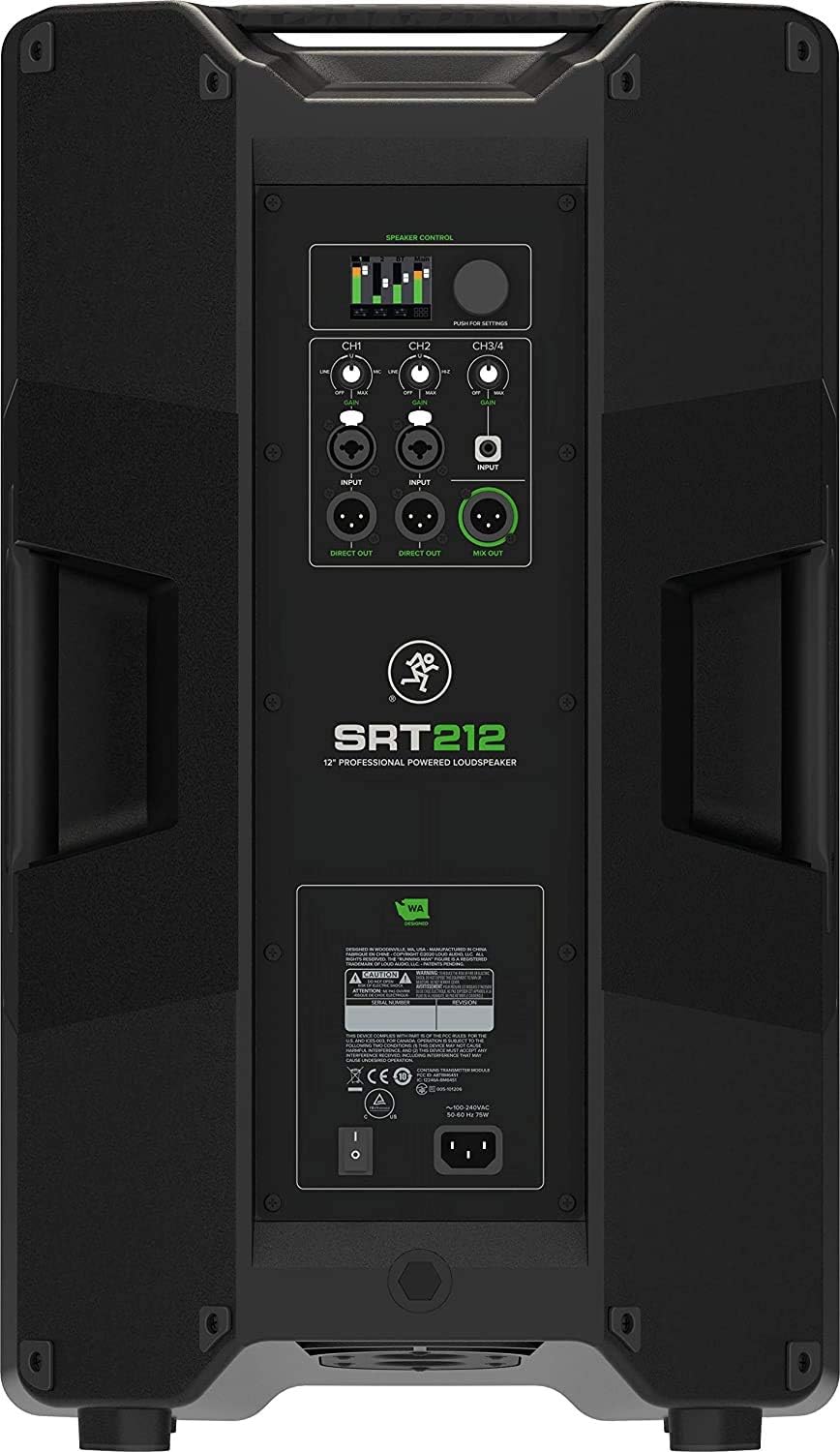
Figure 2: Rear panel of the Mackie SRT212, showing input/output connections and control interface.
5. Initial Power On
Once all connections are made, turn on the SRT212 using the power switch. The display on the rear panel will illuminate, indicating the unit is operational.
Operating Instructions
1. Mixer Control
The SRT212 features an intuitive 4-channel digital mixer accessible via the rear panel display and rotary encoder. Adjust input levels for each channel using the dedicated gain controls. Navigate through menus to access EQ, effects, and routing options.
2. Bluetooth Streaming and Control
- Pairing: Activate Bluetooth on your device. On the SRT212 mixer, select the Bluetooth pairing option. Select "Mackie SRT212" from your device's Bluetooth list.
- Streaming: Once paired, audio from your device will stream to Channel 3/4 of the SRT212 mixer.
- Control: Download the SRT Connect app for wireless control over the mixer functions from your smartphone or tablet.
3. DSP Presets
The Advanced Impulse DSP provides various factory presets optimized for different applications (e.g., DJ, Speech, Live Music). Select the preset that best suits your environment and audio source for optimal sound performance.
4. Output Options
- Direct Out: Provides a direct, unprocessed output of individual input channels for connecting to other devices or recording.
- Mix Out: Sends the combined signal of all active mixer channels to another speaker or mixing console.
Maintenance
Cleaning
Clean the exterior of the speaker with a soft, dry cloth. Do not use abrasive cleaners, waxes, or solvents. Ensure no liquids enter the speaker grille or control panel openings.
Storage
When not in use for extended periods, store the SRT212 in a dry, temperature-controlled environment. It is recommended to use the original packaging or a protective cover to prevent dust accumulation and physical damage.
Safety Precautions
- Do not expose the speaker to rain or moisture.
- Avoid blocking ventilation openings.
- Do not attempt to service the unit yourself. Refer all servicing to qualified personnel.
- Always disconnect power before cleaning or moving the speaker.
Troubleshooting
No Power
- Check if the power cable is securely connected to both the speaker and the electrical outlet.
- Verify the power outlet is functional by plugging in another device.
- Ensure the power switch on the speaker is in the ON position.
No Sound Output
- Check all audio input cables for secure connections.
- Ensure the input gain controls on the mixer are turned up.
- Verify that the master volume on the speaker is not set to minimum.
- If using Bluetooth, confirm the device is paired and audio is playing.
- Test with a different audio source or cable to rule out faulty equipment.
Distorted Sound
- Reduce the input gain of the source device and/or the speaker's input channels.
- Ensure the master volume is not set too high, causing clipping.
- Check if any EQ settings are excessively boosted.
Bluetooth Connection Issues
- Ensure the SRT212 is in Bluetooth pairing mode.
- Move your Bluetooth device closer to the speaker.
- Try unpairing and re-pairing the device.
- Restart both the speaker and your Bluetooth device.
Technical Specifications
| Brand | Mackie |
| Model | SRT212 |
| Output Wattage | 1600 Watts |
| Number of Channels | 4 |
| Woofer Size | 12-inch |
| Tweeter Type | Sym-X Horn |
| Mounting Type | Pole Mount |
| Compatible Devices | Smartphone |
| Manufacturer | Mackie Audio |
| GTIN | 10618952498539 |
Warranty Information
Mackie products typically come with a limited warranty covering defects in materials and workmanship. The specific duration and terms of the warranty may vary by region and product. Please refer to the warranty card included with your product or visit the official Mackie website for detailed warranty information and registration procedures.
Customer Support
For technical assistance, troubleshooting beyond this manual, or service inquiries, please contact Mackie customer support. You can find contact information, FAQs, and additional resources on the official Mackie website. When contacting support, please have your product model (SRT212) and serial number available.
Mackie Official Website: www.mackie.com


