1. Important Safety Instructions
Please read this instruction manual carefully before using the ROIDMI X20 Cordless Vacuum Cleaner. Keep this manual for future reference.
- This appliance is intended for household use only. Do not use it for commercial or industrial purposes.
- Do not use the vacuum cleaner to pick up water or other liquids, hot ashes, cigarette butts, sharp objects, or hazardous materials.
- Ensure the power adapter and charging dock are compatible with your local power supply.
- Do not operate the vacuum cleaner with a damaged cord or plug. If the appliance is not working as it should, has been dropped, damaged, left outdoors, or dropped into water, return it to a service center.
- Keep hair, loose clothing, fingers, and all parts of the body away from openings and moving parts.
- Do not allow children to operate the vacuum cleaner. Close supervision is necessary when used near children.
- Use only manufacturer-recommended attachments and accessories.
- Always turn off the appliance before connecting or disconnecting the motorized brush, extension rod, or other accessories.
- The battery pack must be removed from the appliance before it is scrapped. The appliance must be disconnected from the supply mains when removing the battery pack. The battery pack is to be disposed of safely.
2. Product Overview and Components
The ROIDMI X20 Cordless Vacuum Cleaner comes with several components designed for various cleaning tasks.

Image: The ROIDMI X20 main unit and various cleaning attachments, including different brush heads, a crevice tool, a dusting brush, and the magnetic charging dock.
Main Components:
- Main Unit: Contains the motor, dustbin, and battery.
- Extension Rod: Connects the main unit to the floor brush or other attachments for extended reach.
- Soft Roller Brush: Ideal for hard floors.
- Carbon Fiber Brush: Suitable for carpets.
- Mop Attachment: For wet cleaning of hard floors.
- Crevice Tool: For narrow gaps and corners.
- Dusting Brush: For delicate surfaces and upholstery.
- Magnetic Wireless Charging Dock: For convenient charging and storage.
- Power Adapter: For charging the device.
3. Setup and Initial Use
Assembly:
- Insert the extension rod into the main unit until it clicks securely.
- Attach the desired floor brush (soft roller or carbon fiber) to the other end of the extension rod until it clicks.
- For handheld use, attach accessories directly to the main unit.
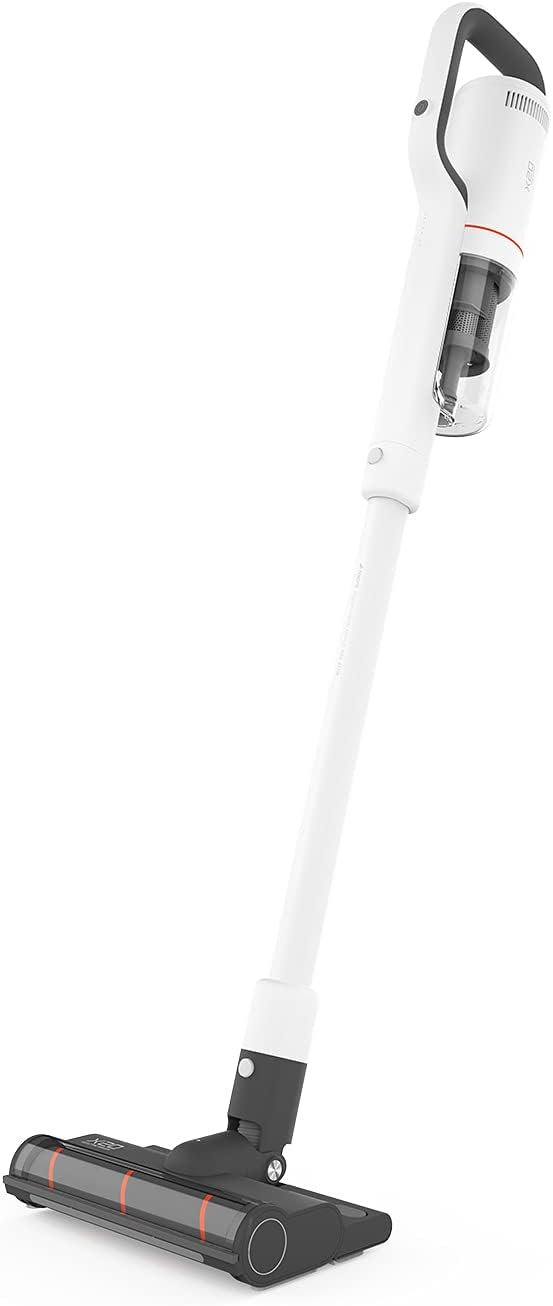
Image: The ROIDMI X20 Cordless Vacuum Cleaner fully assembled with the extension rod and floor brush attached, ready for use.
Charging:
Before first use, fully charge the vacuum cleaner. The ROIDMI X20 features magnetic wireless charging.
- Mount the magnetic wireless charging dock to a wall in a convenient location, ensuring it is near a power outlet.
- Connect the power adapter to the charging dock and plug it into a power outlet.
- Place the vacuum cleaner onto the charging dock. The indicator light on the main unit will illuminate to show charging status.
- A full charge typically takes approximately 2.5 hours. The battery life is up to 65 minutes depending on the power mode used.
4. Operating Instructions
Power On/Off and Suction Modes:
- Press the power button on the main unit to turn the vacuum cleaner on. It will start in the standard suction mode.
- Press the mode button to cycle through the three available power levels (Standard, Strong, Max).
- Press the power button again to turn the vacuum cleaner off.
Vacuuming:
The ROIDMI X20 is suitable for both hard floors and carpets.

Image: A person using the ROIDMI X20 Cordless Vacuum Cleaner to clean a grey carpet in a living room setting.
- For Hard Floors: Use the soft roller brush. Move the vacuum cleaner slowly over the surface to ensure thorough cleaning.
- For Carpets: Use the carbon fiber brush. For deeper cleaning, select a higher suction mode.

Image: A person using the ROIDMI X20 Cordless Vacuum Cleaner to clean a light wooden floor, demonstrating its maneuverability.
Mopping Function:
The ROIDMI X20 integrates vacuuming and mopping for simultaneous cleaning.
- Fill the water tank of the mop attachment with clean water.
- Attach the mop cloth securely to the mop attachment.
- Attach the mop attachment to the floor brush.
- Proceed with vacuuming as usual. The mop attachment will simultaneously wipe the floor.
Using Attachments:
Detach the extension rod and attach the crevice tool or dusting brush directly to the main unit for cleaning furniture, car interiors, or hard-to-reach areas.
App Control:
The ROIDMI X20 can be connected to a smartphone app for additional control and monitoring features. Refer to the app's instructions for pairing and functionality.
5. Maintenance
Regular maintenance ensures optimal performance and extends the lifespan of your ROIDMI X20.
Emptying the Dustbin:
- Ensure the vacuum cleaner is turned off.
- Locate the dustbin release button on the main unit.
- Press the button to detach the dustbin.
- Empty the contents into a waste bin.
- Reattach the dustbin securely.
Cleaning Filters:
The ROIDMI X20 uses a HEPA filter. Clean the filters regularly to maintain suction power.
- Remove the dustbin.
- Carefully remove the filter assembly from the dustbin.
- Tap the HEPA filter gently to remove loose dust.
- Rinse the filter under running water (ensure it is completely dry before reinstallation, which may take 24-48 hours).
- Reassemble the filters and dustbin once completely dry.
Cleaning Brush Rolls:
Hair and debris can get tangled in the brush rolls, affecting performance.

Image: A close-up of the ROIDMI X20 floor brush with a cleaning tool next to it, used for removing tangled hair and debris from the brush roll.
- Turn off the vacuum cleaner and detach the floor brush.
- Locate the brush roll release mechanism (usually a latch or screw).
- Remove the brush roll.
- Use scissors or the provided cleaning tool to cut and remove any tangled hair or fibers.
- Clean any debris from the brush roll housing.
- Reinsert the brush roll and secure it.
Cleaning Mop Attachment:
After each use, remove and clean the mop cloth. It can typically be hand-washed or machine-washed.
6. Troubleshooting
If you encounter issues with your ROIDMI X20, refer to the following common problems and solutions:
| Problem | Possible Cause | Solution |
|---|---|---|
| Vacuum does not turn on | Battery is low or depleted Power button not pressed correctly | Charge the vacuum cleaner fully Ensure the power button is pressed firmly |
| Low suction power | Dustbin is full Filters are clogged Brush roll is tangled Obstruction in nozzle/hose | Empty the dustbin Clean or replace filters Clean the brush roll Check for and remove any obstructions |
| Brush roll not spinning | Brush roll is tangled Obstruction in brush head Brush head not properly attached | Clean the brush roll Remove any obstructions Ensure brush head is securely attached |
| Vacuum stops during operation | Battery is depleted Overheating protection activated | Recharge the battery Turn off the vacuum and allow it to cool down for at least 30 minutes before resuming use |
7. Specifications
Key technical specifications for the ROIDMI X20 Cordless Vacuum Cleaner:
| Feature | Specification |
|---|---|
| Brand | ROIDMI |
| Model Name | X20 |
| Special Feature | Bagless, Vacuum Mop Combo |
| Filter Type | HEPA Filter |
| Included Components | Battery, Mop, Various Brushes |
| Cordless | Yes |
| Dustbin Capacity | 500 Milliliters |
| Recommended Uses | Carpet, Hard Floor |
| Form Factor | Stick |
| Color | White |
| Noise Level | 72 dB |
| Battery Life | Up to 65 minutes |
| Control Method | Push Button, App |
| Number of Power Levels | 3 |
| Item Weight | 13.2 pounds |
| Package Dimensions | 23.86 x 12.68 x 8.11 inches |
8. Warranty and Support
The ROIDMI X20 Cordless Vacuum Cleaner comes with a manufacturer's warranty. Please refer to the warranty card included in your product packaging for specific terms and conditions, including warranty period and coverage details.
For technical support, troubleshooting assistance beyond this manual, or warranty claims, please contact ROIDMI customer service through their official website or the contact information provided in your product documentation.


