
Introduction
Thank you for choosing the EWA A120 Wireless Bluetooth Speaker. This manual provides essential information to help you set up, operate, and maintain your speaker. Please read these instructions carefully before using the product to ensure optimal performance and longevity.
Product Overview
The EWA A120 is a compact, portable wireless Bluetooth speaker designed for high-quality audio playback. Its round design and durable construction make it suitable for various environments, from home use to travel. It supports both wireless Bluetooth connectivity and wired connections for versatile audio options.
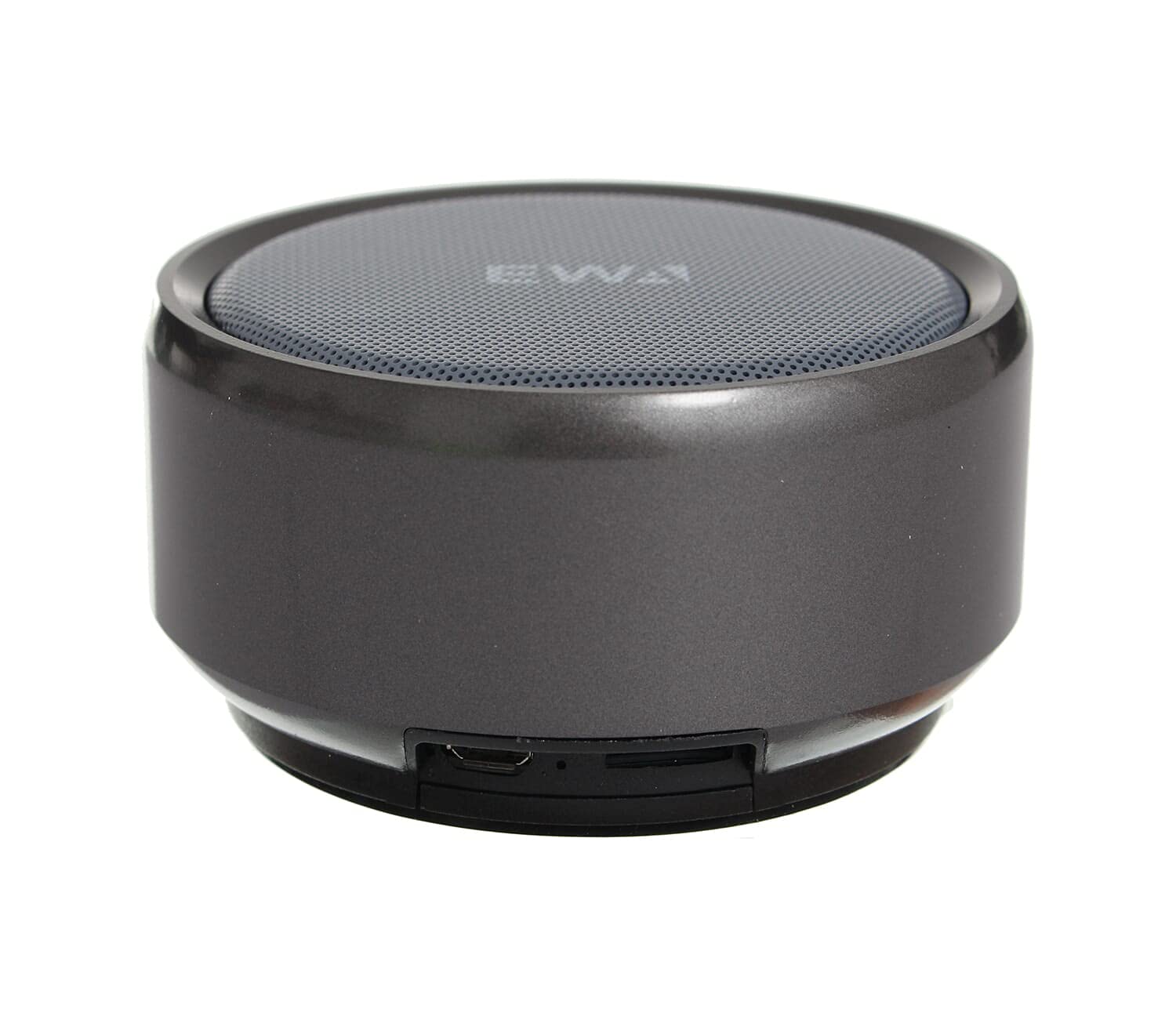
Figure 1: EWA A120 Wireless Bluetooth Speaker. This image shows the compact, round design of the speaker with its mesh grille and EWA branding.

Figure 2: USB Charging Cable. This image displays the white USB charging cable included with the speaker, featuring a standard USB-A connector on one end and a micro-USB connector on the other.
Setup
1. Charging the Speaker
- Connect the micro-USB end of the provided charging cable to the charging port on the speaker.
- Connect the USB-A end of the cable to a USB power adapter (not included) or a computer's USB port.
- The charging indicator light will illuminate, typically red, during charging.
- Once fully charged, the indicator light will change color or turn off (refer to specific product behavior). A full charge usually takes 2-3 hours.
2. Powering On/Off
- To power on: Press and hold the power button (usually marked with ● or ▪) for approximately 3 seconds until you hear an audible prompt or see an indicator light.
- To power off: Press and hold the power button again for approximately 3 seconds until you hear an audible prompt or the indicator light turns off.
3. Bluetooth Pairing
- Ensure the speaker is powered on and in pairing mode. The Bluetooth indicator light will typically flash rapidly (e.g., blue).
- On your device (smartphone, tablet, computer), enable Bluetooth and search for available devices.
- Select "EWA A120" from the list of found devices.
- Once paired, you will hear a confirmation tone, and the Bluetooth indicator light will usually turn solid blue or flash slowly.
- If prompted for a password, enter "0000".
Operating Instructions
1. Playing Audio
- Bluetooth Mode: After successful pairing, play audio from your connected device. The sound will be transmitted wirelessly to the EWA A120 speaker.
- Wired Mode: If your speaker supports a wired connection (e.g., via an AUX port), connect your audio source using a 3.5mm audio cable (not included). The speaker should automatically switch to AUX mode.
2. Volume Control
- Adjust the volume directly from your connected device.
- Some speakers may have dedicated volume buttons (+ / -) on the unit. Refer to the speaker's physical controls for direct adjustment.
3. Call Management (if supported)
- Answer/End Call: Press the multi-function button (often the power button or a dedicated phone icon) once to answer an incoming call or end an ongoing call.
- Reject Call: Press and hold the multi-function button for approximately 2 seconds to reject an incoming call.
Maintenance
- Cleaning: Use a soft, dry cloth to wipe the speaker's surface. Do not use abrasive cleaners, alcohol, or chemical solvents, as these may damage the finish.
- Storage: Store the speaker in a cool, dry place away from direct sunlight and extreme temperatures.
- Battery Care: To prolong battery life, avoid fully discharging the speaker frequently. Charge the speaker regularly, even if not in use for extended periods (e.g., once every 3 months).
- Water Exposure: This speaker is not water-resistant. Avoid exposing it to water, rain, or excessive humidity.
Troubleshooting
| Problem | Possible Solution |
|---|---|
| Speaker does not power on. | Ensure the battery is charged. Connect the speaker to a power source and try again. |
| Cannot pair with Bluetooth device. |
|
| No sound or low volume. |
|
| Sound distortion. |
|
Specifications
| Brand | EWA |
| Model Name | A120 |
| Speaker Type | Bluetooth Speaker |
| Connectivity Technology | Wired/Wireless (Bluetooth) |
| Audio Output Mode | Stereo |
| Mounting Type | Tabletop |
| Materials | Multiple Materials |
| Special Features | Bluetooth, Wireless |
| Recommended Uses | For Smartphones or Tablets, For Music Players, Travel |
| Compatible Devices | Multiple |
| Speaker Diameter | 5 cm |
| Item Dimensions (L x W x H) | 9 x 9 x 5 cm (Approximate, based on 9cm diameter and 5cm height) |
| Item Weight | 500 grams |
| Color | Black and Silver |
| Water Resistant | No |
| Control Method | Remote |
| Power Source | Battery Powered |
| Included Components | 2 speakers (Refers to internal drivers or stereo configuration) |
| Surround Sound Channel Configuration | 2 |
Warranty and Support
For warranty information or technical support, please refer to the documentation included with your purchase or contact EWA customer service through their official website. Keep your proof of purchase for warranty claims.


