
APT Z1C-DW 36TH
APT DW 36 HT Rotary Hammer Instruction Manual
Model: Z1C-DW 36TH
1. Introduction
Thank you for choosing the APT DW 36 HT Rotary Hammer. This powerful corded electric tool is designed for efficient drilling and hammering in various materials. To ensure safe and optimal performance, please read this instruction manual thoroughly before operating the tool. Keep this manual for future reference.
2. Safety Information
Always observe basic safety precautions to reduce the risk of fire, electric shock, and personal injury.
General Safety Rules:
- Work Area Safety: Keep your work area clean and well-lit. Cluttered or dark areas invite accidents. Do not operate power tools in explosive atmospheres, such as in the presence of flammable liquids, gases, or dust.
- Electrical Safety: Power tool plugs must match the outlet. Never modify the plug in any way. Do not abuse the cord. Never use the cord for carrying, pulling, or unplugging the power tool. Keep cord away from heat, oil, sharp edges, or moving parts.
- Personal Safety: Always wear eye protection. Use safety glasses, goggles, or a face shield. Wear hearing protection when operating the tool for extended periods. Dress properly. Do not wear loose clothing or jewelry. Keep your hair, clothing, and gloves away from moving parts.
- Tool Use and Care: Do not force the power tool. Use the correct power tool for your application. Disconnect the plug from the power source before making any adjustments, changing accessories, or storing power tools.
3. Product Components
Familiarize yourself with the main parts of your APT DW 36 HT Rotary Hammer.

Figure 3.1: Main view of the APT DW 36 HT Rotary Hammer. This image shows the overall design of the tool, including the main body, handle, and chuck.
- Chuck: For holding drill bits or chisels.
- Mode Selector Switch: To switch between drilling, hammer drilling, and chiseling modes.
- Auxiliary Handle: Provides additional grip and control.
- Trigger Switch: Activates the tool.
- Depth Gauge: For precise drilling depth control.
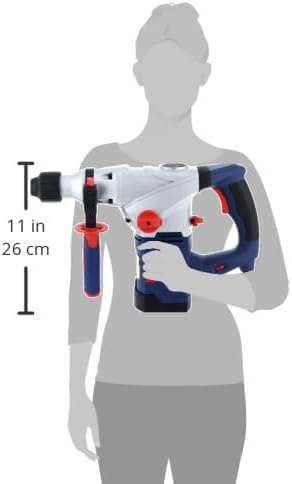
Figure 3.2: Size comparison of the APT DW 36 HT Rotary Hammer with a human figure. This image illustrates the ergonomic design and approximate dimensions of the tool relative to a user, showing its compact yet powerful build.
4. Setup
Attaching the Auxiliary Handle:
- Loosen the auxiliary handle by twisting it counter-clockwise.
- Slide the handle onto the tool's neck.
- Adjust the handle to a comfortable and secure position.
- Tighten the handle by twisting it clockwise until it is firmly secured.
Inserting Drill Bits/Chisels:
- Ensure the tool is unplugged from the power source.
- Clean the shank of the drill bit or chisel.
- Insert the bit into the chuck, pushing it firmly until it clicks into place.
- Pull on the bit to ensure it is securely locked.
5. Operating Instructions
Selecting Operating Mode:
The APT DW 36 HT Rotary Hammer offers three operating modes:
- Drilling Mode: For drilling in wood, metal, and plastic.
- Hammer Drilling Mode: For drilling in concrete, brick, and masonry.
- Chiseling Mode: For light chiseling and demolition work.
Rotate the mode selector switch to the desired icon for your application.
Starting and Stopping:
- To start the tool, press the trigger switch.
- To stop the tool, release the trigger switch.
Working with the Tool:
- Always hold the tool firmly with both hands.
- Apply steady, even pressure. Do not force the tool.
- For hammer drilling, allow the tool's hammering action to do the work.
- When drilling deep holes, periodically withdraw the bit to clear debris.
6. Maintenance
Regular maintenance ensures the longevity and performance of your rotary hammer.
Cleaning:
- After each use, clean the tool's ventilation openings to prevent overheating.
- Wipe the tool's exterior with a soft, damp cloth. Do not use harsh chemicals or abrasive cleaners.
- Keep the chuck clean and free of dust and debris.
Lubrication:
The internal components are factory-lubricated. Do not attempt to lubricate internal parts unless specified by a qualified service technician.
Storage:
Store the tool in a dry, secure place out of reach of children and away from direct sunlight or extreme temperatures.
7. Troubleshooting
If you encounter issues with your APT DW 36 HT Rotary Hammer, refer to the table below for common problems and solutions.
| Problem | Possible Cause | Solution |
|---|---|---|
| Tool does not start. | No power supply. Faulty power cord/plug. | Check power outlet. Inspect cord/plug for damage; replace if necessary. |
| Reduced hammering action. | Worn carbon brushes. Internal mechanism issue. | Have brushes inspected/replaced by service center. Contact service center. |
| Excessive vibration. | Damaged drill bit/chisel. Loose auxiliary handle. | Replace bit/chisel. Tighten auxiliary handle. |
8. Specifications
Technical specifications for the APT DW 36 HT Rotary Hammer.
| Specification | Value |
|---|---|
| Model Number | Z1C-DW 36TH |
| Power Source | Corded Electric |
| Maximum Power | 1500 Watts |
| Voltage | 8 Volts |
| Item Weight | 0.21 Kilograms (209 g) |
| Product Dimensions | 10 x 20 x 37 cm |
| Material | Plastic, Metal |
| Color | Multi |
9. Warranty and Support
Your APT DW 36 HT Rotary Hammer is covered by a manufacturer's warranty. For specific warranty terms and conditions, please refer to the documentation provided with your purchase or contact APT customer support.
Extended Warranty Options:
Extended warranty plans are available for purchase to provide additional coverage beyond the standard manufacturer's warranty:
- 1-Year Extended Warranty: Provides an additional 12 months of coverage.
- 2-Year Extended Warranty: Provides an additional 24 months of coverage.
These extended warranties are typically offered by third-party providers like Salama Care and are delivered via email.
Customer Support:
For technical assistance, spare parts, or service inquiries, please contact APT customer support through their official channels. Always provide your product model number (Z1C-DW 36TH) and serial number (if applicable) when seeking support.
Ask a question about this manual
Ask about setup, troubleshooting, compatibility, parts, safety, or missing instructions. Manuals+ will review the question and use this page’s manual context to help answer it.